Help me trim the fat! Please?

mellojoe

Gawd
Joined
Mar 19, 2007
Messages
703
Finally getting to build a new PC. I have the case, I need all the innards.

I need to shave a few bucks off the budget, though. I'm sitting on Newegg pricing things out, and I'm watching the overall price climb. Is there any way to build something like this, but to save some money in the process?

Goals:
#1) Stability
#2) Longevity.
#3) Performance.
in that order.


Old Idea
Motherboard: DFI LANPARTY Intel X38 - $189.99
CPU: Intel Core 2 Duo E8400 Wolfdale 3.0GHz - $198.99
Memory: G.SKILL 4GB (2 x 2GB) 240-Pin DDR2 (PC2 8000) Dual Channel Kit - $74.99
Video Card: BFG Tech GeForce 8800GT 512MB GDDR3 PCI Express 2.0 x16 - $179.99
Hard Drive: Seagate Barracuda 7200.10 250GB - $64.99
Power Supply: SeaSonic M12 600W - $139.99
.
Subtotal: $848.94


UPDATE:
Motherboard: ......... DFI LANPARTY DK P35-T2RS .............................................. $129.99
CPU: ...................... Intel Core 2 Duo E7200 Wolfdale 2.53 GHz ............................. $134.99
Memory: ................ G.SKILL 4GB (2 x 2GB) DDR2 (PC2 8000) ............................. $74.99
Video Card:............ MSI GeForce 9600GT 512MB GDDR3 PCI Express 2.0 x16 .... $152.99
Power Supply: ....... CORSAIR 750W ................................................................ $109.99
Hard Drive: ............ Western Digital 320GB 7200 RPM ......................................... $69.99

Subtotal: $672.94


I've been out of loop for a while, so let me know if I'm way off on something. However, I've been doing my research, and I think I'm OK with most of this.

All help apprciated. As always, [H] is the best.


Thoughts?
 
Unless you're going to do Crossfire (which that 8800GT can't do) get a P35 chipset board.
 
Try a Radeon 3850 instead of the nVidia card
Go with a cheaper PSU - there's no reason to spend $140 on a damn power supply if you're trying to save money and you're not running 50 bazillion HD's/Video Cards
 
Try a Radeon 3850 instead of the nVidia card
Go with a cheaper PSU - there's no reason to spend $140 on a damn power supply if you're trying to save money and you're not running 50 bazillion HD's/Video Cards

agreed, the Corsair 450VX (VX450 or whatever it's called) Is a damn good PSU and powerfull enough for that system.
 
Don't see a reason why you should drop the 8800GT unless you're not that big of a gamer. But if you really need to cut down costs, drop the 8800GT and go with the 9600GT for $150 instead.

Anyway, unless you need Crossfire, drop the X38 mobo and go with a P35 chipset based mobo like Ryan recommended. Here are some recommendations:
Gigabyte GA-EP35-DS3L Intel P35 Motherboard - $90
MSI P35 Neo2-FR Intel P35 Motherboard - $110
DFI BloodIron P35-T2RL Intel P35 Motherboard - $110
Gigabyte GA-EP35-DS3R Intel P35 Motherboard - $120
DFI LanParty DK P35-T2RS Intel P35 Motherboard - $140
Gigabyte GA-EP35-DS3P Intel P35 Motherboard - $150
Abit IP35 Pro Intel P35 Motherboard - $170
Gigabyte GA-EP35-DS4 Intel P35 Motherboard - $170
Gigabyte GA-EX38-DS4 Intel X38 Motherboard - $207

Just to help you out: If you don't need RAID, more than 4 SATA ports, check out the DS3L. If you need 5 SATA ports, 2 eSATA ports, and a second PCI-E x16 port, then get the Neo2-Fr. If you want heavy overclocking abilities and six SATA ports, check out the Blood Iron. If you like the BloodIron but want significantly better overclock stability, go for the LanParty. If you want 8 SATA ports, RAID, and legacy ports and high overclocks, than the DS3R is a good choice. If you want the DS3R but need Firewire and a second PCI-E x16 port, then go for the DS3P. If you want something that can overclock pretty damn high along with, RAID, eSATA ports and firewire connections, than the IP35 Pro. If you like the DS3P but want better cooling for overclocking, then go for the DS4.

Drop that Seagate drive and get an additional 70GB of storage for only $5 more:
Western Digital WD3200AAKS 320GB 7200RPM SATA 3.0Gb/s Hard Drive - $69

Plus you might get lucky and get the new revision of that WD with the 320GB platter. It's been shown to be almost as fast the 150GB Raptor drive.

As for power supply, I highly recommend getting this PSU:
Corsair 750TX 750W PSU - $105
 
Thanks, gang. I like those recommendations. I'll put together a new list and see what she looks like.

I was worried at about the PSU. Since I've been out of the loop for a while, I wanted to make sure I had a good one that would a) last a while and b) provide enough power to ensure she ran smoothly.

Let me do a little looking around on those motherboards you suggested. That is my main concern. Everything starts with a good base, and I want rock-solid. But, of course I'm a tech-geek so I like a little overclocking with the whole thing. :) So, I'll look at those recommendations and post a new list up and we'll look at that.

Any other thoughts?

This just my personal opinion, but since you plan to overclock, I'd spend a bit extra for a Q6600. They usually hit 3.2-3.6GHz with most motherboards, and you'd have four core goodness. But as I said, that's just me.
 
This just my personal opinion, but since you plan to overclock, I'd spend a bit extra for a Q6600. They usually hit 3.2-3.6GHz with most motherboards, and you'd have four core goodness. But as I said, that's just me.

For a budget build, I would go with an E7200 over a Q6600. It'll save a little money and clock just as high as an E8400. The Q6600 is great, but I don't think he needs 4 cores for gaming.
 
Thanks for the tips. I took a quick peek at several of your suggestions, and I really like the ideas. I was able to shave a bit more than a hundred and seventy bucks right off the top. $176 in savings. And I still think this is going to be a quality build. Here's where I am right now.


Motherboard: ......... DFI LANPARTY DK P35-T2RS .............................................. $129.99
CPU: ...................... Intel Core 2 Duo E7200 Wolfdale 2.53 GHz ............................. $134.99
Memory: ................ G.SKILL 4GB (2 x 2GB) DDR2 (PC2 8000) ............................. $74.99
Video Card:............ MSI GeForce 9600GT 512MB GDDR3 PCI Express 2.0 x16 .... $152.99
Power Supply: ....... CORSAIR 750W ................................................................ $109.99
Hard Drive: ............ Western Digital 320GB 7200 RPM ......................................... $69.99

Subtotal: $672.94

(PS: I clicked "add to cart" and saw that it only has $8 in shipping PLUS it comes with $40 in mail-in rebates. Nice!)

What else do you see?
 
For a budget build, I would go with an E7200 over a Q6600. It'll save a little money and clock just as high as an E8400. The Q6600 is great, but I don't think he needs 4 cores for gaming.

Yet.

One of his goals was longevity. And there are constantly sales going one that put the Q6600 under $200. In fact, I believe Frys and Microcenter both have it for $199.
 
I am considering an upgrade as well. I had set my eyes on the GA-EP35-DS3L, but that MSI board looks to have better cooling and still uses all solid capacitors for not much more money.

I second the e7200 vote as that chip looks to be a monster overclocker and great bang for the buck.
 
Yet.

One of his goals was longevity. And there are constantly sales going one that put the Q6600 under $200. In fact, I believe Frys and Microcenter both have it for $199.


its going to take years to make all 4 cores work on 80 percent of games out by the time that happens...

if he needs money he should jsut save it and get the E7200
 
its going to take years to make all 4 cores work on 80 percent of games out by the time that happens...

if he needs money he should jsut save it and get the E7200

I doubt it'll take years, (which to me implies 5+). But even then it'll only take one game that he wants play that runs much better on a quad core than it does on a dual (supcom anyone?).

But like I said when I first brought up the Q6600, it's just me. His system, his decision. what's important is that he's happy with what he gets and that he feels that he got his money's worth years from now when he's ready to upgrade again.
 
Thanks for the suggestions. I'm probably going to be sticking with the cheaper of the CPU's. While the Quad may be more impressive and more sustainable for future uses, I don't think I can squeeze it with my budget. I'd like to build a Quad with 8GB of DDR3, but that's just out of the question right now.

I have to stick to this budget. That was the whole point, really.

Again, though, I REALLY appreciate your input. I considered it for some time, but unless I found a real good deal, I'm going to go with the alternative.
 
Final update before the check arrives. I'm going to be continually brand-shopping to make sure I get the most stable components my money can get me, while still having room for solid overclockers. Doing all of this on a budget is rough, but that's why I have the experts at [H] helping out.


Any other thoughts?
 
The MSI is actually clocked faster and has a better cooler on it, and MSI is pretty decent with customer service. It also comes with a free game. :D

trust me you DO NOT want stoick cooling on an 8800GT/9600GT... not only do the cards rund hot, but to OC you gotta crank the fan up to max, at that point the fan whines like its going to spin off the bearings.
 
trust me you DO NOT want stoick cooling on an 8800GT/9600GT... not only do the cards rund hot, but to OC you gotta crank the fan up to max, at that point the fan whines like its going to spin off the bearings.

The 9600GT is a cool running card. Mine idles are 37c and under load (1920x1200 and usually 4xAA) it'll get up to about 54c. That's excellent compared to my X1900XT which would idle around 76c and load up around 88c (which was supposedly normal for those).
 
for the power supply, its still fat, you can trim another it a bit more, but 100 bucks for 750 seems a good deal.

go to silentpcreview.com and read what they say, browse their forums, its one of the best sites for powersupplies. they also have an list with efficiency ratings and recommendations.

ps agreed on "you dont want stock colling on 8800GT" dont know about the 8600, but sounds right too. The MSI cards seems to have excellent heat sinks.
 
Thanks. I had actually switched out the MSI for the EVGA in my most recent "newegg" wishlist. I didn't feel like I wanted to pay for an O/C'd card when I can do that myself, but the prices are so similar... as long as MSI still has a good reputation I might just stick with them. I've heard good things about the EVGA, so that's why I was thinking of switching to that one instead.

Eventually I'll be watercooling, but that's not going to happen right away. I already have the pumps and radiators, but I don't know what direction to go with CPU block or GPU block, yet.
 
PS: I know there are happy little deals to be found on individual components, too. Like that powersuplly, the Corsair 750W, can be had for like $85 if you are a first time Google Check-out user... which I am. So, that will be bonus for me.
 
The 9600GT is a cool running card. Mine idles are 37c and under load (1920x1200 and usually 4xAA) it'll get up to about 54c. That's excellent compared to my X1900XT which would idle around 76c and load up around 88c (which was supposedly normal for those).

my X1900XT idles at 55C, goes to about 80 under load at max, and I fixd fan settings in ATItool so it only gets to 75-78C
 
my X1900XT idles at 55C, goes to about 80 under load at max, and I fixd fan settings in ATItool so it only gets to 75-78C

I meant to say 67c not 76c.

But still, the 9600GT is a faster card that runs significantly cooler than the other "high end" cards. My point was that a double slot cooler wasn't esssential for it.
 
The 9600GT is a cool running card. Mine idles are 37c and under load (1920x1200 and usually 4xAA) it'll get up to about 54c. That's excellent compared to my X1900XT which would idle around 76c and load up around 88c (which was supposedly normal for those).

may i ask, what setting is your fan at?
 
may i ask, what setting is your fan at?

I gave the X1900XT away about six months ago, so I don't remember what it ran at. It was variable and got quite annoying when I was playing a game.

The 9600GT is whatever the default fanspeed is. I can't even hear it.
 
I'll probably be pulling the trigger this weekend if I can find any Memorial Day deals.

Any final thoughts?
 
Thanks. Memorial Day... nobody is open. So, I'll have to wait until probably Thursday or Friday for the parts to arrive. I'm hoping they get here before Saturday, so I can spend Sunday putting everything together and then snapping some pics.

I'm also looking forward to loading up some of the "older" games that I never could turn to full graphics before. I think that will be fun, too.

((edit))
Actually, it says estimated delivery for 05/28/08. Which would be AWESOME. If everything arrives on Wednesday, I can start putting it together Thursday night. I promised my 11-year-old cousin that I would teach him how to do this. He's free Thursday night, so the timing would be perfect. Otherwise I might have to wait for Saturday or Sunday night for him to be free again.
 
Parts arrived. :D

Computer_Parts_1.jpg
 
Alrighty. I'm hoping for 3.5GHz myself. Anything over that is gravy. I'm starting with stock cooling to get everything up and running. I've been out of the loop for far too long, so I want to make sure I'm starting with a stable platform.

However, I sitll have a trick up my sleeve for later. ;)

New Images:

Lian-Li-2008-014.jpg

-
Lian-Li-2008-003.jpg

-
Lian-Li-2008-006.jpg

-
Lian-Li-2008-008.jpg


Some notables:
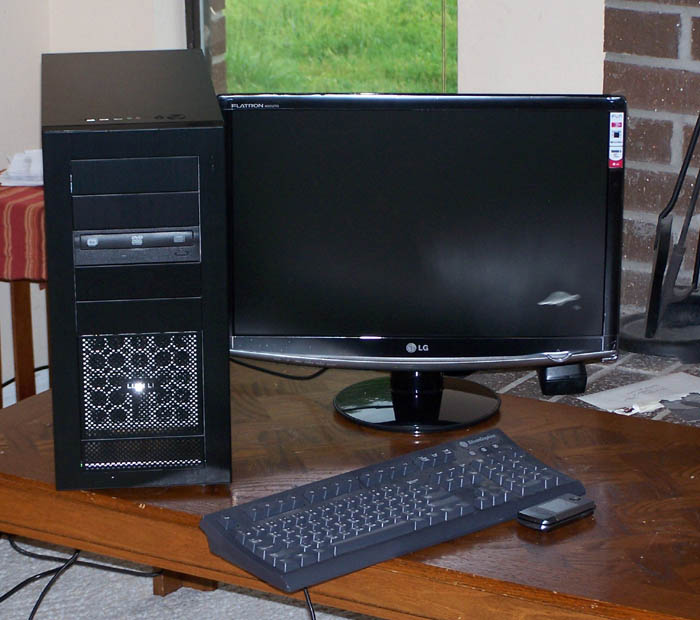
Yes, that is a black Lian-Li A16 all aluminium case. She's stunning. And she fits in directly with the plan for the whole end product. I really wish I could describe how pretty this case is. I'm impressed. From top to bottom, super impressed.

22" LG monitor. I can't believe how big she looks sitting there. Beautiful.

Now, one minor hiccup... I've lost my Windows CD. Yuck. We moved since the last time I used it, and I can't remember where I put it. I know I put it someplace safe that it couldn't get damaged, but now I've forgotten where that safe point is.

Until I find it, I'm stuck. I've booted it up into BIOS, and everything seems to check out beautifully.

Can't wait to find my copy of Windows and get this party started. :D
 
Back
Top