• Some users have recently had their accounts hijacked. It seems that the now defunct EVGA forums might have compromised your password there and seems many are using the same PW here. We would suggest you UPDATE YOUR PASSWORD and TURN ON 2FA for your account here to further secure it. None of the compromised accounts had 2FA turned on.
    Once you have enabled 2FA, your account will be updated soon to show a badge, letting other members know that you use 2FA to protect your account. This should be beneficial for everyone that uses FSFT.

GPU1 Temp excessively higher than GPU2

Luzah

Limp Gawd
Joined
Dec 15, 2007
Messages
369
Hey everyone!

I just purchased my second 460 FTW EE card and installed it yesterday. Today, I decided to run Kombustor and Afterburner (for temp monitoring) and do a quick temp test. I noticed that the GPU1 card got up to 62c, while the GPU2 temp stayed at around 42c with barely any flucuation. Is this normal for the temps to be that far apart from each other? My setup is as follows:

CPU: I-7 920 with a moderate OC of 3.2
Mobo: eVGA x58 LE
Vid: 2x eVGA 460 FTW EE / SLI
PSU: Corsair TX750
Case: Corsair Obsidian 800D

Any advice would be helpful! TIA
 
On your board, most SLI setups are sandwiched. Top GPU will have much higher temps, most of the time. Otherwise, just 10-15C higher temps (range I saw with both my HD5770 CF and successive HD5870 CF on my mATX board).
 
Thanks for that tip! I was thinking of upgrading my motherboard anyhow, so are there any good x58 boards that don't sandwich the SLI setup? I'd rather stick with eVGA or Asus (two faves)..
 
If your case has space, why not move the bottom GPU down to a lower PCIe slot? You can use the triSLI bridge that comes with your mobo, even if you only have two GPU (it's nothing more than 3 SLI birdges linked up in a loop). THough I think eVGA ships those mobos with a long SLI bridge to begin with.
 
Actually, it's at the bottom-most slot on the mobo... that's the weird thing :( It won't fit anywhere else.
 
That's the mobo... and I don't have any other cards in the rig. I just use on-board audio and what-not.
 
That's the mobo... and I don't have any other cards in the rig. I just use on-board audio and what-not.

Then put the first card in the top slot, and the second card in the third slot. Use the long SLI bridge that comes with the mobo, and you should have decent temps after that. You have a total of 4 PCIe slots to take advantage of :D

Also, this is what I mean by "sandwich" :p


Uploaded with ImageShack.us
 
Ahh..i get the sandwich reference now! LOL... BUT, one question I do have. I -was- going to put the card in the third slot, but i looked and it said "pci_x 4" ...Now, please correct me if i'm wrong but if I was to put my second card in that slot, wouldn't the x16 slot "downclock" to match that x4 slot? ..I thought I read somewhere about that stuff, but it's been a while since i've been in the loop.
 
On your mobo, the slots are as follows:

PCIe16 #1 = 16x
PCIe1 #1 = 1x
PCIe16 #2 = 8x
PCI #1 = shared bus
PCIe16 #3 = 8x
PCIe16 #4 = 4x

your mobo has a "fixed" setup. It doesn't adjust the lane allocation.

My recommendation is to use PCIe16 #1 and PCIe16 #3, for 16x and 8x (highlighted green).

HardOCP already showed, in a review, that even 4x/4x didn't really hold back a GTX480 SLI setup :)
http://www.hardocp.com/article/2010/08/25/gtx_480_sli_pcie_bandwidth_perf_x16x16_vs_x4x4/
 
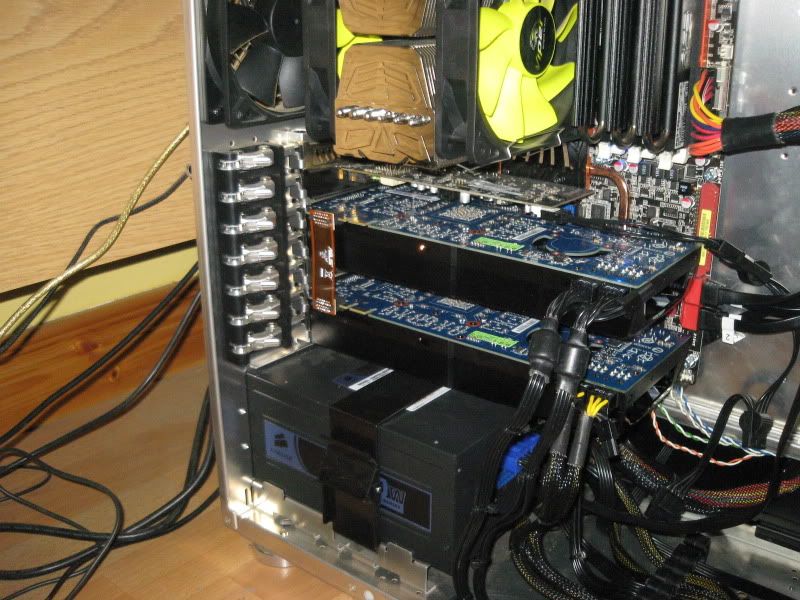
My topmost gtx 470 was running 10c higher than the lower card, (40 and 30c), board is an asus p6t deluxe v2, pretty good card spacing.

IMG_1616.jpg


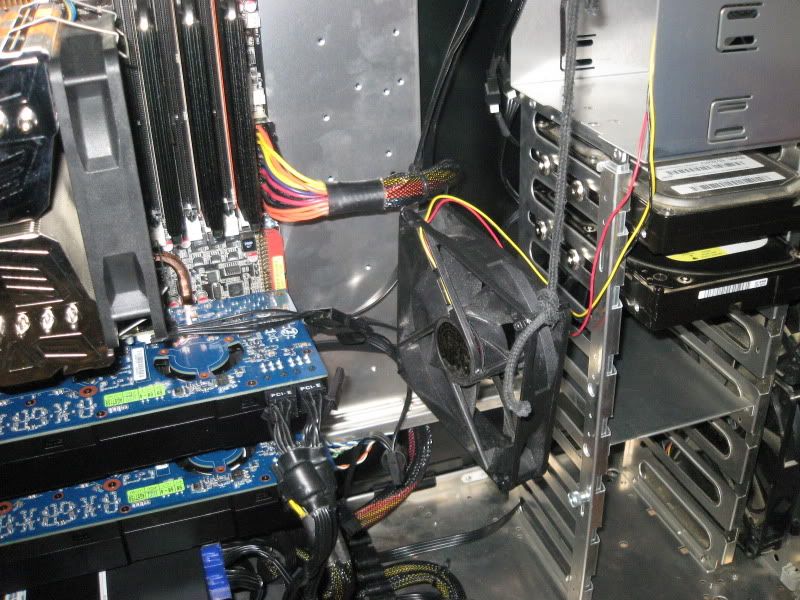
Sorted this out by suspending a 120mm fan behind the cards.

IMG_1620.jpg


Not pretty ill admit, but both cards, (clocked at 751/1502/1694) now idle at 31-30, load temps in game of 77-76, auto fan so they stay quiet.
 
I got an Asus rampage 3 formula with good spacing and my top card is actually 4 C cooler beacuse on the NZXT phatom case the side fan blows right on it. I then added a a Slow fan on the lower card and now they are about even.
 
Back
Top