![[H]ard|Forum](/styles/hardforum/xenforo/logo_dark.png)
Navigation
Install the app
How to install the app on iOS
Follow along with the video below to see how to install our site as a web app on your home screen.
Note: This feature may not be available in some browsers.
More options
-
Some users have recently had their accounts hijacked. It seems that the now defunct EVGA forums might have compromised your password there and seems many are using the same PW here. We would suggest you UPDATE YOUR PASSWORD and TURN ON 2FA for your account here to further secure it. None of the compromised accounts had 2FA turned on.
Once you have enabled 2FA, your account will be updated soon to show a badge, letting other members know that you use 2FA to protect your account. This should be beneficial for everyone that uses FSFT.
You are using an out of date browser. It may not display this or other websites correctly.
You should upgrade or use an alternative browser.
You should upgrade or use an alternative browser.
G80 overclock thread
- Thread starter keldegar
- Start date
TheRapture said:Hence the reason 3DM06 really sucks for actual real game testing...
Crank up the eye candy and resolution in your fave game, watch it run just the same, if you are cpu limited, then the eye candy becomes "free".
Should we try F.E.A.R ? Then resolution comes into play...
thas my score amd rig
http://img54.imageshack.us/img54/4598/2006exqb9.jpg
i got higher scores but not print screnn corectly.
maximum is 9375
http://img54.imageshack.us/img54/4598/2006exqb9.jpg
i got higher scores but not print screnn corectly.
maximum is 9375

- Joined
- Jun 12, 2004
- Messages
- 9,095
Driver Version: 96.89
Card: EVGA 8800GTS
Core Clock: 600mhz
Memory: 1900mhz
Fan speed: 80%
3DMark Score 6740 3DMarks
SM 2.0 Score 3585 Marks
SM 3.0 Score 3914 Marks
CPU Score 1040 Marks
Just a hair below me with the same OC.
sumofatguy
Gawd
- Joined
- Nov 21, 2005
- Messages
- 889
Driver Version: 97.44
Card: BFG 8800GTS
Core Clock: 650mhz
Memory: 1950mhz
Idle temp: 55C
Load temp: 77C
Fan speed: 100%
Extra Cooling: nothing
3dMark06 SM 2.0 score: 4608 Marks
3dMark06 SM 3.0 score: 4613 Marks
Still tweaking a bit, we'll see if I can get it any further
[img=http://img329.imageshack.us/img329/3144/20070119arv1.th.jpg]
Card: BFG 8800GTS
Core Clock: 650mhz
Memory: 1950mhz
Idle temp: 55C
Load temp: 77C
Fan speed: 100%
Extra Cooling: nothing
3dMark06 SM 2.0 score: 4608 Marks
3dMark06 SM 3.0 score: 4613 Marks
Still tweaking a bit, we'll see if I can get it any further
[img=http://img329.imageshack.us/img329/3144/20070119arv1.th.jpg]
Driver Version: 97.92
Card: EVGA 8800GTS
Core Clock: 650 mhz
Memory: 2000 mhz
Fan speed: 99%
3DMark Score 7769
SM 2.0 Score 4306
SM 3.0 Score 4462
CPU Score 1173
Idle's at 50, and gets to 65 under full load.
I have a Zantec Slot cooler about a few pci slots under the GTS and also a 80mm exhuast fan right under the gts near the pci slots.
Card: EVGA 8800GTS
Core Clock: 650 mhz
Memory: 2000 mhz
Fan speed: 99%
3DMark Score 7769
SM 2.0 Score 4306
SM 3.0 Score 4462
CPU Score 1173
Idle's at 50, and gets to 65 under full load.
I have a Zantec Slot cooler about a few pci slots under the GTS and also a 80mm exhuast fan right under the gts near the pci slots.
Driver Version: 97.92
Card: EVGA 8800GTX
Core Clock: 625 mhz
Memory: 2000 mhz
Stable at 625/1000....one hour of RTHDRIBL >> 64C not a single higher.
IDLE >> 48C
Slot cooler underneath which blows the air out works great, also that extra blower beneath the Videocard-cooler.
3Dmark 06 around 11800 if I remeber this correctly.
My further info:
CPU = E6600 @ 3.4
Idle Temp = 39c
Load Temp = 48c
Room Temp = under 20C
Heatsink Fan = Zalman 9700
CPU Thermal Compound = Arctic Silver 5
Additional Info = Vcore 1.400
Mem Volt. = 2.1250
Hans.
Card: EVGA 8800GTX
Core Clock: 625 mhz
Memory: 2000 mhz
Stable at 625/1000....one hour of RTHDRIBL >> 64C not a single higher.
IDLE >> 48C
Slot cooler underneath which blows the air out works great, also that extra blower beneath the Videocard-cooler.
3Dmark 06 around 11800 if I remeber this correctly.
My further info:
CPU = E6600 @ 3.4
Idle Temp = 39c
Load Temp = 48c
Room Temp = under 20C
Heatsink Fan = Zalman 9700
CPU Thermal Compound = Arctic Silver 5
Additional Info = Vcore 1.400
Mem Volt. = 2.1250
Hans.
Driver Version: 97.02
Card: EVGA 8800GTS
Core Clock: 675mhz
Memory: 2106mhz
Idle temp: 48C
Load temp: 64C
Fan speed: 78%
Extra Cooling: Strong 80mm angled at the stock fan (really helps alot)
3dMark06 SM 2.0 score: 3973
3dMark06 SM 3.0 score: 4302
(3d06marks 8806, cpu 1911)
I see my SM2/3 scores are low compared to you guys. I wonder what my problem could be. Is it possible I am ocing too much and its scrweing it up? Used to have that problem on some older cpus. I would "stumble" it in a way.
Any thoughts on the low scores?
Great thread btw.
Card: EVGA 8800GTS
Core Clock: 675mhz
Memory: 2106mhz
Idle temp: 48C
Load temp: 64C
Fan speed: 78%
Extra Cooling: Strong 80mm angled at the stock fan (really helps alot)
3dMark06 SM 2.0 score: 3973
3dMark06 SM 3.0 score: 4302
(3d06marks 8806, cpu 1911)
I see my SM2/3 scores are low compared to you guys. I wonder what my problem could be. Is it possible I am ocing too much and its scrweing it up? Used to have that problem on some older cpus. I would "stumble" it in a way.
Any thoughts on the low scores?
Great thread btw.
Driver version: 97.92 (x64)
Card: eVGA 8800GTS
Core Clock: 635 (stable)
Memory:1050 (stable)
Idle temp: 58c
Load temp: ?
Fan Speed: 75%
Extra Cooling: none
SM 2.0 Score 4121
SM 3.0 Score 4237
3dMark06 : 8863 http://service.futuremark.com/compare?3dm06=1060670
Card: eVGA 8800GTS
Core Clock: 635 (stable)
Memory:1050 (stable)
Idle temp: 58c
Load temp: ?
Fan Speed: 75%
Extra Cooling: none
SM 2.0 Score 4121
SM 3.0 Score 4237
3dMark06 : 8863 http://service.futuremark.com/compare?3dm06=1060670
im really new to overclock, i use ATItools but i'm not even sure if i'm doing it right at all....(no artifacts though so i guess that means the cards ok???)
Driver Version: 97.92
Card: XFX 8800GTS 320mb
Core Clock: 608 mhz
Memory: 900 mhz (this is super low compared to everyone else)
Fan speed: My Nvidia control panel says 75%
Extra Cooling: none
Idle Temp: 62C
SM 2.0 Score 3957
SM 3.0 Score 4106
Question: how do I find out load temp? (using ATItools or w/e else)
Driver Version: 97.92
Card: XFX 8800GTS 320mb
Core Clock: 608 mhz
Memory: 900 mhz (this is super low compared to everyone else)
Fan speed: My Nvidia control panel says 75%
Extra Cooling: none
Idle Temp: 62C
SM 2.0 Score 3957
SM 3.0 Score 4106
Question: how do I find out load temp? (using ATItools or w/e else)
^ Not really, and 900 isn't that low. When people say they have 2000 on the memory clock, they actually have 1000. 1000 is effectively a 2000 MHZ memory clock, which is the number they are using because it is higher.
ok thanks
is there a problem with having your fan speed at 100%?
mines at 75% right now, im just wondering if thats ok or not
- Joined
- Jun 12, 2004
- Messages
- 9,095
XFX 8800GTS
Athlon64 3700+
Core: 615
Memory: 2150
Idle/Load: 54C/66C
Fan: 90%
Cooling: Stock
Driver: 97.44
SM2.0 Score: 3703
HDR/SM3.0 Score: 4096
3DMarks: 6847 (400 increase over stock)
XFX 8800GTS
Athlon X2 5600+ @ 2.8GHz
Core: 590
Memory: 2000
Idle/Load: Unknown
Fan: 99%
Cooling: Stock
Driver: 97.94
SM2.0 Score: 4255
HDR/SM3.0 Score: 4319
3DMarks: 9305
XFX 8800GTS
Athlon X2 5600+ @ 3.0GHz
Core: 590
Memory: 2000
Idle/Load: Unknown
Fan: 99%
Cooling: Stock
Driver: 97.94
SM2.0 Score: 4382
HDR/SM3.0 Score: 4409
3DMarks: 9695
CPU: 2325
Yeah old thread. Just wanted to show the difference a new CPU.
I am terribly sorry if posting here was a mistake, but this thread has been so helpful for me in overclocking my own BFG 8800 GTS 320MB I would like to contribute.
Driver Version: 97.94
Card: BFG 8800GTS
Core Clock: 650 Mhz
Memory: 1700 Mhz
Idle temp: 55C
Load temp: 72C
Fan speed: Auto
Extra Cooling: Nothing
3dMark06 SM 2.0 score: 4104 Marks
3dMark06 SM 3.0 score: 4168 Marks
While I post, I notice that some cards have been clocked further in memory rather than core clock, and vise versa. Which one makes a bigger difference in performance?
Driver Version: 97.94
Card: BFG 8800GTS
Core Clock: 650 Mhz
Memory: 1700 Mhz
Idle temp: 55C
Load temp: 72C
Fan speed: Auto
Extra Cooling: Nothing
3dMark06 SM 2.0 score: 4104 Marks
3dMark06 SM 3.0 score: 4168 Marks
While I post, I notice that some cards have been clocked further in memory rather than core clock, and vise versa. Which one makes a bigger difference in performance?
I have not run 3Dmark06 on my new card since I have not downloaded the HUGE 580mb file. I have run 05 and @ stock speeds I have gotten 11700 in 05.
I am curious on what my system does in 06.
I am going to run a baseline then overclock the card and the cpu and see what happens.
So far with my card it is stable at 650/1000. I think there is more room! Maybe u near 700?
I have the Leadtek 8800 GTS 320MB Extreme (540/700)
I am curious on what my system does in 06.
I am going to run a baseline then overclock the card and the cpu and see what happens.
So far with my card it is stable at 650/1000. I think there is more room! Maybe u near 700?
I have the Leadtek 8800 GTS 320MB Extreme (540/700)
RussianHAXOR
Supreme [H]ardness
- Joined
- Mar 14, 2007
- Messages
- 5,590
EVGA 8800GTS 320MB SC
Athlon X2 4200+ @ 2.4GHz
Core: 630
Memory: 2000
Idle/Load: 54/69
Fan: 99%
Cooling: Stock
Driver: 97.94
SM2.0 Score: 3800
HDR/SM3.0 Score: 3900
3DMarks: 8185
Athlon X2 4200+ @ 2.4GHz
Core: 630
Memory: 2000
Idle/Load: 54/69
Fan: 99%
Cooling: Stock
Driver: 97.94
SM2.0 Score: 3800
HDR/SM3.0 Score: 3900
3DMarks: 8185
Betrayer00GT
Limp Gawd
- Joined
- Feb 25, 2007
- Messages
- 350
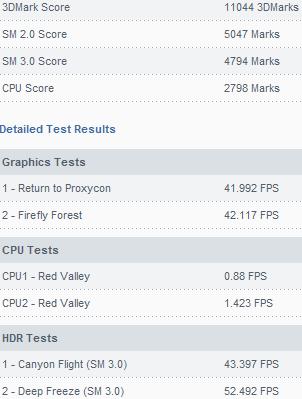
This is useful. I use the MCW60-R swiftech block with their MC8800 heatsink kit and I get:
XFX 8800GTS 640MB
e6600 @ 3.3GHz
Core: 665
Memory: 2000
Idle/Load: 41C/45C
Fan: N/A
Cooling: water
Driver: 158.18 (Vista 32-bit)
SM2.0 Score: 5047
HDR/SM3.0 Score: 4794
3DMarks: 11044
More detail:
XFX 8800GTS 640MB
e6600 @ 3.3GHz
Core: 665
Memory: 2000
Idle/Load: 41C/45C
Fan: N/A
Cooling: water
Driver: 158.18 (Vista 32-bit)
SM2.0 Score: 5047
HDR/SM3.0 Score: 4794
3DMarks: 11044
More detail:
- Joined
- Jun 12, 2004
- Messages
- 9,095
I finally tried 06 last night. Just downloaded it and fired it up, no reboots, no nothing. Not even OC'd
Score: 7812
Cool, although I think the OP was asking for the shader scores and complimentary information:
8x00
CPU
Core:
Memory:
Idle/Load:
Fan:
Cooling:
Driver:
SM2.0 Score:
HDR/SM3.0 Score:
3DMarks:
RussianHAXOR
Supreme [H]ardness
- Joined
- Mar 14, 2007
- Messages
- 5,590
I finally tried 06 last night. Just downloaded it and fired it up, no reboots, no nothing. Not even OC'd
Score: 7812
Try OCing your CPu along with your videocard, you'll see a significant increase.
I went from 575/1800 to 630/2000 and upped my cpu by 240mhz and i gained 1000 marks.
new big score 11253
http://img140.imageshack.us/img140/3622/20063dv6.jpg
i propose a little mayhem with g80 score .Who want to make this?
http://img140.imageshack.us/img140/3622/20063dv6.jpg
i propose a little mayhem with g80 score .Who want to make this?
With the little A64 that could
24/7 setup:
eVGA 8800GTS 640
Opty 165@3007MHZ 1.52
Core: 684
Memory: 999
Idle/Load: 39/47
Fan: n/a
Cooling: MCW60 w/ramsinks
Driver: 158.16
SM2.0 Score: 4920
HDR/SM3.0 Score: 4873
3DMarks: 10503
Benching Setup:
eVGA 8800GTS 640
Opty 165@3061MHZ 1.53
Core: 702
Memory: 1082
Idle/Load: 42/48
Fan: n/a
Cooling: MCW60 w/ramsinks
Driver: 158.16
SM2.0 Score: 5041
HDR/SM3.0 Score: 5017
3DMarks: 10746 Link
24/7 setup:
eVGA 8800GTS 640
Opty 165@3007MHZ 1.52
Core: 684
Memory: 999
Idle/Load: 39/47
Fan: n/a
Cooling: MCW60 w/ramsinks
Driver: 158.16
SM2.0 Score: 4920
HDR/SM3.0 Score: 4873
3DMarks: 10503
Benching Setup:
eVGA 8800GTS 640
Opty 165@3061MHZ 1.53
Core: 702
Memory: 1082
Idle/Load: 42/48
Fan: n/a
Cooling: MCW60 w/ramsinks
Driver: 158.16
SM2.0 Score: 5041
HDR/SM3.0 Score: 5017
3DMarks: 10746 Link
Many of these numbers seem like BS (those without pic proof).
Mem clocks are BS. There was an error in the driver that led to the memory not really being OC'ed. I can' t even run my memory at anything over 1800 now without a lot of corruption.
There was a thread on the memory issue a while back
TheRapture
Supreme [H]ardness
- Joined
- May 31, 2000
- Messages
- 6,885
Yes, lots of the uber high mem clocks are probably not stable or not even overclocking the memory correctly.
At one point I was able to run my mem slider all the way up and it said "it passed" even though we all know that 1500 on one of these 8800's just is not happening.
My 8800GTS is now bios flashed to 625/1800....anything over 1800 on the mem and I also get artifacting.
At one point I was able to run my mem slider all the way up and it said "it passed" even though we all know that 1500 on one of these 8800's just is not happening.
My 8800GTS is now bios flashed to 625/1800....anything over 1800 on the mem and I also get artifacting.
DaCoOlNeSs
[H]ard|Gawd
- Joined
- Jun 8, 2004
- Messages
- 1,474
I have mine running 24/7 on stock heatsink at 648 / 972 @ 67C load. played games for hours on end and nothing happens besides awesomeness