First build in years

darkunitzero

Limp Gawd
Joined
Jan 26, 2007
Messages
264
Just as the title states, this will be my first build since around '04 and I need a little help. This is my first time posting but I have been on reading reviews, post and what not for awhile now. I actually found threads that were very useful when I purchased my 2007wfp.

Anyways, I made a list before the E6420 dropped price so I've been sitting on it for awhile and I think it is about time to bite the bullet, purchase everything and begin my build. I could list everything but I think it'll be easier just to link to my wish list on newegg.
At this time everything adds up to about 1,296 before any tax and shipping charges.

If you guys have any suggestions for alternative parts or feedback on the ones you do own it'll really help me out.

Thanks
 
here an idea: (a bit more expensive than your budged but it worths the extra money)

Cpu: E6850 with AC freezer 7 pro, Zalman 9700 or Thermalright Ultra-120 or q6600 with water.
Mobo: EVGA nForce 680i if u are not OC if yes go for P35 chipsets in my opinion (anyway 680i is a good Oc too)
Ram: 2*1Ghz Corsair dominator XMS2 DDR2 800 or Crucial Ballistix DDR2-800
HDD: WD 320 Raptor + 320gb Seagate.7200.10 rpm
GPU: Evga8800 GTS 320 superclocked
Case: Antec 900, coolermaster stacker, P180, Cooler Master CM690 (80 $)
PSU: choose beetween Seasonic 600W or some OCZ Modular 530W, TAGAN 600W, Silverstone, Antec, Enermax Liberty, Mushkin 500W+
Key board and mouse: Razer Tarantula Keyboard + razer copperhead mouse!
 
Awwww man, does it? Alright, heres a quick list.

Cpu: E6420 ~189.99
Mobo: EVGA nForce 680i ~219.99
Ram: 2*1Ghz Corsair XMS2 DDR2 800 ~104.99
HDD: 80gb Seagate Barracuda 7200rpm ~43.99
GPU: Evga 8800 GTS 320 superclocked ~299.99 (might go with the 640 instead since I have a 20.1" monitor)
Case: Already have one.
PSU: OCZ GameXstream 149.99 ( I believe this doesn't have modular connections. Just means it might me alittle be messier right?)
Keyboard/mouse: Already have those so I'm good.
Cooling: Swiftech water cooling. ~249.99
 
It looks nice! check for those changes if you want!

Cya!

Cpu: E6420 ~189.99 -------> E6600 2.4 ghz 223 usd
Mobo: EVGA nForce 680i ~ 219.99 go for it
Ram: 2*1Ghz Corsair XMS2 DDR2 800 ~104.99 go for it
HDD: 80gb Seagate Barracuda 7200rpm ~43.99 in my opinion check this: http://www.newegg.com/Product/Product.aspx?Item=N82E16822148212
GPU: Evga 8800 GTS 320 superclocked ~299.99 (might go with the 640 instead since I have a 20.1" monitor) - is it your choice
Case: Already have one. ok
PSU: OCZ GameXstream 149.99 ( I believe this doesn't have modular connections. Just means it might me alittle be messier right?) or: Corsair Hx620 http://www.newegg.com/Product/Product.aspx?Item=N82E16817139002&Tpk=corsair%2bpsu
Keyboard/mouse: Already have those so I'm good. ok
Cooling: Swiftech water cooling. ~249.99[/quote] This is a good cooler but i think that is a bit much for a C2D I would suggest air for C2D and water for Quad and up! (just to save some money in my opinion :) )
 
Corsair 520w

Drop the superclocked 320 and go for the 640 and overclock it.
 
Awwww man, does it? Alright, heres a quick list.

Cpu: E6420 ~189.99
Mobo: EVGA nForce 680i ~219.99
Ram: 2*1Ghz Corsair XMS2 DDR2 800 ~104.99
HDD: 80gb Seagate Barracuda 7200rpm ~43.99
GPU: Evga 8800 GTS 320 superclocked ~299.99 (might go with the 640 instead since I have a 20.1" monitor)
Case: Already have one.
PSU: OCZ GameXstream 149.99 ( I believe this doesn't have modular connections. Just means it might me alittle be messier right?)
Keyboard/mouse: Already have those so I'm good.
Cooling: Swiftech water cooling. ~249.99

The E6420 has been replaced by the E6750. Go with that instead for only $190, as flipflopsnowman pointed out.

Why do you need an SLI motherboard? What size monitor do you have? SLI is only needed for high resolution 3D rendering. So, if you plan on getting a 1920x1080 LCD or higher, and want to game on it, then keep SLI as an option. Otherwise, theres no need for it. A single GTX is still fine for a 1920x1080 (or 1920x1200) LCD screen, and more cost effective than an 8800GTS SLI setup. SLI as an upgrade path isn't worth it unless, again, a large LCD is in the future plans. There should always be a better single card solution, and you could sell your old card to help offset the cost.

If you don't need SLI, go for an IP35 Pro or GA-P35-DS3R.

Don't bother with the Corsair XMS2 sticks. They're overpriced, and the rebate isn't worth dealing with. Just go for some G.Skill 2GBNQ sticks instead. They perform the same but cost much less. If you want to pay more than $100 and deal with a rebate, the Crucial Ballistix are a much better deal, since they can OC way past the XMS and NQ sticks. The XMS2 and NQ sticks can reach around 425-450Mhz, while the ballistix can reach 500Mhz.

What case do you plan on re-using?

The GameXstream PSUs are FSP Epsilon based, so they have ripple at high loads. While you may never reach such high loads, there are still better choices. Go for the Corsair 620W from zipzoomfly, buy.com, or clubit.com... basically, whoever has it cheapest (usually NOT newegg for this PSU).

Why do you want watercooling? Do you live in an extremely hot location? If you want silence and good cooling, a good tower air cooler is the best option. A Scythe Ninja Plus Rev.B, Tuniq Tower, or Thermalright Ultra120 eXtreme + S-Flex fan should get that E6750 up to at least 3.6Ghz while still keeping it cool enough.

E6750: 8 * 333 = 2.6Ghz, DDR2-667 << STOCK speeds
E6750: 8 * 400 = 3.2Ghz, DDR2-800 << Easy OC
E6750: 8 * 450 = 3.6Ghz, DDR2-900 << Good OC
E6750: 8 * 500 = 4.0Ghz, DDR2-1000 << Great OC
 
Ok, I'll probably go with the E6750.

I currently have a 20.1" dell 2007wfp but I'm planing to up it to 30" in the future. Even now with the 2007 I'm planing to watch some hi-def HD-DVD out to a plasma. As of right now, 8800GTX is too big of a dive retailing at around 550.

As for the motherboard I was planning to go with the Gigabyte from the beginning but things about the mobos failing and other things floating around made me change my mind.

The reason I picked the Corsair over the other brand is because they run at 2.1v and from what I see around the forums thats the most the EVGA mobo can handle. I might be wrong so please correct me if I am.

Say if I go with the EVGA will 620 watts be able to sustain 2 8800GTS?

You guys are probably right about the wc, overkill in my case. That Tuniq Tower is looking pretty nice.
 
I just read in the OC section that the E6750 needs a lot of voltage to maintain speeds. He was saying he needed 1.55v just to run 2.8ghz.... For my project I was thinking more along the lines of 3.2ghz with the FSB at 400 and to stay within the recommended vcore range which is 0.962~1.350. Another member got it up to 4ghz with 1.5375. Sounds a little crazy. Would you guys still recommend the E6750 over the E6420, which I hear takes ocing like a champ?
 
You don't have to get RAM that run at a certain voltage for compatibility purposes for a motherboard. Any RAM set will do fine. Although there have been a few exceptions. I recommend getting this set of RAM:
A-Data ADQVE1A16K 2 x 1GB DDR2 800 RAM - $78

Anyway, if you don't feel comfortable with the Gigabyte board despite the fact that it's a nice balance of performance and price, go with the Abit board:
Abit IP35 Pro Intel P35 Motherboard - $183

Yes the Corsair 620HX can handle two GTS in SLI. BUT a single GTX can outperform or perform similar to two GTS SLI and it's much cheaper to boot. So just go with the GTX. Oh and here's a link for the Corsair:
Corsair HX620 620W PSU - $147
 
I just read in the OC section that the E6750 needs a lot of voltage to maintain speeds. He was saying he needed 1.55v just to run 2.8ghz.... For my project I was thinking more along the lines of 3.2ghz with the FSB at 400 and to stay within the recommended vcore range which is 0.962~1.350. Another member got it up to 4ghz with 1.5375. Sounds a little crazy. Would you guys still recommend the E6750 over the E6420, which I hear takes ocing like a champ?


Well it depends on what mobo you have and what CPU you get. That guy may have gotten a CPU that needed more voltage than others to OC well. Also people add more voltage just to make sure things are stable. I still recommend the E6750.
 
Wow, list has changed quite a bit:
Motherboard: Abit IP35
Processor: E6750
Power Supply: Corsair 620W
Hard Drive: Seagate Barricuda 160GB
Cooling: I want the Tuniq but I'm not sure if itll fit my old case
Video Card: Evga 8800GTS 640 oc or GTX. Still unsure.

Is there a way I can check to see if the Cosair PSU will fit my case?
Whoa.. I found my case still on newegg. Mines exactly like that, but I unplugged all the little leds.

BTW any recommendations for a cheap case/ decent looking case?
 
I'd go with the Gigabyte if you don't need all the features of the IP35 Pro, and if you want to save money. I used the DS3R in a few builds so far, and it works great.

Why wouldn't the Corsair PSU fit in your case? Its a standard-sized ATX PSU. You have a standard-sized ATX case, so yes, it will fit. Your case is 7.8" wide, so the Tuniq will fit fine.

What is your budget for a case? A popular choice is the Antec P180B, usually found for $70AR. Another option is the Antec Nine Hundred, usually $80. If you need a cheap, budget case, the Centurion 532 or 534 are usually $35 at svc.com, but check how much shipping costs.

If you plan on getting a 30" LCD, don't even bother with a GTS. Danny's right, a single GTX or Ultra would be more cost effective, and its performance would be on par with two GTS in SLI; not to mention it would have more vidRAM, since the GTS only comes with max 640MB. VRAM is needed for high detail, and in SLI, you only get to use one card's VRAM. If you plan on getting a 30" LCD within the next year or so, stick with the eVGA 680i SLI A1 board.

The reason I picked the Corsair over the other brand is because they run at 2.1v and from what I see around the forums thats the most the EVGA mobo can handle. I might be wrong so please correct me if I am.

I'm sorry, but WHAT?!?!? That made no sense at all. Even if it did only support up to 2.1v, why would you buy 2.1v RAM when you can get 1.8v RAM?!?!? The JEDEC standard specifies 1.8v 5-5-5-15 for DDR2-800 RAM. All boards that support DDR2-800 support that spec. You don't want the highest voltage possible, you want the lowest.
 
Is there a way I can check to see if the Cosair PSU will fit my case?
Whoa.. I found my case still on newegg. Mines exactly like that, but I unplugged all the little leds.

BTW any recommendations for a cheap case/ decent looking case?

That was my first case when I built my first PC. Ahh the memories. and the noise. and the blood from when I used the dremel on it. Ahh nostalgia. I still have that case actually. Check my sig for what's now in that case.

Anyway yes the Corsair PSU will fit because it's a standard size PSU and you have a standard size case.

There are plenty of cheap cases out there. As for decent-looking, well that's up to the beholder. Cases are a personal choice item so it'sup to you to decide what case looks good. Also, what's your definition of cheap?

Basically I'm asking what's your budget for the case?
 
Some higher end cases would be Lian-Li or Silverstone. Gigabyte actually has some nice ones, too. It all depends on your budget.
 
Oh, alright I've been reading around too much and getting confused. Thanks for clearing up the ram issue and case thing.

Ahhh, the reason I was planning to go with the GTS SLI was to have my comp up and running now and adding in another one but thinking it over it would be a lot smarter just to run the GTX. I also wouldn't have to deal with the extra room that it takes up and the heat as well. So I might have to do what enginurd suggested and purchase the GTS now and when I purchase a bigger monitor I could just sell it to offset the price.

For my current case, I've had for a pretty long time and yes it's loud and lights up a room like no other. I'm glad that I am not the one only one with scrapes from using this case. lol.
 
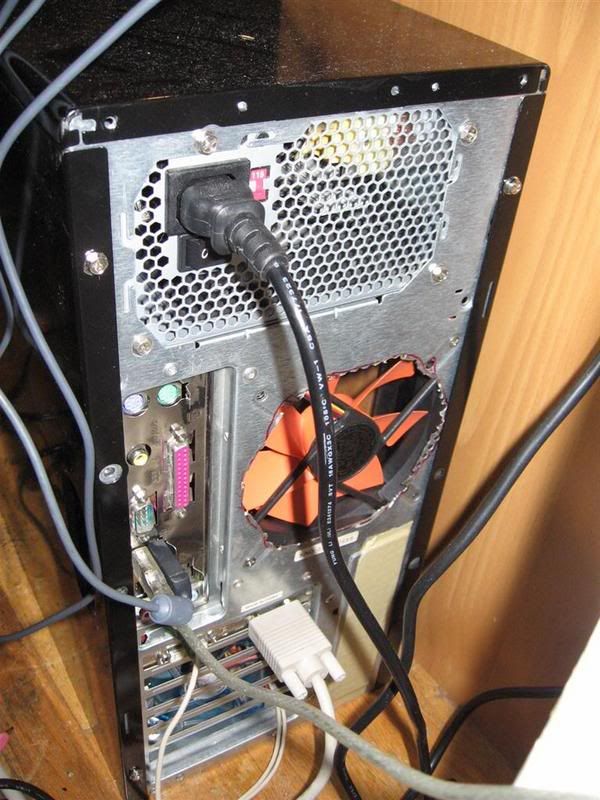
Yeah that case is loud and doesn't cool too well. To improve that, I borrowed my friend's dremel and cut out the rear grill:
IMG_2280Large.jpg


Added a 120mm Yate Loon and the PC is much much quieter. Still somewhat loud compared to the P180 case, a very quiet if not silent PC case.

Anyway if you still want to buy a new case, just tell us your budget and we can help you out a bit.
 
I am loving that P180 case, but at around 129.99 I may have to settle with Centurion.

Which were you rather have, a Seagate Barracuda 7200 SATA for 43.99 or 49.99 have the same Barracuda but instead have a 160GB ultra ATA100? Oh, and I do own a external 500GB WD with eSATA.

Do you think a 8800GTX will fit in the X-dreamer case? From what I hear, they're quite large.
 
SATA because it's easier for cable management and because a good majority of motherboards these days only have one IDE port. Also it's $5 cheaper.

The GTX will fit inside the X-Dreamer, but barely. Around an inch left between the card and the hard drive cage. A tight fit.

FYI, every few weeks or so, there's usually a deal on the P180 cases. Check frys.com or bestbuy.com for deals on the P180. I remember a deal a few months back when the P180 was $40 after rebate!
 
Do you think a 8800GTX will fit in the X-dreamer case? From what I hear, they're quite large.

I have an x-dreamer II (i think), it's probably 3 years old...I have always hated it. It's loud, the lighting elements don't work well, and I have had grounding problems with it. I bought the parts for my new build this weekend, and I went with an Antec 900 (80AR from Compusa). As far as size, unless other models of the xdreamer are larger, I can't imagine a GTX fitting in it. My 6800GT fits, but it is so tight it creates air pressure/flow problems. After fighting with this thing, I spent the extra $200 and got a decent power supply and a nice case this time around.
 
Alright, I guess I'm going to be waiting around for the Antec case. It sure is pretty.

On my X-Dreamer the first LEDs are starting to go but I don't mind. Way to bright now that it in my actual room. It is a bit loud but I can't say I hate it.

Yay, first step is almost done.:cool:
 
Back
Top