![[H]ard|Forum](/styles/hardforum/xenforo/logo_dark.png)
F@HMonitor Pro Version 2.0!!!
*Uninstall the old version ans then install this version!!! just installing over the old version may cause problems with force closing!!!!*
Here is the first major revision of the Android app.
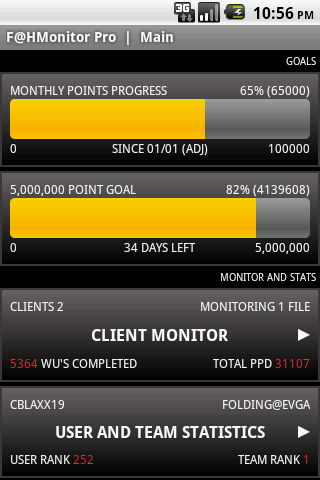
We are glad to introduce an all new Home Screen.
This new home screen has progress bars for both monthly point totals and all time point goals.
You can set a monthly point goal to monitor like the EVGA Bucks point levels. It also monitors all time totals and tracks goals ranging from 100,000 to 20,000,000,000.
There is also some information displayed on the buttons for the Client Monitor and User Stats.
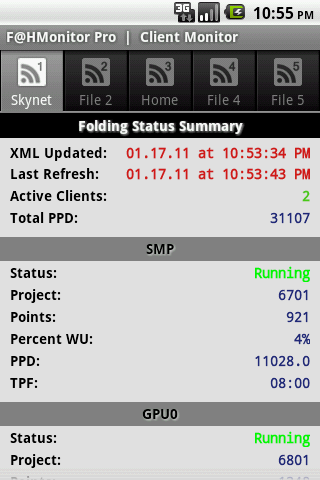
The Client Monitor now has tabs for the different XML files being monitored where as before, you had to enter the settings and change which file you wanted to view. You can also name the tabs to label which system you are monitoring.
Since the phone cant retrieve data while it is off, there is an offset option in the setting for the monthly points. If you miss the first day or two of the month, you can manually input the points that you received up to that point.
ex. if you get the app on the 10th of the month, you would input the points made that month up to the 10th.
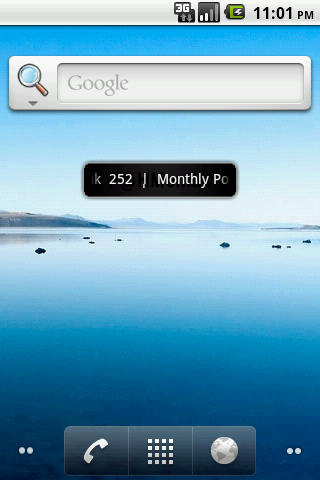
There is also a widget for the phone’s home screen now. It is like a stock ticker and scrolls through user selected data for easy viewing without opening the app.
This version also starts to save data for future implementation of graphs.
Here some screenshots:
The New Home Screen with Progress Bars and informative buttons!
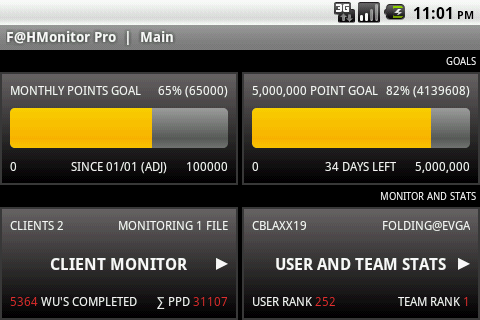
Landscape!!!
Here is the home screen Widget!!
This is the new Client Monitor with the tabs for different XML Files!
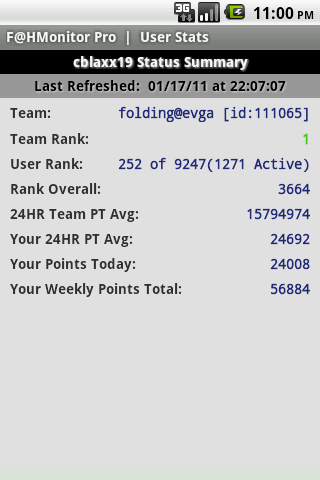
The User Stats page hasn’t changed much.
Hope you guys like it. Let us know if you have any suggestions or find any issues.
F@HMonitor App Release Version 1.0
version 1.5 has been released as of 12/19/10
I have some exciting news for everyone!! The Android Version of F@HMonitor is now available in the Android Marketplace.
This app is for remotely monitoring your folding clients on your smartphone. It currently supports F@H GPU Tracker V2 and F@Hutil programs. These programs allow for upload of an xml file to an ftp of your choice.
If you dont have a ftp already, you can get a free one from 000webhost.com or just google for other options.
HFM.net is now supported!!!! The update is available in the android marketplace now!
You can also view your user stats via EOC folding stats. you will need your EOC # which can be found by going here: http://folding.extremeoverclocking.com/ and searching for your username. Your EOC number will be on the left hand side, it is a 6 digit number. it is also the number at the end of the url of your stats page.
There are two version of the app, please visit our webpage(www.breakneckapps.wordpress.com) for info on the two versions.
Our website is www.breakneckapps.wordpress.com
Feel free to ask questions, make suggestions for updates, or let us know what you think in this thread.
Hope you enjoy it!!!
*Uninstall the old version ans then install this version!!! just installing over the old version may cause problems with force closing!!!!*
Here is the first major revision of the Android app.
We are glad to introduce an all new Home Screen.
This new home screen has progress bars for both monthly point totals and all time point goals.
You can set a monthly point goal to monitor like the EVGA Bucks point levels. It also monitors all time totals and tracks goals ranging from 100,000 to 20,000,000,000.
There is also some information displayed on the buttons for the Client Monitor and User Stats.
The Client Monitor now has tabs for the different XML files being monitored where as before, you had to enter the settings and change which file you wanted to view. You can also name the tabs to label which system you are monitoring.
Since the phone cant retrieve data while it is off, there is an offset option in the setting for the monthly points. If you miss the first day or two of the month, you can manually input the points that you received up to that point.
ex. if you get the app on the 10th of the month, you would input the points made that month up to the 10th.
There is also a widget for the phone’s home screen now. It is like a stock ticker and scrolls through user selected data for easy viewing without opening the app.
This version also starts to save data for future implementation of graphs.
Here some screenshots:
The New Home Screen with Progress Bars and informative buttons!
Landscape!!!
Here is the home screen Widget!!
This is the new Client Monitor with the tabs for different XML Files!
The User Stats page hasn’t changed much.
Hope you guys like it. Let us know if you have any suggestions or find any issues.
F@HMonitor App Release Version 1.0
version 1.5 has been released as of 12/19/10
I have some exciting news for everyone!! The Android Version of F@HMonitor is now available in the Android Marketplace.
This app is for remotely monitoring your folding clients on your smartphone. It currently supports F@H GPU Tracker V2 and F@Hutil programs. These programs allow for upload of an xml file to an ftp of your choice.
If you dont have a ftp already, you can get a free one from 000webhost.com or just google for other options.
HFM.net is now supported!!!! The update is available in the android marketplace now!
You can also view your user stats via EOC folding stats. you will need your EOC # which can be found by going here: http://folding.extremeoverclocking.com/ and searching for your username. Your EOC number will be on the left hand side, it is a 6 digit number. it is also the number at the end of the url of your stats page.
There are two version of the app, please visit our webpage(www.breakneckapps.wordpress.com) for info on the two versions.
Our website is www.breakneckapps.wordpress.com
Feel free to ask questions, make suggestions for updates, or let us know what you think in this thread.
Hope you enjoy it!!!
Last edited:


