• Some users have recently had their accounts hijacked. It seems that the now defunct EVGA forums might have compromised your password there and seems many are using the same PW here. We would suggest you UPDATE YOUR PASSWORD and TURN ON 2FA for your account here to further secure it. None of the compromised accounts had 2FA turned on.
    Once you have enabled 2FA, your account will be updated soon to show a badge, letting other members know that you use 2FA to protect your account. This should be beneficial for everyone that uses FSFT.

E6300s Are Not All the Same

FrgMstr

Just Plain Mean
Staff member
2FA
Joined
May 18, 1997
Messages
58,241
To follow up on Chris' thread here about some Core 2 Duo processors not living up to expectations I wanted to post my experience here.

I purchased two week 29 E6300 processors at Fry's this week. With one of them I had a remarkable experience that pushed our motherboard to a 500MHz FSB and our processor to 3.5GHz+. The second CPU that I bought has not faired as well out of the box. It looks as if 3.15GHz is about the upper stable limit of this processor with any voltage, but it will do the 3.15GHz at stock voltage. Both of these CPUs were tested on the same exact setup and switched out several times to see if the same results were achieved.

Just wanted to share my experiences here. As we have said for years, there are no guarantees when it comes to overclocking.
 
Damn a week 29 too.

Goes to show you, just b/c its week ___ it doesn't mean its going to hit ___ clocks!

THX, for giving heads up on the bad experience too. B/c most people only brag when they have a kick ass chip, so some people are expecting a little too much.

Its like gamblers... you only hear about it, when they win! ;)
 
I'm guessing one of your dual core cpu's can't overclock as much as the other on the same die. so it's limiting the second cpu. Luck of the draw i guess.
 
I have a week 29 E6400, and at my first overclock attempt I tried 3.2GHz at stock voltage and it ran stable. Even if that would end up being the limit of my processor, it's still a good 50% increase in performance. It is noticable.
 
how do you find out what week cpu you have without taking the heatsink off?

nm, i have a week 26 6300.

ill let ya'll know what it hits when i get new ram in. (currently on ddr2-533 that wont do a lick over 534..)
 
I just ordered a E6300 from newegg. I hope that I can get 3.2GHz stable. I would be happy with that. The only question is....how do you overclock these things? I bought a E6300 and Gigabyte DS3 motherboard from newegg. Any suggestions would be helpful, or you can see my other thread.

Lyquist
 
Lyquist said:
I just ordered a E6300 from newegg. I hope that I can get 3.2GHz stable. I would be happy with that. The only question is....how do you overclock these things? I bought a E6300 and Gigabyte DS3 motherboard from newegg. Any suggestions would be helpful, or you can see my other thread.

Lyquist

Here are the step:

1- sleep alot before your package comes because you will not sleep when it does
2- Get into BIOS and then hit CONTROL and F1 keys
3- Go to M. I. T menu
3- Enable Host Frequency and change your FSB (or host Frequency) to 333
3- change your PCI E to 100
4- Change Memory Multiplier to 2
5- Set DRAM Timing to mannual and change CAS-tRCD-tPR-tRAS to your memory spec (such as 4-4-4-14)
7 - EXIT BIOS and save.
9 - BAM, YOU GOT 2.3GHZ
10 - increase vCORE voltage if needed. and keep increasing FSB until you reach the max.
 
foxnews said:
Here are the step:

1- sleep alot before your package comes because you will not sleep when it does
2- Get into BIOS and then hit CONTROL and F1 keys
3- Go to M. I. T menu
3- Enable Host Frequency and change your FSB (or host Frequency) to 333
3- change your PCI E to 100
4- Change Memory Multiplier to 2
5- Set DRAM Timing to mannual and change CAS-tRCD-tPR-tRAS to your memory spec (such as 4-4-4-14)
7 - EXIT BIOS and save.
9 - BAM, YOU GOT 2.3GHZ
10 - increase vCORE voltage if needed. and keep increasing FSB until you reach the max.


Agreed (good quick guide)

Though I would go with 5-5-5-15, just so you can be sure to push your CPU to the max before your ram limits you. (he bought ddr2 667) After you find your top CPU clock, you can always play around & try to tighten the timings up.
 
Wait wait, I just got lost on a few parts:

3- change your PCI E to 100 - What does that specifically do? I thought you wanted your PCI-E to run at full speed?

4- Change Memory Multiplier to 2 - And what does this do? Is it really possible to double your ram speed this way? I don't follow.

Thanks in advance!
 
ekoshyun said:
Wait wait, I just got lost on a few parts:

3- change your PCI E to 100 - What does that specifically do? I thought you wanted your PCI-E to run at full speed?

4- Change Memory Multiplier to 2 - And what does this do? Is it really possible to double your ram speed this way? I don't follow.

Thanks in advance!

noob alert! :) j/k LOL

3- default speed of the PCIe bus is 100, so people just want to be sure it stays at the correct speed, by manually setting it. I just left mine to Auto/Normal. The motherboard should be smart enough to leave it at 100.

4- on the Gigabyte boards. They call the ram ratio by what your dram speed will be times the FSB. So at 400FSB with 2x dram ratio you would be running DDR2 800. Even though technically its a 1:1 ratio as most motherboards call it. Or at default speed 266 FSB with 2.5 ratio your ram would be at 667. (266 FSB x 2.5 = 667 dram)
 
Hi..
without a Hi-performance ram..
can i OC my E6300?

im now having E6300 , Gigabyte DS3 too..
Should i flash Bios before doing OC?

Should a water/air cooler installed before OC ??

thanks dude. im a noobie here. :(
 
actually they do susprisingly well with the stock cooler, your ram might hold you back some, you didnt give any details about what it is so hard to say, but loosen the timings up to 5 5 5 18 and see how far you can raise the FSB before it wont boot then back off . see the guide above. I bet you can get the 1.8GHz cpu to 2.5 GHz at least :) do make sure you have decent airflow thru your case, fan in front and fan in back etc. Blow the dust outa her when you install the new gear

yes flash to latest bios download and put on floppy, boot and go into bios and use the flash utility (look along bottom of screen while in main bios screen, if I remember right).

oh, and set the max cpu temp alarm in the mother board to 70C and if it ever starts beeping like mad you know you need to back it down some till you can get improved heatsink/fan for the cpu.
 
Thanks Billparrish.
im using 512mb x 2 Kingston Value Ram

I jus downloaded the DS3 Bios Latest version "F5"..
it's an EXE file..

So do u mean copy the EXE file to a floppy disk.
then boot from Drive A ..will i find a bios flash utility there?

what should i do next step ? :confused: :confused:
 
No surprise not everything is equal but a 6300 @ 3.1 is still a pretty nice OC. :)
 
haobeck said:
Thanks Billparrish.
im using 512mb x 2 Kingston Value Ram

I jus downloaded the DS3 Bios Latest version "F5"..
it's an EXE file..

So do u mean copy the EXE file to a floppy disk.
then boot from Drive A ..will i find a bios flash utility there?

what should i do next step ? :confused: :confused:

Run the exe file, it will extract 3 files:
the flash program, the bios file & autoexec.bat

Put them on a floppy

Boot to the floppy, then type "autoexec.bat" at the A:\ prompt
you'll need to follow the directions (ie: hit enter a few times)

& then you'll be on your way.
 
Die floppy Die!!

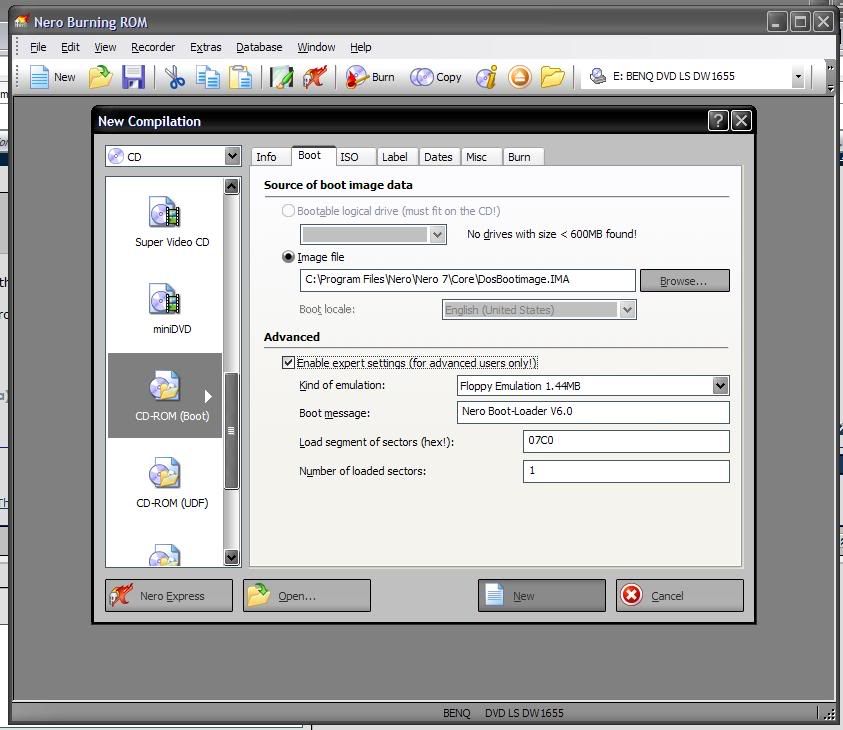
U can use Nero to create a bootable disc. Then navigate to your HDD where the files are stored and flash away!
 
chrisf6969 said:
Goes to show you, just b/c its week ___ it doesn't mean its going to hit ___ clocks!

THX, for giving heads up on the bad experience too. B/c most people only brag when they have a kick ass chip, so some people are expecting a little too much.

This is all too true. I see it over and over again in various forums and in RL. "Oh you got an Opteron 144, you *SHOULD* get 2.7-3GHz out of it." BS, I had three of them and two will do 2.7GHz, third (using same test parts) can barely do 2.3GHz. I inquired with other people who had them, and indeed some reported to me that their Opty144 did only 2.4GHz or 2.5GHz, but that they didn't bother making a big deal out of them. I know someone in RL with a C2D (don't remember model but it was a lower end) that would barely do 2.7GHz on an Asus 975X board. I checked out the system myself - he wasn't doing anything "wrong" and his hardware choices were top notch, plus BIOS settings looked right, but around the 2.6-2.7GHz range the CPU started needing more and more voltage to get a bit higher.

To everyone who says "you *should* be able to get such and such speed" or "you must be doing something wrong," I say to you STFU! Put your money where your keyboard is and offer to buy the low-clocking CPU so that you can either prove your point or find out that you were wrong.
 
chrisf6969 said:
Run the exe file, it will extract 3 files:
the flash program, the bios file & autoexec.bat

Put them on a floppy

Boot to the floppy, then type "autoexec.bat" at the A:\ prompt
you'll need to follow the directions (ie: hit enter a few times)

& then you'll be on your way.

Oh i can see 3 files.

So after flashing the bios file...which is *.f5 ..
Should i go to BIOS setup and set "LOAD OPTIMIZED DEFAULT" as Gigabyte website said? Or "LOAD FAIL-SAFE" as from http://www.xtremesystems.org/forums/showthread.php?t=110460
:confused: :confused:

to:jodiuh
hmm..i dono how to create bootable disc.sigh.. :mad:
 
Just have to have Nero, which comes with a lot of optical drives. Here's a pic.

nero.jpg
 
haobeck said:
Oh i can see 3 files.

So after flashing the bios file...which is *.f5 ..
Should i go to BIOS setup and set "LOAD OPTIMIZED DEFAULT" as Gigabyte website said? Or "LOAD FAIL-SAFE" as from http://www.xtremesystems.org/forums/showthread.php?t=110460
:confused: :confused:

to:jodiuh
hmm..i dono how to create bootable disc.sigh.. :mad:

You'll need 2 floppys, since the flash program & file take up a whole floppy by itself.

SO stick a 2nd blank floppy in the drive, go to My Computer, right click the A: drive, select Format, and there's an option to make a bootable disk.
 
Actually what's the difference between flash bios & upgrade bios?

Is is so dangerous to flash a bios?

Or should i use the BIOS utility from my DS3 CD and flash the BIOS from windows mode?? :confused: :confused:
 
haobeck said:
Actually what's the difference between flash bios & upgrade bios?

Is is so dangerous to flash a bios?

Or should i use the BIOS utility from my DS3 CD and flash the BIOS from windows mode?? :confused: :confused:

jesus christ, read the Gigabyte website and JUST DO IT ALREADY!!

I'm thinking maybe you should have just bought a Dell, if you can't read & follow a few simple instructions for making a bootable floppy and flashing the BIOS.

ITs only dangerous to flash a BIOS in the middle of a thunderstorm.

Flashing the BIOS could "kill" the motherboard if you hit the restart button or power failed in the middle of the flash. Oh yeah, and if you're overclocking, its best to set the board back to stock before you flash. Though if your overclock is truly stable it shouldn't matter, as I've forgetten to go back to stock many times while flashing.

Just don't mess with the computer while its in the middle of the BIOS flash. A few idiots in the past have changed their mind or got impatient while it was flashing and killed their motherboard that way.
 
chrisf6969 said:
jesus christ, read the Gigabyte website and JUST DO IT ALREADY!!

I'm thinking maybe you should have just bought a Dell, if you can't read & follow a few simple instructions for making a bootable floppy and flashing the BIOS.

Ya know, I'm starting to get grumpy too. I'm only 28, but wondering where all my patience went. :(
 
Back
Top