• Some users have recently had their accounts hijacked. It seems that the now defunct EVGA forums might have compromised your password there and seems many are using the same PW here. We would suggest you UPDATE YOUR PASSWORD and TURN ON 2FA for your account here to further secure it. None of the compromised accounts had 2FA turned on.
    Once you have enabled 2FA, your account will be updated soon to show a badge, letting other members know that you use 2FA to protect your account. This should be beneficial for everyone that uses FSFT.

Dell U2711

Mine shipped today :D Sadly though, I'm going to have to run a two monitor setup until the 980X cpu comes out; no PCI-E slots left on my current motherboard to run a second gfx card :(
 
So I got mine today, and just got it all set up.

The picture looks....really strange? It's set to the right resolution, but I can't read ANYTHING, and the text is all warped and colored looking?

What setting do I need to change? Win 7 recognized it as a U2711, and the right resolution.

What's the fix here?

It only does this at the highest resolution. At 1680x1050 (previous resolution) it looks fine.
 
Last edited:
Did you ever get a tracking number for yours?

Mine has been shipped for 4 days and no tracking....

god I hate dell now..
 
Did you ever get a tracking number for yours?

Mine has been shipped for 4 days and no tracking....

god I hate dell now..

Shipped on the 27th and I didn't get a tracking number until very late last night.

Supposed to arrive Friday.

Steve
 
Have you had a monitor that required a dual link hooked up before?
(2560x1xxx)

Sounds like if that rez is that only problem could be the video card or unfortunately the scaler in the monitor.


So I got mine today, and just got it all set up.

The picture looks....really strange? It's set to the right resolution, but I can't read ANYTHING, and the text is all warped and colored looking?

What setting do I need to change? Win 7 recognized it as a U2711, and the right resolution.

What's the fix here?

It only does this at the highest resolution. At 1680x1050 (previous resolution) it looks fine.
 
So I got mine today, and just got it all set up.

The picture looks....really strange? It's set to the right resolution, but I can't read ANYTHING, and the text is all warped and colored looking?

What setting do I need to change? Win 7 recognized it as a U2711, and the right resolution.

What's the fix here?

It only does this at the highest resolution. At 1680x1050 (previous resolution) it looks fine.

Make sure you are plugged into the dual link DVI output of your GPU. It is usually the one closest to the mobo and of course some are dual link on both outputs. Make sure you are using a dual link cable and make sure the connectors are screwed down tight.

A couple of things to try anyway.

Dave
 
Got mine today and the only OSD light thats on is the exit button. When I press it a lock appears but none of the other buttons function. Any idea how to unlock the OSD?

Never mind, found it in the end of the OSD section and Its the exit button you have to hold not the menu button.
 
Last edited:
Just got my U2711.

I got the same issue with text, I cannot read anything at 2560 x 1440. All texts and icons are blocky. Anyone know how to fix this?

Best resolution for being able to read text is 1920 x 1200.

Grr, am annoyed at this, might send it back.

Ahh managed to fix it by putting the DVI connector into the nearest slot to the motherboard on my 4890x2 and swapping DVI leads for the Dell one in the box.

Looking awsome now although I have one stuck pixel that will not go to black in the middle of the screen.

Can't see any tinting issues as yet.

I managed to buy it for £680 on ebay! Its £1050 on dells website!

OK so i tried Crysis Warhead and COD WAW. My graphics card was struggling with the resolution. Figured that if you turn of Anti Aliasing you won't notice it as the dot/pixel count is tiny. The screen was struggling with Vsync off but enabled Vsync and seemed to be ok. Still getting ghosting effects when turing fast thogh.

Will try the gaming mode for it later.

Initial impressions is quite impressed, think i am gonna keep it. I sent a 2407 back last time i had a dell monitor.
 
Last edited:
Hi All,

I've been following this thread closely and I'm close to getting a u2711.

Has anybody tried hooking up a PS3 or xbox360 to a u2711 yet? If so, what was it like? That is definitely something I'd be doing with the u2711.
 
Hi All,

I've been following this thread closely and I'm close to getting a u2711.

Has anybody tried hooking up a PS3 or xbox360 to a u2711 yet? If so, what was it like? That is definitely something I'd be doing with the u2711.

I'll let you know as soon as I try it out, as I'm definitely planning on it using it with my ps3/x360 as well. It should be here tomorrow.
 
Hi All,

I've been following this thread closely and I'm close to getting a u2711.

Has anybody tried hooking up a PS3 or xbox360 to a u2711 yet? If so, what was it like? That is definitely something I'd be doing with the u2711.

Ok, i have owned this monitor for a day now, testing it as much as possible.

I came from a viewsonic p227f which is one of the last manufactured CRT displays, so i will say: i'm not blown away by the u2711 apart from on one point: the resolution.

Gaming on this display is a truly majestic experience. I find it quick and responsive.

To answer your question - i've tried hooking up my PS3 and it works flawlessly, it detects it as a 1080p source and Uncharted 2 looks great. The iMAX scenes in The Dark Knight look so much better on this display than on my folks 42" panasonic 720p plasma.

It took a while for me to get used to the anti-glare, but now i normally don't see it without trying.

I was originally set on waiting for WWDC and see what Apple would bring, but seeing how i got this for less money than the 24" LED Cinema Display already costs (€720 vs €810), i figure there's no realistic way of me getting my hands on anything bigger through them. Also, i doubt they'll have more inputs than one display port.

I'm a student, i study almost exclusively in front of the computer (medicine) and also do some graphic design on the side. The CRT was superb - far beyond what the current market can offer in terms of color accuracy, black levels and responsiveness, but it was really wearing on my eyes! It was tiring reading on it. I don't have room for using two displays and i also don't think it's a good solution at all when the CRT already takes such an insane amount of space in my one-room apartment.

In closing - coming from any other LCD you can get for less money, this will be night and day. Coming from a CRT, it'll be a disappointment at first, but it grows on you. It is by far better than the current generation of 30" displays as well, in fact apart from EIZOs, NECs and the new iMac/Cinema display - this is the best picture i've seen on a TFT available for consumers.

Main downside is still the anti-glare. If you're used to working on an all-white/light gray background in photoshop (like i was), it's gonna take some getting used to. Green on black CAD is perfect though. Anyways, the anti-glare issue is only apparent if you work with huge areas of uniform non-blacks, so the case can be made that the advantage of not seeing reflections that would be there on a glossy display type during general computer use (browsing, gaming, videos), outweighs the downsides.

I'll post again once i've used it for a longer period of time as there seems to be very few detailed user experience posts in the thread.

Edit: since it was requested, settings are: 18 brightness 50 contrast 84 R 82 G 87 B.
 
Last edited:
add me to the list of ebay sales. i thought i was getting scammed because the seller said that dell kept delaying orders. i did a google search, and saw this thread and it put me at ease. i got a great deal at around 870 after bing cash back from seller "cmcredding" i recommend him if any are looking to buy from ebay.

anyway my monitor showed up today! no dead pixels. I upgraded from a pair of 2209s. now my question is i have a 4890 and was wondering if it will support two of these at the highest resolution. i see a lot of people are having the fuzzy text problem. if i buy another, am i going to have a problem with that? thanks
 
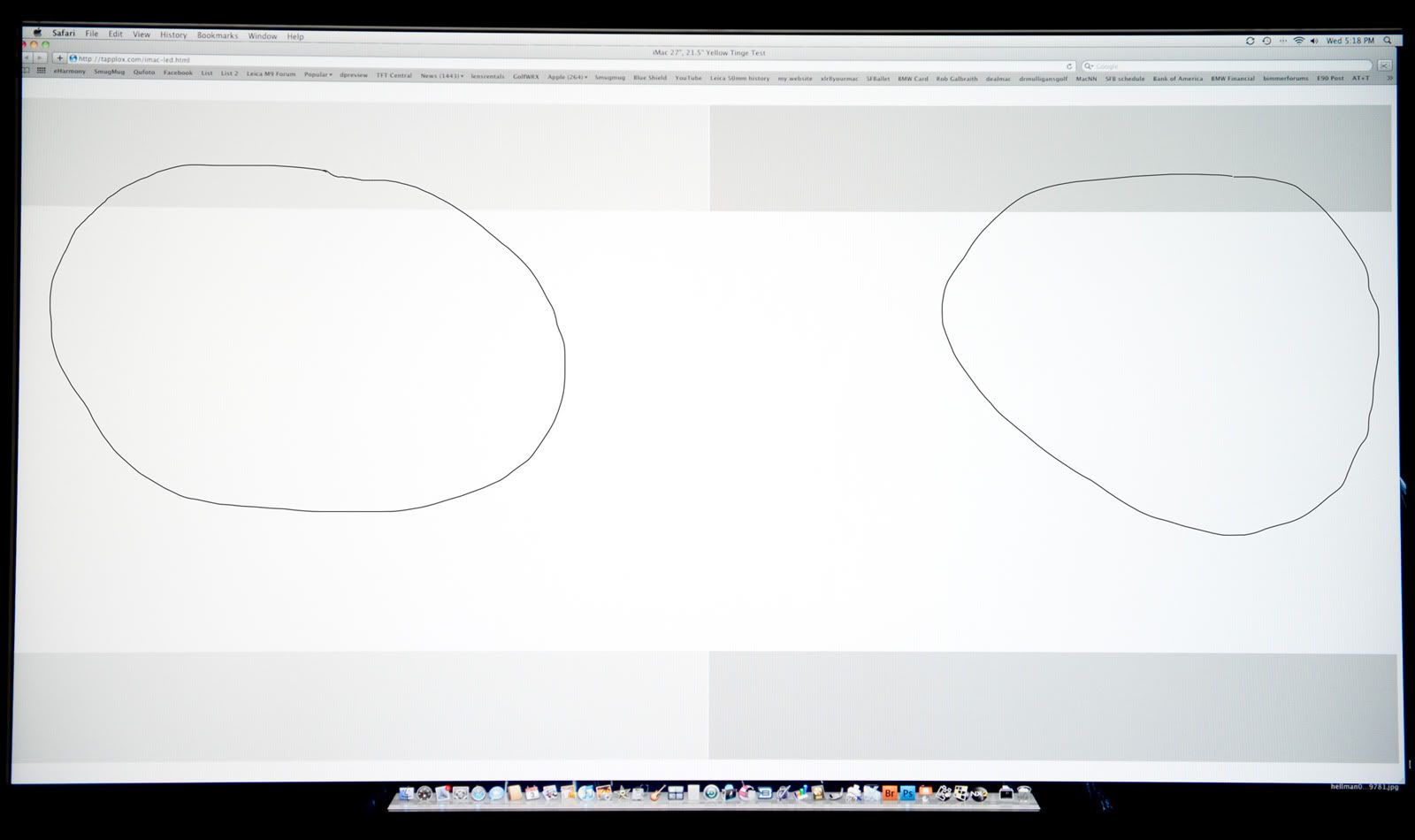
I just got my u2711. I'm seeing a green to reddish tint from right to left. The whites are definitely different from side to side. Its pretty easy to see but I circled two areas where you can see the different tints. Anyone else have this problem?

u2711tint.jpg
 
Well I just ordered this monitor, I'll post here on my experience with it after it arrives! Thanks for the reviews so far, lots of positive out there!
 
Last edited:
I just ordered a second one! looks like its not gonna get delivered till the 26th of march? when are they gonna catch up with demand!?
 
I just got my u2711. I'm seeing a green to reddish tint from right to left. The whites are definitely different from side to side. Its pretty easy to see but I circled two areas where you can see the different tints. Anyone else have this problem?

Nope, i don't have that problem at all actually, tried the same website as you.
 
My u2711 showed up yesterday and I am almost complete with a PC/mac setup I decided to pursue instead of buying a new i7 machine a few months back.

I picked up this arm also for fun
(Innovative 7500-1500 27-Inch Deluxe Floating Flat Panel LCD Monitor Radial Arm) from amazon for a nice price. Its 99 down from 399 list and is all quality to say the least.

I have not calibrated the monitor yet. So this is just a get the pics up as fast as possible post.
Out of the box the imac 27'' has the edge in every way but fiddling with things I think I could mirror the imac display easily with the right settings. They appear to be the same panel. Both panels need some tweaking.
Switching from display port to dvi (mac 2nd monitor to pc) is faster than I expected and works great as far as both machines not getting confused about new monitors popping up and out.
I am very pleased with it but make no mistake about it. The AG coating on this monitor sucks and looks even rougher next to the imac. My wife noticed this without me saying anything the first time she sat down. (she almost packed up and left me when she saw the portrait setup, its a little awesome and kinda useless at the same time)

I am coming from a 3007wfp I have had for 4 years. The u2711 is better on the color and brightness but white pages and text still sparkle just the same.
I have not read one review that mentions anything about this. It is about time someone nailed them for this. It sucks.

That said there is really no ips without it so I would still say go for it.

If you have any photo requests let me know.

(the sonic all-stars is pc version at native rez)


Mine came in the mail yesterday... love it so far, though the pixel-density did make my eyes bleed at first, heh. Have it setup with a pair of 2209WAs flanking it in portrait. Pics will come once my new headphones and keyboard/mouse come in. >8)
 
add me to the list of ebay sales. i thought i was getting scammed because the seller said that dell kept delaying orders. i did a google search, and saw this thread and it put me at ease. i got a great deal at around 870 after bing cash back from seller "cmcredding" i recommend him if any are looking to buy from ebay.

anyway my monitor showed up today! no dead pixels. I upgraded from a pair of 2209s. now my question is i have a 4890 and was wondering if it will support two of these at the highest resolution. i see a lot of people are having the fuzzy text problem. if i buy another, am i going to have a problem with that? thanks

Only thing is a few weeks ago before dells stock ran out, there were a few sellers selling them in stock now for 830-850 before cashback, I missed out on it too. At least one of the sellers had very good feedback.
 
Only thing is a few weeks ago before dells stock ran out, there were a few sellers selling them in stock now for 830-850 before cashback, I missed out on it too. At least one of the sellers had very good feedback.

i still saved alot over buying from dell, so i'm happy. there is always someone on ebay selling a product cheaper at some point. the seller i bought mine from "cmcredding" kept me updated the whole time, and my monitor showed up and its perfect, so i'm happy. I just ordered another one from him. I'm not spend any time thinkin about how i should have bought earlier or later and saved 100 bucks. I'm going to enjoy my new monitor.
 
So I've got mine setup, it totally dwarfs my 2005wfp's that I was using before. The picture looks great, but does anyone else have an issue with the bottom most menu button light flickering/blinking on and off? It's a small nitpick, but it's starting to annoy me since it happens right at the edge of my peripheral vision.
 
So I've got mine setup, it totally dwarfs my 2005wfp's that I was using before. The picture looks great, but does anyone else have an issue with the bottom most menu button light flickering/blinking on and off? It's a small nitpick, but it's starting to annoy me since it happens right at the edge of my peripheral vision.

any impressions with the ps3 and xbox360 mate?
 
Well, I've got mine all setup....and I have one single black stuck pixel roughly in the middle of the screen.

Not happy about that. I barely notice it though. Worth the hassle of returning it? I've got a small amount of light leak in the far most upper part of the screen. I can barely see it and have to walk across the room and look at it in a dark room to notice.

Thoughts? Can I even return it with one stuck black pixel?
 
My u2711 showed up yesterday and I am almost complete with a PC/mac setup I decided to pursue instead of buying a new i7 machine a few months back.

I picked up this arm also for fun
(Innovative 7500-1500 27-Inch Deluxe Floating Flat Panel LCD Monitor Radial Arm) from amazon for a nice price. Its 99 down from 399 list and is all quality to say the least.

I have not calibrated the monitor yet. So this is just a get the pics up as fast as possible post.
Out of the box the imac 27'' has the edge in every way but fiddling with things I think I could mirror the imac display easily with the right settings. They appear to be the same panel. Both panels need some tweaking.
Switching from display port to dvi (mac 2nd monitor to pc) is faster than I expected and works great as far as both machines not getting confused about new monitors popping up and out.
I am very pleased with it but make no mistake about it. The AG coating on this monitor sucks and looks even rougher next to the imac. My wife noticed this without me saying anything the first time she sat down. (she almost packed up and left me when she saw the portrait setup, its a little awesome and kinda useless at the same time)

I am coming from a 3007wfp I have had for 4 years. The u2711 is better on the color and brightness but white pages and text still sparkle just the same.
I have not read one review that mentions anything about this. It is about time someone nailed them for this. It sucks.

That said there is really no ips without it so I would still say go for it.

If you have any photo requests let me know.

(the sonic all-stars is pc version at native rez)


Thx. Your feedback is especially helpful. Since you have it side-by-side with a 27" iMac without the AG, how would you compare for standard web browsing, documents, spreadsheets, etc. where the white background is most often prevalent. Do you find you favor the iMac screen for those docs? If you could buy the same screen with AG or without, which would you choose?
 
I don't post here much, but I did want to come into 'the' U2711 thread and mention the AG coating grain.

Yes, it's there. Why does no one say anything? So far it's my only disappointment... but come on, how is this not a major issue? On one hand, mainstream-everyone loves Macs, which are shiny. On the other hand, Dell apparently thinks all its customers are hippies out programming in the sun or something. Matte has always been glare-resistant, adding this coating was not necessary. I think anyone willing to spend $1000+ on a monitor (especially for pro work) (buy on Ebay by the way) has glare under control. I'm no graphic designer, but if I was, this would drive me crazy.

You learn to look past it, but I keep wanting to think there's a screen protector I need to pull off.

STILL an awesome monitor, etc.

4406936355_653d050488_o.jpg

4407316665_d6d954b6d3_o.jpg

4407316683_9347ce7560_o.jpg
 
Last edited:
Well, I've got mine all setup....and I have one single black stuck pixel roughly in the middle of the screen.

Not happy about that. /*snip*/ Thoughts? Can I even return it with one stuck black pixel?
Well you've just spent a very large sum of money on a product, you should be totally 100% satisfied with your purchase. I'd send it back now before its too late, that one dead pixel could leave you bitter and annoyed, perhaps you'll regret later when it's no longer possible to do anything about it.
That monitor is very expensive, I would not tollerate even a single dead pixel.
 
I agree, Dell is renown for having a 0-dead-pixel guarantee for a reason: it is a very desirable assurance.

...especially because of the replacement. They will send you a new one overnight, then you send the 'old' one back at their cost. It is practically of no inconvenience to you.
 
I agree, Dell is renown for having a 0-dead-pixel guarantee for a reason: it is a very desirable assurance.

...especially because of the replacement. They will send you a new one overnight, then you send the 'old' one back at their cost. It is practically of no inconvenience to you.

I guess back it goes then.
 
I don't post here much, but I did want to come into 'the' U2711 thread and mention the AG coating grain.

Yes, it's there. Why does no one say anything? So far it's my only disappointment... but come on, how is this not a major issue? On one hand, mainstream-everyone loves Macs, which are shiny. On the other hand, Dell apparently thinks all its customers are hippies out programming in the sun or something. Matte has always been glare-resistant, adding this coating was not necessary. I think anyone willing to spend $1000+ on a monitor (especially for pro work) (buy on Ebay by the way) has glare under control. I'm no graphic designer, but if I was, this would drive me crazy.

You learn to look past it, but I keep wanting to think there's a screen protector I need to pull off.

STILL an awesome monitor, etc.

Personally I didn't notice it until I saw some people mentioning it and then I saw it. Doesn't but me at all, I think other dell monitors have much worse coatings.
 
Thx. Your feedback is especially helpful. Since you have it side-by-side with a 27" iMac without the AG, how would you compare for standard web browsing, documents, spreadsheets, etc. where the white background is most often prevalent. Do you find you favor the iMac screen for those docs? If you could buy the same screen with AG or without, which would you choose?

For those uses the imac wins hands down. If you have good control over your lighting it wins in other areas too.

For professional use I cannot comment because I have not used a calibrator on either.

I like the u2711 and its a great monitor but at this point I have had it with the AG coating. Maybe in 2007 it was tolerable but it is just plain annoying now.

There has to be a middle ground on coating vs. glare.
I can close my shades and the imac has little to no reflection, there is nothing I can do to get the crap off that u2711 screen.

I still recommend it because there is no other option and it is a nicer screen than the 3007 IMHO.
 
It looks like according to this, I can't get a replacement panel.

http://support.dell.com/support/top...dsn/document?c=us&cs=19&l=en&s=dhs&dn=1018431

I only have one dark lit pixel. Says I have to have six or more....where are you guys getting zero from?
Wow, didn't know they categorized it for dark and light now...
Just call them, you have a lot of leverage right now.

Personally I didn't notice it until I saw some people mentioning it and then I saw it. Doesn't but me at all, I think other dell monitors have much worse coatings.
I wish. It was the first thing I noticed, no exaggeration, when I hooked up this monitor. I've always hated the anti-glare coatings. This one isn't the worst I've seen, but like the other guy said, you can close the blinds, turn off the lights... but never get rid of the grain. I personally keep light away from my monitor 'religiously', I've never had a glare problem with any monitor. I would think a monitor marketed for professional work would follow the same school of thought: quality over convenience.
At least it is only noticeable on white and webpages/text/etc. You can see it a little in pictures, but only if you look for it. Anything with motion is fine.
 
It looks like according to this, I can't get a replacement panel.

http://support.dell.com/support/top...dsn/document?c=us&cs=19&l=en&s=dhs&dn=1018431

I only have one dark lit pixel. Says I have to have six or more....where are you guys getting zero from?

Zero Bright Pixels: Under Dell's Premium Panel Guarantee2, you will receive a free panel exchange should even one bright defective pixel appear on the screen during your Limited Hardware Warranty period.

http://accessories.dell.com/sna/pro...tdetail.aspx?c=ca&l=en&cs=cadhs1&sku=224-8284

And if it's a dead pixel not a bright pixel just tell them on the phone it's a bright pixel anyways, at the cost of this monitor there should be ZERO issues.
 
Back
Top