![[H]ard|Forum](/styles/hardforum/xenforo/logo_dark.png)
Navigation
Install the app
How to install the app on iOS
Follow along with the video below to see how to install our site as a web app on your home screen.
Note: This feature may not be available in some browsers.
More options
You are using an out of date browser. It may not display this or other websites correctly.
You should upgrade or use an alternative browser.
You should upgrade or use an alternative browser.
Dell U2711
- Thread starter evilsofa
- Start date
can someone please advise me on how to get the Lock icon to go away? I can't find any information online nor was DELL of any help.
I appreciate it greatly.
Nevermind I guess some how I reset the monitor and now it's unlocked. I just unplugged it and hit the power button a few times and then plugged it back in and it worked.
Is there an official unlock pattern?
I appreciate it greatly.
Nevermind I guess some how I reset the monitor and now it's unlocked. I just unplugged it and hit the power button a few times and then plugged it back in and it worked.
Is there an official unlock pattern?
gweminence
Limp Gawd
- Joined
- Dec 22, 2006
- Messages
- 458
Does anyone know how to access the service menu on this monitor, or otherwise tell how many hours are on it?
Blazestorm
Supreme [H]ardness
- Joined
- Jan 17, 2007
- Messages
- 6,940
I almost want to get one of these... has anyone found a good monitor to pair alongside of it? Like the old 30" + a 20" ?
I've seen these on Ebay too and the price makes it pretty tempting... used 30" for about $750-800 or a new 27" for the same-ish price.
Seems like the only issue people have is the color uniformity and having tinting issues.
I've seen these on Ebay too and the price makes it pretty tempting... used 30" for about $750-800 or a new 27" for the same-ish price.
Seems like the only issue people have is the color uniformity and having tinting issues.
terrannova
n00b
- Joined
- Sep 24, 2009
- Messages
- 50
Just got mine, the native res text is extremely small / blurry. I don't think it's the coating the only way to make it manageable is by using 200+ dpi. Definitely not digging it so far.
EDIT: I'm a tard, I was using my u2410 cable that isn't dual link dvi, I switched to the one that came with the u2711 and all the issues are gone. This thing is amazing and gaming on it ROCKS
Glad to hear it.
I've had this monitor for well over a month now and I absolutely love it. No problems at all other than my random displayport link failure which just causes my windows to resize after the monitor has been off for over 8-12 hours.
Using DisplayPort, for bragging rights mostly, could just as easily plug the dual-link DVI into my 5870. I'm the only person in my area to be using DP.

Just ordered mine today, new, and through eBay for $833.99 and that includesI wonder if anyone would be willing to post some shots and/or impressions of the U2711's interpolation quality. I'd love to get some qualitative and quantitative impressions on how it downscales to say 1920x1200....
shipping and a $20 pixel/tint check that I have requested. I too was interested
in the quality of the scaler and wanted pictures. Hopefully I can take some pics
with a tripod when I receive it.
What resolutions would you like to see? It shouldn't take much time to go switch
through each resolution after the camera is setup. I do not know if the monitor can
scale to all of these, but these are pretty common.
16:9
2560x1440
1920x1080
1366x768
1280x720
16:10
1920x1200
1680x1050
1440x900
1280x800
4:3 or 5:4
1600x1200
1280x1024
1024x768
What single image would be a good sample to use for scaling comparison?
Please give me an image with text and other known patterns that show issues with
image clarity. Also, can you specifically isolate a part of the screen that would be zoomed into.
Michaelius
Supreme [H]ardness
- Joined
- Sep 8, 2003
- Messages
- 4,684
Personally I'd be very interested in scalling from 1280x720 and if you have one maybe you could connect PS2 or Wii to it and make a picture how badly it looks
Does anyone know how to access the service menu on this monitor, or otherwise tell how many hours are on it?
Watch this video: http://www.youtube.com/watch?v=uwf2Z0sd6Mw
Its probably been posted, but there is a close up of how the u2711 scales text to 1920x1080. Its more than 3/4 the way down the page.I wonder if anyone would be willing to post some shots and/or impressions of the U2711's interpolation quality. I'd love to get some qualitative and quantitative impressions on how it downscales to say 1920x1200....
http://www.tftcentral.co.uk/reviews/dell_u2711.htm
Startup123
Weaksauce
- Joined
- Apr 26, 2010
- Messages
- 92
Thanks, I didn't know about that. I looked at the manual and didn't find any mentioning about accessing this menu. I'm also not sure what these changes are affecting. It seems that resetting Time will loose time used record permanently. Also just going up and down the options changes things like color temperature and I'm not sure if this affects the pressers from normal menu. I hope I didn't screw something - looks like undocumented feature that should not be used by regular users. I hope I didn't screw something by just scrolling through the options.Watch this video: http://www.youtube.com/watch?v=uwf2Z0sd6MwOriginally Posted by gweminence said:Does anyone know how to access the service menu on this monitor, or otherwise tell how many hours are on it?
Does anyone know details?
Startup123
Weaksauce
- Joined
- Apr 26, 2010
- Messages
- 92
I've checked all possible resolutions and In my opinion any other resolution than the native 2560x1440 is useless. I think that this is the case with any LCD.I wonder if anyone would be willing to post some shots and/or impressions of the U2711's interpolation quality. I'd love to get some qualitative and quantitative impressions on how it downscales to say 1920x1200....
I almost want to get one of these... has anyone found a good monitor to pair alongside of it? Like the old 30" + a 20" ?
I've seen these on Ebay too and the price makes it pretty tempting... used 30" for about $750-800 or a new 27" for the same-ish price.
Seems like the only issue people have is the color uniformity and having tinting issues.
19" 1440x900 monitors do exist and you can use them as side monitors, but I really have to wonder if they are worth it because you'd only get 900 pixels of width to work with in portrait mode.
Startup123
Weaksauce
- Joined
- Apr 26, 2010
- Messages
- 92
I always wonder why some people need another monitor beside such large wide screen monitors. Because of an exchange I had the opportunity to have two u2711 side by side and when I tried to use both as split screen, I had to roll my chair left and right to avoid looking from extreme angles. Also I was constantly loosing where the mouse cursor is and had to shake the mouse all the time to find it.19" 1440x900 monitors do exist and you can use them as side monitors, but I really have to wonder if they are worth it because you'd only get 900 pixels of width to work with in portrait mode.Originally Posted by Blazestorm
I almost want to get one of these... has anyone found a good monitor to pair alongside of it? Like the old 30" + a 20" ?
I've seen these on Ebay too and the price makes it pretty tempting... used 30" for about $750-800 or a new 27" for the same-ish price.
Seems like the only issue people have is the color uniformity and having tinting issues.
gweminence
Limp Gawd
- Joined
- Dec 22, 2006
- Messages
- 458
Just got this beast, and love it so far. My question is, what's the best mode for every-day (read: non-photographic-working) use? Mostly just gaming.
Yes, I know there's a 'gaming' mode, but that doesn't mean it's the best. I, however, have no experience in judging such things, so what's the general consensus for the best mode to use day to day?
Yes, I know there's a 'gaming' mode, but that doesn't mean it's the best. I, however, have no experience in judging such things, so what's the general consensus for the best mode to use day to day?
Startup123
Weaksauce
- Joined
- Apr 26, 2010
- Messages
- 92
Unless you are creating content to be viewed on other monitors or media, just play with the settings and choose what looks best for you. Depending on the lighting environment and what is displayed you may need to change the settings on a regular bases. For example I change the brightness all the time depending how dark is in the room.Just got this beast, and love it so far. My question is, what's the best mode for every-day (read: non-photographic-working) use? Mostly just gaming.
Yes, I know there's a 'gaming' mode, but that doesn't mean it's the best. I, however, have no experience in judging such things, so what's the general consensus for the best mode to use day to day?
gweminence
Limp Gawd
- Joined
- Dec 22, 2006
- Messages
- 458
Unless you are creating content to be viewed on other monitors or media, just play with the settings and choose what looks best for you. Depending on the lighting environment and what is displayed you may need to change the settings on a regular bases. For example I change the brightness all the time depending how dark is in the room.
Just out of curiosity then, what would be the best mode for creating content for other displays? sRGB?
http://www.compu2000.com/product/11360/224_8284/DELL/
Just saw it at 850$ at a store in canada. Seems like a good deal.
Just saw it at 850$ at a store in canada. Seems like a good deal.
Livestrong7
n00b
- Joined
- Apr 13, 2010
- Messages
- 15
I was constantly loosing where the mouse cursor is and had to shake the mouse all the time to find it.
Windows has a built-in tool for helping you find a wayward cursor with minimal fuss. It's definitely not new to Windows 7 but it's worth highlighting for its time-saving powers.
Open the mouse settings in the control panel and navigate to the "Pointer Options" tab. Down at the bottomseen in the screenshot aboveyou'll see a checkbox that says "Show location of pointer when I press the CTRL key", check it. Now when you press the CTRL keybut not when it's part of a keyboard comboa roughly 200 pixel wide circle forms around the cursor and sweeps in towards it. It's a small tweak, but it's oh-so-handy when you're staring at one corner of your monitor array wondering where the cursor went and it's all the way on the other side of your farthest monitor.
http://lifehacker.com/5526025/make-the-most-of-your-multiple-monitors-in-windows-7
Startup123
Weaksauce
- Joined
- Apr 26, 2010
- Messages
- 92
Thanks Livestrong7,
that was a great tip. Very much appreciated.
that was a great tip. Very much appreciated.
Startup123
Weaksauce
- Joined
- Apr 26, 2010
- Messages
- 92
I'm not a big expert in this but I'll try to explain. You know that most of of the monitors are sRGB but some of the new monitors like u2711 are wide gamut which is still small percentage from the overall market. So, you have to have this in mind when crating content for other displays.Just out of curiosity then, what would be the best mode for creating content for other displays? sRGB?
To create sRGB content on a wide gamut monitor like u2711 you have to first calibrate the monitor to sRGB and then use a color managed program like Photoshop that can simulate sRGB display on a wide gamut monitor.
Basically sRGB defines a color gamut which is a certain color palette and a gamma of 2.2 which is a certain way of displaying the midtones. AFAIK, the calibration which is also the purpose of the sRGB preset deals with the gamma but not the gamut. You need a software like Photoshop to deal with the mapping if the different gamuts. Some wide gamut monitors, like some NEC models, have built in LUT that can turn the wide gamut monitor into an sRGB monitor, so this can be helpful with creating content in programs that are not color managed.
If you create wide gamut content that is displayed on sRGB monitors then if the software displaying it is not color managed, the colors will not look right - they will be dull and desaturated. This is the opposite effect of how sRGB content displays on a wide gamut monitor without color management - colors are oversaturated looking unrealistic.
I'm still learning about all this and so far this is basically how I understand it.

- Joined
- Jan 18, 2009
- Messages
- 32,178
can someone please advise me on how to get the Lock icon to go away? I can't find any information online nor was DELL of any help.
I appreciate it greatly.
Nevermind I guess some how I reset the monitor and now it's unlocked. I just unplugged it and hit the power button a few times and then plugged it back in and it worked.
Is there an official unlock pattern?
According to the manual you hold down the menu button for 15 seconds, not working for me though....
terrannova
n00b
- Joined
- Sep 24, 2009
- Messages
- 50
Yeah I use sRGB mode all the time. It just seems to have the right colors for everything. Reds and Oranges aren't oversaturated, etc.
For those of you, who hate the Anti Glare coating of the U2711, check out this glossy U2711 of mine:
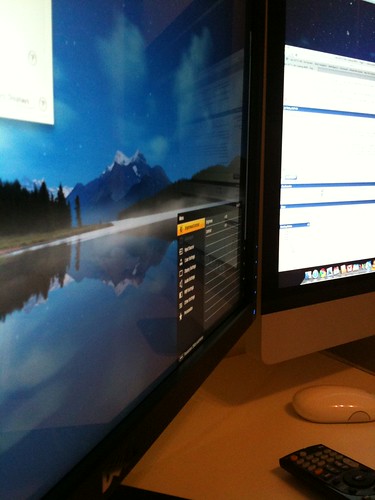
This is my U2711 next to an iMac. You can clearly see the reflection of the iMac on the U2711's surface.
This was done by disassembling the unit, and 'surgically' removing that annoying AG coating.
The display is now much brighter, the contrasts are awesome, and most importantly the image is crisp clear and sharp, gone is the blurry/fuzzy grainy effect that was so very annoying (to me).
Of course Warranty os over/kaput/finito... Btw, the display was purchased two days ago.
For more images (disassembled U2711, removal of the AG, and before/after pictures) check out this flickr page:
http://www.flickr.com/photos/42236618@N07/tags/u2711/
For the AG removal idea, credit goes to djdude1010, and the LumenLab forum's brave pioneers.
This is my U2711 next to an iMac. You can clearly see the reflection of the iMac on the U2711's surface.
This was done by disassembling the unit, and 'surgically' removing that annoying AG coating.
The display is now much brighter, the contrasts are awesome, and most importantly the image is crisp clear and sharp, gone is the blurry/fuzzy grainy effect that was so very annoying (to me).
Of course Warranty os over/kaput/finito... Btw, the display was purchased two days ago.
For more images (disassembled U2711, removal of the AG, and before/after pictures) check out this flickr page:
http://www.flickr.com/photos/42236618@N07/tags/u2711/
For the AG removal idea, credit goes to djdude1010, and the LumenLab forum's brave pioneers.
Last edited:
pedophilekiller
Limp Gawd
- Joined
- Jul 29, 2007
- Messages
- 462
Very impressive. But what was troublesome about the antiglare? I've heard a lot of people have problems with this feature but I can't really notice it on my unit. But then again, I don't have a glossy display to compare to.
fridaylights
n00b
- Joined
- Oct 22, 2009
- Messages
- 35
Very impressive. But what was troublesome about the antiglare? I've heard a lot of people have problems with this feature but I can't really notice it on my unit. But then again, I don't have a glossy display to compare to.
Can't comment on the U2711, I haven't seen it. But on the U2410, it was so bad that I thought what is the big deal with IPS technology. A TN screen looks more clear.
It seems most IPS screens have the AG effect to some degree. A lot of people are saying the Dells are the worst offenders. ie. the U2410 compared to other manufacturers using the same panel for example the HPs.
Very impressive. But what was troublesome about the antiglare? I've heard a lot of people have problems with this feature but I can't really notice it on my unit. But then again, I don't have a glossy display to compare to.
I think its a matter of preference. Some people actually like antiglare, some don't. I can live with antiglare, if it's not too blurry and does not have the 'rainbow' effect. According to my percepcion, the U2711 has a substandard AG coating, which makes the display unbearable for me, so I just had to act.
This mod is definetly not for the majority, who don't really understand the problem, or to whom this does not matter. This is for that small minority who have their brains wired in some funny way and suffer from 'AG coating hypersensitivity'...
This mod is definetly not for the majority, who don't really understand the problem, or to whom this does not matter. This is for that small minority who have their brains wired in some funny way and suffer from 'AG coating hypersensitivity'...
I'm the opposite. I suffer from Display Reflection Hypersensitivity
Any reflection I see on a screen makes me 1000x angrier than any loss of contrast due to antiglare coating, so yeah this mod isn't for me. Still, mighty impressive work there, and props for having the guts and the skill to pull it off successfully.For those of you, who hate the Anti Glare coating of the U2711, check out this glossy U2711 of mine:
Those whitish spots on your display - where are they from?

daveswantek
[H]ard|Gawd
- Joined
- Oct 30, 2007
- Messages
- 1,231
Yep; you can see them reflected in the water at the bottom of the orignal pic.
Dave
Dave
Those whitish spots on your display - where are they from?[/IMG]
Yeah, those are the stars in the sky.
For those who like it, here is the 2560x1440px version for your U2711. The shot was taken by Dominic Kamp, the location is Maligne Lake in Jasper National Park, Alberta, Canada.
terrannova
n00b
- Joined
- Sep 24, 2009
- Messages
- 50
Don't mind the AG coating on my u2711, probably because it's so similar to my six year old S-IPS 2005FPW sitting beside me while I type this.
I gotta admit, that glossy u2711 up above there does look interesting.
I gotta admit, that glossy u2711 up above there does look interesting.
Hmmmz.... I currently have an Acer AL2016W 20" LCD which is dying on me and needs replaced. I was looking to replace it with a display with the following features:
2650x1440-1600 resolution for good PQ with movies (don't care about small text)
Low input lag for PC gaming
Support for PS3
I was overjoyed when I found the U2711 which is WQHD and seems great for gaming. I was just about to order one up when I read about the dreaded "AG coating". :-(
Basically, I have never even heard of AG coating or known it even existed until I saw this thread. I know others have asked about the AG coating and its "sparkle" effect and I hope I'm not being redundant by asking how severe this problem is.
If I were to buy the U2711, would the AG coating seriously make the picture INFERIOR to any off-the-shelf LCD at Best Buy?
And if so, are there any other displays that are comparable with the U2711 minus the AG coating? All the other 30" displays I've looked at seem to not support the PS3 due to scaling issues or have bad input lag. I fear I may be looking for a display that perhaps doesn't even exist?
2650x1440-1600 resolution for good PQ with movies (don't care about small text)
Low input lag for PC gaming
Support for PS3
I was overjoyed when I found the U2711 which is WQHD and seems great for gaming. I was just about to order one up when I read about the dreaded "AG coating". :-(
Basically, I have never even heard of AG coating or known it even existed until I saw this thread. I know others have asked about the AG coating and its "sparkle" effect and I hope I'm not being redundant by asking how severe this problem is.
If I were to buy the U2711, would the AG coating seriously make the picture INFERIOR to any off-the-shelf LCD at Best Buy?
And if so, are there any other displays that are comparable with the U2711 minus the AG coating? All the other 30" displays I've looked at seem to not support the PS3 due to scaling issues or have bad input lag. I fear I may be looking for a display that perhaps doesn't even exist?
Blazestorm
Supreme [H]ardness
- Joined
- Jan 17, 2007
- Messages
- 6,940
Every single LCD that is matte has an AG coating, and I honestly never been bothered by it... some are worse than others, and some people are more sensitive to it. I hate glossy panels with a passion, it's hard to find matte screens at even BestBuy... except LCD TV's, which all have AG coating / matte screens.
I have a WUXGA 15.4" LCD I put in my T500, now that has some terrible AG coating, worse than my 3007WFP-HC, or my NEC 23" or any monitor I've had. But it was $50 and high resolution...
But that WUXGA panel was made in 2004 and pulled out of a Dell D620 or something...
I have a WUXGA 15.4" LCD I put in my T500, now that has some terrible AG coating, worse than my 3007WFP-HC, or my NEC 23" or any monitor I've had. But it was $50 and high resolution...
But that WUXGA panel was made in 2004 and pulled out of a Dell D620 or something...