• Some users have recently had their accounts hijacked. It seems that the now defunct EVGA forums might have compromised your password there and seems many are using the same PW here. We would suggest you UPDATE YOUR PASSWORD and TURN ON 2FA for your account here to further secure it. None of the compromised accounts had 2FA turned on.
    Once you have enabled 2FA, your account will be updated soon to show a badge, letting other members know that you use 2FA to protect your account. This should be beneficial for everyone that uses FSFT.

Connecting Receiver to Computer

excellsior

Limp Gawd
Joined
Jun 10, 2006
Messages
323
With no spdif on my mobo and having to buy the digital i/o module ($15) for my sb xtreme music, I was considering this would be a good time to upgrade to a cheap quad core ~$200 for an amd 2.5 quad + mob w/ spdif (coaxial and digital).
http://www.newegg.com/Product/ComboDealDetails.aspx?ItemList=Combo.182262

Should I just buy the $15 and wait for better deals on the quad or just pull the trigger now?
sb_iomod.jpg


I am working with a Denon avr 2805 infinity sl50 and sl20 speakers.
30910987-2-440-overview-1.gif


This scares me...
DSCN8069.jpg


Old School.. Replacing my Swan D1080mk2 that I'll be connecting downstairs to a laptop/mp3 player.
DSCN8073.jpg


DSCN8075.jpg


Sorry for the blurry pics. It's me, not the camera.
 
I recall answering this question a few days ago...

Regardless: if your receiver supports 'surround sound in' (sometimes under DVD in, look for L/R inputs for front, rear, center and sub) then you can get 3x mini -> RCA cables and connect the fronts (green on soundcard) to front_in on the receiver and the rears to the rear inputs, then the mini->RCA from the center/sub out goes to center & sub in, doesn't matter which cable to which I think.

Nothing wrong with new CPU & MB too though :-P
 
it only has L/R input for one set of audio under dvd in.. i have those connections you speak of, but only under OUT..

So can I just connect single mini from PC to RCA into L/R of DVD in?
h043183190p.jpg
 
Using the [3.5mm/headphone jack] going out from your PC to the [RCA Red/White] into the Denon will give you Stereo analog sound. This is probably the most basic setup, but itll get the job done well.

Or you could buy that mobo (which looks like has both types of SPDIF), and buy this. This will send digital PCM to the receiver, which should give great quality sound.

But if all you need is a quick stereo setup coming from the PC, the [headphone jack] to [denon RCA] should do just fine. :)
 
Is it possible to plug the mini plug into an mp3 player and just use the receiver like that?
 
im pretty sure u can use the 3 to rca cables and plug them in under Ext. in section on ur reciever. It seems to me that would work
 
Doesn't that card have a jack that can be selected as "digital" in the Creative software? Couldn't he then use a single mini-jack to RCA cord and run it to the Digital Coax in of his Denon?
 
Or you could buy that mobo (which looks like has both types of SPDIF), and buy this. This will send digital PCM to the receiver, which should give great quality sound.

this is what I am doing. PCM 16bit 44.1khz sounds really good. FLAC ftw. I love how the reciever does the work...

Really puts my older audigy card to shame.
 
Last edited:
i used the line out and even switched the digital i/o option for the 4th plug and tried that too with all my receiver inputs and nothing has been working.
 
it only has L/R input for one set of audio under dvd in.. i have those connections you speak of, but only under OUT..

So can I just connect single mini from PC to RCA into L/R of DVD in?
h043183190p.jpg

Be sure to get oxygen free copper cables with gold plated terminals.
Your kit is of decent enough quality to tell the difference.
They arent expensive, I believe monoprice is the place to go (I'm in the UK).
 
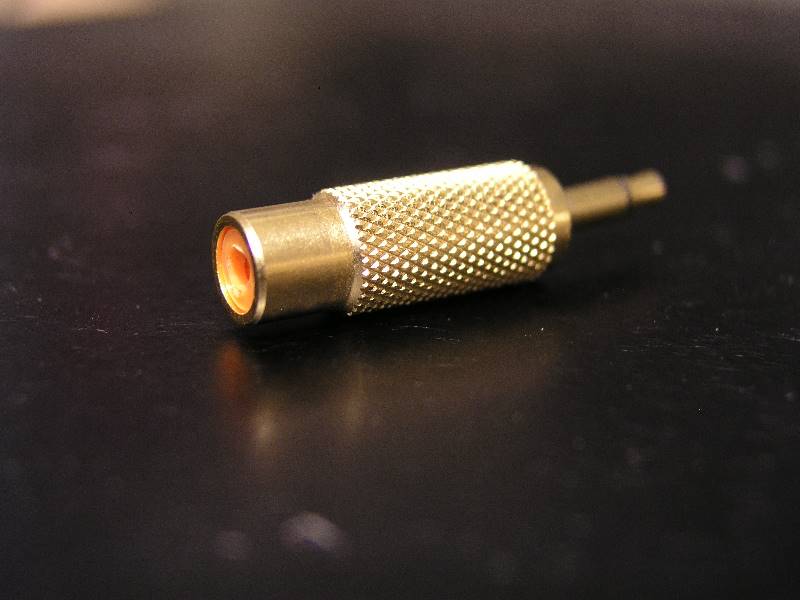
You have digital out available on the x-fi. The pics a little blurry but it looks like you have a coax digital inputs. If so.. just purchase a "mono" mini-plug to rca jack adapter. Make sure it's mono since you're using digital. Then just run a coax cable to the digital in's on the reciever. The adapter goes into your flexijack port on the x-fi. Make sure you flip the setting in windows to use digital outs too.

looks like this... got it at radio shack

P1010046.jpg
 
Last edited:
If you go digital you can get away with almost any quality cable unless running long lengths.
That is one of the great advantages of SPDIF, you can have damn long signal cables that are tough and cheap.
Optical is a farce.
 
I cant use this because my receiver doesnt have those inputs.
I went into Google for a better quality picture, and seems you do have those inputs. It's the one in the left corner. It's called "EXT IN". So you can totally use that Creative cable, this, and get 5.1 or 7.1. However, if you want to buy a new mobo with digital out, make sure it supports Dolby Digital Live or DTS Connect and it provides you with that software, because otherwise you are gonna get 2.0 PCM.
 
I finally purchased a 1/8" mono mini -> rca cable but i still cant get any sound to come out. im not sure what to select on the speaker. ive already clicked digital i/o on the creative console.
 
i plugged that wire i just got into the coax digital and could not get it to work...

so i reused my 1/8 mini to 2x rca and plugged it into the one of the vcr/dvd inputs and im getting a tiny bit of sound and a whole lot of static now.
 
I went into Google for a better quality picture, and seems you do have those inputs. It's the one in the left corner. It's called "EXT IN". So you can totally use that Creative cable, this, and get 5.1 or 7.1. However, if you want to buy a new mobo with digital out, make sure it supports Dolby Digital Live or DTS Connect and it provides you with that software, because otherwise you are gonna get 2.0 PCM.

sweet.. i just used my cables to copy this setup and it works now! so far just running one wire.

automatically i can tell that the speakers are a lot warmer than the hivi's!

hmmm.. for some reason i cant control the volume using the receiver... the sound seems to come out no matter what source i choose

highs are decent, but the vocals are barely coming out

i wondering why my digital i/o isnt working... im going to switch back to the hivis until i get this figured out.

edit: got it to work with the digital i/o to coax 2 digital in... the source is tv on the receiver... sounds pretty good and will do a review after i figure this all out further.
 
Last edited:
Back
Top