Computer Crashes While Gaming

calib3r

n00b
Joined
Feb 3, 2007
Messages
10
Not sure if this is the place to put this but.... I basically upgraded my whole PC, new motherboard, graphics card, CPU, and RAM. Whenever I would play a game like Call of Duty 4 my computer will simply shutdown no blue screen or anything but, when I'm doing everything else such a web surfing like I am now it works fine. New OS install.

Processor: 3.0GHz Intel Core 2 Duo E8400
Memory: 3GB G.Skill DDR2-1066
Hard Drive: 320GB + 640GB
Video Card: 1GB NVIDIA GeForce 9800 GX2
Sound Card: SoundMAX Integrated Digital HD Audio
OS: Windows Vista Ultimate
Motherboard: ASUS P5Q Pro
PSU: 700W Thermaltake Toughpower
 
you didn't overclock anything right?, is it happen on any full screen game? or just graphic intensive game?
 
My 750W Toughpower just died on me with a similar setup. I went out and bought a new PSU and everything works fine.

I would guess a power issue or maybe memory. Does your computer pass Prime95 testing?
 
My RAM is set to the correct voltages and timings. Could it be because only 1 PCI-E connecter with a 6pin to 6pin/8pin adapter is plugged in to my video card?
 
Cue alg7_munif to tell you its nVidia drivers in 3..2..1..

You definitely need all cables plugged into the video card which is a 6pin PCIe and an 8pin PCIe(doesnt matter if its true 8pin or 6+2, what matters is they are both plugged in), although im pretty sure nV cards have a warning siren if only one is plugged in or if the card is under powered. If it were ram it would most likely blue screen or freeze or just restart with out warning. Since its just shutting down...i would suspect powersupply first or try relax mem timings, upping the voltage a bit, or lowering the mem clocks. You may also have memory that just doesnt get along with your motherboard. Hope this helps.
 
What I meant was I have 1 cable with an adapter that has 2 wires a 6 pin and a 8pin plugged into my video card. I plugged 2 cables in and it didn't crash but I only played for about 15 minutes but before it would crash within 1 minute so I might of fixed the problem..
 
What I meant was I have 1 cable with an adapter that has 2 wires a 6 pin and a 8pin plugged into my video card. I plugged 2 cables in and it didn't crash but I only played for about 15 minutes but before it would crash within 1 minute so I might of fixed the problem..

As long as both the 6 pin socket, AND the 8pin socket on the graphics card have separate cables plugged into them, it should be fine. From what you initially described it seems like you only had the 8pin socket plugged in with a 6+2 pin adapter.
 
I was getting various blue screen errors as well for a time I have a 9800gx2 as well. I thought it was a video card driver conflict but I tried many different driver versions to see if this was the issue but it wasn't I recommend you try out different graphics drivers as well what driver version are you using now? I also ran memtest 86+ to see if my memory was faulty I ran 5 or 6 passes overnight and no errors showed up for me. I recommend you do the same http://www.memtest.org/ just burn the program to a cd or dvd disk reboot your computer and it will start running I recommend you run it overnight. I finally realized that my errors were related to an ethernet driver conflict so I downloaded the most recent ethernet drivers for my ethernet adaptor, as I found I was getting blue screens when downloading files and also when playing online games but never when playing singleplayer. When exactly do you get these blue screen errors. Is it only when playing a certain game? only when playing online?
What is the name of the blue screen error you're getting.
 
What I meant was I have 1 cable with an adapter that has 2 wires a 6 pin and a 8pin plugged into my video card. I plugged 2 cables in and it didn't crash but I only played for about 15 minutes but before it would crash within 1 minute so I might of fixed the problem..

I am confused about your wiring here and am concerned about whether you have done it properly. I know that the 9800GX2 card has a 6-pin socket and an 8-pin socket. If you do not plug power connectors into both sockets, the card should not operate at all and squeal an alarm at you.

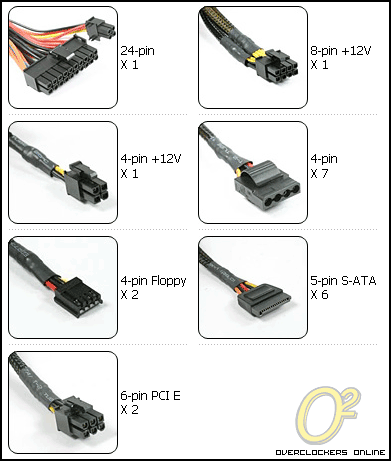
Your PSU has two 6-pin PCI-E power connectors. Here is a picture of the power connectors your PSU has:
specs-2.gif

(Picture taken from Overclockers review of Thermaltake Toughpower 700W)

First, I want to be sure that you haven't plugged that 8-pin CPU power connector into the video card's 8-pin socket. I don't think that from what you said, and they may have made that impossible to do (I would hope so).

Now, the adapter that you say you are using - I am assuming it plugs into the 8-pin connector on the video card, but what exactly have you plugged into the adapter's two sockets? Are the adapter's sockets 4-pin or 6-pin or both?

If you've done all that properly, my main suspects would be bad RAM - you should certainly run the Memtest86+ 2.01 test linked above on any newly assembled system or new RAM chips.

If not that, then I wonder if your CPU is overheating because the cooler is not fully engaged. It can require a surprising amount of force to get all four pins properly engaged, and if one pin is not all the way in, your CPU may overheat after a few minutes of operation, and when that happens it automatically shuts itself down to protect itself from damage.
 
The adapter has both a 6-pin and an 8-pin socket (kind of like a splitter) which I had connected to 1 cable. Anyways, I have 2 cables from the PSU connected to it and it hasn't crashed since so that might of been the problem.
 
I was playing Medal of Honor Allied Assault and it crashed again..Weird because this only happens every once in a while it looks like. Forgot to mention my video card is recertified (refurbished) from EVGA.
 
Back
Top