![[H]ard|Forum](/styles/hardforum/xenforo/logo_dark.png)
- Joined
- Sep 15, 2011
- Messages
- 3,479
I can no longer boot my laptop into Windows and get this error message:
"checking media presence no media present"
I checked the BIOS as oer these instructions but do not see PXE Boot as an option
"Please refer these suggestions:
1. Boot into BIOS settings of your device, in the Boot section, configure PXE boot and set it to Disable.
2. In the BIOS settings, set your hard drive at the top priority for the boot order.
3. If you've a Dell manufactured system for local use, in the BIOS settings, disable 'Onboard Nic ipv4', 'Onboard Nic ipv6'. Don't do this, if your system is connected to organization/work/school account."
I ran diagnostics but didn't get an error about a missing hard drive
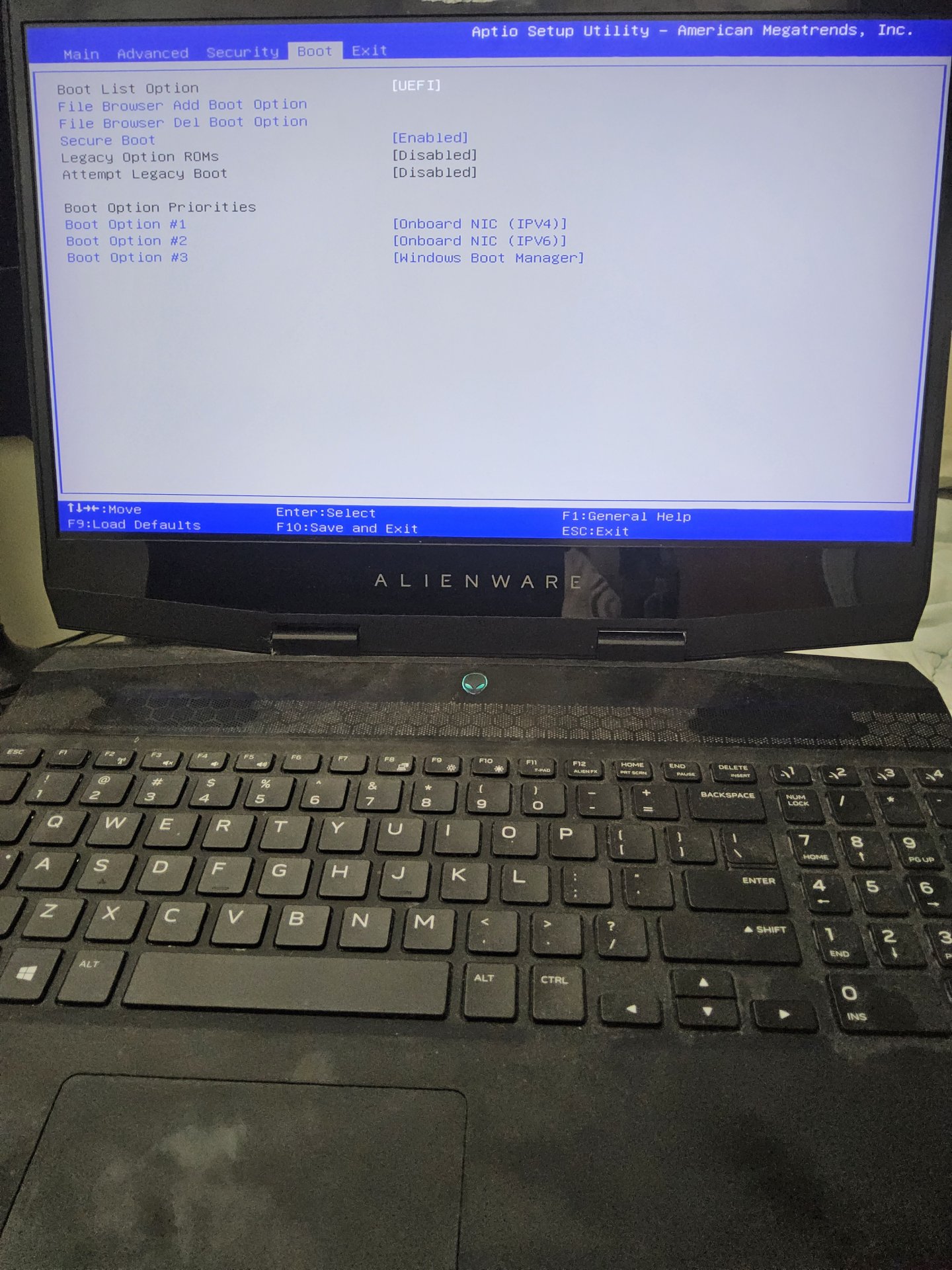
Here is what I see in Boot section in BIOS:
I'm assuming the worst here, that my only drive on my laptop has died, but want to see what other options I have.
Windows did not provide me with any kind of warnings that the drive was malunctioning. This just happened out of the blue.
If there's no software option to troubleshoot this is it worth opening the laptop and reconnecting or repeating the drive?
"checking media presence no media present"
I checked the BIOS as oer these instructions but do not see PXE Boot as an option
"Please refer these suggestions:
1. Boot into BIOS settings of your device, in the Boot section, configure PXE boot and set it to Disable.
2. In the BIOS settings, set your hard drive at the top priority for the boot order.
3. If you've a Dell manufactured system for local use, in the BIOS settings, disable 'Onboard Nic ipv4', 'Onboard Nic ipv6'. Don't do this, if your system is connected to organization/work/school account."
I ran diagnostics but didn't get an error about a missing hard drive
Here is what I see in Boot section in BIOS:
I'm assuming the worst here, that my only drive on my laptop has died, but want to see what other options I have.
Windows did not provide me with any kind of warnings that the drive was malunctioning. This just happened out of the blue.
If there's no software option to troubleshoot this is it worth opening the laptop and reconnecting or repeating the drive?