• Some users have recently had their accounts hijacked. It seems that the now defunct EVGA forums might have compromised your password there and seems many are using the same PW here. We would suggest you UPDATE YOUR PASSWORD and TURN ON 2FA for your account here to further secure it. None of the compromised accounts had 2FA turned on.
    Once you have enabled 2FA, your account will be updated soon to show a badge, letting other members know that you use 2FA to protect your account. This should be beneficial for everyone that uses FSFT.

CachyOS VS Nobara

Nvidia works fine with arch. Bolting out of mainline drivers onto you kernel is a PITA no matter what distor your using. The level of BS you'll put up with is just higher then most peoples. ;)
Except it's not:

Code:
sudo apt install nvidia-driver-565
installs the latest 565 branch of drivers.

If I want to roll back drivers, all I do is issue a:

Code:
sudo apt install nvidia-driver-560

Wait a couple of minutes for drivers to install and reboot = Done. Drivers compile and install perfectly, and no gremlins as a result of installing drivers.

The level of BS you'll put up with is just higher then most peoples.
I think you've been using Arch for too long. ;) One thing I will say about Arch is that pacman isn't as intuitive as apt. No one can really claim pacman -Syu is as intuitive as sudo apt install. If you're running an Nvidia GPU and plan on using Nvidia proprietary drivers, you're best to tun a distro based on Ubuntu LTS.
 
Last edited:
Mazzspeed said:
I think you've been using Arch for too long. ;) One thing I will say about Arch is that pacman isn't as intuitive as apt. No one can really claim pacman -Syu is as intuitive as sudo apt install. If you're running an Nvidia GPU and plan on using Nvidia proprietary drivers, you're best to tun a distro based on Ubuntu LTS.

Exactly. Not sure what they are thinking over in the pacman group lol
 
Except it's not:

Code:
sudo apt install nvidia-driver-565
installs the latest 565 branch of drivers.

If I want to roll back drivers, all I do is issue a:

Code:
sudo apt install nvidia-driver-560

Wait a couple of minutes for drivers to install and reboot = Done. Drivers compile and install perfectly, and no gremlins as a result of installing drivers.


I think you've been using Arch for too long. ;) One thing I will say about Arch is that pacman isn't as intuitive as apt. No one can really claim pacman -Syu is as intuitive as sudo apt install. If you're running an Nvidia GPU and plan on using Nvidia proprietary drivers, you're best to tun a distro based on Ubuntu LTS.
pacman -Syu is equivalent to apt update + apt upgrade or dist-upgrade or full-upgrade & pacman -S is equivalent to apt install.

S = sync
y = refresh
u = sysupgrade

pacman -S --noconfirm is equivalent to apt install -y, with the caveat for package replacement conflicts that need review. --sudoloop can be added to that to make it work through everything with only 1 prompt for privilege escalation.
 
  • Like
Reactions: ChadD
like this
pacman -Syu is equivalent to apt update + apt upgrade or dist-upgrade or full-upgrade & pacman -S is equivalent to apt install.

S = sync
y = refresh
u = sysupgrade

pacman -S --noconfirm is equivalent to apt install -y, with the caveat for package replacement conflicts that need review. --sudoloop can be added to that to make it work through everything with only 1 prompt for privilege escalation.
We weren't saying we didn't know the commands. Just that it isn't as intuitive as "install" or "update" or "upgrade". Those are idiot proof. I mean, what stopped pacman devs from being clear like apt? Why force the user to find the readme and parse it for possible syntaxs?,
 
We weren't saying we didn't know the commands. Just that it isn't as intuitive as "install" or "update" or "upgrade". Those are idiot proof. I mean, what stopped pacman devs from being clear like apt? Why force the user to find the readme and parse it for possible syntaxs?,
Learning? Memorizing command line switches is part of enjoying & figuring it all out. Sometimes too simple means too boxed in with lack of options.
 
Learning? Memorizing command line switches is part of enjoying & figuring it all out. Sometimes too simple means too boxed in with lack of options.
And yet it would be nice if the commands made sense instead of relying on arguments after the command for a simple install process.
 
And yet it would be nice if the commands made sense instead of relying on arguments after the command for a simple install process.
How is typing -Syu not simple once memorized or utilized with shell history?
 
How is typing -Syu not simple once memorized or utilized with shell history?
I'm not stating it's not simple, I'm stating it's not as intuitive as 'apt install [package name]'. I'm not interested in an argument, that's my perspective on the matter. If you have a different perspective you're naturally welcome to it.

Once again: I've used Arch as well as many other distro's for extended periods - I do know the command syntax.
 
I'm not stating it's not simple, I'm stating it's not as intuitive as 'apt install [package name]'. I'm not interested in an argument, that's my perspective on the matter. If you have a different perspective you're naturally welcome to it.

Once again: I've used Arch as well as many other distro's for extended periods - I do know the command syntax.
All good. I'm just asking for the perception of it.
 
pacman -Syu is equivalent to apt update + apt upgrade or dist-upgrade or full-upgrade & pacman -S is equivalent to apt install.

S = sync
y = refresh
u = sysupgrade

pacman -S --noconfirm is equivalent to apt install -y, with the caveat for package replacement conflicts that need review. --sudoloop can be added to that to make it work through everything with only 1 prompt for privilege escalation.

I know 3 arguments... instead of 3 separate commands. Whatever could the pacman developers be thinking right. :)
 
I think you've been using Arch for too long. ;) One thing I will say about Arch is that pacman isn't as intuitive as apt. No one can really claim pacman -Syu is as intuitive as sudo apt install. If you're running an Nvidia GPU and plan on using Nvidia proprietary drivers, you're best to tun a distro based on Ubuntu LTS.

I don't actually use arch proper, have installed it sure, but don't use it. As far as I understand Nvidia works fine with arch... if it didn't I would think there would be a few complaints. lol To be fair its been a few years since I used Nvidia under anything. I still have a old NV machine around but I haven't booted it in over a year. Think it has Manjaro on it? Can't remember.
It doesn't sound like your using Ubuntu proper either.
I run cachy these days... and ya it installs Nvidia drivers at install. Or you can use chwd (cachy hardware detection) [All the larger arch derivatives have some sort of Nvidia pre compile or detection]
https://github.com/CachyOS/chwd/
https://wiki.cachyos.org/features/chwd/#_top
I have clicked on enough bad Youtube videos to know there are people happily using their 4090s on Cachy Open source with zero issues.

Cachy ships with pre compiled Kernel options with free or closed source Nvidia drivers. No need to use DKMS really even if you want the closed source for now the cachy devs do it for you if you want such things. Though yes you can do all the command line script junk in cachy/arch like you can in any other distro. Your just likely to have to jump through the closed source hoops more then once. But ya if you run cachy and you want closed source drivers, for now you just set your Cachy Kernel manager to install the kernel you want and reboot. Your system will update with that version of the compiled kernel as updates roll no issues. At least until the point when Nvidia stops supporting the closed source modules. Then you can switch over to the open source compiled version of the kernel. You can get super granular with the Cachy kernel manger and compile the kernel from source. (has a nice profile system for future re compiles) Nvidia open or closed / ZFS / LTO on or off / CPU optimization levels / NUMA and a ton of other minor options and optimizations... oh and of course which scheduler(s) you want compiled. (not that I think anyone needs to get that crazy... Peter and the Cachy devs are already providing like 20 some different compiled kernels).
 
Arguments aren't as intuitive as verbose commands, it's a fairly simple statement.
I disagree. :) We can do that.
I don't think its intuitive at all to a windows user that 3 commands are required to update. In my experience they are as likely to type the first sync command and think they are done. Or realistically look for the GUI that has an [UPDATE] button. ;) Seeing as the command line update is mostly just for us neck beard types, I don't think the difference is all that major and seeing as the command line is mainly for folks like You and I. I would personally prefer one line.
 
I disagree. :) We can do that.
We can, likewise I disagree with a number of your claims. Freedom of choice is a strength of Linux and we all tend to be fairly passionate about our chosen distro's. At the end of the day, we're still all Linux users and we band together.

I don't think its intuitive at all to a windows user that 3 commands are required to update.

It always made perfect sense to me. Sudo elevates privileges, apt is the package manager, I want to install a package = sudo apt install [package name]. Really, the one major implementation attracting Windows users to Arch based distro's is the AUR, and that's because the idea of PPA's seems downright alien to transitioning Windows users. In time, Flatpak may make the AUR redundant, especially if the implementation keeps improving and resolving the few shortcomings of Flatpak's.
 
Last edited:
BTW: Diablo 4 is free to play for a limited time under BattleNet. I'm playing it ATM, worth a shot if you haven't tried it already...
 
BTW: Diablo 4 is free to play for a limited time under BattleNet. I'm playing it ATM, worth a shot if you haven't tried it already...
I couldn't do the always online thing. When I bought it I wasn't really tracking the "MMO" aspect of it. I guess I was used to D2.
 
Cachy ships with pre compiled Kernel options with free or closed source Nvidia drivers. No need to use DKMS really even if you want the closed source for now the cachy devs do it for you if you want such things.

This is the case with Arch now, as a result Nvidia driver issues have been virtually eliminated. It's the reason I asked CrimsonKnight13 how he installed his Nvidia drivers, as the process should be essentially trouble free now assuming you're installing drivers along with system wide OS updates. The problem with such an approach is that rolling back drivers in the event of an issue relies on snapshots or backups.

I couldn't do the always online thing. When I bought it I wasn't really tracking the "MMO" aspect of it. I guess I was used to D2.

Agreed. The trial is very limited. You download a roughly 90GB game (without high res textures, that's around 120GB), and you get to play it perhaps once. After that it's locked under BattleNet and you have to purchase the full game to keep playing. I think I actually preferred Diablo III...
 
This is the case with Arch now, as a result Nvidia driver issues have been virtually eliminated. It's the reason I asked CrimsonKnight13 how he installed his Nvidia drivers, as the process should be essentially trouble free now assuming you're installing drivers along with system wide OS updates. The problem with such an approach is that rolling back drivers in the event of an issue relies on snapshots or backups.


Agreed. The trial is very limited. You download a roughly 90GB game (without high res textures, that's around 120GB), and you get to play it perhaps once. After that it's locked under BattleNet and you have to purchase the full game to keep playing. I think I actually preferred Diablo III...
A buddy at work said that D4 is essentially D3 but with online mode only. No thanks. Still working through Skyrim... About that, I copied my saves from my windows Skyrim install and put them in the Arch Skyrim install and they worked! Thank. God.
 
A buddy at work said that D4 is essentially D3 but with online mode only. No thanks. Still working through Skyrim... About that, I copied my saves from my windows Skyrim install and put them in the Arch Skyrim install and they worked! Thank. God.

The exception is that loot drops were far more prevalent under D3 than D4, not sure if that's micro transaction related or not?
 
The exception is that loot drops were far more prevalent under D3 than D4, not sure if that's micro transaction related or not?
Does D4 have micro transactions? /snicker

I'm sure they do, but if it's anything like wow, they don't help, just cosmetic.
 
Going to post this here.
So my old monitor died and I bought a new 1440p monitor today.
And the gaming gods smiled on my little Linux box.... 6.14 Kernel drop today for CachyOS as well.
So new NTSync. I ran this bench......

Marvel Guardians - same settings as previous Ultra Settings FSR Quality higher res [2560x1080 previous 2560x1440 now]
Average FPS 108
Min 73
Max 135
2560x1440 same hardware [3600x 5700xt]

Gotta love Linux developers. Bump the res a good amount... and compared to number from just 5 months ago loose zero performance.
 
I'll be doing tests with games on my gaming desktop (sig) & SD LCD now that I have 6.14 installed on both.
 
  • Like
Reactions: ChadD
like this
I'll be doing tests with games on my gaming desktop (sig) & SD LCD now that I have 6.14 installed on both.
I was worried bumping to proper 1440 today was going to make my poor old 5700xt cry a bit more then I like. So many older games on MMOs I play where it was sitting in fan stop before.
It all lined up today. 6.14 drops and so far its looking like a net wash for me. I just got a free bump in Res I guess. Still testing it out, I'm sure there are a few games I might have to dial down a few settings, maybe. So far no.
I have been going through my games figuring out where to set my frame limiter to keep the fans from spinning up too much. Have most of them sitting at nice low RPM 850 or so with some frame limit capping. Figuring out where I still get nice smooth game play with FreeSync.

BTW for anyone that doesn't know under Linux games using DXVX you can force frame caps with a simple launch argument.

If your launching from Steam just add something like this. Set the max to whatever makes sense. Play a lot of games that I'm fine capping and with sync its still silky smooth.
DXVK_FRAME_RATE=85 %command%
 
BTW for anyone that doesn't know under Linux games using DXVX you can force frame caps with a simple launch argument.

I just use MangoHud's inbuilt limiter. That way I can assign more than one FPS cap and switch between them at the press of a key while in game.
 
Last edited:
Reran a borderlands run. at 1440 ultra settings 59.66.... so lost 4-5 FPS.
Gotta love Linux optimizations. I was happy before. Added 940,000 more pixels on my monitor, only lost 5fps.
If I re run BL3 I'll probably drop it down to high to get closer to 70fps average.
Impressive gains with the new kernel.
 
I just use MangoHud's inbuilt limiter. That way I can assign more than one FPS cap and switch between them at the press of a key while in game.
Once I dial it in I tend to leave it be. Launcher argument is simple no extra software required. :) Your right though Mango can handle it with some extra options if you need/want em. I tend to just find a sweat spot and set it... most games have a in game FPS limiter should I need a more aggressive limit.
 
For the past couple of months I've been distro shopping with various machines. I've tried CachyOS, Nobara, and Bazzite extensively, with KDE, Gnome, and Budgie, and Nobara with Gnome was the most stable, most up-to-date, and least resource-hungry OS in actual use. Cachy used less memory but was somehow slower in just about every way. Also for some reason Gnome has higher upload and download speeds and better Bluetooth support than KDE. Shouldn't be the case but it is.

I'll give Arch another try if SteamOS supports my laptop (I have a Deck so I'm using it with that already) down the road, but for now, Nobara with Gnome has been great.
 
  • Like
Reactions: ChadD
like this
Bluetooth support shouldn't have anything to do with the DE.

In terms of NTSync, technically speaking there really shouldn't be any notable variance in performance whatsoever, the main benefit of NTSync is better upstream support and technical 'correctness'.
 
Bluetooth support shouldn't have anything to do with the DE.

In terms of NTSync, technically speaking there really shouldn't be any notable variance in performance whatsoever, the main benefit of NTSync is better upstream support and technical 'correctness'.
NTSync 100% improves performance. Compared to Fsync its 0-5% depending on the title in question. It for sure will be better for games with 0.1% and 1% low dips. For wine without Fsync it can be as much as 150% as wine right now doesn't have a sync.
NTsync is the work of Zeb Figura from Code weavers. This is a kernel side implementation not a user space one like Fsync. The screen is from her talk and this is vs wine not proton. NTSync is a big improvement, its now a kernel driver... its going to lead to improvements in a lot of titles. It should for sure help in less popular older games that haven't had Valve going over and optimizing for them.

View: https://www.youtube.com/watch?v=NjU4nyWyhU8
Screenshot_20250327_002145.png
 
NTSync 100% improves performance. Compared to Fsync its 0-5% depending on the title in question. It for sure will be better for games with 0.1% and 1% low dips. For wine without Fsync it can be as much as 150% as wine right now doesn't have a sync.
NTsync is the work of Zeb Figura from Code weavers. This is a kernel side implementation not a user space one like Fsync. The screen is from her talk and this is vs wine not proton. NTSync is a big improvement, its now a kernel driver... its going to lead to improvements in a lot of titles. It should for sure help in less popular older games that haven't had Valve going over and optimizing for them.

View: https://www.youtube.com/watch?v=NjU4nyWyhU8
View attachment 719591


Proton already supports esync as well as fsync. If you're running Wine, NTSync will provide a notable benefit (pushing performance to within a statistical margin of error, give or take, compared to Proton under certain titles). However, if you're running Proton, any gains are bound to be minimal. The biggest advantages are accuracy, compatibility, and better upstream support.

I have no idea why anyone would be running Wine over Proton. The only real reason to game under Wine over Proton is to experiment with the recently released, and still somewhat buggy, Wine-Wayland.

EDIT: NTSync isn't even a part of Wine as yet. The patches haven't been implemented, and implementing them is no trivial matter unless you trust the wine-tkg repo.
 
Last edited:
Proton already supports esync as well as fsync. If you're running Wine, NTSync will provide a notable benefit (pushing performance to within a statistical margin of error, give or take, compared to Proton under certain titles). However, if you're running Proton, any gains are bound to be minimal. The biggest advantages are accuracy, compatibility, and better upstream support.

I have no idea why anyone would be running Wine over Proton. The only real reason to game under Wine over Proton is to experiment with the recently released, and still somewhat buggy, Wine-Wayland.

EDIT: NTSync isn't even a part of Wine as yet. The patches haven't been implemented, and implementing them is no trivial matter unless you trust the wine-tkg repo.
Its going to improve non gaming things as well. Lots of people use wine for lots of things.
It is still an improvement for gaming. Valve will move over to it and drop their own solution. Its now a kernel level driver with 100% accuracy.
It will also very much depend on what software you are looking at. For the latest AAA titles that valve has been tweaking proton to handle. Your correct it won't be a massive difference. For older titles and more obscure ones that no one has tweaked. That run with issues... or don't run at all, or run but have horrible 1% lows. Its often because base proton isn't handling some ops properly. Fsync can't emulate a bunch of calls properly it is forced to use a couple cycles.

I know it improves performance because I have seen it. As an example I play Star Trek online. My 1% lows are doubled. Overall FPS isn't much changed no because my highs haven't went up big... that game has specific GFX that no matter what you do tank FPS when they are on screen. That isn't happening now. My guess is the 15 year old MMO has a bit of messy code, and in places its not properly doing wait calls or whatever the case is. Things fsync can't actually handle at all. NTsync can.

This is big for Linux gaming... not for performance boosts in the handful of AAA games people care about. Its going to help in obscure gaming titles, and software people do run under wine where not just performance matters but stability. Even if the game your playing NTsync is a wash vs Fsync in performance NTsync is going to be more stable. If something is crashing with NTSync well then it is also crashing under windows.
 
CachyOS is seeing improvements at the least due to already implementing NTSync before 6.14 was released.
https://discuss.cachyos.org/t/ntsync-in-latest-proton-cachyos-wine-cachyos/5254
On that thread ptr1337 is Peter Jung Cachys head dev/founder. Like he was saying they implemented parts of it in Jan. To use it you still had to flip it on with launch arguments and it wasn't fully implemented. They had pulled forward some things into their earlier kernel. Anyway yes some cachy users have been testing it since then with testing compiles of cachy-proton. As expected where it is helping is heavy CPU bound areas. Things that cause 1% dips, also scenes that just require more computation work.
I'm not a great programmer in anyway... what it looks like the main issue is in those situations is wait for all. Something Fsync and the other user space solutions can't emulate.
http://undocumented.ntinternals.net... Functions/NT Objects/Event/NtPulseEvent.html
http://undocumented.ntinternals.net...Objects/Type independed/OBJECT_WAIT_TYPE.html

These things can't be properly emulated in just user space. Or at least no one has found a way to do that yet. Fsync can't handle wait calls properly. This doesn't matter most of the time... but when you get in situations where you are CPU bound and threads are waiting it causes issues, and extra cycles to get eaten up vs windows where NTAPI can handle wait calls. NTsync being driver level they have been able to include the wait calls and handle them in the same way windows does. So when you get into situations where your CPU SPIKES to high usage, NTsync is going to make a huge difference.

NTSync advantage will vary a lot on hardware as well. You will see bigger uplift if your on a system which requires more CPU to get the job done. So people on say 3600 6 core CPUs... are more likely to see uplift. Vs someone on a 8 core X3D chip. Spaghetti code games with scenes or elements that hit the CPU hard... basically NTsync is going to improve the things people complain about under linux the most. No its not going to boost the latest AAA title by 50% or antyhing crazy vs Proton, but it may mean someones less popular pet game runs smoother. It might mean people don't see a big dip when they hit a specific part of a game... where they didn't remember experiencing issues under windows.
 
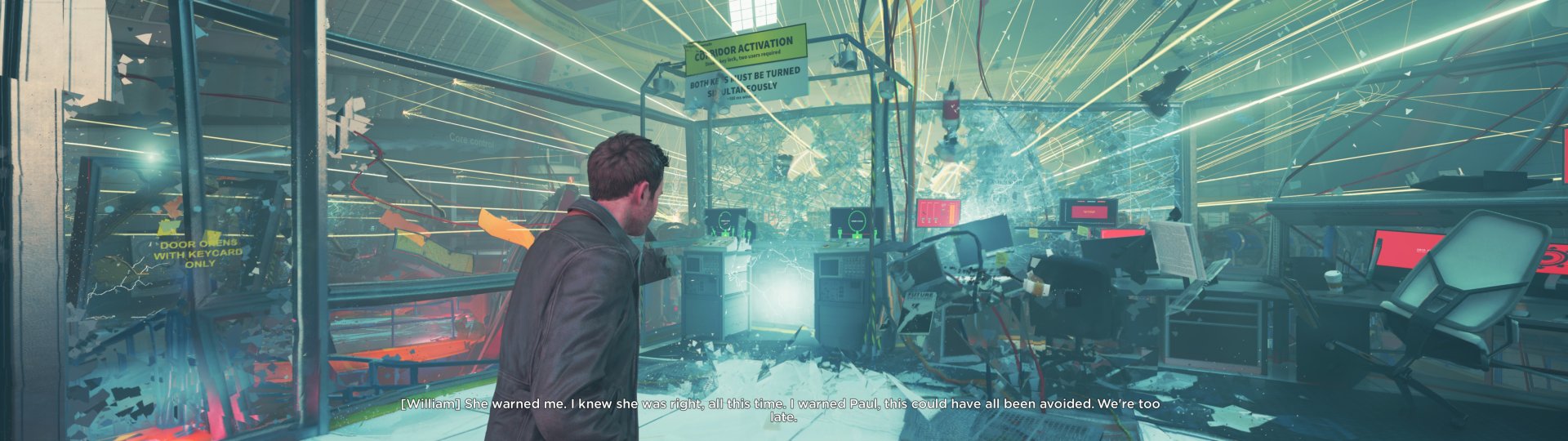
I tested Quantum Break last night & it ran really well, though I hit the lame 21:9 max resolution hardlimit. I'll be testing out the modified exe tonight for my 32:9 monitor & see how the game flows with FPS & frame time.

Running & looking good. Seems butter smooth with the current kernel & Mesa drivers.

1743123739004.jpeg
 
Last edited:
Back
Top