Building new PC...

BaGGy

Limp Gawd
Joined
May 23, 2005
Messages
155
I was looking at buying myself a E6750, as well as that Ballistix ram as I have read that its doing fantastic. I am just trying to keep my system capable of playing this years latest games, StarCraft 2, and EverQuest 2, World of Warcraft, Crysis, Battlefield: Bad Company, BF2142, and many other games similar to that. The graphics card will be the powerhouse ofcourse, and I may up myself to dual graphics cards if I plan on getting a 24" LCD, but that is undetermined currently. I also am undecided on what size power supply I will need, but I do know that I will be getting a heat sink that fits my case, and the case is also undecided. Everything is open for feedback, and recommendations please help me build my dream machine. My budget varies, so far I am trying to get around $1500.

I don't have a build list entirely, I just have a lot of information stored in my head.

I would also like a PC that I could add to as time goes on, if needed. Such as, if like I decide to go with this new processor that Intel is planning to release such as the one with Integrated Graphics and I think like 4 or 8 cores, I could do that. I just want to have that option of upgrading with minimal amount of cash investment rather then having to rebuild another PC.


My "brain" list is:
E6750 -- because I might want to go with 45nm next year.

P35 mobo either IP35 or P35-DS3R or something else (I need a motherboard with atleast 3 or 4 USB 2.0 ports for my keyboard, mouse, ipod, and I would like to have a great built-in ethernet port (or 2) with 10/100/1000 support, and not quite sure what a good built-in RAID Controller is. No idea what I need firewire for, and eSATA either).

Crucial Ballistix ram 4GB (x4) or 2GB (x2).. I am going for performance and efficency for gaming, graphics, and developement.

Graphics card is still undetermined, I haven't followed this area enough same with monitors.

Hard drive may just be a Barracuda or two. For games, itunes music storage, developing games/apps, graphics as well. Maybe a RAID setup would better help me?

Power supply, I was looking at the Corsair PSU's they look nice, and I hear nothing but good things so far, or the expensive PC Power and Cooling ones.

Case, I want something with very effective, efficient cooling but not loud. I was looking at the Antec 900 but heard it was loud, so I looked into the Cooler Master Cosmos 1000 but it ways more than two Playstation 3's bare, and the handles look cosmetic, and hard drive cooling looks poor.

Floppy, and Rom drives... hmm well maybe a floppy for bios updates? or can they be done via flash drives now? And just a basic CD/DVD combo drive, I really dont ever burn discs anyway as flash drives are just as efficient, if not faster.


------------ OFFTOPIC -----------
My current system is also going to be used as a WoW system for my girl friend, as well as a homework machine. It's very outdated but I am looking to upgrade it as well as it needs it.
It currently has:
Pentium 4 Nortwood 1.6Ghz
768MB DDR 266 (1x - 256MB and 1x 512MB)
BFGTech Geforce FX 5600 Ultra w/ 256MB Video ram
Shuttle AV49V/N

I might put in a new P4 processor, 2.8Ghz with FSB of 533, as I assume the current one is bottlenecking the graphics card a tad, and I might just upgrade the graphics as well to an X800 or something. Memory will get a change as well....
 
So actually going to buy this time, eh BaGGy?

Well just so you know, a single GTX can handle games on a 24" monitor. And Q1 2008, the GTX's successor will most likely be able to as well. So no real need for SLI or Crossfire actually.

Cases are a personal choice item. So I can't really tell you want to buy. Trash to one is a treasure to another. What I can do is give you a few recommendations:
Cooler Master Elite 330 RC-330-KKN1-GP ATX Case - $40
COOLER MASTER RC-690-KKN1-GP ATX Case- $65
NZXT Hush ATX Case - $75
Antec P180 ATX Case - $110
Antec Sonata III Case - $114
Antec Nine Hundred ATX Case - $120
Antec P182 ATX Case - $115
Antec P180B ATX Case - $130
XCLIO Windtunnel ATX Full Tower Computer Case - $130
Gigabyte Aurora GZ-FSCA1-ATB ATX Case - $135
Thermaltake Armor VA8000BWS Full Tower ATX Case - $137
Thermaltake Armor VA8003BWS Full Tower ATX Case - $150
LIAN-LI PC-V1100A PLUS II - $220

As for video card, what size monitor do you have now? Also, when do you plan on getting a bigger monitor?

Also, will you be overclocking? OH and you can get the E6750 for a bit cheaper than newegg here:
Intel Core 2 Duo E6750 CPU - $187

Also, is the OS included as part of the budget? Will you be using Vista or stick with XP?

I say go with the Corsair 620HX. It should be plenty of power for your rig for a few years at least.

And I just remembered that I did a build list for you right before the forum outage. Still taking your time eh?
 
Sadly, I am the most indecisive person, yet money sensitive person alive... When it comes to making $10-20 purchases I cringe at the thought, so you can just imagine what $1000 does to me. But anyway, I am planning on going through with it here shortly, I told myself I will wait til November.. and well it is near.

The other reason I brought up a new post is because I did lose the build list you had given me sadly, so I was just going off pure memory... Speaking of which, I have been having a memory dilemma, and deciding if I should go with (2x) 1GB sticks or (4x) 1GB sticks or (2x) 2GB sticks, as well as Vista. I do have Vista Ultimate as well as XP Professional, so I am undecided as to which route I want to go on that subject as well as the 32bit vs 64bit. So many factors...

Case wise I am getting interested in that P180 case, it looks nice, the reviews on the newegg site are kind of sad, however, these forums provide some uplifting information regarding that case specifically. I will just change some of the fans to those Sycthe fans that everyone recommends, that use liquid rather than bearings. Or even a Lian-Li equivlent case like (http://www.newegg.com/Product/Product.aspx?Item=N82E16811112116) .. in the pictures it shows its aluminum but in a few of the pictures it looks like plastic (which I am not a big fan of, I prefer metal overall).

Then depending on the motherboard I choose, which I have been hearing fantastic things about both the P35-DS3R and the IP35 Pro, and that also makes the decision by far much more difficult. If I plan on going with a RAID configuration would that matter with either of the boards, which would be better in that case. Also I don't plan on using firewire, but I do plan on using USB, and I haven't a clue what eSATA is used for yet so I probably wont need that either. It seems as if the DS3R is capable of higher memory speeds as well, and if I remember correctly 1066 is a good speed for the E6750, and 800 is good for the Q6600.

On overclocking, I am kind of interested in getting involved with it now, as I hear its easy to do and fun.

The monitor I will probably have early next year or christmas time this year, currently I am just using a 17" CRT, so I may just get the Radeon X1950 Pro to last me for now, and wait for the GTX to go down in price when the next series is released.
 
Keep in ming if you go 4GB on 32bit windows you will see about 3.25GB useable memory. If you want max memory, you need 64bit
 
Well if you have the cash for it now, go for 2 x 2GB because it'll be easier to OC as well as make it easier for future upgrades. However, you will need Vista64bit or any 64bit OS in order to use all 4GB of RAM. If you don't have a 64bit OS nor want to try one, then just go with a 2 x 1Gb set for now. 2GB of RAM is plenty for current games.

You got the fans mixed up. The Scythe fans are ball-bearing fans, meaning they will last longer and can be placed in any position, horizontal or vertical. The fans that come with the P180 are also ball bearing fans I think but they just suck/blow in terms of airflow to noise levels. Hence the recommendations for the Scythe S-Flex fans or Yate Loons

As for RAID, It wouldn't matter with either board because they both use the same RAID chip IIRC. As for eSATA, it's just an external SATA connector to connect external hard drives via SATA. With eSATA, you do get incredible speed with transferring files and such since it's just a normal SATA port converted for external use. If you don't need firewire or eSATA forced on you, then go with the DS3R. Although the DS3R does come with a bracket to convert two onboard SATA ports to eSATA should you ever need it.

Yes, I concur with getting the x1950Pro. You'll only have to put up with it for 2-3 months until the GTX successor comes around.
 
I agree with Danny. Thanks for saving me all that typing. :D

BTW, the S-Flex fans are S-FDB (sony fluid dynamic bearing), which makes them quieter and more reliable than ball bearings, and they can push more air, too. Sleeve bearing fans are quieter than ball, but fail sooner. Hydrowave is basically the same thing as FDB, or S-FDB.
 
BTW, the S-Flex fans are S-FDB (sony fluid dynamic bearing), which makes them quieter and more reliable than ball bearings, and they can push more air, too. Sleeve bearing fans are quieter than ball, but fail sooner. Hydrowave is basically the same thing as FDB, or S-FDB.

Ahh, thanks for the correction, again!
 
So in terms of ram, what would be the best for my build, we have already come to the conclusion that I should go with 2x 2GB sticks, now what about in terms of latency and speed? This field is still somewhat confusing...

I am not totally worried about using all 4GB, unless its a performance issue. I still am undecided on Vista vs XP, I may just go with XP for the time being as Vista seems to be inefficient game wise for now, as my friend has it and he says its slower for many of the games he plays on it.

Did I mention I love you guys... :p
 
Hmm from what I've read so far, online anyway, with newer games, Vista and XP performance is about the same give or take a few FPS. Not too sure about that though. Haven't used Vista in quite a while. I really should get around installing it someday just so I can help my friends with their Vista laptops.

For speed, all you need is DDR2 800 even with overclocking planned. The price difference between DDR2 667 and DDR2 800 RAM is so small, you might as well go for DDR2 800. As for latency, you seriously won't notice any performance increase with RAM with lower timings. Unless you're running benchmarks all the bloody time, don't pay extra for RAM with lower timings.

Now since you're planning to get the E6750, any cheap set of DDR2 RAM is all you need to OC the E6750 to 3.2Ghz. Anything higher than that, you will need to buy RAM that has Micron D9 chips. Basically any RAM with Micron D9 chips are almost guaranteed to overclock nicely. This RAM list will tell you which set of RAM comes with Micron D9 chips:
http://ramlist.ath.cx/ddr2/

And just to clear things up for you, here's some math:

E6750:

Multiplier x FSB, RAM Speed = CPU Speed

8 x 333Mhz, DDR2 667 RAM = 2.66Ghz <== Stock Speeds
8 x 400Mhz, DDR2 800 RAM = 3.2Ghz <== Good OC
8 x 450Mhz, DDR2 900 RAM = 3.6Ghz <== Great OC
8 x 500Mhz, DDR2 1000 RAM = 4.0Ghz <== Excellent OC, if you get this, you get some pretty heavy bragging rights.

Do remember that RAM speed is twice the speed of the FSB.
 
Furthermore, FSB is referred to in two ways, typically, with Intel platforms. The base FSB is the one everything is calculated off of, and is basically SDR, single data rate. The FSB listed on the CPU is the effective FSB speed, which is QDR, quad data rate. Formulas for Intel platform @ 1:1 settings: (base FSB speed is SDR, or single data rate)
(CPU Multiplier) x [Base FSB speed] = CPU Clock speed
2 x [Base FSB speed] = RAM speed (DDR: double data rate)
4 x [Base FSB speed] = Effective FSB speed (QDR: quad data rate)

As Danny pointed out, with an E6750, you'd be best served by sticks with Micron D9's if you'd like to OC. However, they don't come in 2x2GB configuration. So, if you're OC goal is ambitious (higher than 3.2Ghz; and yes, these chips can reach 4Ghz), you'd still be best served by 4x1GB of some Crucial Ballistix DDR2-800. If 3.2Ghz is good enough for you, go for some G.Skill DDR2-800 PQ sticks instead.

Newegg's rebate was over, but Buy.com's rebate is still goin (at the time of this post)...
$115 - Crucial Ballistix 2GB (2x1GB) DDR2-800 BL2KIT12864AA804 ($55 MIR)

$170 - G.Skill 4GB(2x2GB) DDR2-800 F2-6400CL5D-4GBPQ
 
Personally, I highly recommend the Ultima90 over the Tuniq. Mine performs just as well as my Tuniq, yet its much lighter/smaller.

$46 - Thermalright Ultima 90 CPU HS + Panaflo Hydrowave fan, FBA09A12M - Z ($3)

I actually got the same temps out of this cooler when I switched from the Tuniq. And, its only $5 more, total, than the Tuniq.
 
Case is the last thing on my list.. and I have everything else ready to check out. I am just struggling on case selection at the moment... Antec 900 is good at cooling but loud, and the P180 looks neat but I am unsure of its cooling, and the Lian-Li apparently has good cooling as well. Any overall suggestions? (I did go through the list Danny gave)


Here is my current plan:

All Newegg just for price estimates...
------------------------------------------------------
Seagate Barracuda 7200.10 ST3320620AS (Perpendicular Recording Technology) 320GB 7200 RPM SATA 3.0Gb/s Hard Drive - OEM - $84.99

SAPPHIRE 100196L Radeon X1950PRO 512MB 256-bit GDDR3 PCI Express x16 HDCP Ready CrossFire Supported Video Card - Retail - $154.99

CORSAIR CMPSU-620HX ATX12V v2.2 and EPS12V 2.91 620W Power Supply - Retail - $169.99 ($30 MIR)

Crucial Ballistix 2GB (2 x 1GB) 240-Pin DDR2 SDRAM DDR2 800 (PC2 6400) Dual Channel Kit Desktop Memory Model BL2KIT12864AA804 - Retail - $94.99

GIGABYTE GA-P35-DS3R LGA 775 Intel P35 ATX Intel Motherboard - Retail - $129.99

Intel Core 2 Duo E6750 Conroe 2.66GHz LGA 775 Processor Model BX80557E6750 - Retail - $194.99

Total w/o Shipping = $829.94
-----------------------------------------------------------------
 
I own 2 Antec 900s and they are the most quiet cases I've ever owned. Turn all the fans to low (they come with speed selectors) and you're good to go.
 
Airflow on the P180 is great if you add fans to the top chamber. I forgot how many it comes with, since I gave mine away, lol. I should have kept it... cuz I got it for $40AR, lol! Anyhow, there should be a front intake in the upper chamber, I believe, along with two exhaust (rear and top). The bottom chamber has the PSU fan and two fans for the HDDs. The seprated chambers keeps heat well compartmentalized.
 
CORSAIR CMPSU-620HX ATX12V v2.2 and EPS12V 2.91 620W Power Supply - Retail - $169.99 ($30 MIR)

That Corsair is cheaper here:
Corsair HX620 620W PSU - $147

The P180 comes with three fans: one top exhaust, one rear exhaust and one lower bay fan blowing on the PSU. You can add another fan in front of the HDD bay in the upper chamber if you wanted to. As for the lower hard drive bay, you'll need to use a slim 120mm fan like this one here:
120mm Yate Loon D12SL-12C Case Fan - $5

Do note that if you put a slim 120mm Fan in front of the lower HDD bay that you probably won't need that fan blowing on the PSU anymore. You can then move that fan to the upper chamber. Even at stock setup w/ stock fans, the cooling in the P180 is pretty good. Though you may want to experiment a little bit with the fan setup just to see which one works for you.
 
Corsair 620HX cables are long enough to not cause issues for the P180 series cases?
 
Was the hard drive choice a good one?
Seagate Barracuda 7200.10 ST3320620AS (Perpendicular Recording Technology) 320GB 7200 RPM SATA 3.0Gb/s Hard Drive - OEM - $85

Gah I gotta stop bothering you guys ... your going to end up killing me.. lol
 
Yup, I have 3 of those particular model, and they're all fast. Two of mine are a bit loud (as loud as my raptor), but the newest one and two newer 300GB models of the same line are much quieter.
 
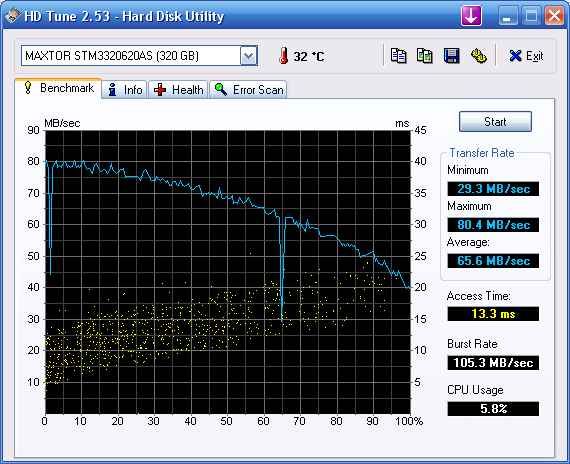
I have the rebadged Maxtor version of the 7200.10 320GB when it was on sale for $60. And enginurd is right, it is a fast drive:

HDTune_Benchmark_MAXTORSTM3320620AS.png
 
Heh, I get those same results on all of my .10 'cudas. I have the two 300's in raid0, for 112MB/s sustained. :D
 
Why would you suggest it? I prefer the newer form factor, with the PSU on the bottom of the case. Also already purchased an Antec P182.
 
Is Jab-Tech reliable?

I just ordered from them and they said I was declined, but my bank says that I was charged... ?!:confused:
 
Weird. Hit Jab-Tech's customer service for help.

Did they tell you why you were declined?

Oh and to answer your question, yes Jab-tech is reliable, at least to me. I've ordered from them a few times, never had any problem.
 
They were the first I attempted to order from today, everything is en route to my destination. I should see it next week.
 
Ok we have fixed the problem.

Anyway I will be getting the Thermalright Ultima 90 and that fan you suggested 'nurd. Also, I was curious does that come with all the parts/pieces for applying it to the motherboard?
 
Ok we have fixed the problem.

Anyway I will be getting the Thermalright Ultima 90 and that fan you suggested 'nurd. Also, I was curious does that come with all the parts/pieces for applying it to the motherboard?

yup!
 
Bringing it retro, what about my offtopic PC specs. I am looking to upgrade that as well, I just can't decide on decent ram for that PC or graphics card. The processor I found already... suggestions here would rock, I am trying to minimize its bottlenecking...

------------ OFFTOPIC -----------
My current system is also going to be used as a WoW system for my girl friend, as well as a homework machine. It's very outdated but I am looking to upgrade it as well as it needs it.
It currently has:
Pentium 4 Nortwood 1.6Ghz
768MB DDR 266 (1x - 256MB and 1x 512MB)
BFGTech Geforce FX 5600 Ultra w/ 256MB Video ram
Shuttle AV49V/N

I might put in a new P4 processor, 2.8Ghz with FSB of 533, as I assume the current one is bottlenecking the graphics card a tad, and I might just upgrade the graphics as well to an X800 or something. Memory will get a change as well....
 
Bringing it retro, what about my offtopic PC specs. I am looking to upgrade that as well, I just can't decide on decent ram for that PC or graphics card. The processor I found already... suggestions here would rock, I am trying to minimize its bottlenecking...

I think it's the video card that's the problem, not the CPU. But I could be wrong and a faster CPU can't hurt.

However, since it is an AGP system, just to keep costs low, try to look for a Radeon 9800Pro for like $40 from the For Sale/For Trade forum/ebay/craigslist. It's twice as fast as that 5600 Ultra and there are plenty of gamers out there who upgraded from rigs with 9800Pros and want to get rid of that card. Though x800s are a pretty good option if you're willing to spring for it. Those x800s have held up remarkably well over the years. As long as the games that GF plays games that only need Pixel shader 2.0 and below, she should be set for the forseeable future.

As for RAM, 1GB should be enough for WoW and HW. DDR RAM is kinda expensive compared to DDR2 RAM now, so again, you may want to buy that used to cut costs
 
Everything has been received and I plan on building tonight. However, a few questions lie yet. It seems as if I am stupid or something... but are the SATA cables the orange ones?
 
112MB sustained? How so I only sustain 79.2MB..

For the RAID0 array? Which drives are you using? The 'cudas? Theres a TINY jumper on two pins in the back of the drive, next to where the SATA plugs are. You need to remove those for SATA300 operation. Otherwise, they're capped at SATA150 for compatibility purposes. How fast is a single drive? Or did you not test that before setting up the raid array?
 
Jumpers? I wasn't aware of them as ClubIT didn't ship the drives with a manual. Anyway, I remove both of them?
 
Back
Top