• Some users have recently had their accounts hijacked. It seems that the now defunct EVGA forums might have compromised your password there and seems many are using the same PW here. We would suggest you UPDATE YOUR PASSWORD and TURN ON 2FA for your account here to further secure it. None of the compromised accounts had 2FA turned on.
    Once you have enabled 2FA, your account will be updated soon to show a badge, letting other members know that you use 2FA to protect your account. This should be beneficial for everyone that uses FSFT.

Aquaero Question and Answer Thread

R1ckCa1n

Supreme [H]ardness
Joined
Jul 22, 2004
Messages
4,355
OK, since we seem to be asking a ton of questions that involve many Aqua Computer products, I figure we should at least break out the Aquaero. I have had this unit for a few weeks and am finding more and more about it each day. Here are some of the simple things I have found so far.

1. How to flash to the most current version of OS.

Instuctions HERE

Files http://www.aqua-computer.de/download/aquaero_software/aquaero_4_Beta_4/aquasuite_beta41.zip

2. Setting up your AquaStream for overclock.

I have been messing with mine and find that it is hit or miss regarding overclocking the Aquastream via AquaSuite 4.1. Thanks to Shoggy, the work around is to go into the settings via the Aquaero and manually set the hz it will run. I am found anywhere between 65 and 70 work great and 71 makes my AquaStream turn off.

3. LED's with the Aquero.

You want 5mm LED's for this adventure. Make sure you use a 220ohm resistor in series such that you don't burn something up. I will post pictures today of a sucessfull installation.

4. Aquaero User Manual in English.

http://www.aqua-computer.de/download/AC_aquaero20040726engl.pdf

5. Temp sensors way off.

In AquaSuite under the Sensors tab , make sure the "Sensor offset in K" value is 0.0 (you must manually type in the value as the slider does not give 0.0) and the "Sensor factor" is 0. This worked perfect for me.

6. Fans are showing wrong RPM

Have not found a fix for this yet. I notice two of my three fans adjust perfect and one requires %100 output just to turn (all same exact fans).

7. How to output the XML to Samurize

I am working on this too. Samurize is a great utility that will embed information regarding your computer onto the desktop. More to come on this!


Well this is a start so please chime in with additions. I will be uploading supporting images once I have my photobucket account setup since my lame ISP only allow 6megs on a personal website.
 
1.) HERE <-- WHERE? :D

5.) Standard settings are 0,0 and 0. In your text it sounds a bit like we always have to set it to your values.
 
Shoggy said:
1.) HERE <-- WHERE? :D

5.) Standard settings are 0,0 and 0. In your text it sounds a bit like we always have to set it to your values.

The HERE is work in progress. My god.......................
 
The colors man... the colors!

Anyway... it might also be worth pointing out that you may still need to make adjustments if you're not using AC temperature or flow sensors. Those fields in the set-up program are meant to compensate for sensors from other manufacturers (I've gotta give credit to them for, if nothing else, including that ability in the software).
 
Im still wondering about the resister, how exactly do you hook it up to your LED's? I would think the aquaero would be able to run them correctly considering they have pins just for LEDs to be hooked into..
 
To lower the voltage. The one that comes from AC also has the resistor in series. I am working on it now and should be done soon.
 
Okay, got a link for the one ac sells?

I just saw your post futher down and the one guy said the aquaero has a built in one?
 
That was my post... and...

The Aquaero (kinda') english instructions say they have resistors built in... but who knows, maybe that means they can use 12v+ LEDs. The thing is that I've seen pics of the AC LED module and I've not seen any resitors.

I was planning on using regular 5v+ LEDs but now I'm concerned about that plan.
 
GokuSSL said:
As am I , I ordered two 5v UV led's and I'm hoping they work

Good... you be my guinnea pig... if they fry something let me know... if not I'll give it a try myself.

I'd be more than happy to actually order one from AC but $12 for two LEDs and a fan cable? C'mon!
 
Where did you find them from AC directly? I don't think they have them at Sharka right now.
 
GokuSSL said:
Where did you find them from AC directly? I don't think they have them at Sharka right now.

Last time I checked Sharka did not sell them, they do have them at SNT Systems although, from what I've read SNT is having some import problems at the moment and if the item is not currently on hand you may wait a while for delivery.

However, if you look at the picture from SNT you'll notice the connector is a standard 3-pin fan molex with one connector split as a common ground. The wires then continue without break for an inline resistor and terminate directly to the LEDs.

The Aquaero (sorta) English instructions say, "Standard LEDs (1max 20 mA) may be used without a series resistance, which is already integrated in the [A]quaero." which would lead me to think resistors aren't needed. That having been said maybe "Standard LEDs" is German for "12v LEDs".

*edit* The LED module to fit the Aquatube does appear to have a resistor inline (covered by heat shrink right before the the LED but that does not connect to the Aquareo, it has a standard Molex plug on the back to draw power straight off the PSU. Is that the module you're talking about or were you talking about the one that connects to the Aquaero and lights two lights depending on the temperature readings from a thermal probe?
 
I just need two LED's for my two aqua tubes, I don't have the one thermal sensor YET but just wanted to do this till I got my hands on one.
 
Then you're not looking to power it off the Aquaero. The LED connector on the back of the Aquaero is to power two LEDs (or a single bi-color) LED which reacts to temperature from a thermal probe.

i.e. At start-up temperature LED1 is lit, as the temperature rises LED1 begins to dim while LED2 gets brighter, at the peak temperature set in the Aquaero control LED1 is completely dark and LED2 is fully lit.

A common set-up might have LED1 green and LED2 red as temperature status indicators.

A cool effect might be to use a bi-color LED mounted into a single Aquatube so that when you start up the computer the light is blue but as temperatures rise it switches to UV or something.

To mount LEDs in the Aquatube I'd just run it directly off a standard molex with an in-line resistor.

*edit* Rip apart one of those LaserLED thingies with the 3 LEDs mounted in them.
 
I am using a red and a blue led, starts off blue then gradually turns purple and then red.
 
The Aquaero LED module should be in local stock here in the USA in about 10 days.
 
Top Nurse said:
The Aquaero LED module should be in local stock here in the USA in about 10 days.
And it is in stock~~~~~! I picked one up on Friday.
 
OK... So now my Aquaero is working great and am starting to get Samurize working with the system. Here is a screenshot of just the tip of what Samurize can do.

Desktop2.JPG


My question is has anyone used the XML output from Aquasuite and then have Samurize display the data on the desktop? I just started to look and hate wasting time.
 
Well that was too easy! Here is the data from the aquaero displaying via Samurize. Very slick!!!!!


Desktop4.JPG
 
Isn't it absolutely amazing how well that computer runs on such a low flow highly restrictive 6mm system with a weakass Aquastream pump? :cool:
 
Yeah,,,, pretty cool stuff. I might go with a AquaeroLT with a 4 line LCD next time and output that way. ;)

Here is the run down on how to output your data from AquaSuite to Samurize.

1. Setup your AquaSuite to output XML data.

AquaSuiteConfig.jpg


2. Download the ReadXML plugin for Samurize and copy to the plugin directory

3. Add a plugin

ConfigEditor1.JPG


4. Configure the plugin to read the data from AquaSuite

ConfigEditor2.jpg


ConfigEditor3.jpg


ConfigEditor4.jpg


You can get the information needed by reading your XML output file via Internet Explorer. Each item in the < > is data that can be displayed.

XMLOutput.jpg
 
Has no one else tried these cool tools? Lets see some configurations or what people are doing with jaLCD.
 
R1ck,

I had some time this weekend to teach myself Samurize and get my Aquaero working with it. Great guide! I wouldn't have been able to get it working without those pictures you posted. :)
Now that I've got the hang of it, I'll make it look nice and post pics.
 
Sensor one and two are water temp sensors inside each aquatube and three/four are afixed to the RAM sticks. I still want to add two more sensors somewhere maybe to measure the incoming and outgoing air temps so I can see how much heat is being generated by the radiators.


I want to mess with jaLCD next so I can get some fancy graphics going on the Aquaero. ;)

The trick to Samurize is to use the "test function" button after each device is added so you don't go along thinking everything is great. There are a ton of killer examples on their website so you don't have to start from scratch everytime.
 
R1ckCa1n said:
Sensor one and two are water temp sensors inside each aquatube and three/four are afixed to the RAM sticks. I still want to add two more sensors somewhere maybe to measure the incoming and outgoing air temps so I can see how much heat is being generated by the radiators.


I want to mess with jaLCD next so I can get some fancy graphics going on the Aquaero. ;)

The trick to Samurize is to use the "test function" button after each device is added so you don't go along thinking everything is great. There are a ton of killer examples on their website so you don't have to start from scratch everytime.

I have sensor 1in the Aquatube, sensor 2 case temp, sensor 3 water temp cpu, sensor 4 water temp NB, sensor 5 GPU, sensor 6 water temp after the last rad.
Check my post about 6800 prob's, I have been running prime95 for six hours and my cpu temp has not exceeded 38C. Looks good to me.
 
R1ckCa1n nice job with the help with Samurize! I wanted to set it up just as you did but didn't take the time to figure it out. Glad you did. :)
 
theseeker said:
I have sensor 1in the Aquatube, sensor 2 case temp, sensor 3 water temp cpu, sensor 4 water temp NB, sensor 5 GPU, sensor 6 water temp after the last rad.
Check my post about 6800 prob's, I have been running prime95 for six hours and my cpu temp has not exceeded 38C. Looks good to me.


Just some helpful info. I find that CPUBURN produces the highest cpu temps. On my system they usually increase 2*-3*C.

CpuBurn
 
Greetings...

For those of you who have been thinking of using the Innovatek rev 2 Flowmeter with the Aquaero due to its straight though design I found out the necessary info to make it work with the Aquaero. This was kindly provided to me by Nexxo on the bit-tech.net Forum.

The magic number is 232 impulses per liter, which you would put into your Aquaero software under the flowmeter settings. :D The original Innovatek thread is here.

Note: I also posted this into the main AC Thread.
 
Top Nurse said:
Greetings...

For those of you who have been thinking of using the Innovatek rev 2 Flowmeter with the Aquaero due to its straight though design I found out the necessary info to make it work with the Aquaero. This was kindly provided to me by Nexxo on the bit-tech.net Forum.

The magic number is 232 impulses per liter, which you would put into your Aquaero software under the flowmeter settings. :D The original Innovatek thread is here.

Note: I also posted this into the main AC Thread.

Thanks for this! I just (literally) got the pdf for the Rev. 2 flow meter and it also verifies 232 Imp/L. :)
 
Found a review in Germany on the Aquaero version 4 with the Aquasuite. You can find it at the DeXgo website appropriately translated by Google. :cool:
 
Is the Aquaero rev. 3.99 have the new hardware that can take 10A on each line?

I was told it was, but then i've been told that only the rev. 4 Aquaeros had the new hardware?

Anybody know.... (waits for TN!)
 
Hardware revision 3.07 can take a maximum of 5 watt per channel while hardware revision 4.00 can take up to 10 watt per channel but the overall consumption should not be higher than 30 watt.

If you mean the firmware when you said 3.99(d) then you have a Aquaero with hardware revision 4.00.
You should also update to the new OS 2.03 and a current firmware version.
 
Can anyone give me a rough estimate of total wattage I can expect to get through my Aquaero? I have two Aquastreams hooked up, three 120mm fans (2.16 watts per fan), three temp sensors, and two flow meters. Trying to decide if I can use one pigtail off my PSU to run the Aquaero and the two optical drives.
 
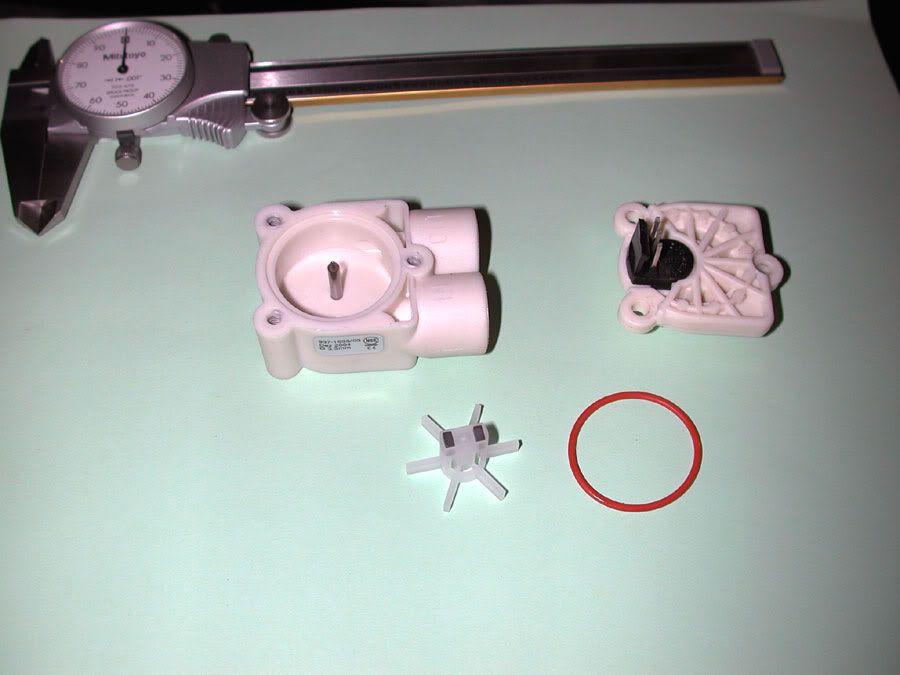
Thought you might like to see what is in the Aquaero flowmeter. Here it is in it's unassembled state.


ACFlowmeterAssembly1.jpg


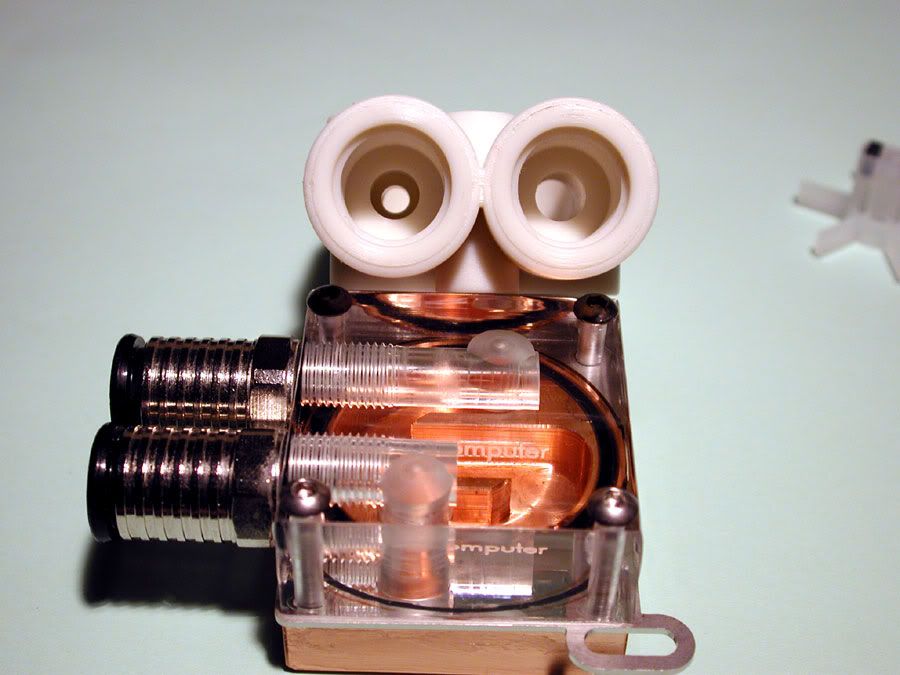
If your wondering why you get such low flow readings out of your Aquaero, the next two pics will show what the problem is. Yes you really are getting that low of a flow.
eyebrow.gif
Kind of makes you wonder why AC sells these like this when they have a perfectly good machine shop that could easily bore them out. :rolleyes:


ACFlowmeterAssembly3.jpg


ACFlowmeterAssembly4.jpg


Here is the top part that hold the magnetic impulse sensor.


ACFlowmeterAssembly6.jpg


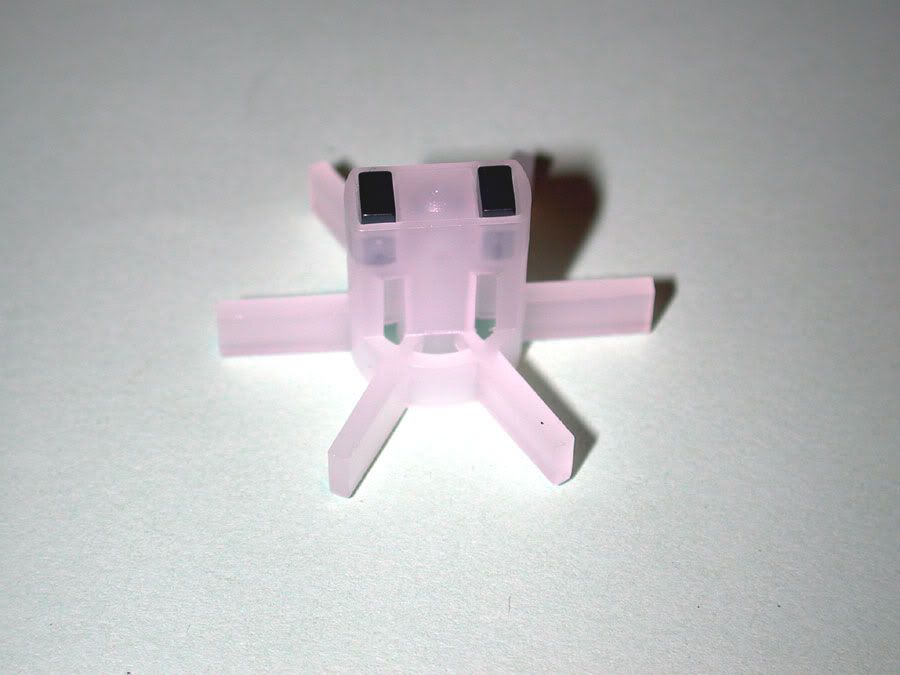
And finally here is the impeller.


ACFlowmeterAssembly8.jpg


So what is the fix you say? You actually have a few choices. :) You can disassemble the AC unit and drill or bore out the small intake to the same size as the output. Shoggy recommended that if you do this that you should put the intake in the output side. Not sure how that would affect anything, but I assume someone has already done the footwork on that one.

Second you can get an Innovatek flowmeter as indicated a few posts up. Shonuff has already done some testing on this and he gets pretty close to four (4) liters/min through his dual Aquastream rig. The initial tests showed about 3.7 liters/min with one Aquastream IIRC.

Third you can get some other types of flowmeters. So long as they have similar wiring on a three wire sensor that does not output a voltage you are good to go. Calibrating isn't really difficult as all you have to do is to set up a closed loop using a one gallon or bigger container and just measure how much you get in one minute. Then adjust your impulses per minute on the Aquaero to match and you are good to go. :D
 
Back
Top