Apple 27" LED Cinema Display

Got my new PC up and running everything is beautiful now, haha,. One question how do I adjust brightness on the monitor? Is it right click on my desktop or something?

Thanks.

Do NOT use the brightness setting under the nvidia control panel. That does not control the brightness of the backlight.

In the previous pages of this thread, the 'applecontrolcenter.exe' link is posted to allow you to change the brightness of the display. There should be two links - one for 64bit windows, and the one that I posted for 32bit windows. Download the one that you need. Make sure the USB cord is plugged in for the display, and then running the exe should allow you to change the brightness.
 
Do NOT use the brightness setting under the nvidia control panel. That does not control the brightness of the backlight.

In the previous pages of this thread, the 'applecontrolcenter.exe' link is posted to allow you to change the brightness of the display. There should be two links - one for 64bit windows, and the one that I posted for 32bit windows. Download the one that you need. Make sure the USB cord is plugged in for the display, and then running the exe should allow you to change the brightness.

I found one here, but it didn't let me excute the file. Is it the bootcamp one?
 
I found one here, but it didn't let me excute the file. Is it the bootcamp one?

There is a weird issue with the .exe where it won't run if your system is set to AHCI mode. You can get around this issue by simply putting a bootable disc in your DVD drive, such as a Windows 7 DVD.
 
I have now just recently recieved the female mDP -> DP-adapter from Circuit Assembly Store, and I'm happy to report that it works flawlessly combined with my AMD HD 6850 graphics card.

Oh my god it's good to have my 2560 x 1440 back ;)
 
Do not forget to create a shortcut to manually put to sleep the monitor (along with a key combination), specially if you are using Win 7:

http://www.howtogeek.com/howto/windows-vista/create-a-shortcut-or-hotkey-to-turn-off-the-monitor/

Unfortunately, the sounds stops as well (wish it would only turn off video).


And yes, for those kind of monitors it's always important to check the ATi/AMD videocard before purchasing it, as some brands skips the mini-Displayport to reduce costs.
 
http://twitpic.com/3qdatw/full

Very happy with my 27". Finally found a decent successor for my 20" MVA vx2025wm.

The gloss is ok, between LG's IPS coating and glossy coating I'd take the gloss. Some of the *VA screens have a nice semi gloss coating which is probably the best compromise.

I've had the Dell u2711, but returned it because of aggressive AG coating and tinting. I've also owned the 2408, but returned that because I couldn't calibrate sRGB correctly and it made a whining sound.
 
On what page in this thread can I find the control panel, or if someone could repost it?
 
On what page in this thread can I find the control panel, or if someone could repost it?
Since nobody responded, I just uploaded both versions here:

AppleControlPanel - 64 bits
AppleControlPanel - 32 bits

Alternatively, you can download the most recent Boot Camp and extract the file (it's just an EXE).


It's important to stress that if the speakers/microphone/webcam do not work, is probably because you forgot to plug in the USB cable (and not just the mini-Displayport).
 
Since nobody responded, I just uploaded both versions here:

AppleControlPanel - 64 bits
AppleControlPanel - 32 bits

Alternatively, you can download the most recent Boot Camp and extract the file (it's just an EXE).


It's important to stress that if the speakers/microphone/webcam do not work, is probably because you forgot to plug in the USB cable (and not just the mini-Displayport).


I still get that error even with a bootable disk in my DvD drive.
 
Since nobody responded, I just uploaded both versions here:

AppleControlPanel - 64 bits
AppleControlPanel - 32 bits

Alternatively, you can download the most recent Boot Camp and extract the file (it's just an EXE).


It's important to stress that if the speakers/microphone/webcam do not work, is probably because you forgot to plug in the USB cable (and not just the mini-Displayport).
Thanks! The boot camp files where also hard to find i remember.
 
Last edited:
I still get that error even with a bootable disk in my DvD drive.
Sorry, do not own an nVidia card (much less an Athlona) to test. But since the problem does not occur on Safe mode, it sounds like a software/driver issue with something you installed in the past. Perhaps Boot Camp itself?

The error itself implies the lack of Administrator privileges at some point, though.
To be honest, I would install (from scratch) the whole OS. Sometimes it's just easier.. :eek:

._
 
Sorry, do not own an nVidia card (much less an Athlona) to test. But since the problem does not occur on Safe mode, it sounds like a software/driver issue with something you installed in the past. Perhaps Boot Camp itself?

The error itself implies the lack of Administrator privileges at some point, though.
To be honest, I would install (from scratch) the whole OS. Sometimes it's just easier.. :eek:

._

Wait, do i have to install bootcamp on my PC?
 
Wait, do i have to install bootcamp on my PC?

Actually, you should never, ever, ever install Boot Camp on your PC. It's absolutely NOT needed for the ACD27" brightness controls. All you need to do is run the .exe. I'm not sure why it isn't running for you with a bootable DVD in your drive, but like Atajo said, it could be an administrator privilege issue.

Just out of curiosity Sky15, are you running in AHCI mode? I know AHCI is usually the central culprit on systems where applecontrolcenter.exe fails to run. If so, you might be able to switch from AHCI to IDE mode in the BIOS, adjust your brightness, then switch back from IDE to AHCI again.

Hope that helps!
 
Actually, you should never, ever, ever install Boot Camp on your PC. It's absolutely NOT needed for the ACD27" brightness controls. All you need to do is run the .exe. I'm not sure why it isn't running for you with a bootable DVD in your drive, but like Atajo said, it could be an administrator privilege issue.

Just out of curiosity Sky15, are you running in AHCI mode? I know AHCI is usually the central culprit on systems where applecontrolcenter.exe fails to run. If so, you might be able to switch from AHCI to IDE mode in the BIOS, adjust your brightness, then switch back from IDE to AHCI again.

Hope that helps!

I think I am, I 'll check et out.
 
I used this at an Apple Store, with a wired Apple mouse, and the input lag was noticeably bad. Why do some people report that the input lag is okay?
 
Once brightness is adjusted with the .exe file does it stay that way, or will one have to adjust it every time they boot up the computer?

Thanks,
Josh
 
I used this at an Apple Store, with a wired Apple mouse, and the input lag was noticeably bad. Why do some people report that the input lag is okay?

There are so many factors at play here, that its going to be difficult to try to isolate the answer to your question. However, I will try to take a stab at it.

1.) Was the input lag you noticed under OSX or Windows? OS X for whatever reason tends to feel a tad laggier compared to windows, especially if you are just comparing simple things like mouse cursor movements.

2.) Strange Apple Store configurations. Believe it or not, this can and does happen. Sometimes there are some strange apps installed, or running in the background that does some funky stuff. When I first saw the ACD in the Apple store, it had MAJOR banding issues in the lagom LCD grayscale test, even though it was running in 32bit color, and no color correction or strange color profiles turned on. The ACD I saw in another store looked perfect. The one I own is also perfect. What caused that banding? I have no idea.

3.) Your subjective opinion of input lag may be very different from ours. Anandtech measured the ACD as having 12ms input lag, which is very good for an IPS of this size, but is still much higher than many other TN panels. Perhaps you are used to faster displays in general? However, I cannot tell a difference between the ACD and my old CRT. I CAN however tell the difference between the ACD and several Dell LCD's, where I can clearly see and feel the input lag.

These are just a few variables that might have come into play. I'm sure there are others as well.
 
Once brightness is adjusted with the .exe file does it stay that way, or will one have to adjust it every time they boot up the computer?

Thanks,
Josh

It stays that way. Even if you unplug the USB cable, it will stay that way. You can even remove power (the AC cord) from the display and it will remember the brightness setting. You only need the exe to change the brightness, or turn on/off the autobrightness feature.
 
Cat said:
I used this at an Apple Store, with a wired Apple mouse, and the input lag was noticeably bad. Why do some people report that the input lag is okay?
The mouse cursor in Mac OS X has a two-frame lag with vsync (33-50 ms) along with crazy acceleration. The monitor itself doesn't have lag.
 
Liekomg said:
When I first saw the ACD in the Apple store, it had MAJOR banding issues in the lagom LCD grayscale test, even though it was running in 32bit color, and no color correction or strange color profiles turned on. The ACD I saw in another store looked perfect. The one I own is also perfect. What caused that banding? I have no idea.
Mac OS X always has color management regardless of the profile, and Safari uses that color management for images. Lagom tags the gradient test image as sRGB, which they shouldn't do because you will see banding in color-managed programs unless you're using an sRGB profile or have calibrated to the sRGB gamma curve.
 
I notice that quite a lot of the new Sandybridge mobos have an onboard displayport output. I understand the graphics performance of the Sandybridge processors aren't great, but has anyone tried a ACD on this? Do you think there will be any compatability issues?
 
I was thinking on getting this Apple 27 Cinema Display BUT I need to know that with the Atlona DP400 if I can use my gtx480 and get full 2560x1440 resolution?? I see some posts in the last few pages saying they cant get higher then 720p and some youtube videos are saying the same thing.

So is it possible to use a PC with a gtx480 and get the full res of this monitor??

Otherwise I may go with the Sony 32 google tv as my monitor but I know the Apple handles text much better, thank you in advance!
 
I was thinking on getting this Apple 27 Cinema Display BUT I need to know that with the Atlona DP400 if I can use my gtx480 and get full 2560x1440 resolution?? I see some posts in the last few pages saying they cant get higher then 720p and some youtube videos are saying the same thing.

So is it possible to use a PC with a gtx480 and get the full res of this monitor??

Otherwise I may go with the Sony 32 google tv as my monitor but I know the Apple handles text much better, thank you in advance!

Hi coolhandm3,

There are some problems with the DP400 only achieving 720p, but this is an ATi/AMD specific issue with certain Radeon models. nVidia cards work beautifully with Atlona products. I have a GTX260 and my DP400 worked fine out of the box. The Apple LED Cinema 27" ran @ 2560x1440 and video was fine during POST.
 
BTW, Zotac non-reference GTX 580 w/ built in Displayport works w/ iMac 27" (using DP-DP cable and DP-MDP adaptor) so it should also work with the 27" ACD. Only problem is no display during BIOS, but if you have a secondary monitor connected to DVI it shows up there.
 
I also have an XBOX360 that I want to use, but it's an older model without HDMI. I was looking around at converters and it seems Atlona sells VGA to HDMI converters, and HDMI to mDP converters. I am REALLY hoping I can go XBOX360 (vga) ---> AT-HDVIEW (vga to hdmi) ---> AT-HD620 (hdmi to mdp). Once I get these other Atlona devices I'll report back with an update.

Thanks for the great review. I just pulled the trigger on this screen myself.

I'm curious, did you ever get your Xbox 360 hooked up to the ACD27" using the Atlona devices (or something else)? I would be interested in doing the same thing. It really blows that apple doesn't offer any inputs other than the mini-DP. :(

I wonder how the ACD27" would handle the 1929x1080 res of the Xbox 360 since it doesn't have a built-in scaler. Streched to full screen, black borders on all 4 sides...? Does anyone have an idea?
 
Just as an update for anyone interested, using one of those new Nvidia GTX 500 series cards with displayport output works wonderfully on the 27" ACD using a miniDP -> DP adapter, which costs about $20 online. Everything shows up, including POST and BIOS.
 
I'm really tempted to get this monitor as well, but I'm also wondering how well the Atlona scaler works with X360. I'm also using a AMD 6950 so I'm hoping that doesn't have any issues.
 
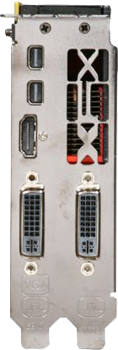
Just got the ACD 27" last night. I have a new Sandy Bridge motherboard that I recently built with a XFX HD Radeon 6870 Black Edition with dual Mini DisplayPorts. The ADC works right out of the box, without needing any drivers. Sounds, USB ports, iSight, and microphone all work. I also have the yellow exclamation icon next to Other devices > Display iSight like many of you, but that's OK because iSight does work in YIM.

I did setup the Brightness Control by creating a shortcut to the AppleControlPanel.exe as described in this post. Works nicely without having to insert a bootable DVD or changing SATA ports from AHCI to IDE (well, mine wouldn't boot if I changed to IDE).

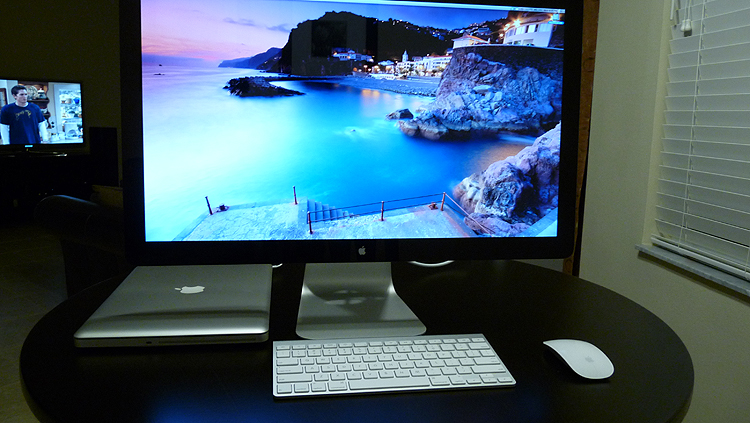
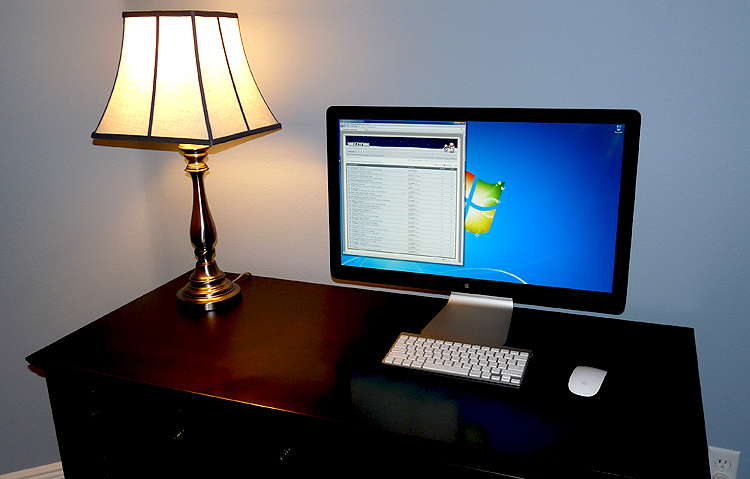
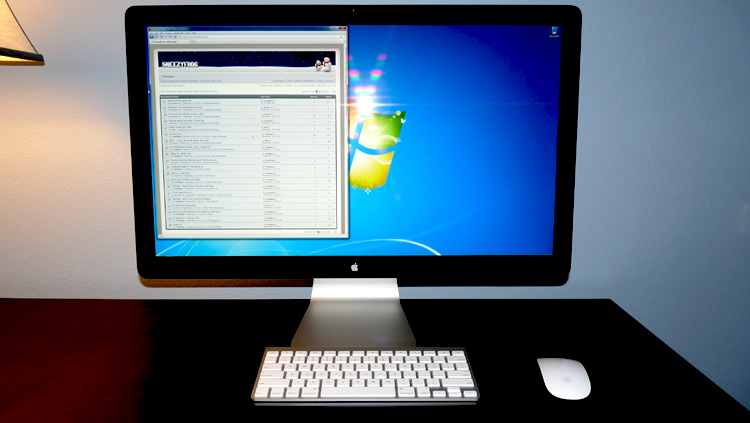
Here are some pics for you. One setup is with my MBP and the other is with my Windows 7 PC. A clean setup with the Apple wireless keyboard and magic mouse :)

p2obvllYFmBT.JPG

vDz5IF.JPG

d6Vy61B.JPG


Here's the back of the XFX HD Radeon 6870 Black Edition with dual Mini DisplayPorts.

XDlAShMfRX2.png
 
Nice setup! Let us know your impressions once you've gotten a chance to use it.
 
Using with a 15" MacBook Pro. Thought it was a bit too big at first but got used to it after a while. Couldn't be happier with this display.

m7tg7o.jpg


v6ur8o.jpg
 
If anyone can help me out with this - whats the best mini display port to dvi or to hdmi adapter for this that doesn't use scaling? I need one that just passes the 2560x1440 signal without adding input lag (not the 720p compatible ones/scalers for consoles etc). I don't mind paying for one that uses usb connector if necessary. If I went with that kind, I would keep it on a powered usb hub which should help eliminate any initialization/sync issues.
.
I'm probably going to run my computer from 20' away past a wall if I get this screen. I do the same thing now but with a dvi to hdmi adapter and a long hdmi cable off my gtx260 to a hannspree 28" 1920x1200. Considering my setup, using an adapter that went directly to hdmi would be preferable. If mini display port to dual link dvi, I would have to use one of my dual link dvi-to-hdmi adapters so that I can use my existing long hdmi cable, or I could buy a new longer shielded dvi cable from monoprice if I had to.

Thanks for any help.
 
Last edited:
If anyone can help me out with this - whats the best mini display port to dvi or to hdmi adapter for this that doesn't use scaling?

Hi elvn,

Are you trying to go miniDP to DVI or DVI to miniDP? miniDP to DVI converters (i.e. http://www.monoprice.com/products/p...042802&p_id=6904&seq=1&format=3#specification) are for hooking up mDP Macs to DVI displays (they cannot go backwards). It sounds like you want to connect an ACD27" to a DVI video card though, if I'm not mistaken? If that's the case you would need to buy the Atlona DP-400 (it passes 2560x1440 with no scaling and zero input lag), but it's $150 and for the same price you could just buy a new mDP capable Radeon or GeForce card.

For using HDMI devices with the ACD27", the Atlona HD620 converts an HDMI source (cable box, 360, PS3) to 1440p. Another option is the cheaper Kanex XD which converts an HDMI source (cable box, 360, PS3) directly to 720p with no upscaling. Note that it is impossible to convert HDMI to 1080p with an ACD27", you must go to 720p straight or upconvert to 1440p.
 
Sorry if I wasn't being very clear. I wanted to convert a dvi output on my current nvidia card to hdmi (using a simple adapter I already have) so that i could run my existing long hdmi cable to my desk, then use a hdmi to display port adapter - if there is one and it works well - to the 27" ACD. I figured that if there are some adapters that are known to work without being too buggy, people might tip me off about them if I asked.

----------------------------------------------------------

I have a dvi-d to female hdmi adapter already. Its just a coupler that looks similar to the dvi-to-vga ones that typically come with video cards. The dvi-d to female hdmi 'plug' lets me connect my hdmi cable into my gtx260's dvi output so I can run the longer hdmi cable to my desk. Once at the desk, I wondered if there was an hdmi-to-displayport that could connect to the 27" ACD without any upscaling, or uncessary processing that could introduce more input lag when all I'm trying to do is transmit the 2560x1440 signal.
....................................................................

In a month or so I will probably get an eyefinity6 card ('m hoping ati releases their 6990 soon). At that point I will need to run a mini dp off the card across a long cable (hdmi or dp cable?) and end up connected to the 27" ACD. I will also need to run some mini display port adapters to do two more hdmi cable runs from my new ati card's mini display ports to two monitors that have dvi inputs because I'm planning on flanking the 27" ACD with LED backlit dvi monitors.

--------------------------------------------

If the cost is too high for the adapter(s) , or the adapting method ends up not direct enough for my tastes regarding the "in the meantime" plan of running the 27" ACD off my gtx260 - I could just wait on buying the ACD until after I buy a newer ati card I suppose.

As for my initial questioning about it .. I guess I was interested in both

gtx260 dvi out -> to hdmi female adapter-> long hdmi cable --> hdmi to dp adapter -> 27" ACD

and

new ati card mini display port(s) --> hdmi adapter(s) --> long hdmi cable(s) --> side dvi monitor(s)
+
new ati card mini dp ---> Long dp cable? or adapt to long hdmi cable again? --> dp into 27" ACD ? or the long hdmi cable adapted back to ACD's dp?

The main thing is , I already have some long hdmi cables that I've been using that I'd prefer to use. If I had to I could see if there are some long display port or dvi cables on monoprice as a last resort if I needed to take the hdmi out of the layout. I don't know if dp cables can even do long runs like hdmi or dvi can though.

Sorry if this reply is long or messy. I could draw a pic that would illustrate what I'm trying to do a lot better if needed.
 
Ah okay,

Well the only HDMI converter that can pass through 2650x1440 is the HD620, which is $250.

You might be able to go:
gtx260 dvi out -> to hdmi female adapter -> long hdmi cable -> hdmi to mdp (hd620) -> 27" ACD

But the HD620 is designed to take a direct HDMI input. I don't know if there would be any issues with going from DVI to HDMI to the HD620, you would probably want to check with Atlona's tech support and see if this is allowed. But clocking in at $250, it's not the most economical solution.

I actually have your same card, the GTX260. My setup is as follows:
gtx260 dvi out -> (dvi to mdp) dp400 -> 6ft. dp extension cable -> 27" ACD

Of course, even the DP400 is a pricey $150, so the most economical solution would be:
new dp video card -> dp extension cable -> 27" ACD

I believe you can get DisplayPort extension cables that support 2560x1440 up to 10 feet. (http://www.datapro.net/products/mini-displayport-extension-cable-male-female.html)
 
Back
Top