![[H]ard|Forum](/styles/hardforum/xenforo/logo_dark.png)
After much debate in not wanting to jump in on new hardware until they go through the typical growing pains, I have decided to pull the trigger on a new build.  I was planning on waiting for LGA2011, but I figured I can always upgrade later if I wanted.
1) What will you be doing with this PC? Gaming? Photoshop? Web browsing? etc
- Gaming with Photoshop and some video editing (not enough to justify the $100 for the 2600K in my opinion)
2) What's your budget? Are tax and shipping included?
- Around $1200 but very flexible
3) Where do you live?
- Florida
4) What exact parts do you need for that budget? CPU, RAM, case, etc. The word Everything" is not a valid answer. Please list out all the parts you'll need.
- CPU, Mobo, GPU, HDD, PSU, case
5) If reusing any parts, what parts will you be reusing? Please be especially specific about the power supply. List make and model.
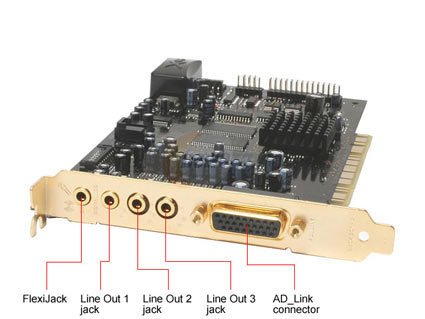
- DVD drive, HDDs (WD Raptor 74GB, 150GB, and Seagate Barracuda 500GB from '07), RAM (8GB (2x4GB) of Corsair Vengeance DDR3 1600), Creative X-Fi Fatal1ty Pro (PCI)
6) Will you be overclocking?
- Yes.
7) What size monitor do you have and/or plan to have?
- Two 24 inch monitors at 1920x1200.
8) When do you plan on building/buying the PC?
- As soon as possible.
9) What features do you need in a motherboard? RAID? Firewire? Crossfire or SLI support? USB 3.0? SATA 6Gb/s? etc.
- SLi. I am considering running two GTX560s.
10) Do you already have a legit and reusable/transferable OS key/license? If yes, what OS? Is it 32bit or 64bit?
- Yes. Windows 7 64-bit
Here is what I have so far. Feel free to change.
$390 - Intel i5-2500K and ASUS P8P67 Pro
$28 - Cooler Master Hyper 212+
$198 (after shipping and no tax it appears) - Cooler Master ATCS 840 Full Tower Case
$170 ($150 after MIR) - CORSAIR HX Series CMPSU-850HX 850W
I like the Corsair 800D but $275 is beyond my limit of $200 that I would like to spend on a case. I have also been told that it doesn't have the best air cooling which I would be doing. The ATCS 840 is over 2 years old which begs to question if there will be an update soon. I still have my Cooler Master Cosmos, but it leaves some things to be desired.
For the GPUs, I am looking at the 560s in SLi. I can still use my GTX285 for the time being if there is thought that the 560s may drop due to AMD dropping their prices.
For the HDDs, I will be reusing my current HDDs that are over 3 years old mainly for the fact that I want to wait to see what the new SSDs will be in the next few months. One thing I would like to do is have most of my storage internal. Currently I use my 1TB and 1.5TB as backups but I also house a lot of my video files on them with the 1.5TB being the backup of those. I also feel like they are in large part due to my current system slowdowns at times. Some programs take longer to startup because they wait for the HDDs to spin up after being in sleep. I just missed the 2TB deal last week on NewEgg which would have been nice. Again, I'd like to keep things internal along with backups as the two external drives (WD MyBook Home and Seagate FreeAgent) seem to cause slowdowns unless there is something I can do to change that.
Will the stock fan on the Hyper 212+ be fine? Will having two fans be beneficial? I read in some places that it is recommended to upgrade to something quieter and that will have more airflow.
The ASUS P8P67 PRO seems to be the popular motherboard of choice. Are there better alternatives out there that I am not aware of? I know ASUS recently released their Sabertooth series.
All suggestions are welcome.
I was planning on waiting for LGA2011, but I figured I can always upgrade later if I wanted.1) What will you be doing with this PC? Gaming? Photoshop? Web browsing? etc
- Gaming with Photoshop and some video editing (not enough to justify the $100 for the 2600K in my opinion)
2) What's your budget? Are tax and shipping included?
- Around $1200 but very flexible
3) Where do you live?
- Florida
4) What exact parts do you need for that budget? CPU, RAM, case, etc. The word Everything" is not a valid answer. Please list out all the parts you'll need.
- CPU, Mobo, GPU, HDD, PSU, case
5) If reusing any parts, what parts will you be reusing? Please be especially specific about the power supply. List make and model.
- DVD drive, HDDs (WD Raptor 74GB, 150GB, and Seagate Barracuda 500GB from '07), RAM (8GB (2x4GB) of Corsair Vengeance DDR3 1600), Creative X-Fi Fatal1ty Pro (PCI)
6) Will you be overclocking?
- Yes.
7) What size monitor do you have and/or plan to have?
- Two 24 inch monitors at 1920x1200.
8) When do you plan on building/buying the PC?
- As soon as possible.
9) What features do you need in a motherboard? RAID? Firewire? Crossfire or SLI support? USB 3.0? SATA 6Gb/s? etc.
- SLi. I am considering running two GTX560s.
10) Do you already have a legit and reusable/transferable OS key/license? If yes, what OS? Is it 32bit or 64bit?
- Yes. Windows 7 64-bit
Here is what I have so far. Feel free to change.
$390 - Intel i5-2500K and ASUS P8P67 Pro
$28 - Cooler Master Hyper 212+
$198 (after shipping and no tax it appears) - Cooler Master ATCS 840 Full Tower Case
$170 ($150 after MIR) - CORSAIR HX Series CMPSU-850HX 850W
I like the Corsair 800D but $275 is beyond my limit of $200 that I would like to spend on a case. I have also been told that it doesn't have the best air cooling which I would be doing. The ATCS 840 is over 2 years old which begs to question if there will be an update soon. I still have my Cooler Master Cosmos, but it leaves some things to be desired.
For the GPUs, I am looking at the 560s in SLi. I can still use my GTX285 for the time being if there is thought that the 560s may drop due to AMD dropping their prices.
For the HDDs, I will be reusing my current HDDs that are over 3 years old mainly for the fact that I want to wait to see what the new SSDs will be in the next few months. One thing I would like to do is have most of my storage internal. Currently I use my 1TB and 1.5TB as backups but I also house a lot of my video files on them with the 1.5TB being the backup of those. I also feel like they are in large part due to my current system slowdowns at times. Some programs take longer to startup because they wait for the HDDs to spin up after being in sleep. I just missed the 2TB deal last week on NewEgg which would have been nice. Again, I'd like to keep things internal along with backups as the two external drives (WD MyBook Home and Seagate FreeAgent) seem to cause slowdowns unless there is something I can do to change that.
Will the stock fan on the Hyper 212+ be fine? Will having two fans be beneficial? I read in some places that it is recommended to upgrade to something quieter and that will have more airflow.
The ASUS P8P67 PRO seems to be the popular motherboard of choice. Are there better alternatives out there that I am not aware of? I know ASUS recently released their Sabertooth series.
All suggestions are welcome.
As an Amazon Associate, HardForum may earn from qualifying purchases.