![[H]ard|Forum](/styles/hardforum/xenforo/logo_dark.png)
Navigation
Install the app
How to install the app on iOS
Follow along with the video below to see how to install our site as a web app on your home screen.
Note: This feature may not be available in some browsers.
More options
-
Some users have recently had their accounts hijacked. It seems that the now defunct EVGA forums might have compromised your password there and seems many are using the same PW here. We would suggest you UPDATE YOUR PASSWORD and TURN ON 2FA for your account here to further secure it. None of the compromised accounts had 2FA turned on.
Once you have enabled 2FA, your account will be updated soon to show a badge, letting other members know that you use 2FA to protect your account. This should be beneficial for everyone that uses FSFT.
You are using an out of date browser. It may not display this or other websites correctly.
You should upgrade or use an alternative browser.
You should upgrade or use an alternative browser.
Another Alternative to HFM.net
- Thread starter amang
- Start date
What is wrong with using HFM.net in Ubuntu?
So there is none then, I assume?

The fact that you have to manually re-login to network drives after reboot
Are these Windows network drives you are referring to? If everything is properly set up, you should not need to manually do anything on a reboot. I'd be interested in looking at your setup to see what is going on.
So there is none then, I assume?
HFM is pretty widely regarded as the best monitoring app out there. FahMon is another one that does work natively with Linux, but I have heard it lacks some features. There are some others listed HERE, but I do not have any experience with any of them.
FYI, I do have am HFM installer script that makes setup very simple if you are interested.
Nah, thanks for that. I've got it installed here (thanks to you how-to).
I am having difficulty to add HFM as a launcher. Any idea on how to do that? Or is there any quick way where I can start HFM without having to "Ctrl-Alt-T > sudo mono HFM.exe"?
To make a desktop launcher:
1. Download this icon somewhere - probably your directory containing the rest of your HFM files - wget https://github.com/team33/hfminstall/raw/master/hfm_48_48.ico
2. Make the desktop launcher:
Code:
cd ~/Desktop
nano HFM.desktop
Code:
[Desktop Entry]
Type=Application
Version=0.9.1.595
Name=HFM.net
GenericName=Harlam Folding Monitor
Icon=/home/<user>/hfm/hfm_48_48.ico
Exec=nohup mono /home/<user>/hfm/HFM.exe
Categories=Accessories;Internet;
3. Make the desktop launcher executable
Code:
chmod +x HFM.desktop
D
Deleted member 12106
Guest
If you guys have a windows machine that is always running, you could toss hfm on that and then create an internal website, which is what I do.
If power draw is a concern, with some elbow grease one of these can be setup to run windows(which is easier for most) http://www.ebay.com/itm/One-Nice-HP...466582?pt=US_Thin_Clients&hash=item4d0b8ff916
These have a socketed cpu/ram, you can also get a DOM or, cf card adapter, ribbon cable, and card to toss windows on. There is a winxpe image avail for these, but not sure if it would allow you to install or not. A stripped down version of winxp or win7(thin pc) would be perfect for this.
Just idea.
If power draw is a concern, with some elbow grease one of these can be setup to run windows(which is easier for most) http://www.ebay.com/itm/One-Nice-HP...466582?pt=US_Thin_Clients&hash=item4d0b8ff916
These have a socketed cpu/ram, you can also get a DOM or, cf card adapter, ribbon cable, and card to toss windows on. There is a winxpe image avail for these, but not sure if it would allow you to install or not. A stripped down version of winxp or win7(thin pc) would be perfect for this.
Just idea.
As an eBay Associate, HardForum may earn from qualifying purchases.
Are these Windows network drives you are referring to? If everything is properly set up, you should not need to manually do anything on a reboot. I'd be interested in looking at your setup to see what is going on.
thanks for the offer, but I gave up on putting Ubuntu on my netbook. It was a mix of Win7/Vista and Ubuntu 10.4/12.4 shared FAH v6 folders so I could access with FHM.net installed on the netbook. I could probably recreate the issue, but I just as soon wait for another day.
If you guys have a windows machine that is always running, you could toss hfm on that and then create an internal website, which is what I do.
If power draw is a concern, with some elbow grease one of these can be setup to run windows(which is easier for most) http://www.ebay.com/itm/One-Nice-HP...466582?pt=US_Thin_Clients&hash=item4d0b8ff916
These have a socketed cpu/ram, you can also get a DOM or, cf card adapter, ribbon cable, and card to toss windows on. There is a winxpe image avail for these, but not sure if it would allow you to install or not. A stripped down version of winxp or win7(thin pc) would be perfect for this.
Just idea.
Or you can simply use a free account from Dropbox to create that sort of website.
As an eBay Associate, HardForum may earn from qualifying purchases.
D
Deleted member 12106
Guest
Or you can simply use a free account from Dropbox to create that sort of website.
Curious, why? HFM has an integrated website creation ability. You just need to add iis which comes with pretty much every windows os? You point HFM to your clients (v6/v7) and it compiles into web version of hfm.(see below)
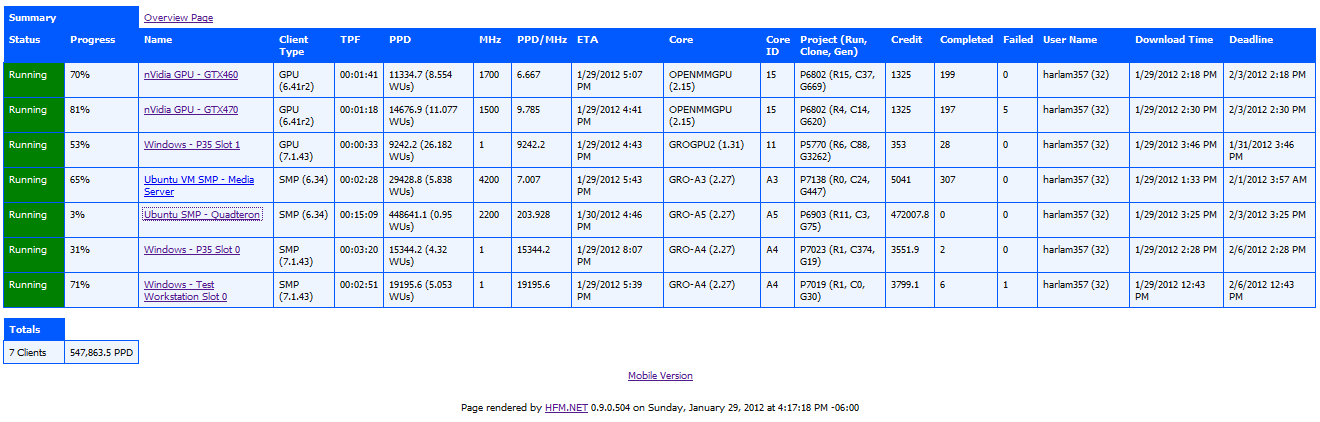
Though, the dropbbox method can work for remote boxen...I would be concerned with dropbox having conflicting file copies/versions though.
I think he means save the HTML file to dropbox and then you can see it anywhere skipping IIS/Apache.
BTW as far as I know, IIS is only installed on "server" windows OSs. Apache is a much better choice for a windows box IMHO as if a hacker sees the OS is linux he tries Apache attacks, if he sees windows he tries IIS attacks, mix the two and you are in such a small percentage of the possibilities they don't look for it and are highly unlikely to succeed.
BTW as far as I know, IIS is only installed on "server" windows OSs. Apache is a much better choice for a windows box IMHO as if a hacker sees the OS is linux he tries Apache attacks, if he sees windows he tries IIS attacks, mix the two and you are in such a small percentage of the possibilities they don't look for it and are highly unlikely to succeed.
D
Deleted member 12106
Guest
IIS is a feature for desktop os. Has been incorporated since windows 9x (called pws then). I use it because it is there. It's very easy to setup and get running. Not really worried about getting hacked, are they going to steal my "top secret" HFM website?