• Some users have recently had their accounts hijacked. It seems that the now defunct EVGA forums might have compromised your password there and seems many are using the same PW here. We would suggest you UPDATE YOUR PASSWORD and TURN ON 2FA for your account here to further secure it. None of the compromised accounts had 2FA turned on.
    Once you have enabled 2FA, your account will be updated soon to show a badge, letting other members know that you use 2FA to protect your account. This should be beneficial for everyone that uses FSFT.

Alternative to burning CD/DVDs?

Red Squirrel

[H]F Junkie
Joined
Nov 29, 2009
Messages
9,223
Whenever I need to install something such as a Linux distro, or other OS on physical hardware most of the time the only way is with a CD or DVD. Some Linux distros have a "USB edition" but the standard still seems to be ISOs. ISOs on themselves are great, especially in a virtual environment, but when it comes to physical, I can't stand having to burn discs. Half the time it fails with a coaster. It has never been a reliable process even after all these years.

Is there perhaps an alternative to burning? Maybe a way to "burn" it to a USB stick and make the machine think it's a USB cdrom drive or something? PXE maybe? Is there a way to load an ISO into a PXE environment and boot off of it through PXE?

Often I find myself burning CDs for something I might install once or twice at most, so to me it's just a waste. Like I said, I know some distros/products will have a USB installer, but I'm looking for something that will work with everything regardless. In fact PXE would be awesome, if I could have some kind of boot menu and pick from an ISO repository what I want to boot from. Is there a way of doing that?
 
+1 for unetbootin. It's very easy, just run it and choose your linux distro from the dropdown list and which USB drive to use and go. It will download the appropriate ISO for you and install it to the USB drive and make it bootable. About as easy as it gets. There are also other methods that will allow more than one distro to be put onto a single USB drive, giving you a menu at boot time to choose among them.

Dustin
 
xboot is also awesome. You can load it up with all kinds of boot utilities, operating systems, etc and have 1 master multiboot USB drive.
 
Another +1 for unetbootin, have only used it a couple of times but has always worked reliably for me for making external USB HDs bootable with images.

Although I am slightly confused by OP, I think the last time I can recall getting a coaster from burning an ISO was around 2001 with an IDE Pioneer DVD writer! What software/OS are you using to burn?
 
Sounds like your DVD burner is worn out. Why not replace it?
 
We have been using these at work lately:

http://www.zalman.com/eng/product/Product_Read.asp?idx=431

They are around $50 without drive. Allow you have a folder structure setup with different groups of ISO's (Windows, Linux, Games,etc)

Mine now goes everywhere with me

Thanks. I am very interested in this being that I have several hundred dvd/cds at work. I do have most of them as isos but that does not help OS installs or the few times I have to go to a remote location..
 
I use this for OS installs all of the time. It can run in a few different modes. I tend to leave mine Hybrid mode so that i can use the device as a storage medium and a cd-rom. Once the ISO's are in the proper folders on the drive, you use the jog wheel to select it.
 
Hmmm now I want a usb iso picker cd emulator thing. Not totally sure why, but I totally do. Brilliant.

Dustin
 
My Zalman just came in!

I might review it later. It looks pretty slick. Looking forward to playing around with it.
 
Half the time it fails with a coaster. It has never been a reliable process even after all these years.

Then there is something wrong with your Rig, i cant remember the last time i burnt a coaster.
 
Then there is something wrong with your Rig, i cant remember the last time i burnt a coaster.

This happens on all computers, not just mine. I have never seen a computer that can burn CD's 100% reliably. Optical media is very picky. A single spec of dust, or a scratch, and you are toast. Hard drives are sealed and are not as prone to such elements.
 
I've been playing with it for over an hour and can't figure out how to get to the menu where I can select the active ISO. Not finding much online either. I tried dual mode and ODD mode, no luck. I just get a "1st partition: FF" screen, if I press on the jog switch it shows the HDD info and all that then eventually goes back. Going up or down does nothing in either mode. I'll have to play with it again tomorrow. From what I've read, I need to upgrade the firmware, but you'd think they would ship with a firmware that matches the instructions.
 
If you get a new DVD drive, get also Verbatim Datalife or equivalent DVD-R media, and stop smoking. ^-^
 
That Zalman gadget seems neat. At first it just seemed to be a normal USB HDD enclosure, but the ISO functionality seems useful if it works well. Would really save time. For those who have gotten it working reliably does the BIOS report it as a USB disc drive, or HDD ? Are there different modes so to speak so that it can just appear as a typical USB/Esata hard drive? I'm guessing if the ISO mounter is active, it will appear to the OS as removable media so you won't be able to access anything else on the drive. Also of note... what file systems can the internal ISO mounting software work with? That is to say, if the thing is formatted in NTFS, Fat32, EXT4 etc... will it still be able to select and mount images? Or is there a special partition that needs to be untouched for the image mounting software/firmware?

Lots of questions but if it works well I could see myself buying one ASAP.
 
There's ODD mode which makes it show up as a cdrom drive and there's HDD mode to see the actual HDD, and dual mode which shows the HDD and the cdrom. You need to select the ISO using the toggle switch to "mount" it. This part I have not gotten to work though, I just don't get the option. Maybe it has to be formatted in a specific file system. I tried NTFS and FAT32. About to try EXT3. The ISOs go in the _iso folder.
 
I got it going! So turns out it has to be NTFS. Think the first time the partition was not set as active or something.

So you format the drive NTFS, make a _ISO folder, and you can put ISOs or other folders with ISOs in them.

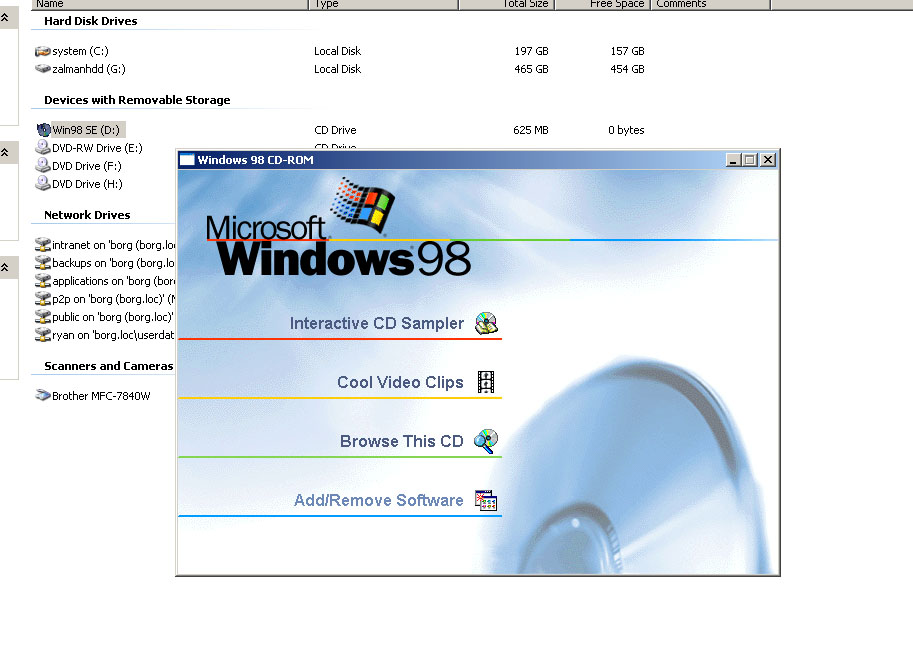
zalmancdromemulation.jpg


Just used windows 98 cd as a test to show that it's not using anything special that only new stuff supports it's true emulation. I'm going to try to boot off it now for fun.

I did have an issue where the drive randomly dropped while it was copying. Did this twice. I just heard a loud CLICK and then got delayed write failed and the transfer errored out. Not sure what that's about. Wondering if I got a DOA drive. For something like this, it's almost worth using a SSD as it's meant to be a portable drive that wont get much writes to it. I plan to use this strictly for ISOs so I will load up all the frequently used ISOs as well as any new linux distro I decide to try. So even a 120GB drive would be fine.
 
Well it has no external power supply, I would assume it's designed to work that way. I will have to try the HDD in another enclosure and see, but that's the only 2.5" enclosure that I have. I was going to try a 3.5" drive in the enclosure but now that you mention juice, that may not be a good idea. Maybe a SSD is in order after all. They use way less power.

I tried to boot off a CD and it just crapped out in the middle of it. So this is not looking so good. I have the worse luck with hard drives though, I'm thinking the drive is DOA. I wonder if I have something generating lot of magnetic fields in my house or something lol.
 
I got it going! So turns out it has to be NTFS. Think the first time the partition was not set as active or something.

That makes sense for DVDs. Remember that the FAT32 supports up to 4GB files and some DVD iso (like the windows 8 preview) will be larger than that.
 
The drive works fine on my Linux server. I did a large write to it from dd and then read the data out. It was dog slow, 5MB/sec, but I think that more has to do with Linux's not so good support for NTFS. The drive never dropped out.

The drive only uses 0.55 amps according to the label, but is that right? That seems very low. At 5 volts that comes up to 2.75 watts. Really?

I'm thinking it's the enclosure, I'll have to contact Zalman. I just plugged it in again, now the light just flashes blue and nothing is happening.
 
This happens on all computers, not just mine. I have never seen a computer that can burn CD's 100% reliably. Optical media is very picky. A single spec of dust, or a scratch, and you are toast. Hard drives are sealed and are not as prone to such elements.

Again, haven't burned a coaster in ages, and i used to burn... easily 20-30 DVDs a month, lately at work i am burning 2-3 CD's a day for old servers getting them running, 4-5 50G BR's disks now at work as wel, and not a single coaster, before that i was always burning CD's and DVD's in a very dry and dusty area, i don't know of any person who couldn't burn a working CD/DVD for years, so yes, something wrong with your rig if you have so much trouble burning a a couple disks.
 
Again, haven't burned a coaster in ages, and i used to burn... easily 20-30 DVDs a month, lately at work i am burning 2-3 CD's a day for old servers getting them running, 4-5 50G BR's disks now at work as wel, and not a single coaster, before that i was always burning CD's and DVD's in a very dry and dusty area, i don't know of any person who couldn't burn a working CD/DVD for years, so yes, something wrong with your rig if you have so much trouble burning a a couple disks.

I would have to agree with this. It's been years since I have burned a coaster. However I mostly burn isos. For that part I am talking about write once media. I also burn RW media but that generally does not give coasters but after so many write / erase cycles (100?) the media becomes less readable and eventually degrades.
 
Again, haven't burned a coaster in ages, and i used to burn... easily 20-30 DVDs a month, lately at work i am burning 2-3 CD's a day for old servers getting them running, 4-5 50G BR's disks now at work as wel, and not a single coaster, before that i was always burning CD's and DVD's in a very dry and dusty area, i don't know of any person who couldn't burn a working CD/DVD for years, so yes, something wrong with your rig if you have so much trouble burning a a couple disks.

You say "my rig" but like I said, I have experienced this on all computers that I have used, not just mine. I've just never had any luck with burning CDs, the failure rate is super high. I usually use Nero, is that program considered bad nowdays? I know at one point Easy CD Creator was dubbed Easy Coaster Creator. Is Nero now bad as well?
 
Well it has no external power supply, I would assume it's designed to work that way. I will have to try the HDD in another enclosure and see, but that's the only 2.5" enclosure that I have. I was going to try a 3.5" drive in the enclosure but now that you mention juice, that may not be a good idea. Maybe a SSD is in order after all. They use way less power.

A 3.5" drive in a 2.5" enclosure ?

The drive works fine on my Linux server. I did a large write to it from dd and then read the data out. It was dog slow, 5MB/sec, but I think that more has to do with Linux's not so good support for NTFS. The drive never dropped out.

The drive only uses 0.55 amps according to the label, but is that right? That seems very low. At 5 volts that comes up to 2.75 watts. Really?

I'm thinking it's the enclosure, I'll have to contact Zalman. I just plugged it in again, now the light just flashes blue and nothing is happening.

Well, USB2 specifications call for 0.5 amps for an USB port, so your drive is over that, does the Zalman use a Y cable ?
 
The connector is one that has the power and sata combined, so unless I makeshift some kind of cable, I can't add external power to it. Or do they make sata cables where it's male on one side and female on the other? The current connector is the same that would normally be found on a 3.5 drive backplane.

I contacted Zalman so I'll see what they say. I'm starting to think I got a defective unit. Now it does not even do anything, I plug it in and the blue light just flashes.
 
You say "my rig" but like I said, I have experienced this on all computers that I have used, not just mine. I've just never had any luck with burning CDs, the failure rate is super high. I usually use Nero, is that program considered bad nowdays? I know at one point Easy CD Creator was dubbed Easy Coaster Creator. Is Nero now bad as well?

I use nero on pretty much every non iso burn on windows. On linux mostly k3b. Are you using name brand media like Memorex, TDK, Verbatim, Sony?
 
Back
Top