AIO options for ITX portable build

Code_Man

Weaksauce
Joined
Jun 22, 2022
Messages
76
Hi HardForum Team,

I am building out an portable ITX gaming build. So far, I have the following parts allocated:

1. AMD Ryzen 7600X3D CPU
2. ASRock B850i Lighting Wi-Fi MOBO

I am asking about the AIO first, before I start down the path of an ITX case. I'm thinking a 240mm AIO would do fine. I'm looking for feedback and opinions on this! Also, what brands have better AIO reputation and price/performance wins?

Thanks in advance!
 
For a portable iTX build, 240mm AIO is the best solution if you want it to be relatively lightweight. You'll get better performance out of a 360, but usually an iTX case will be too small for that. I haven't checked to see if any iTX cases support a 280mm radiator (two 140mm fans), but I'm sure there are some out there, and they perform on par with a 360. However, bigger radiators = more liquid = more weight. Most iTX builds don't do overclocking, and for those that do, they're pretty minimal. I have another 13600K to replace a 13600T coming, so I'll be putting the 13600K with the iTX that has more VRM's, and the 13600T in a m-ATX board that has less VRM's. I'll also be swapping a small 80mm CPU cooler with a 240mm AIO. You also get better cooling if you can put the radiators in a push/pull config, than just a push or pull config. In the past I used four thin 120mm fans in push/pull, and they performed much better than just two regular 120mm fans in a small iTX case.
 
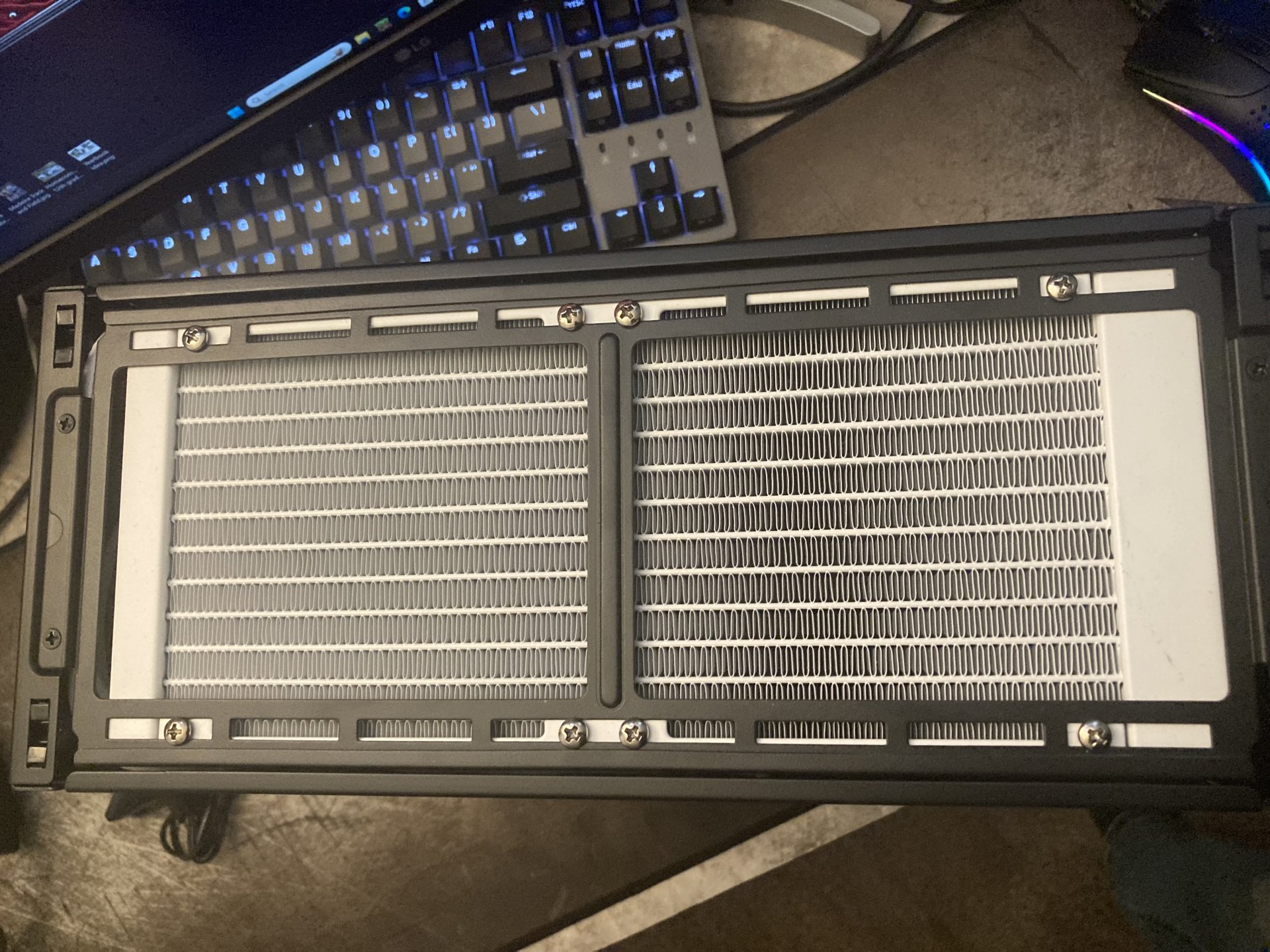
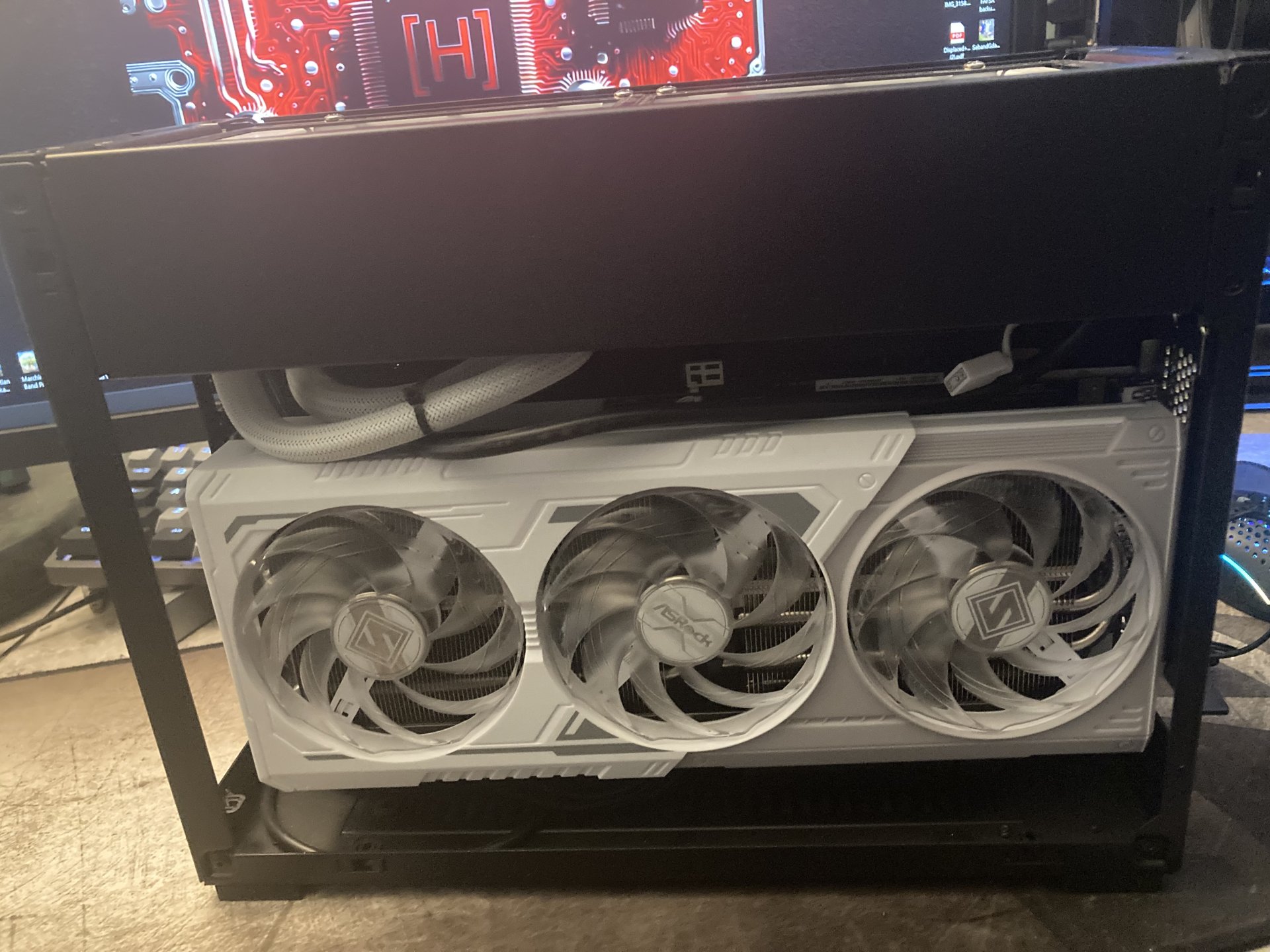
I’m loving this A4 H2O and Cooler Master 240mm AIO setup. Fits like a glove!

Z790i
12600k
Steel Legend B580

I also fit a Asus Pro Art 4070 super in this case easily.

IMG_6717.jpeg
 

Attachments

  • IMG_6718.jpeg
    IMG_6718.jpeg
    369.2 KB · Views: 0
  • IMG_6719.jpeg
    IMG_6719.jpeg
    326.5 KB · Views: 0
  • IMG_6720.jpeg
    IMG_6720.jpeg
    559 KB · Views: 0
  • IMG_6721.jpeg
    IMG_6721.jpeg
    397.1 KB · Views: 0
  • IMG_6723.jpeg
    IMG_6723.jpeg
    378.5 KB · Views: 0
Personally, I would define your portable build goals first before deciding on a case. How important is size? What portability options are important? How will it be transported around?

For me, since my portable build was primarily going in my checked suitcase, I decided I did not want to deal with the weight and potential leak of an AIO. I wanted a long case that can fit GPUs that I retire from my primary computer. Started with a cheap lightweight KXRORS S400 case, but that case quickly proved too weak to handle being abused in checked luggage. Went to a much sturdier Fractal Design Ridge case and that has generally been good until this last trip broke the PCI-E riser board. Replacing that with a riser cable and gonna see how I can help keep the GPU from moving- the riser board design was disappointingly flimsy and wasn't well secured, allowing a lot of movement. The flatter design of the Ridge works better for packing luggage, at least for me. I feel that the GPU cooling is better than the sandwich style cases too.

My CPU cooler of choice was the Thermalright AXP120-X67. It has fit in both of the cases I used and cools the Ryzen 7 1700X without issues. I rarely ever hear the CPU fan spin up; usually it's the 2080ti fans that I hear more.

Side note on the 2080ti- this is the ideal GPU if you're using it with a portable monitor. Most, if not all, variants come with USB-C output, allowing you to use a single USB-C cable for display and power. Eliminating a single cable might not seem much but every bit matters when it comes to portability.
 
Personally, I would define your portable build goals first before deciding on a case. How important is size? What portability options are important? How will it be transported around?

For me, since my portable build was primarily going in my checked suitcase, I decided I did not want to deal with the weight and potential leak of an AIO. I wanted a long case that can fit GPUs that I retire from my primary computer. Started with a cheap lightweight KXRORS S400 case, but that case quickly proved too weak to handle being abused in checked luggage. Went to a much sturdier Fractal Design Ridge case and that has generally been good until this last trip broke the PCI-E riser board. Replacing that with a riser cable and gonna see how I can help keep the GPU from moving- the riser board design was disappointingly flimsy and wasn't well secured, allowing a lot of movement. The flatter design of the Ridge works better for packing luggage, at least for me. I feel that the GPU cooling is better than the sandwich style cases too.

My CPU cooler of choice was the Thermalright AXP120-X67. It has fit in both of the cases I used and cools the Ryzen 7 1700X without issues. I rarely ever hear the CPU fan spin up; usually it's the 2080ti fans that I hear more.

Side note on the 2080ti- this is the ideal GPU if you're using it with a portable monitor. Most, if not all, variants come with USB-C output, allowing you to use a single USB-C cable for display and power. Eliminating a single cable might not seem much but every bit matters when it comes to portability.
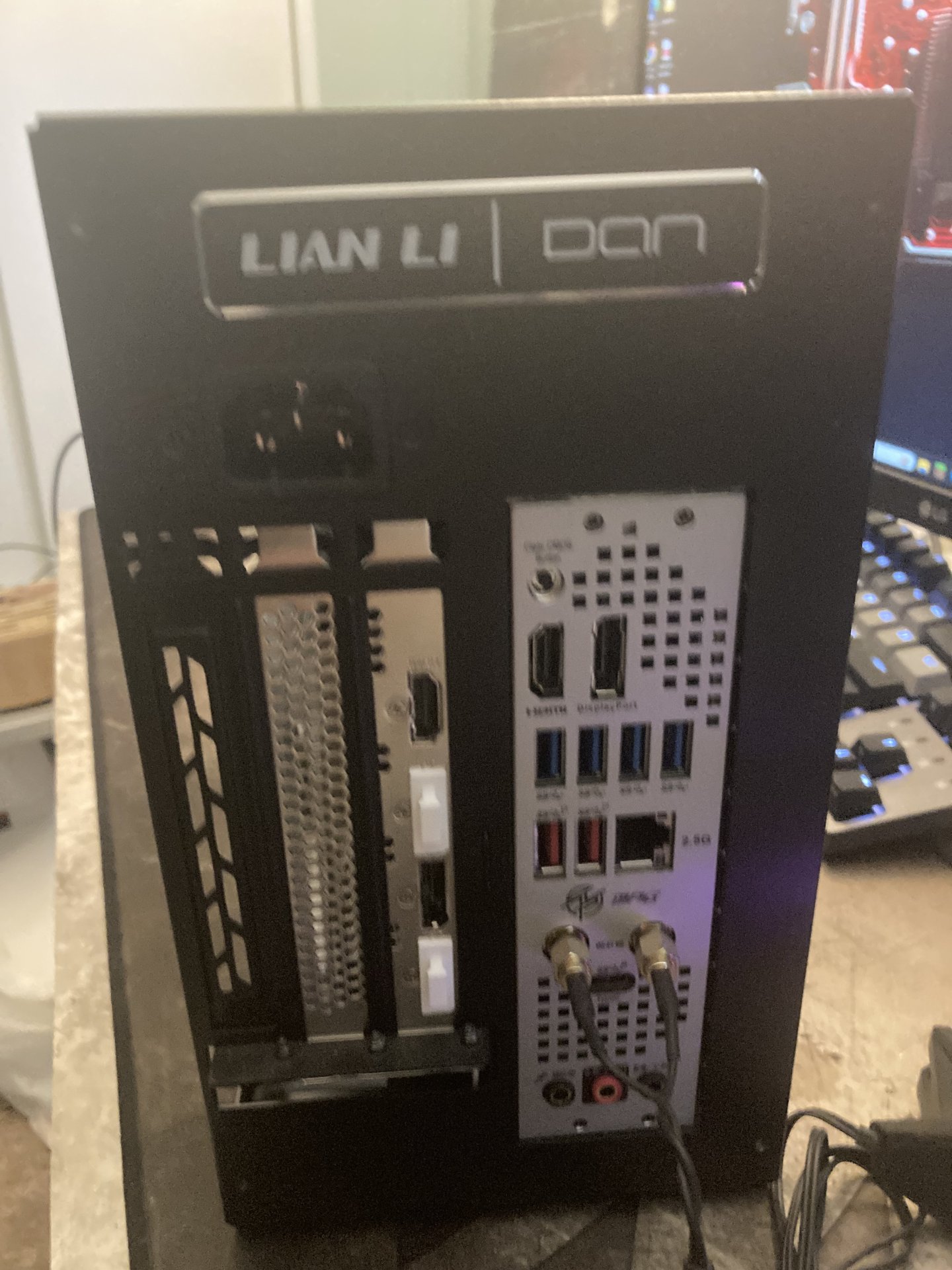
Some of the AM5 ITX boards support DP-Alt over USB-C on the motherboard-----for the dedicated GPU. Asrock's B850i is one of those boards. Its an official AM5 feature. But not all boards enable it.

When did you buy your Fractal Ridge? I bought one to do a build for someone, a few months ago. and he riser board was extremely well bolted down. Zero movement. And the PCB of the board was pretty strong. No flex under a realistic scenario.

Fractal is usually good about supporting their cases. I would email them and ask about a new Riser board.
 
Some of the AM5 ITX boards support DP-Alt over USB-C on the motherboard-----for the dedicated GPU. Asrock's B850i is one of those boards. Its an official AM5 feature. But not all boards enable it.

When did you buy your Fractal Ridge? I bought one to do a build for someone, a few months ago. and he riser board was extremely well bolted down. Zero movement. And the PCB of the board was pretty strong. No flex under a realistic scenario.

Fractal is usually good about supporting their cases. I would email them and ask about a new Riser board.
I built it out of spare parts I had around, which meant a 1700X CPU (and thus AM4 platform). One day it'll get upgraded to AM5, maybe. Probably at the same time I upgrade it from a 2080ti.

I bought mine second-hand about 4 months ago. It had basically never been used, I think the guy bought it for a custom build that the buyer ended up backing out on.

The primary 90 degree riser wasn't the problem, but the secondary straight riser was since it wasn't bolted to anything. I think things would have been fine if the secondary riser was a ribbon cable instead of the solid board they used. The flex and movement the secondary riser allowed caused a corner of the primary riser slot to break off.

broken riser board.jpg
 
A few years ago I used an i7-10700 and a 120mm AIO in a compact mATX build for my dad. The 120mm was really not bad at all. I did some temp/watts testing on it by increasing PL1, then set it back to the stock Intel 65W PL1 250W PL2 setup. For a 7600X3D I'd think a 120mm would be fine. It's a relatively low power chip with a "TDP" of 65W.

Testing was done with ambient temps around 70F.

Came out like this:
Power Limiti7-10700 All Core Speed (GHz)Temp (C)
65W3.354
95W3.861
125W4.265
155W4.576
170W4.681
185W4.681
 
I have a Lian Li DanA4 H2O with a ID Cooling flow master x 240 AIO. Fits perfect. You will need a modular psu with flexible cables tho.
 
For a portable iTX build, 240mm AIO is the best solution if you want it to be relatively lightweight. You'll get better performance out of a 360, but usually an iTX case will be too small for that. I haven't checked to see if any iTX cases support a 280mm radiator (two 140mm fans), but I'm sure there are some out there, and they perform on par with a 360. However, bigger radiators = more liquid = more weight. Most iTX builds don't do overclocking, and for those that do, they're pretty minimal. I have another 13600K to replace a 13600T coming, so I'll be putting the 13600K with the iTX that has more VRM's, and the 13600T in a m-ATX board that has less VRM's. I'll also be swapping a small 80mm CPU cooler with a 240mm AIO. You also get better cooling if you can put the radiators in a push/pull config, than just a push or pull config. In the past I used four thin 120mm fans in push/pull, and they performed much better than just two regular 120mm fans in a small iTX case.
Yes, going try to get a 240mm at the least. Thanks for the feedback!
 
Personally, I would define your portable build goals first before deciding on a case. How important is size? What portability options are important? How will it be transported around?

For me, since my portable build was primarily going in my checked suitcase, I decided I did not want to deal with the weight and potential leak of an AIO. I wanted a long case that can fit GPUs that I retire from my primary computer. Started with a cheap lightweight KXRORS S400 case, but that case quickly proved too weak to handle being abused in checked luggage. Went to a much sturdier Fractal Design Ridge case and that has generally been good until this last trip broke the PCI-E riser board. Replacing that with a riser cable and gonna see how I can help keep the GPU from moving- the riser board design was disappointingly flimsy and wasn't well secured, allowing a lot of movement. The flatter design of the Ridge works better for packing luggage, at least for me. I feel that the GPU cooling is better than the sandwich style cases too.

My CPU cooler of choice was the Thermalright AXP120-X67. It has fit in both of the cases I used and cools the Ryzen 7 1700X without issues. I rarely ever hear the CPU fan spin up; usually it's the 2080ti fans that I hear more.

Side note on the 2080ti- this is the ideal GPU if you're using it with a portable monitor. Most, if not all, variants come with USB-C output, allowing you to use a single USB-C cable for display and power. Eliminating a single cable might not seem much but every bit matters when it comes to portability.
Thank you for the feedback. I wont be traveling but till a few buddies house's to "LAN" up and play Star Citizen.
 
A few years ago I used an i7-10700 and a 120mm AIO in a compact mATX build for my dad. The 120mm was really not bad at all. I did some temp/watts testing on it by increasing PL1, then set it back to the stock Intel 65W PL1 250W PL2 setup. For a 7600X3D I'd think a 120mm would be fine. It's a relatively low power chip with a "TDP" of 65W.

Testing was done with ambient temps around 70F.

Came out like this:
Power Limiti7-10700 All Core Speed (GHz)Temp (C)
65W3.354
95W3.861
125W4.265
155W4.576
170W4.681
185W4.681
Yes the TDP on the 7600X3D chip is 65w. This is GREAT for ITX thermals in a compact case.
 
Yes the TDP on the 7600X3D chip is 65w. This is GREAT for ITX thermals in a compact case.
While true I haven’t seen one available for a decent price in months. You’re better off putting that towards a 9800x3d running it in eco mode if needed.

The 9800x3d is already much cooler stock than my 7800x3d was, you may not even need to use eco mode with a 240 AIO.
 
While true I haven’t seen one available for a decent price in months. You’re better off putting that towards a 9800x3d running it in eco mode if needed.

The 9800x3d is already much cooler stock than my 7800x3d was, you may not even need to use eco mode with a 240 AIO.
They were available last December, so less than 2 months. The 7600X3D (and 5600X3D) is/was a Microcenter exclusive in the US. Microcenter had a really nice bundle deal going during the holiday season. Now they're OOS and who knows if they'll be back. We might get a 9600X3D eventually, but the 5600X3D and 7600X3D both came long after the rest of the X3D chips in their respective generations so I wouldn't hold your breath on it coming out this year.

Either way I'd think something a bit more power hungry would be fine with a 240mm AIO as long as your case moves enough air. 9800X3D is only 120W if you don't OC it. That 120mm I tested with an i7-10700 did fine with a PL1 limit of 125W. 65C in a 70F room, and that case wasn't the best for airflow. It was a Cooler Master Silencio, so it's designed for low noise at idle and it's dead silent at idle. At any rate I think a 240mm should be plenty given my experience with a 120mm.
 
Thank you for the feedback. I wont be traveling but till a few buddies house's to "LAN" up and play Star Citizen.
The Dan A4 H2O would definitely be an easy pick. 55mm space means it should fit most 240mm AIOs (most of them are in the 25-30mm thickness range, +25mm for fans). I found this to be a very useful resource:
View: https://docs.google.com/spreadsheets/d/1AddRvGWJ_f4B6UC7_IftDiVudVc8CJ8sxLUqlxVsCz4/edit?gid=1459265577#gid=1459265577

Most should perform similarly, so it comes down to price, features, and warranty support. I wouldn't pay extra for gimmicks like RGB fans and screens on the CPU cooler. Corsair is obviously a big name in the industry but Thermalright has been competitive on the bang/buck side from what I've seen.

My 1700X has a TDP of 95 watts, being used with a low profile heatsink with a single slim 120mm fan. 240 AIO is going to be overkill.
 
While true I haven’t seen one available for a decent price in months. You’re better off putting that towards a 9800x3d running it in eco mode if needed.

The 9800x3d is already much cooler stock than my 7800x3d was, you may not even need to use eco mode with a 240 AIO.
I already purchased the 7600X3D in December from MicroCenter Houston. It was a decent price at the time.
 
The Dan A4 H2O would definitely be an easy pick. 55mm space means it should fit most 240mm AIOs (most of them are in the 25-30mm thickness range, +25mm for fans). I found this to be a very useful resource:
View: https://docs.google.com/spreadsheets/d/1AddRvGWJ_f4B6UC7_IftDiVudVc8CJ8sxLUqlxVsCz4/edit?gid=1459265577#gid=1459265577

Most should perform similarly, so it comes down to price, features, and warranty support. I wouldn't pay extra for gimmicks like RGB fans and screens on the CPU cooler. Corsair is obviously a big name in the industry but Thermalright has been competitive on the bang/buck side from what I've seen.

My 1700X has a TDP of 95 watts, being used with a low profile heatsink with a single slim 120mm fan. 240 AIO is going to be overkill.

True. I could get by on a 120mm and single slim fan for the CPU. It would do fine. But, if I every need to upgrade the CPU I could have the 240mm ready an waiting. Yes overkill till that happens.

Also, THANK YOU for the 'Link Database'. I will utilize that for sure!
 
Using a GAMDIAS CHIONE M4-240 AIO using two Scythe Slip Stream Slim SY1212SL12H 120mm Case Fans in pull with my 13600K in my old Corsair Obsidian 250D case. With the motherboard I had, I couldn't fit the regular-sized 120mm fans. Even with the side panel removed, those old fans just couldn't pull enough air from the radiator at max load. Currently looking at some slim 120mm fans from reviews. The Silverstone Air Slimmer 120mm fan is so far the best, but it's near $25 per fan.
2025-02-04_10-29-55.png
 
Back
Top