Coming off decades of Intel and now going AMD, I'm wondering if the nubs (as I call them lol) coming off the CPU around the edges... need to have paste applied on them? Or can I mask them off and simply apply/spread paste around the square section of the processor and be ok?
![[H]ard|Forum](/styles/hardforum/xenforo/logo_dark.png)
Navigation
Install the app
How to install the app on iOS
Follow along with the video below to see how to install our site as a web app on your home screen.
Note: This feature may not be available in some browsers.
More options
-
Some users have recently had their accounts hijacked. It seems that the now defunct EVGA forums might have compromised your password there and seems many are using the same PW here. We would suggest you UPDATE YOUR PASSWORD and TURN ON 2FA for your account here to further secure it. None of the compromised accounts had 2FA turned on.
Once you have enabled 2FA, your account will be updated soon to show a badge, letting other members know that you use 2FA to protect your account. This should be beneficial for everyone that uses FSFT.
You are using an out of date browser. It may not display this or other websites correctly.
You should upgrade or use an alternative browser.
You should upgrade or use an alternative browser.
9800X3D thermal paste application?
- Thread starter M0710NM4N
- Start date

- Joined
- Oct 7, 2000
- Messages
- 79,051
^^ thats how i apply paste but with the 9800 id put a little dot on the nubs anyways.
- Joined
- Jun 15, 2005
- Messages
- 2,774
AM5 contact frame will keep the thermal paste from making a mess of the cpu pcb.
As an Amazon Associate, HardForum may earn from qualifying purchases.
- Joined
- Mar 19, 2003
- Messages
- 11,107
I just hawk tuah it...

- Joined
- Jul 11, 2001
- Messages
- 12,830
I think that you just need to consider the surface of your heatsink/waterblock. Is the surface of the heatsink/waterblock larger than the size of the CPU heatspreader? Will it also cover (and thus make contact with) the "nubs"?
A lot of the classic general-advice recommendations from years/decades ago to use a pea or other formation and then just let it spread itself out comes from the era when the heatspreaders were a lot smaller, the CPU die under the heatspreader was a lot smaller, and heatsinks/waterblocks were smaller. Stock heatsinks often had a contact surface about the size of a Quarter or even a Nickel.
If my waterblock or heatsink contact surface is larger than the heatspreader, then I manually spread a very thin layer of paste across the entire heatspreader (including the "nubs"). This ensures even distribution of paste, maximizes the contact surface area, and also prevents it from oozing off the side and causing a mess in any location.
A lot of the classic general-advice recommendations from years/decades ago to use a pea or other formation and then just let it spread itself out comes from the era when the heatspreaders were a lot smaller, the CPU die under the heatspreader was a lot smaller, and heatsinks/waterblocks were smaller. Stock heatsinks often had a contact surface about the size of a Quarter or even a Nickel.
If my waterblock or heatsink contact surface is larger than the heatspreader, then I manually spread a very thin layer of paste across the entire heatspreader (including the "nubs"). This ensures even distribution of paste, maximizes the contact surface area, and also prevents it from oozing off the side and causing a mess in any location.
- Joined
- Aug 15, 2005
- Messages
- 9,231
use the spread method and cover all of it, IMO. Those "nubs" are part of the IHS. And therefore, will transfer some heat.Coming off decades of Intel and now going AMD, I'm wondering if the nubs (as I call them lol) coming off the CPU around the edges... need to have paste applied on them? Or can I mask them off and simply apply/spread paste around the square section of the processor and be ok?
Probably not consequential. But, its technically part of the first heat removal of your CPU.
All that said, even if you "mask" them off. Once you install a heatsink or water block, it will likely spread over the nubs naturally, from pressure and then heat.
*P.S. the contact frames don't do a great job of keeping thermal paste from getting onto the PCB of the CPU. It doesn't matter at all. But, someo people are worried about it. If you are worried about it, Thermal Grizzly and a couple of other brands make a silicon gasket which tightly hugs the IHS and properly keeps thermal paste from spilling over the sides of the IHS. The contact frames have gaps.

- Joined
- Jul 24, 2021
- Messages
- 3,696
Like learners permit said the contact frame is a great idea cause it serves performance along with it. Otherwise I believe deepcool has a little thingy that slips over/around the odd shaped puzzle piece CPU to keep the sludge from slipping down potentially into the CPU socket where you will bend pins trying to get it out lol
- Joined
- Aug 15, 2005
- Messages
- 9,231
If you have thermal paste spilling all the way off the CPU onto the sides of the socket, you are using way too much thermal past. At worst, a little bit spills over the side of the IHS and only makes a small border line around the IHS.Like learners permit said the contact frame is a great idea cause it serves performance along with it. Otherwise I believe deepcool has a little thingy that slips over/around the odd shaped puzzle piece CPU to keep the sludge from slipping down potentially into the CPU socket where you will bend pins trying to get it out lol
I went back to AMD here about six months ago, and agree the contact frame is nice. I use the Thermalright frames on my Intel PC's for better contact with the heatsink, but for AMD it basically boils down to less mess. chameleoneel is right as well that if you're getting that mess without the frame you're using too much paste, but it is nice to have a little piece of mind with the contact frame.AM5 contact frame will keep the thermal paste from making a mess of the cpu pcb.
As an Amazon Associate, HardForum may earn from qualifying purchases.

- Joined
- Dec 5, 2018
- Messages
- 1,276
I found Intel tricks don't work on AMD.
I draw a line down the side, and spread across the IHS.
I go in a few directions, but always straight.
When I am done I have killer temps.
I draw a line down the side, and spread across the IHS.
I go in a few directions, but always straight.
When I am done I have killer temps.

- Joined
- Jun 19, 2003
- Messages
- 9,101
I personally use this:
https://www.thermal-grizzly.com/en/kryosheet/s-tg-ks
WAY less of a mess and fantastic cooling too.
https://www.thermal-grizzly.com/en/kryosheet/s-tg-ks
WAY less of a mess and fantastic cooling too.
- Joined
- Dec 5, 2018
- Messages
- 1,276
Someone needs to send me one, because I honestly do not believe it is better 
- Joined
- Jul 24, 2021
- Messages
- 3,696
You mean the 9800X3D compared to the 7800X3D?Someone needs to send me one, because I honestly do not believe it is better
Brian from Tech Yes City doesn't feel like there is any meaningful difference and makes his points in this video
View: https://youtu.be/BbkXAaYJnWA?si=1T_68r_p0seRba6m
- Joined
- Oct 7, 2000
- Messages
- 79,051
um were talking about paste, not the cpu. "send me one" = kryosheet....You mean the 9800X3D compared to the 7800X3D?
- Joined
- Mar 20, 2017
- Messages
- 444
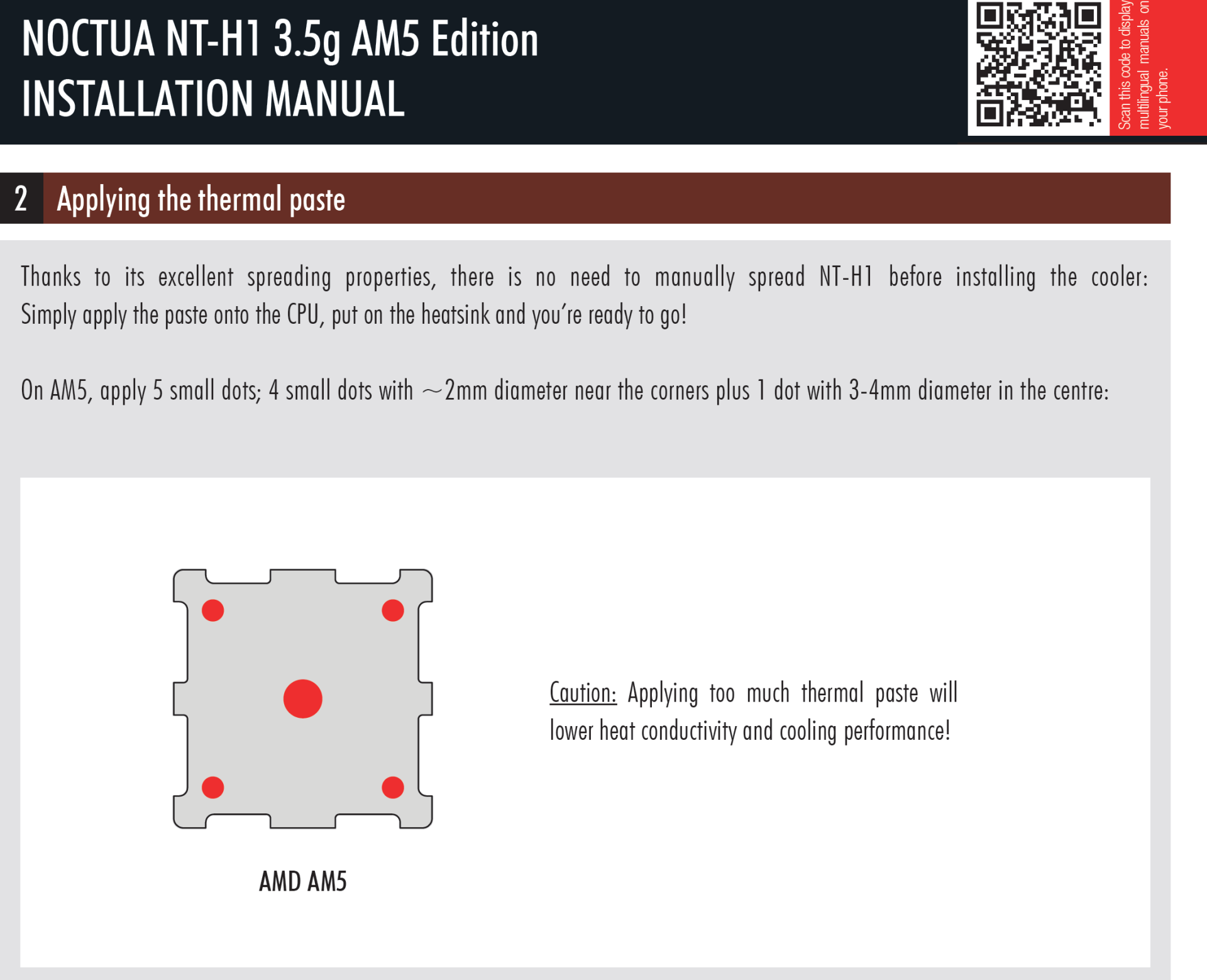
I just follow the guide from Noctua.
You mean the 9800X3D compared to the 7800X3D?
Brian from Tech Yes City doesn't feel like there is any meaningful difference and makes his points in this video
View: https://youtu.be/BbkXAaYJnWA?si=1T_68r_p0seRba6m
Coming from a 7800X3D to a 9800X3D the normal every day tasks such as browsing and some light MS Office work are definitely quicker over the 7800X3D which to me was the only issue I had with that CPU. My Intel CPU's were much quicker in those tasks. The gaming difference is there as well between the two AMD CPU's, but not as noticeable. Temps for me are better with the 9800X3D as well.
- Joined
- Dec 5, 2018
- Messages
- 1,276
I don't buy Noctua stuff, so there is that.
Those dots look stupid. wtf.
Those dots look stupid. wtf.
- Joined
- Jul 24, 2021
- Messages
- 3,696
I don't buy Noctua coolers, but the Noctua paste is legendary and priced right I always use it because it lasts looooong and I don't need to worry about it drying out and the temps are extremely competitive with it.I don't buy Noctua stuff, so there is that.
Those dots look stupid. wtf.
- Joined
- Dec 5, 2018
- Messages
- 1,276
I tried their TIM when I had a D14. Maybe they changed the formulation since then, but I thought it was terrible.I don't buy Noctua coolers, but the Noctua paste is legendary and priced right I always use it because it lasts looooong and I don't need to worry about it drying out and the temps are extremely competitive with it.
- Joined
- Jul 24, 2021
- Messages
- 3,696
The NTH1 and NTH2 Yeah been using it for years it gets thousands of 5 star reviews and it is top competitive with all the more expensive pastes within a degree or two benchmarked with all the exotic ones but last looooong....I tried their TIM when I had a D14. Maybe they changed the formulation since then, but I thought it was terrible.
Which one do you prefer?
- Joined
- Dec 5, 2018
- Messages
- 1,276
I really like SYY-157 lol..The NTH1 and NTH2 Yeah been using it for years it gets thousands of 5 star reviews and it is top competitive with all the more expensive pastes within a degree or two benchmarked with all the exotic ones but last looooong....
Which one do you prefer?
Who??
- Joined
- Aug 15, 2005
- Messages
- 9,231
Or you could spread it and not "hope" it works out
And probably use a bit less than that 5 dots, too.

- Joined
- Apr 4, 2012
- Messages
- 553
I usually just do a 3/8" line of paste down the center (coming from decades of Intel), but I was concerned about the location of the 9800x3d die under the IHS, and the funky cutouts.
I decided to try the Noctua 5 dot method conservatively (just barely a 3mm dot x 1, and a 1.5-2mm dot x4) using MX-6. I also put a tiny dab on each cutout. CPU block is a Heatkiller IV Pro Nickel/Copper, EVGA 3090 under an Optimus block, and 2 420mm rads with NFA-14 IPPCs.
Using a modest PWM curve on pump and fans I get 29c Idle, and peaked at 69c in Blender CPU bench. If I wind up the spinny bits it stays under 65c. Haven't had a chance to test gaming loads yet.
I was suspicious of the method, but it seems to be working ok. I'd love to hear about other results under similar watercooling setups.
I decided to try the Noctua 5 dot method conservatively (just barely a 3mm dot x 1, and a 1.5-2mm dot x4) using MX-6. I also put a tiny dab on each cutout. CPU block is a Heatkiller IV Pro Nickel/Copper, EVGA 3090 under an Optimus block, and 2 420mm rads with NFA-14 IPPCs.
Using a modest PWM curve on pump and fans I get 29c Idle, and peaked at 69c in Blender CPU bench. If I wind up the spinny bits it stays under 65c. Haven't had a chance to test gaming loads yet.
I was suspicious of the method, but it seems to be working ok. I'd love to hear about other results under similar watercooling setups.
X method with dots in the triangles with an Arctic Freezer II 420, 5400MHz manual OC at 1.23 core voltage, no negative core voltage offset. I see around 75 to 85C in extended Aida CPU stress testing. In games, it's harder to tell on a single monitor since Afterburner doesn't support power and temp readings for Zen 5 - but I'd say it averages 50 to 55C or so. Mid to high 70C when building game shaders.
- Joined
- Dec 5, 2018
- Messages
- 1,276
My 58X3D idles under 25 with my method and AIO. Can get lower if I run at stock speed..

- Joined
- Nov 13, 2006
- Messages
- 3,772
Also using this - came as a combo with the new waterblock I picked up for my 9800x3d build. Happy with it and couldn’t have been any easier and less messy to apply.I personally use this:
https://www.thermal-grizzly.com/en/kryosheet/s-tg-ks
WAY less of a mess and fantastic cooling too.
- Joined
- Jul 24, 2021
- Messages
- 3,696
I miss the days of idle in the high 20s I can't get my 13900KS below 30c lol. I always ice the IHS like a cake I need all the help I can getMy 58X3D idles under 25 with my method and AIO. Can get lower if I run at stock speed..

- Joined
- Dec 5, 2018
- Messages
- 1,276
That is pretty much how I do mine brotha. Nice and thin, but not translucentI miss the days of idle in the high 20s I can't get my 13900KS below 30c lol. I always ice the IHS like a cake I need all the help I can get
Vengance_01
Supreme [H]ardness
- Joined
- Dec 23, 2001
- Messages
- 7,730
Try the new Kyro Sheets or the PTM from honeywell. Works great with my recent 5700x3d and the Kryo Sheet
- Joined
- Mar 8, 2007
- Messages
- 4,098
Totally unnecessary and probably not advisable. This is not a hard chip to cool. Five dots on the main part of the chip is fine. Even if there was some benefit, it would be so negligible it isn’t worth a second thought.
I bought one to use on one of those mini-pcs, that I don't want to have to ever open up again.I personally use this:
https://www.thermal-grizzly.com/en/kryosheet/s-tg-ks
WAY less of a mess and fantastic cooling too.
More expensive than paste, but seems to work great, and I'll never have to repaste.
- Joined
- Jun 12, 2018
- Messages
- 1,620
Try the new Kyro Sheets or the PTM from honeywell. Works great with my recent 5700x3d and the Kryo Sheet
I've tried a similar thermal sheet by Innovative Cooling many years ago and it was a pain to install as the sheet would float or shift while installing the heat sink so I never got a good contact so I went back to paste. Does the Kyrosheet float or has someone figured out a way to install it easily without the pad shifting?
I've seen on Youtube someone mentioned using a little thermal paste to hold the sheet in place.
Last edited:
- Joined
- Aug 15, 2005
- Messages
- 9,231
Kryosheet now comes with a little packet of silicon oil. You put one or two small drops on the IHS, and it will "hold' the kryosheet in place, while you install the heatsink.I've tried a similar thermal sheet by Innovative Cooling many years ago and it was a pain to install as the sheet would float or shift while installing the heat sink so I never got a good contact so I went back to paste. Does the Kyrosheet float or has someone figured out a way to install it easily without the pad shifting?
I've seen on Youtube someone mentioned using a little thermal paste to hold the sheet in place.
Thermal Grizzly also has a phase change material like PTM 7950, called Phasesheet.
- Joined
- Nov 21, 2024
- Messages
- 148
I had always just used 1 small pea size dot in the middle and let the heatsink spread it on everything the last 20 years, but it just does not work with AM5 CPU's at all they need the paste spread thinly over the whole thing.
- Joined
- Jun 12, 2018
- Messages
- 1,620
- Joined
- Oct 7, 2000
- Messages
- 79,051
the big-ass gob method would work fine too, just makes a mess...