• Some users have recently had their accounts hijacked. It seems that the now defunct EVGA forums might have compromised your password there and seems many are using the same PW here. We would suggest you UPDATE YOUR PASSWORD and TURN ON 2FA for your account here to further secure it. None of the compromised accounts had 2FA turned on.
    Once you have enabled 2FA, your account will be updated soon to show a badge, letting other members know that you use 2FA to protect your account. This should be beneficial for everyone that uses FSFT.

9800X3D Memory Overclocking

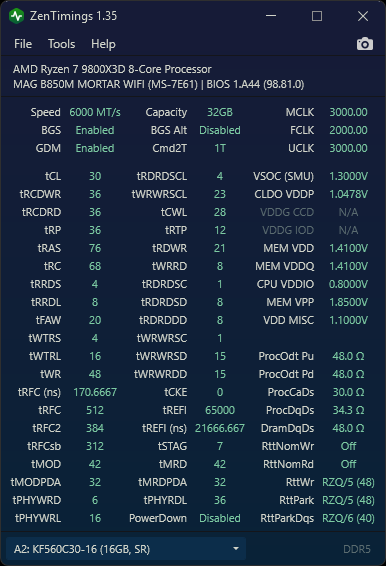
Are these good timings for my CL30 ram? Anything I can do to further improve performance?
What's your memory latency? That's what it all boils down to.

I got mine down to 68.5ns with a 96GB kit and was pretty excited. When I had a 32GB single rank kit I wasn't happy unless I was in the 50ns range.
 
About 70 ns.
What kit do you have? Is it a single rank kit? Mine is dual rank. If yours is a 64-96GB dual rank kit, you're doing well. If you scroll up and look at my timings, there's a couple you could lower and perhaps shave a few ns off.

EDIT: If it's the kit in your sig, I'd say you can do better. Since you have the same mobo as I do, try going into the BIOS and setting the memory timings to "Tightest" in the option that allows it. (I can't remember what it's called). I know tightest sounds intimidating, but it's pretty tame compared to the timings I was being suggested to use.
 
Last edited:
Mine is single rank. I just tightened CL30 to CL28 and remaining CL38s to CL36. It was working fine but then I saw that it was unable to unpack nvidia drivers. So yeah, it craps out even with 1.4 volts. Maybe I need to try 1.45 volts? I don't know much about timings. I took bulldzoid timings and tightened them up a little bit more.
 
Last edited:
Does anyone know if the new 6400 cl26 RAM that is for expo would work on a raptor lake CPU? Curious lol or for those that want it for AMD It could be an option also.

Based on my experience trying to use Intel-optimized RAM on AMD hardware, it may not be worth the trouble. You may be able to get it working if you spend a lot of time testing custom timings, but without the XMP profile to fall back to you won't have a good baseline to work from.
 
Based on my experience trying to use Intel-optimized RAM on AMD hardware, it may not be worth the trouble. You may be able to get it working if you spend a lot of time testing custom timings, but without the XMP profile to fall back to you won't have a good baseline to work from.
Darn. Cause all the new low latency RAM is for AMD and was wondering if I could throw one of the new CL26 kits on my Raptor lake 😁
 
Darn. Cause all the new low latency RAM is for AMD and was wondering if I could throw one of the new CL26 kits on my Raptor lake 😁

Not sure about Raptor Lake, but on the AMD side CL < 30 has shown pretty marginal gains. I'd save your cash if it were me.
 
Got my 6000 CL30 kit. Hoping to find time this evening to do the swap and install the heatspreaders on the new kit. I also have a KryoSheet I've been meaning to use on my 9800X3D. Might be a good time to do that too.
 
So, i said screw it and ordered the cl26 64gb bundle. I know I posted in here with some really good results, but getting the CL26 means I dont have to ever mess with 8000mhz+ memory.

Never know could get even better speeds. Either way been wanting to go 64gb over 32gb
 
  • Like
Reactions: Epos7
like this
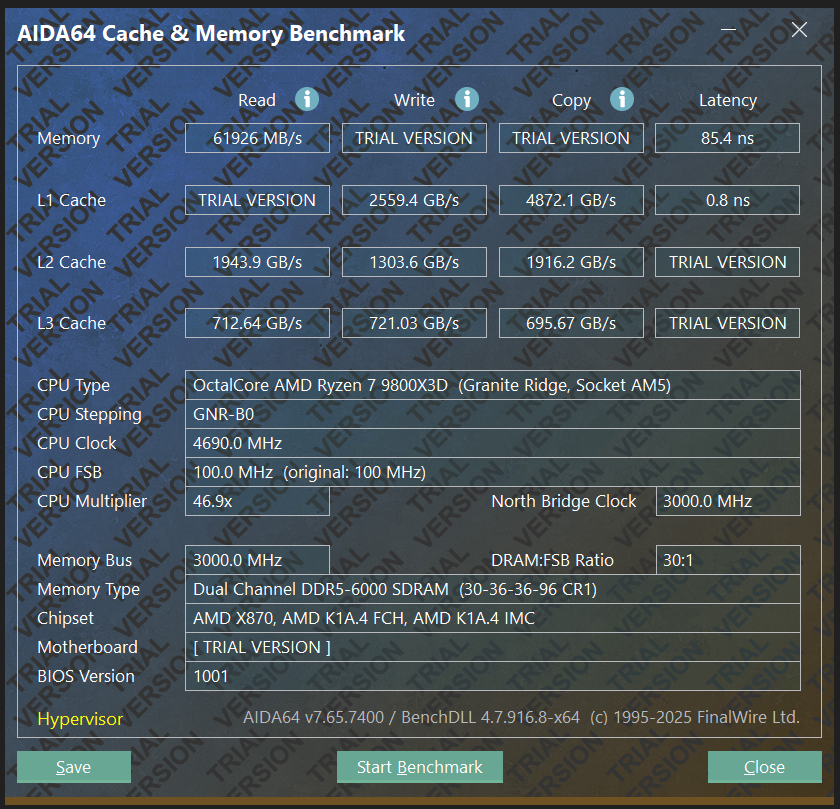
Got my 96GB 6000 CL30 kit. Put the copper heatsinks on. Loaded up EXPO and smooth sailing so far.

Starting point with EXPO.

1749445291907.png
1749445323670.png


Planning to do some stress testing before making any changes. So far, passed OCCT's basic memory test.
 
Last edited:
Does anyone have recommendations on good 2X24gb 6400/CL30 memory? Im currently running 6000/CL30 and its fine, but its boring and my performance is so generic, and my specific kit has absolutely no desire to run much faster than it is. It takes 1.47v just to run 6200/CL30 while I can do 6000/CL30 at just 1.3v, 6400mhz would be an unthinkable frequency even at CL32 (not to mention im not so sure about my infinity fabric being able to do 2133, 2067 is stable at 1.2v though).

I currently have this kit:
https://www.newegg.com/g-skill-trid...y-cl36-desktop-memory-black/p/N82E16820374580

I really really dont want any RGB kits, and I would prefer white, but I can always paint the heatspreaders and kill all the LEDs if I need to. Thats why I got the above kit, because they dont sell the white variant without RGB so I just bought black and painted it. It seems like I can have what I want if im willing to drop from 24gb DIMMs down to 16gb DIMMs, but im literally not willing to do that, ive had 32gb RAM since 2012, im ready to see a bigger number in task manager now.

I can only find one kit that meets my requirements, and I have never heard of the brand before:

https://pcpartpicker.com/products/memory/#ff=ddr5&b=ddr5&Z=49152002&sort=cas&L=300&S=6400

Anyone used them before? Any good? Am I better off just waiting and hoping faster memory gets released eventually?
 
Does anyone have recommendations on good 2X24gb 6400/CL30 memory? Im currently running 6000/CL30 and its fine, but its boring and my performance is so generic, and my specific kit has absolutely no desire to run much faster than it is. It takes 1.47v just to run 6200/CL30 while I can do 6000/CL30 at just 1.3v, 6400mhz would be an unthinkable frequency even at CL32 (not to mention im not so sure about my infinity fabric being able to do 2133, 2067 is stable at 1.2v though).

I currently have this kit:
https://www.newegg.com/g-skill-trid...y-cl36-desktop-memory-black/p/N82E16820374580

I really really dont want any RGB kits, and I would prefer white, but I can always paint the heatspreaders and kill all the LEDs if I need to. Thats why I got the above kit, because they dont sell the white variant without RGB so I just bought black and painted it. It seems like I can have what I want if im willing to drop from 24gb DIMMs down to 16gb DIMMs, but im literally not willing to do that, ive had 32gb RAM since 2012, im ready to see a bigger number in task manager now.

I can only find one kit that meets my requirements, and I have never heard of the brand before:

https://pcpartpicker.com/products/memory/#ff=ddr5&b=ddr5&Z=49152002&sort=cas&L=300&S=6400

Anyone used them before? Any good? Am I better off just waiting and hoping faster memory gets released eventually?
I’ve used team create expert on a few builds and found them to be excellent no frills ram. 48gb 6400 cl32 is available in white
https://www.teamgroupinc.com/en/pro...ert-u-dimm-ddr5-white-CTCWD548G6400HC32ADC01/

Ahh shoot, misread post at top, thought you were looking for cl32.

But instead of looking at specs through pcpp have you tried running through the list of compatible ram for your mobo? Considering the timings sometimes ram will be finicky even though the specs seem to be rated correctly to run at certain timings.
 
Last edited:
I’ve used team create expert on a few builds and found them to be excellent no frills ram. 48gb 6400 cl32 is available in white
https://www.teamgroupinc.com/en/pro...ert-u-dimm-ddr5-white-CTCWD548G6400HC32ADC01/

Ahh shoot, misread post at top, thought you were looking for cl32.

But instead of looking at specs through pcpp have you tried running through the list of compatible ram for your mobo? Considering the timings sometimes ram will be finicky even though the specs seem to be rated correctly to run at certain timings.

Thats great, thank you. CL32 is a bit high but thats a much better start than what ive got now, I might try changing my current subtimings to match that kit (32-37-37-80 @ 1.5v was not stable on my current kit for 6400mhz) just to see if thats the normal range. Maybe im being too greedy thinking ill get a 6400/CL30 kit out of the box, I would be happy if my baseline was 6400/CL32 @ 1.4v, it might hit CL30 with a little more voltage.
 
Does anyone have recommendations on good 2X24gb 6400/CL30 memory? Im currently running 6000/CL30 and its fine, but its boring and my performance is so generic, and my specific kit has absolutely no desire to run much faster than it is. It takes 1.47v just to run 6200/CL30 while I can do 6000/CL30 at just 1.3v, 6400mhz would be an unthinkable frequency even at CL32 (not to mention im not so sure about my infinity fabric being able to do 2133, 2067 is stable at 1.2v though).

I currently have this kit:
https://www.newegg.com/g-skill-trid...y-cl36-desktop-memory-black/p/N82E16820374580

I really really dont want any RGB kits, and I would prefer white, but I can always paint the heatspreaders and kill all the LEDs if I need to. Thats why I got the above kit, because they dont sell the white variant without RGB so I just bought black and painted it. It seems like I can have what I want if im willing to drop from 24gb DIMMs down to 16gb DIMMs, but im literally not willing to do that, ive had 32gb RAM since 2012, im ready to see a bigger number in task manager now.

I can only find one kit that meets my requirements, and I have never heard of the brand before:

https://pcpartpicker.com/products/memory/#ff=ddr5&b=ddr5&Z=49152002&sort=cas&L=300&S=6400

Anyone used them before? Any good? Am I better off just waiting and hoping faster memory gets released eventually?
When I had a 7800X3D system, I used a DDR5 7200 A-Die XMP kit. And manually tuned it down to good speeds and timings for Ryzen.

You also have to keep in mind that 6400 isn't guaranteed on Zen 4 and 5. Even with a capable RAM kit, there are plenty of CPUs which won't do it.

6200 and 6400 are relatively difficult to tune and there really aren't any clear benefits. IMO its more interesting to either do really low latency 6000, or run the memory controller at 1:2 ratio for 8000+.
 
When I had a 7800X3D system, I used a DDR5 7200 A-Die XMP kit. And manually tuned it down to good speeds and timings for Ryzen.

You also have to keep in mind that 6400 isn't guaranteed on Zen 4 and 5. Even with a capable RAM kit, there are plenty of CPUs which won't do it.

6200 and 6400 are relatively difficult to tune and there really aren't any clear benefits. IMO its more interesting to either do really low latency 6000, or run the memory controller at 1:2 ratio for 8000+.

Thats basically what I tried to do, I figured my 7200/CL36 kit would pretty happily turn into a 6400/CL30 or at the very least 6000/CL28. I have spent days tuning this memory, and I still cant really tell if its my RAM or my CPU thats the limiting factor for 6400, either the CPU just flat out wont want to do it or the memory is the issue, and based on how it responds to the 6200mhz tune im guessing (hoping) its the memory. There seems to be a giant cliff right at CL30 at any frequency, I think my current memory is hopelessly generic and not at all destined for the great things I was expecting :p

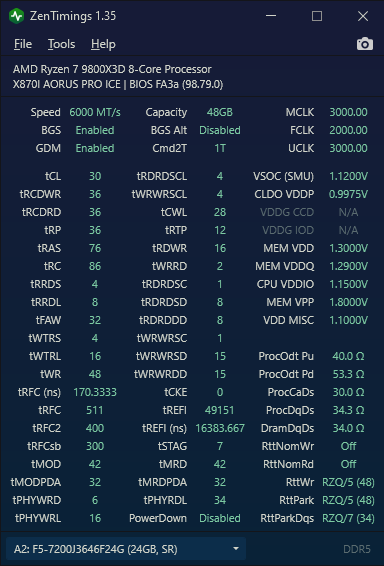
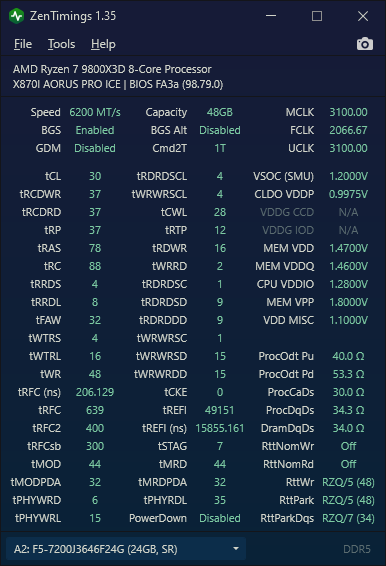
These are my current settings for 6000 and 6200, all voltages are set as low as I possibly could while still being OCCT stable, I technically could be a slight bit more aggressive on the timings but im under 70ns latency in aida so it feels "fine". Trying to run 6000/CL28 would put me around 1.43v, which isnt the worst I guess, but thats a huge jump up from my current 1.3v just for a negligible increase in performance. I did wind up buying new memory, it will be here next week, went with an odd brand but theyre apparently owned directly by SK Hynix, im hoping this is like what Crucial is to Micron.

https://www.amazon.com/KLEVV-Urbane-6400MHz-Desktop-KD5KGUD80-64A320M/dp/B0DSVXHDL7?th=1

I liked how its directly advertised as A Die (I thought only 16gb kits came in A) and how it claims to do 6400/CL32 @ 1.35v, most kits require 1.4v for that and my ITX build doesnt get the best airflow over the RAM so lower voltage is important. They have another similar kit rated for 6400/CL30 @ 1.4v, with any luck the binning will be the same.

If everything goes well I got some liquid tape to cover the LEDs with, hopefully thats fine lol
 

Attachments

  • 6000.png
    6000.png
    34.1 KB · Views: 0
  • 6200.png
    6200.png
    34.3 KB · Views: 0
As an Amazon Associate, HardForum may earn from qualifying purchases.
  • Like
Reactions: jaffy
like this
I run Klevv Kras A-Die, similar to your link above: https://www.amazon.com/dp/B0CX8MXZP2?ref_=ppx_hzsearch_conn_dt_b_fed_asin_title_1&th=1

Been impressed so far. Can't get down to CL26, but CL28 is doable. My chip won't run 6400 1:1 but this works well enough. Also, these settings aren't stable at 1.35V. so YMMV.

View attachment 737348

Awesome, thats already better than what my current RAM can do, and im hoping sticking to single rank gives me a little edge with the OC. What are your aida64 scores on that setup?
 
As an Amazon Associate, HardForum may earn from qualifying purchases.
I swear latency was below 70ns last I ran this. Probably need to reboot, it's been a while.
1750616896507.png
 
Those little gaming CPUs are pretty good for games, but a bit rough when it comes to these types of benches.

Screenshot 2025-06-22 135421.png
 
I swear latency was below 70ns last I ran this. Probably need to reboot, it's been a while.
View attachment 737367

My scores jump around a lot too, usually ill get 69.X, ive been down to 63ns before at 6400mhz but it wasnt fully stable

Those little gaming CPUs are pretty good for games, but a bit rough when it comes to these types of benches.

View attachment 737373

Thats really really good, do the non X3D chips have an easier time doing 6400 1:1 or did you just get lucky? 2200 FCLK is really high, im just hoping I can get 2133 at under 1.28v SOC.
 

Attachments

  • cachemem.png
    cachemem.png
    251.8 KB · Views: 0
hats really really good, do the non X3D chips have an easier time doing 6400 1:1 or did you just get lucky?
Thanks man.. its just EXPO tweaked a bit.. nothing crazy since I don't really know what I am doing with the memory side of things :D

As for 6400.. not sure, it is my first AM5 CPU, but I have a bunch of upper end Zen 3 parts.. that helped me for the CPU tuning haha..
 
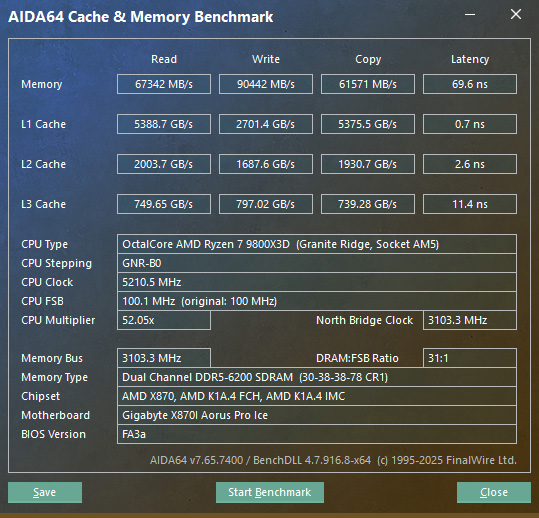
Well the Klevv memory came in, it performs pretty well, will do 6400/CL30 @ 1.4v stable, but it turns out my CPU really wont. Trying to run 1:1 mode would definitely require some voltage higher than what my board allows, even at max 1.3v it isnt fully stable. So im settling for 6200 1:1 with a 2133fclk (2200 is unstable) which only takes 1.2v SOC, the problem is the klevv ram refuses to boot at over 1.43v for some reason. Trying to run 30-36-36-76 @1.43v is almost fully stable so I try to raise it up to 1.44 or 1.45 but the system completely hangs and I get the BIOS message that my settings were unstable. Swapped the gskill back in and I can apparently run the same settings as the klevv, I think my subtimings were bad when I was testing before, plus there isnt that strange ~1.43v limit on these.

For whatever reason the XMP profile pretty significantly outperforms the EXPO profile when running AIDA, several gb/s in bandwith and a full 1ns reduction in latency with no other changes made, I tested both to see if that was the cause of the voltage limits on the klevv. Also going from 30-38-38-78 to 30-36-36-76 is worth another 1ns reduction in latency, so it seems worth it for the small voltage increase. Im going to keep my gskill kit and return the klevv, I would have probobly kept it if my CPU could do 6400 1:1, but this way I dont have to deal with covering all the RGBs.
 

Attachments

  • 6200Urbane.png
    6200Urbane.png
    251.9 KB · Views: 0
I swear latency was below 70ns last I ran this. Probably need to reboot, it's been a while.
View attachment 737367

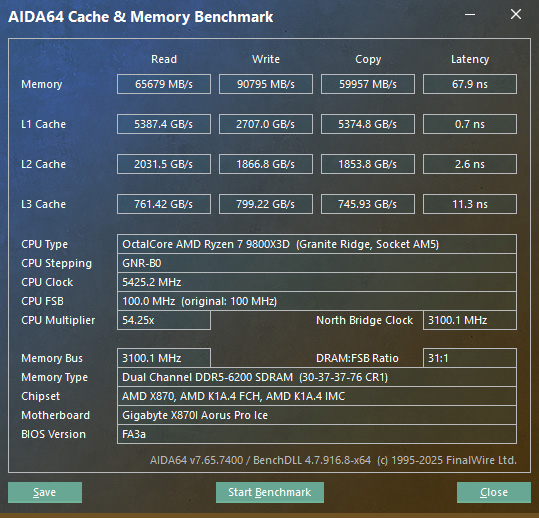
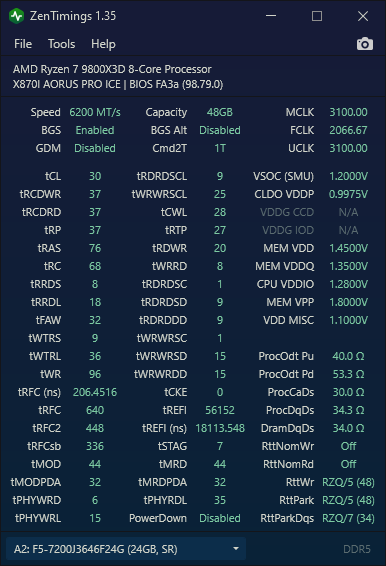
So ive been really trying to dial the GSkill kit back in and im now pulling 67s on latency, apparently I still dont get how any of this works. You have lower frequency than me yet I have lower bandwidth, and I have worse timings than you and somehow get better latency ¯\_(ツ)_/¯. One thing I have noticed is definitely run XMP, even though its not meant for AMD systems it has consistently performed better in my testing compared to EXPO, im guessing it has more aggressive tertiary timings? It also seems like the 3:2 ratio for FCLK to UCLK is valid, running 3100UCLK with 2067FCLK produces slightly better results than 2133FCLK, if youre running 3000 UCLK you should experiment with running your FCLK at exactly 2000, 2200FCLK would be 3:2 for a 3300UCLK (althoguh 2200fclk is really impressive, my chip cant do that). Also im not sure if anyone else does this but I always disable GDM, theoretically that should help with latency but ive definitely left it on before and not really noticed. The only reason I started doing that is because I had an ASRock board that wouldnt let me enter odd numbers into CL and I had to go down the whole rabbit hole of learning what GDM is and does, its probobly useful for people doing 8000mhz+ runs, we should be good with it off at normal speeds. Also I noticed some strange behavior when running my 3 tRFC timings too low, everyone seems to like the 500, 400, 300 buildzoid recommendations but thats way too low for my kit and seems to introduce either silent corruption or some sort of issue where it kills latency as the memory is trying to regain stability, you might see performance increases by raising those numbers up if theyre currently on the edge of stability (never crashed, just performed worse at 512 than 640), I also try to keep them as multiples of 8 but thats just a me thing I think.

All of the above helped me out getting the below results, and I specifically noticed better L2 and L3 cache results when operating in 3:2 FCLK to UCLK mode, so definitely pay attention to those numbers as you make changes. Hopefully with a few tweaks you can be well under 70ns, im still working on tuning my kit but im already really happy.
 

Attachments

  • 6200GSkill.png
    6200GSkill.png
    251.9 KB · Views: 0
  • 6200GSkillTiming.png
    6200GSkillTiming.png
    36.9 KB · Views: 0
Last edited:
So ive been really trying to dial the GSkill kit back in and im now pulling 67s on latency, apparently I still dont get how any of this works. You have lower frequency than me yet I have lower bandwidth, and I have worse timings than you and somehow get better latency ¯\_(ツ)_/¯.
IMO, there seems to be a thing where certain brands and/or certain modules get more attention when motherboard brand X tunes their BIOS. And you end up with better overall latency, compared to similarly specced memory from another brand. Its a bit nebulous.
 
Upgraded my system a couple of days ago and this Hynix A-Die kit Kingston beast 6000CL30 2x16GB has been a real bastard. Honestly think there is something wrong with one of the dimm's heatspreader contacts. Was getting weird EXPO I instability issues at 6000. Nothing i could do would fix it, was questioning the cpu and motherboard. But nothing helped, one clue was a bit better stability by dropping the mem voltage to 1.35 instead of 1.4. Temps were low to mid 50's so nothing crazy i would think.
Used buildzoid's timing or just stock expo and both unstable. Since my case(silent base 802) is inverted it's easy to point a fan directly on it, that along side a makeshift cardboard fanduct thingy finally gave stability with ramtemps staying below 45C with OCCT. Barely any noise from the extra fan, i know some people use high rpm fans but i don't want that noise.

For now it's running 2200FCLK, -25CO and the 6000CL30 with BZ's timings. Going to stress test for a while but i'm not sure what to do about the memory, send it back? Open it up?
 
I have those sticks as well.
mid 50's ?
Isn´t that already in the danger-zone for ddr5?
Personally i don´t go over 52c and 1.55 volt on those.

You haven´t told us how big the temp difference is between both sticks.
Without that it´s really hard to propose opening one up.

I suggest that a 4-6 c difference is normal without fans blowing on them.
And if it´s bigger than that i rather would return the this kit.

If possible a zentimings screenshot would be nice please.
 
I have those sticks as well.
mid 50's ?
Isn´t that already in the danger-zone for ddr5?
Personally i don´t go over 52c and 1.55 volt on those.

You haven´t told us how big the temp difference is between both sticks.
Without that it´s really hard to propose opening one up.

I suggest that a 4-6 c difference is normal without fans blowing on them.
And if it´s bigger than that i rather would return the this kit.

If possible a zentimings screenshot would be nice please.
One of the sticks was bad, they're already back and i'm waiting on a replacement. Even stock EXPO 1, 2:1 one stick errors out and the other is fine.
 
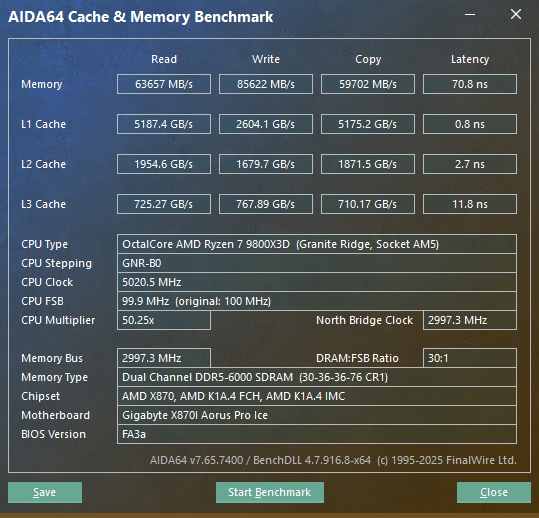
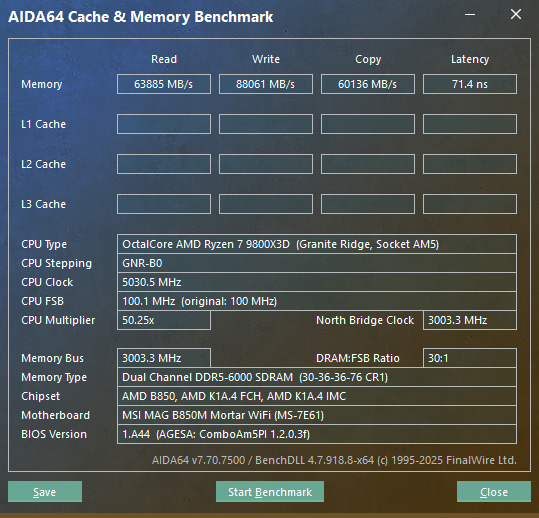
im sure i could tweak more. just havent had time.
 

Attachments

  • cachemem.png
    cachemem.png
    247.2 KB · Views: 0
  • ZenTimings_Screenshot_29318397.7542533.png
    ZenTimings_Screenshot_29318397.7542533.png
    36.6 KB · Views: 0
The last couple of AGESA fixed an issue with A-Die.. so now Aida is kind of sucky for latency. But R/W/C got a boost.
 
Back
Top