• Some users have recently had their accounts hijacked. It seems that the now defunct EVGA forums might have compromised your password there and seems many are using the same PW here. We would suggest you UPDATE YOUR PASSWORD and TURN ON 2FA for your account here to further secure it. None of the compromised accounts had 2FA turned on.
    Once you have enabled 2FA, your account will be updated soon to show a badge, letting other members know that you use 2FA to protect your account. This should be beneficial for everyone that uses FSFT.

8800GTS temps

Joined
Mar 30, 2007
Messages
24
Just curious, what are your guys' idle/load temps for a 640 8800GTS? I have an evga (stock speeds atm), and I'm concerned about upping the clocks because of my temperatures. nVidia monitor gives me 65C idle and this doesn't seem good. My system is at 34 and cpu is at 39. I'm not totally sure about load temps but its at least 75C. Do GTS's usually run this warm? Am I OK in upping it to the SC'd clock speeds?
 
That might be just a bit high.
Usually the cards idle in the uppers 50s.

But hitting 80C+ at load with these cards is not uncommon.
You don't really need to worry unless you get over 100C at load.
Even at this temperature you should still be safe.
 
Idle can be so dependent on airflow in the case, etc. LOAD temps matter much more. On an overclocked GTS, seeing 85c load temps is nothing to worry about, at all. Once you start approaching or crossing 90c, I would consider fixing that....

My GTS at 600/1850 idles at 60c with the fan at 80%, but only hits max load temps of ~75c in CoD2 at 1920x1200 with 4x AA and pretty much maxed IQ.
 
You should try a more GPU intensive game like FEAR or Oblivion and see if your load temps are any higher.
 
Mine idles in the low 40's, never breaks goes past 50 under load. Stock 640 MB 8800GTS from Evga, stock cooler. $30 POS rosewill case.
 
idles in the low 40's? LOL, I need a picture to believe that. What do you live on the North Pole?
 
My card idles at 52c mostly. Loads at 67 or 69. But 65 idle.. is the fan spinning?
 
The fan is blowing, but it seems pretty weak. You can't feel any vibrations touching the fan housing and I can barely feel warm air being blown out the back (idling at 63C). I usually have a 80mm chassis fan blowing air onto the card from outside the case. When I take the side panel off (and the 80mm fan with it), I idle at 58C. Think its worth RMA'ing? I got it at the egg and I want to OC eventually.

Also, not sure if this helps but I have a green PCB version, not black like the one shown on newegg. I'm not sure, but I think I remember reading somewhere that this means I have one of the early ones? Correct me if I'm wrong.

Oh and my basement is pretty cold, esp. for May, so it can't be ambient temps causing probs
 
So I tried to get a good load temp and with NO OC'ing of any components, nvidia monitor told me my GPU temp was 77C, but the only real graphics intensive game I have atm is Rainbow 6: Vegas. So I played for about 25 minutes (all the time I had for now) at 12x9 resolution, all the settings turned up although admittedly there are few ingame settings, and thats what I got. I appreciate your feedback.
 
its not unusual. the temps are slightly high. Mine idles around 50 and tops out in the 70 area.
but i can never hear the fan and dont feel much air out the back...the few slits near the end let most of the air out inside the case and not much makes it all the way out the back. Kind of silly but normal. I usually check now and then to see if the fan is running since its so quiet.
you can crank the fan all the way up to 100% to cool it better....or add a $10 large slot cooler
 
so i tried leaving my 80mm chassis fan unplugged and now my load temp is 67C...and idles around 52C. Does this make sense to anyone else? I ran the same game, same settings, same amount of time.

One thing I had considered was negative pressure around the card, but the fan was blowing air into the case, onto the card, not away from it. Plus its only a small 80mm....so wth? I suppose I'll just have my single 120mm case fan to do most of the air circulation and leave out the 80mm for now...Any ideas on what the heck is going on?

Oh and 2 more questions:

1) does the green PCB have any significance to me? Besides, obviously, being green?
2) how do I change the fan speed? I can see it in nTune, but it wont let me change it...Thanks
 
[ T ] A C O;1031060295 said:


See my post above with pic. And after I posted it, it dropped 1 more degree...so right now i'm sitting at 42C
 
Hey just picked up a BfgTech 8800Gts 320 and when i was gamming after i installed all propper drivers 158.22 and after 1hour my temps on card shut me down......I didnt know that the 3d fan setting was not even kicking in under my 3d apps....It was set to idle by default by the Nvidia Driver...Its not even funny how bad the Ntune fan settings are and the fact that i Have to use Rivatuner to Make my New Card stable at stock speeds......Wow is all i can say..

Destipe that i Run RIVATUNER Low level fan setting to 100% and my fan settings option for 2d 3d and low level at100% and now am stable at 49idle and 67c at load after 3hours of gamming...

For people who havent used rivatuner i will post some pics of what to click for the fan settings if this helps ...

Rivatuner3.jpg


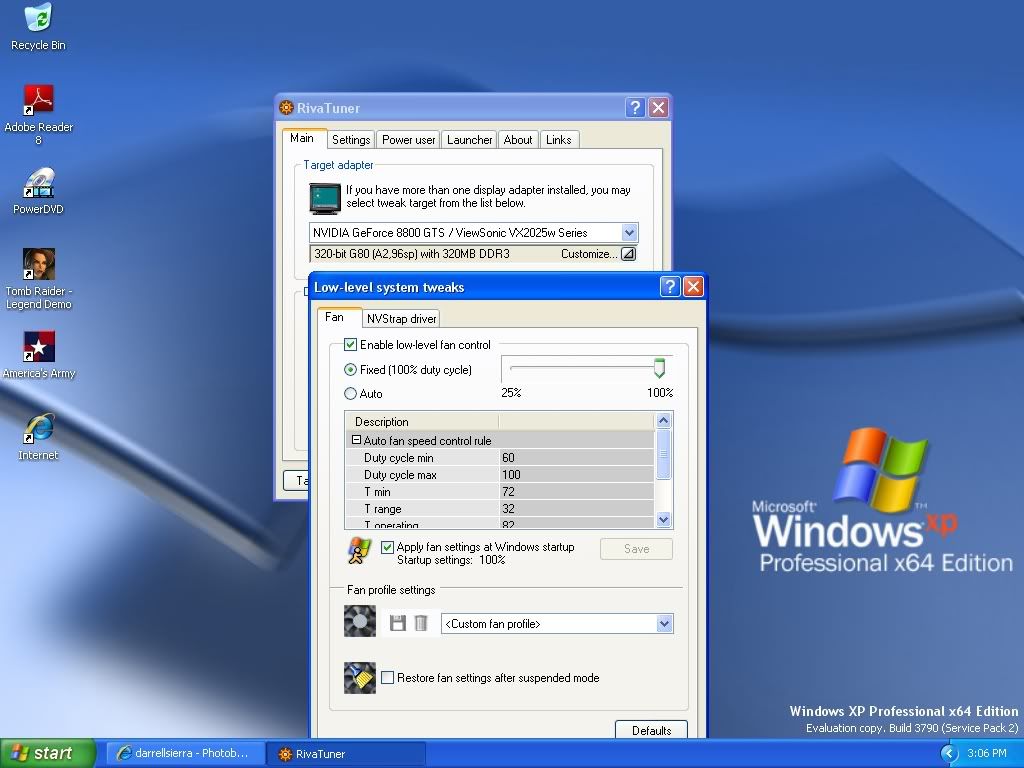
Click on the Customize button in the first dark shaded box ....then a new option will appear and click the first box looks like a video card and click the Video Card you then should have the next screen below

Rivatuner.jpg


Then Check( Enable Low Level Fan Control)!!! and set to 100% then check (apply fan settings at Windows start up) then apply settings at bottom of page .

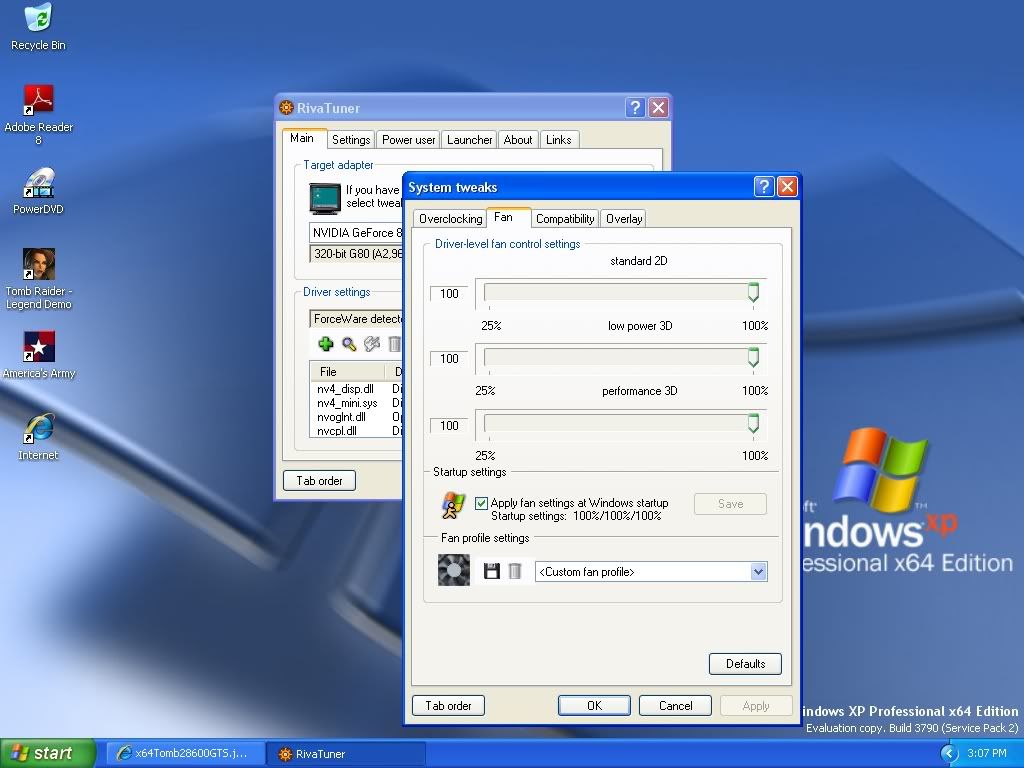
Next you will select the Customize button in Display settings

Rivatuner3.jpg


Again check the lil( videocard first box) that comes up when you click on the customize button...you will then see this screen shot below..

Rivatuner2.jpg


Ok i set my fan setting to 100% dosnt hurt your fan is not loud at all and will Let your card live ....Make sure you check the (Apply Fan Setttings at Windows Startup)100%100%100% the %will read what ever you set them too!!!

I did not save any fan profiles you can if you wish but it will load every time Remember this is for the Fan settings only and used Ntune to Overclock my card too 651/1650 and works great ...I have Antec Tower with 4x80fans intake and 2x120 fans exaust with a vented side panel my board was always at around 32c idle and cpu 27cidle Gpu 49cidle after system has been on for over 5hours:D

ntune.jpg


For the best of us the cooling on the GTS is very good except for the lil vents and Nvidia not making sure thier drivers work so your card dosnt fry...I know they run hot but drivers are everything in my book..Hope this helps..i would not of even botherd to check my cards fan if it didnt overheat!!!!!My case has a small hurricane inside so cooling i knew i hadplenty of....:cool:
 
My EVGA 8800GTS 320MB SC idles at 59/60C and under load it only gets up to 65C. It used to get higher under load until I added the Antec 'super cyclone' blower to remove the hot air under the card coming out of the slots:

 
nice rig .....i wish a had digatal camera that worked!!! yeah case cooling is a must..i have a side panel that i drilled out and have my fans pull fresh air in that blows over my 8800gts and out the back of my case ...My air intake flow is so strong that you can feel it suck the air into the case ....The exaust is about the same air flow going out the back..
 
1) does the green PCB have any significance to me? Besides, obviously, being green?
2) how do I change the fan speed? I can see it in nTune, but it wont let me change it...Thanks

1. The green PCB signifies a newer card. A few months after production began Flextronics switched from a black PCB to a standard green PCB. There are no other appreciable design differences in the card otherwise.

2. nTune has gradually become less and less useful with each release. I suggest RivaTuner.
 
I'm not hearing any shit talking about my temps now, lol.
 
well lets take a look at your screenshot...

http://img341.imageshack.us/my.php?image=tempsry8.jpg

it says the DIODE its @ 51c... you gotta look at the GPU diode thats where everyone looks... otherwise i could tell you my card is idling @ 34c... when the diode its @ 42c, and i have an aftermarket cooler HR-03 PLUS and thats with a 92mm fan @ 1250rpm when it should be doin 2600rpm ^_^

 
I'm not hearing any shit talking about my temps now, lol.

Post a pic of your case & setup; that little screen doesn't do much for me. And I still don't believe that's the actual temp of your card, comeon, you'd be the only one with temps that low.

NORMAL TEMPS are 58-63 idle and around 79-82 @ load; assuming the ambient temps are around 78F
 
Post a pic of your case & setup; that little screen doesn't do much for me. And I still don't believe that's the actual temp of your card, comeon, you'd be the only one with temps that low.

NORMAL TEMPS are 58-63 idle and around 79-82 @ load; assuming the ambient temps are around 78F

its cos hes not lookin at the diode temps... thats where everyone looks at.... my DIODE doesnt hit 50c under full load... with my HR-03 PLUS, and with stock cooling it wouldnt hit 70c.... even overclockd... no1 looks at the gpu temperature they all look at the diode...
 
Hi guys just wanted to chime in on this discussion on the 8800's. My Evga @ 612/2016 as I type this 100% fan speed is idle 59C. It's 65 F outside right now. For comparison my Athlon 64 3700 @ 2508 is idle at 29C with all my case fans at miniumum. I really find it hard to believe without AC that any 8800 at any speeds will be able to hit 40-50C. I have had my windows open when it was feb and it was like 30's outside and this thing still never dipped into the 40's. They run hot pretty much across the board. Not calling anyone a liar or insinuating that anyone is not telling the honest truth I just find it hard to believe any of them run that cool without artificial cooling of any sort. Right now according to Everest my 8800 temps are as follows
GPU 48C/118F
GPU DIODE 59C/138F
GPU MEMORY 48C/118F
GPU AMBIENT 44C/111F
 
damn you gonna make me post pictures of my case :(
coolermaster stacker


stock cooling idled at 55c being round 75F in my room


here i was puttin the HR-03 PLUS


HR-03 PLUS INSTALLED


IN MY CASE


CLOSE-UP


overclocked idlin' @ 44c =) goes down to 42c when @ stock speeds
 
I think he was talking about stock cooling... obviously the Thermalright beast of a cooler is going to do a much better job of it ;)

Mine usually doesn't idle any lower than 55C when it's cool... but it doesn't always get super-cool here. I'm reinstalling RivaTuner to try and turn on 100% fan again and see what happens... but I don't know about you guys, but I find the fan LOUD! I mean it's not like a train going by, but it's definitely noticeable. Maybe if I just get used to it....
 
Thanks for the pics that's a sweet setup. Nice choice on the Aerocool fan. I swear by them. Congratulations and thanks for showing it off I really only was hoping for ya to show some pics as by your sig it sounded pretty excellent. Have a great day and happy gaming to you all :) :) :) :)
 
summer is no good in Vegas for any card.

my 8800GTS is getting warm.

Any news if the CoolViva Pro will have a revision soon to work on 88xx models?
 
Thanks for the pics that's a sweet setup. Nice choice on the Aerocool fan. I swear by them. Congratulations and thanks for showing it off I really only was hoping for ya to show some pics as by your sig it sounded pretty excellent. Have a great day and happy gaming to you all :) :) :) :)

Man that heatsink takes up some slots there holy wow :eek: :eek: :eek: :eek:
 
I'm not sure but if I stuck that in my case I think I would have to say bye-bye to my sound card....

Aldaris, I'm just curious... the fan you have on that HR-03.... is that blowing up towards the video card or pushing it down into the case? If I had that I might think about trying to mount the fan on the right side of the heatsink, open up those PCI-slots and have all the air pushing out the case, might even give you a PCI slot back. But that's just me because I want my sound card :p
 
I'm not sure but if I stuck that in my case I think I would have to say bye-bye to my sound card....

Aldaris, I'm just curious... the fan you have on that HR-03.... is that blowing up towards the video card or pushing it down into the case? If I had that I might think about trying to mount the fan on the right side of the heatsink, open up those PCI-slots and have all the air pushing out the case, might even give you a PCI slot back. But that's just me because I want my sound card :p
the fan is blowing TOWARDS the video card, i wanna have it like that, cos its coolin the memory heatsinks while its coolin the video card :eek:
hmm yeah i woulda done that ...the thing is that you see that lil card above my video card? thats the MOBO soundcard, i think that if i "sandwich" the card between the heatsink first i wouldnt be able because of the NB heatsink 2nd because of the CPU heatsink 3rd because of the mobo sound card, and 4th because i want the fan to cool the video card ram heatsinks :eek: but yeah, id be sweet that i could have a pci-e slot back :(
 
the fan is blowing TOWARDS the video card, i wanna have it like that, cos its coolin the memory heatsinks while its coolin the video card :eek:
hmm yeah i woulda done that ...the thing is that you see that lil card above my video card? thats the MOBO soundcard, i think that if i "sandwich" the card between the heatsink first i wouldnt be able because of the NB heatsink 2nd because of the CPU heatsink 3rd because of the mobo sound card, and 4th because i want the fan to cool the video card ram heatsinks :eek: but yeah, id be sweet that i could have a pci-e slot back :(

What if you got a bigger fan, probably a 120mm would fit nicely, blow across the video card and the whole heatsink? It might even cooler better if it's ALL getting exhausted out the case.
 
Nice! And hopefully it's a bit cooler. If it didn't help with the cooling of the video card, I would think it could at least shave a couple degrees off the inside of your case.
 
my.php


You asked for DIODE to show low 40's, I give you just that. :D Stock cooling, $30 Rosewill case

And I might mention my CPU temp as well, running at 3.14 Ghz on the stock cooler at 1.3375 Volts...and ram at 1150 Mhz @ 2.3V 5-5-5-15 :)
 
my.php


You asked for DIODE to show low 40's, I give you just that. :D Stock cooling, $30 Rosewill case

And I might mention my CPU temp as well, running at 3.14 Ghz on the stock cooler at 1.3375 Volts...and ram at 1150 Mhz @ 2.3V 5-5-5-15 :)

You are a god :eek:

So you live in Antartica?
 
Heh, nope. I'm just awesome....you see, I realize that you people think that you have to buy these expensive ass ($150+) cases (i.e. fatality case, antec p180's, etc.) to achieve maximum cooling capacity. This is infact not true, I spent a small ($30) amount of money on my case but I maximized the value by looking at placement and number of fans. I have 1 single 120mm fan as exhaust, and 2 side intake (1x80mm and 1x120mm) fans and it's a decent looking case as well. This is all on stock air cooling that I have achieved these numbers. For my CPU I plan to get a Scythe and that will be the maximum extent of my purchase for cooling...simply because the stock intel coolers really suck, I am thoroughly amazed that I've gotten the clock that I have (stable) out of my current cooler. And for the record I live in Texas, and those who live in texas know just how hot it gets down here.
 
Back
Top