• Some users have recently had their accounts hijacked. It seems that the now defunct EVGA forums might have compromised your password there and seems many are using the same PW here. We would suggest you UPDATE YOUR PASSWORD and TURN ON 2FA for your account here to further secure it. None of the compromised accounts had 2FA turned on.
    Once you have enabled 2FA, your account will be updated soon to show a badge, letting other members know that you use 2FA to protect your account. This should be beneficial for everyone that uses FSFT.

7970 Purchasing Thread

Zarathustra[H];1038356090 said:
yeah, Newegg is all out now. So annoying.

The fact that I had to RMA my Gigabyte card has set back my plans completely.

The card is currently marginally usable (but it overheats if you look at it wrong, and has constant image signal issues on the DVI port).

I called in my RMA with Newegg last Friday, and I only have 7 days to ship it, so come Friday, I will be without a video card (already sold my old ones), and I can't seem to order a replacement. So annoying.

what kind of signal issues?
 
Clean install of windows finally for that just out of the box experience.
I am loving it!
So on a old install the drivers were flawless and now on a fresh install they still are.
Gotta say everything is running better even GTA4 finally.
 
what kind of signal issues?

Check out these two video's:

Its a huge issue in person, but due to the closeness of black and blue, not as apparent in the video's.

Watch in high res.

Gigabyte Video 01

Gigabyte Video 02

If I leave ity long enough the monitor eventually just says "signal out of range". It's repeatable across multiple monitors.

This is primarily why the card is going back.

Something really messed up with it.
 
Zarathustra[H];1038356829 said:
Check out these two video's:

Its a huge issue in person, but due to the closeness of black and blue, not as apparent in the video's.

Watch in high res.

Gigabyte Video 01

Gigabyte Video 02

If I leave ity long enough the monitor eventually just says "signal out of range". It's repeatable across multiple monitors.

This is primarily why the card is going back.

Something really messed up with it.

Suck. Does it do it on the desktop too?
 
Suck. Does it do it on the desktop too?

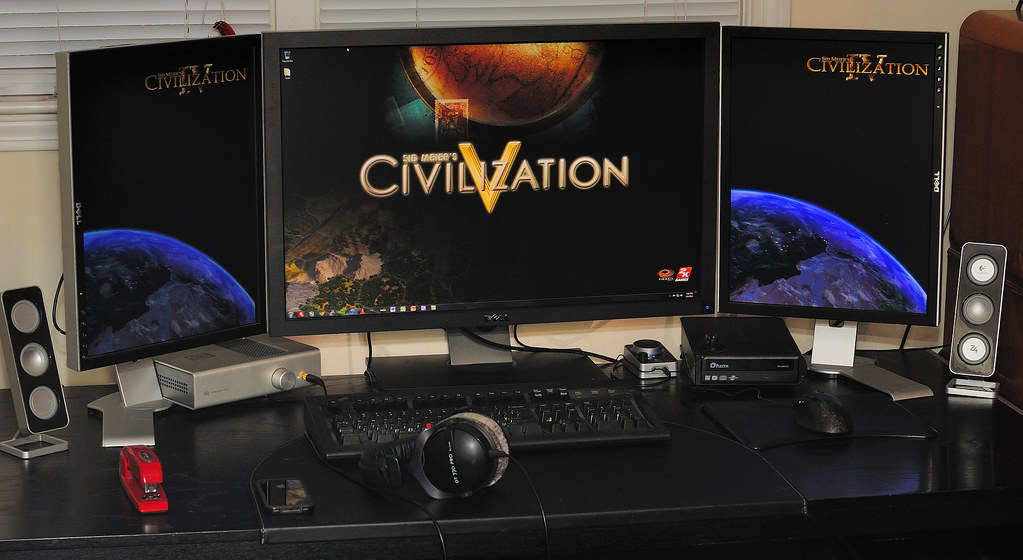
That - in the video - is my right side monitor desktop. Like in this pic:

6663592717_ea3020d8ec_b.jpg


It does it over DVI, but not over DP. My center monitor is DP, but my side monitors are both DVI/VGA only. My plan was to hook up one side monitor to the DVI port, and another to the HDMI port using a DVI adapter. I don't have an HDMI adapter yet though, so I don't know if the HDMI port is problematic as well.
 
Is Diamond a decent brand? How's their return/RMa process? I've never owned one, though it looks like they have a 5 year warranty....
 
I got a little too excited and like an evening with my girlfriend blew my wad (of cash) on that Diamond in stock.

Now the hard part is what to do with my 570s...
 
EDIT: On second thought, cancelled the order. I gotta get something with more than a 2 year warranty if I'm gonna spend that kind of money. Gogo waiting game...
 
Last edited:
Yep, just noticed the Sapphire is back in stock. Picked one up, I can handle $559. It just seems like so much less than $599 for some reason...

Never owned a Sapphire card before either. Seems like they're pretty common - hope they're okay!

Yeah I don't know about that, $40 when your already spending $560 is sort of like pinching pennies when your pulling out a wad of hundreds but that's just me lol.
 
Zarathustra[H];1038358438 said:
So how do you guys feel about Sapphire.

I'm not really familiar with them, and have never owned anything of theirs.

Their AMD's #1 board partner shipping more GPU's than the others combined and offer a solid 2 year warranty. Only other brand I'd take over them would be ASUS.
 
Arrgh. I have a Sapphire 7970 in my cart to complete my Xfire set (I had a pair in Xfire initially but I gave one to my brother), but it seems the Sapphire toxic/atomic models are coming out early March just before CeBit.

Sneak peek:
CardB.jpg
 
Anyone know when there will be stock ? they seem to be sold out everywhere, Id settle for a couple of XFX 7950s but cant find those either.
 
I'm waiting for an Asus model to be in stock in Canada, or that Gigabyte model with two actual DP ports, not shitty miniDP that give nothing but trouble. I have a triple U3011 setup and I don't want to mess with adapters that work half the time.

Is Asus going to release a DirectCUII model of the 7970 with DP ports as well?
 
Is gta4 supported now? I had an issue when it came out. It wouldnt recognize 3gb.
You have to use a command line to unrestrict memory usage.
I had the same issue with both Steam and stand alone copies of GTA4.
Which version do you have?
 
My beautiful closet of New Egg Goodies!
I hate to sound like a Mc Donalds commerical but Im loving it.
Phone030.jpg
 
I've got one of the XFX Black editions on back order from Amazon for 579...

They are saying March 10 though.

Oh well. At least drivers might be out by then.
 
I've got one of the XFX Black editions on back order from Amazon for 579...

They are saying March 10 though.

Oh well. At least drivers might be out by then.

LOL, don't hold your breath.
 
Just purchased 2 7970 from newegg...should i be worried? I play bf3, skyrim, gta4. not sure if i should just return one and keep one? im so lost. not sure if its worth all the hassle.
 
Just purchased 2 7970 from newegg...should i be worried? I play bf3, skyrim, gta4. not sure if i should just return one and keep one? im so lost. not sure if its worth all the hassle.

I would say a lot depends on your monitor size and resolution.
 
I would say a lot depends on your monitor size and resolution.

Thats the thing i currently have a dell u2412 1920x1200. but i would like to max everything out in bf3 on ultra. i had one 7970 before but it was too laggy for me. it would be anywhere from 35-65 fps. i would like it as smooth as possible. im aiming towards 60fps avg at 1200 on ultra with 4xaa etc.
 
Thats the thing i currently have a dell u2412 1920x1200. but i would like to max everything out in bf3 on ultra. i had one 7970 before but it was too laggy for me. it would be anywhere from 35-65 fps. i would like it as smooth as possible. im aiming towards 60fps avg at 1200 on ultra with 4xaa etc.

Adding SLI/Crossfire usually isn't very helpful on multiplayer FPS games.

You might actually wind up with a worse experience, instead of a better one. The problem is AFR. It's the worst idea in video cards ever.

Video card manufacturers use AFR cause it scales better, but the truth is it is a fake higher FPS. It looks smooth to the eye due to the higher frame rates, but input and rendering lag go up due to the concurrent renders on both GPU's, and thus winds up feeling less responsive when played in many cases.

This review of the ATI Rage Fury from 1999, one of (if not the) first dual GPU video cards, compared to the Geforce 256 a stronger single GPU board illustrates the issue:

lag.gif


If hardware game developers really cared, they would instead develop for one of the many split screen render methods methods (Nvidia's SFR or AMD's Supertiling are two examples). They don't do this though, because it doesn't scale as well.

AFR = You can get almost 100% scaling with SLI/Crossfire, but suffer from crippling lag
SFR/Supertile = Scaling is significantly lower, but it is every bit as smooth as a single GPU.

SFR/Supertile is clearly the better method, but because marketing people run the show, and not engineers, we get AFR instead :rolleyes:

You can force SFR in Nvidias drivers, or supertile using RadeonPro in for AMD boards, but a lot of the time this leads to instability or improper rendering as the games aren't designed/tested for it. In some rare cases it may be useful though.

For games where lag may not be as much of a concern (Strategy, Single player FPS games, etc.) this may not be a bad solution, but for fast paced multiplayer FPS's I've pretty much given up on SLI/crossfire.

On top of the above add all the incompatibility issues with crossfire/SLI issues and I would just stay away all together.

IMHO you'd be much better off spending the money spent on the second video card on some sort of extreme cooling and going for a more aggressive overclock, than doing SLI/Crossfire as it stands today.

Personally I have been using two 6970's in crossfire for about a half a year now. I sold one of them the other day (other being sold as well) and I now have a defective 7970 which is being RMA'd. I plan on replacing it with a good 7970, and then modding it to be cooled with a Corsair H80 as well as aftermarket ram and VRM sinks. I'm hoping this will allow me to clock it high enough that I will be happy with just one GPU, and then I will not have to deal with lag or crossfire profile incompatibility.

If it isn't enough for the games I play at 2560x1600, I may reluctantly add a second GPU later, but for now I'm hopeful!
 
Last edited:
If price is the same (which it is for me) between the Gigabyte OC 7970 and the Asus DCU2 Top edition, which version would you guys go for?
The only disadvantage for the Asus card I see is that it's triple slot instead of the Gigabyte's dual slot, not a huge concern for me since my 3rd slot is a PCI slot which I'd never use anyway.
 
If price is the same (which it is for me) between the Gigabyte OC 7970 and the Asus DCU2 Top edition, which version would you guys go for?
The only disadvantage for the Asus card I see is that it's triple slot instead of the Gigabyte's dual slot, not a huge concern for me since my 3rd slot is a PCI slot which I'd never use anyway.

The gigabyte has a blue pcb and the asus has a black pcb. And from the review posted just a few days ago the gigabyte might not be a reference card, so possible watercooling issues (unlikely since you're paying for the extra cooler anyway).

I'd personally go for the Asus since it will have no problems watercooling in the future, and it has a black pcb because I care about what my components look like. And apparently Asus doesn't use foxconn for their manufacturing so no thought of slave labor.
 
If price is the same (which it is for me) between the Gigabyte OC 7970 and the Asus DCU2 Top edition, which version would you guys go for?
The only disadvantage for the Asus card I see is that it's triple slot instead of the Gigabyte's dual slot, not a huge concern for me since my 3rd slot is a PCI slot which I'd never use anyway.
Both seem to have there trade offs when it comes to cooling. It's really up to you if need the extra slot.

The gigabyte has a blue pcb and the asus has a black pcb. And from the review posted just a few days ago the gigabyte might not be a reference card, so possible watercooling issues (unlikely since you're paying for the extra cooler anyway).
Well for the DirectCu there is only 1 full cover block coming at least for now.
 
Both seem to have there trade offs when it comes to cooling. It's really up to you if need the extra slot.


Well for the DirectCu there is only 1 full cover block coming at least for now.

Yeah EK is the only company that makes it. And the DC2 has a backplate, so a little extra for the money.
 
If price is the same (which it is for me) between the Gigabyte OC 7970 and the Asus DCU2 Top edition, which version would you guys go for?
The only disadvantage for the Asus card I see is that it's triple slot instead of the Gigabyte's dual slot, not a huge concern for me since my 3rd slot is a PCI slot which I'd never use anyway.

Coming from a two Asus DCII 6970 crossfire setup, I'll lend my opinion.

Asus Advantage:
4 DP ports and (perfect for Eyefinity setups avoiding tearing caused by different display port types)
Two DVI ports
Noise levels
cooling capacity

Gigabyte advantage:
2 slot design
Possibly OE board layout, in case of future watercooling.

The three slots don't seem like a big issue at first, until you try to run crossfire.

It was rather difficult to find a motherboard this would work well on. Far too many motherboards don't have their 16x slots lined up in a way that this will fit on the motherboard (first card doesn't cover second slot), or in the case (second 16x slot too close to edge of board to fit in 8 slot case.)

If you think you might go crossfire some day, or if you might watercool some day, I wouldn't choose the Asus, otherwise its the Asus hands down.

The Asus may be more expensive for the board itself, but if you consider that you might have to buy adapters for the Gigabyte, it can actually wind up being cheaper.

For me, I have two monitors that accept DVI/VGA only and one in the center that accepts everything I can think of (VGA, 2 DVI, 2 HDMI, DP, Component).

On my DCII board I had the two DVI ports hooked up to my side monitors, and the DP hooked up to the center one.

When I picked up a Gigabyte board I had to buy a mini-DP to DP converter and a HDMI to DVI converter so that I could hook up one DVI monitor to the DVI, one to the HDMI and the center to one of the mini-DP plugs. Since I was in a hurry I bought them locally at microcenter for a total of ~$50...
 
Last edited:
If price is the same (which it is for me) between the Gigabyte OC 7970 and the Asus DCU2 Top edition, which version would you guys go for?
The only disadvantage for the Asus card I see is that it's triple slot instead of the Gigabyte's dual slot, not a huge concern for me since my 3rd slot is a PCI slot which I'd never use anyway.

Not sure about Asus, but Gigabyte does serial number based warranty, so that's an advantage for reselling the card later.
 
Zarathustra[H];1038365226 said:
Coming from a two Asus DCII 6970 crossfire setup, I'll lend my opinion.

Asus Advantage:
4 DP ports and (perfect for Eyefinity setups avoiding tearing caused by different display port types)
Two DVI ports
Noise levels
cooling capacity

Gigabyte advantage:
2 slot design
Possibly OE board layout, in case of future watercooling.

The three slots don't seem like a big issue at first, until you try to run crossfire.

It was rather difficult to find a motherboard this would work well on. Far too many motherboards don't have their 16x slots lined up in a way that this will fit on the motherboard (first card doesn't cover second slot), or in the case (second 16x slot too close to edge of board to fit in 8 slot case.)

If you think you might go crossfire some day, or if you might watercool some day, I wouldn't choose the Asus, otherwise its the Asus hands down.

The Asus may be more expensive for the board itself, but if you consider that you might have to buy adapters for the Gigabyte, it can actually wind up being cheaper.

For me, I have two monitors that accept DVI/VGA only and one in the center that accepts everything I can think of (VGA, 2 DVI, 2 HDMI, DP, Component).

On my DCII board I had the two DVI ports hooked up to my side monitors, and the DP hooked up to the center one.

When I picked up a Gigabyte board I had to buy a mini-DP to DP converter and a HDMI to DVI converter so that I could hook up one DVI monitor to the DVI, one to the HDMI and the center to one of the mini-DP plugs. Since I was in a hurry I bought them locally at microcenter for a total of ~$50...
I would actually prefer the Asus if you're doing WC+Crossfire, at least for the 7970. The EK DirectCu blocks should be coming with the 2 slot brackets included.

Not sure about Asus, but Gigabyte does serial number based warranty, so that's an advantage for reselling the card later.
Both are based on serial #.
 
Thanks for all the feedback guys.
I'd probably never do WC, at least not on this card, as by the time I decide to go to a true WC solution, I'll be using a new video card.

I might actually go CF since I recently moved to a new high res monitor, so there is a possibility of needing to go dual down the road. My case is the Corsair 650D, so I think it should fit another DCU2, but really, there's nothing saying that I have to go with another DCU2 for CF down the road.

Again, price is exactly the same on the 2 cards for me at $600, and I've ordered both, but will cancel the one I don't want. It looks like I'll have the Asus first (early next week), so I may stick with it.
 
Back
Top