6GB vs 8GB gaming

Status
Not open for further replies.

polonyc2

Fully [H]
2FA
Joined
Oct 25, 2004
Messages
30,475
I see most people recommending 8GB system memory for gaming...or 4GB at a bare minimum...but I'm wondering if 6GB is theoretically the same as 8GB...meaning most people come up with the 8GB number because of quad channel or dual channel requirements...but for those (like me) with triple channel memory isn't 6GB pretty much the equivalent of 8GB?...or do I really need to upgrade to something like 12GB (3 x 4GB)?
 
Last edited:
I went from 6GB to 12GB because I noticed with the other crap I had going when I launched into some of the bigger games I was hitting close to max memory, ~5.6-5.8GB used.I haven't noticed any huge improvement, and it seems to comfortably use 6.5-7gb in even the most demanding games right now.

I could have easily turned off a few of the background programs, but I don't like too. If you don't run much in the background or don't mind turning them off I think you'll be fine with 6GB, otherwise I would lean toward 12GB.

Just my two cents!
 
Opinion seems equally divided, and complicated by RAM speed questions with memory controller (CPU) of choice and motherboard(?)s.

On a basic system doubtful.
With enough tabs open, or things like CAD or some photo manipulation probably.

One article says SSD endurance benefits from 16 GB or more memory.

AMD APUs benefit from 8GB over 4 GB, though how much under which circumstances is argued.

On an I3 laptop (2350m, integrated graphics) it "felt" to me going from 6 GB to 8 GB was worthwhile.

I will maybe use 16 GB on SSD builds ..
 
so which memory is widely considered the best at the moment?...G.Skill RipJaws, G.Skill Sniper, Corsair Vengeance etc?
 
Last edited:
i switched from 6 to 8 back when bf3 came out, noticed the stuttering i was suffering dissapeared
 
I went from 6 to 12 and have not noticed a thing.
I went from 8 to 16 to 24 and didn't notice much if any difference other than the pagefile is a lot smaller. I usually use around 10gb lately, so I think Windows is good at pagefiling the overloaded 2gb if it's just from a browser that isn't currently being used or something. I assume people who are truly multitasking and not just leaving programs open would see more benefit.

Though, overall, the system does feel faster since basically having a zero-size pagefile. Feels snappier than hell, actually, but I'd have to do back-to-back tests to be sure.

With two cores and only 8gb, I was getting stuttering while playing a game while also watching a video at the same time on a second screen. I'll have to lock down the extra cores again and see if there's any change now that the memory isn't maxed out. Would think it's just a CPU speed issue, but then again maybe memory plays a part.

Oh, and I used 4gb for a bit while swapping some parts and testing some things. Even with only having a few things open, I didn't like that.
 
I went from 4GB of DDR2-800 up to 8GB of DDR3-1600 and noticed no difference in gaming. Overall my computer "seemed" a little snappier but I think that was maybe me just thinking it was as I noticed no difference in benchmarks or anything measurable like that.
 
someone give me an opinion on the best memory manufacturer to buy some good DDR3 1600 memory
 
I went from 4GB ram to 8GB and barely saw a difference in gaming, but some aspects of computing ran out of memory.
I would put 6GB as the current minimum as long as you can maintain at least dual channel.

someone give me an opinion on the best memory manufacturer to buy some good DDR3 1600 memory
For Intel CPUs since Sandybridge, they are all the same for gaming.
You wont notice much if any difference going from CL6 to CL11 and 1600MHz to 2400MHz.

I had 4GB 1600MHz low latency GSkill and upgraded to 8GB CL11 2400MHz Kingston and cant tell the difference except when memory was running low.
 
someone give me an opinion on the best memory manufacturer to buy some good DDR3 1600 memory

I've had g.skill in the past and had good experiences with them, have some ballistix in one machine and they are doing well also. Have 16 gb of that low profile samsung memory, that stuff has been amazing... I think they have been discontinued though.
 
Used more Corsair sticks than I can count and never had a problem with any of them.

I'd have no problem using G Skill either. Always hear great things about them. Mushkin too.
 
This whole thread makes me want to cliff dive...

You have enough RAM as long as you don't run out.


Ram performance is tied to the benchmark you are running. Most of the time the performance difference between expensive ram and normal cost ram is less than 8%. Back when we all used DDR2 that was a different story. There are applications that are exceptions to the rule...but no one here is probably using any of them.
 
RAM is RAM has been the rule.
The latest chips are higher latency while faster speed.

Opinions I've heard is AMD benefits most from faster speed RAM, C Settings less important. Though claims were made to opposite affect with Samsung "wonder RAM."
Various articles appear to show 1866~2133 the best cost/performance choices.

Intel articles seem to favor 1600 as the sweet spot, c settings as low as possible.

In both cases people are looking for "more performance," how much difference it makes outside of benchmarks, I do not know.

I usually go for "name brand on sale." Though know whether you wish to overclock the RAM, and its reputation before hand.

Lately having no heat spreader sticking up to interfere with "cooler of choice" is the most serious concern.
 
Basically stick with what you have. Unless you are using all the ram up on a application/game. No need to spend money on something you don't need. Unless you want to get 16Gb or bigger and make a ram drive.

Faster ram helps out in synthetic benchmarks and memory intense applications {general people don't use these applications}. If you aren't doing HWBOT, then you will not be able to tell the difference between speeds. Save you money for a rainy day.
 
I personally would not be running with only 4GB these days.

When my 1366 setup was my main rig, I had 6GB initially but then went to 12GB. Even 6GB isn't really enough IMHO.

The more RAM you have, the less paging to the hard drive. Levels in games will load faster, and it will usually cache game resources.

Lower latency does make a marked difference in smoothness as well. FPS readings may not change much, but the whole sstem will be a bit snappier.
 
Lower latency does make a marked difference in smoothness as well. FPS readings may not change much, but the whole sstem will be a bit snappier.

This doesnt work as a blanket statement.
As you increase MHz, the overall latency drops because the whole memory read/write takes less time.
Faster ram that has higher latency values doesnt necessarily have higher overall latency, it might even be improved!

I tested 1600MHz CL6 at CL9 (using the built in standard and XMP profiles) and it felt no different, I was watching hard for a difference in gaming and general windows use considering thats up to a 50% increase in latency.
Latency used to matter more on socket 775.
 
I recently upgraded from 4gb to 16gb. There was a very noticeable difference. All stuttering in games are effectively gone.

As for 6 gb, I've monitored my system and it's has gone up to 7gb in usage. 8 should be fine though.
 
I recently upgraded from 4gb to 16gb. There was a very noticeable difference. All stuttering in games are effectively gone.

As for 6 gb, I've monitored my system and it's has gone up to 7gb in usage. 8 should be fine though.

placebo.gif


...or you have a fuckton of unnecessary shit running.
 
I made a thread about this. BF3 was stuttering and Planetside 2 was stuttering. If it wasn't I wouldn't go out and spend a hundred bucks for more ram.
 
I made a thread about this. BF3 was stuttering and Planetside 2 was stuttering. If it wasn't I wouldn't go out and spend a hundred bucks for more ram.

it still could have been a placebo...system memory is not the miracle worker it was years ago...for a game like BF3 the VRAM, CPU etc are much more important
 
it still could have been a placebo...system memory is not the miracle worker it was years ago...for a game like BF3 the VRAM, CPU etc are much more important

For something like the batman game which ran pretty fine before, then yeah it could be. But for those 2 games they were unplayable before getting the ram. Add to the fact that the usage went past 4 or 5 gb after I gave it 16.
 
I made a thread about this. BF3 was stuttering and Planetside 2 was stuttering. If it wasn't I wouldn't go out and spend a hundred bucks for more ram.

Memory usage is 2.5gb sitting at desktop. Memory usage running BF3 crept up to 3.8gb. You were running a fuckton of unnecessary shit, had a virus, tons of spyware, etc...or its placebo. Its ok, i wasted almost 100 bucks on more ram too.
 
Memory usage is 2.5gb sitting at desktop. Memory usage running BF3 crept up to 3.8gb. You were running a fuckton of unnecessary shit, had a virus, tons of spyware, etc...or its placebo. Its ok, i wasted almost 100 bucks on more ram too.

Yes that's the point of having a pc. So you can run a ton of programs. If you want to have to close your browser everytime you boot up a game and not have the option of listening to music, that's fine. Me? I like to be able to alt tab in and out of BF3 without my pc having a seizure.
 
This doesnt work as a blanket statement.
As you increase MHz, the overall latency drops because the whole memory read/write takes less time.
Faster ram that has higher latency values doesnt necessarily have higher overall latency, it might even be improved!

I tested 1600MHz CL6 at CL9 (using the built in standard and XMP profiles) and it felt no different, I was watching hard for a difference in gaming and general windows use considering thats up to a 50% increase in latency.
Latency used to matter more on socket 775.

I never said that lower latency slower RAM is going to be better than higher latency faster RAM.

I generally run my RAM at the highest Mhz I can achieve and then tweak the timings.

Also, the main timings aren't the only thing that affects latency at a given speed. The sub-timings have a lot to do with it as well.

In tweaking settings, I have been able to drop latency a decent amount as well as get a couple more GB/s throughput by adjusting the sub-timings.

Another thing is that latency settings are not equal at different speeds.

The latency settings are in ticks/clock cycles.

So at 1600, 9 clock cycles is a lot longer than 9 clock cycles at 2400.

I had actually made a chart up quite a while back and posted it here. That was probably over a year ago now.

edit:
My old chart had to do with latency settings and uncore speed on the LGA1366 platform, so not super suited for this discussion.

In any case, this should give you an idea of latency at different speeds.

With DDR3-1600 you are getting 1.6 clock cycles per nanosecond. So CL9 (9 clock cycles would be 5.625ns)
With DDR3-2400 you are getting 2.4 clock cycles per nonasecond. So CL9 (9 clock cycles would be 3.75ns)

For another example, CL13 2400Mhz (5.416ns) is less latency than CL9 at 1600Mhz (5.625ns)
 
Last edited:
The difference between 6GB and 8GB of RAM for gaming, all other applications or resident programs aside, is probably meaningless.

On the other hand, more RAM for other fun things is always a good thing. RAMDisks are awesome, for instance :)
 
BTW

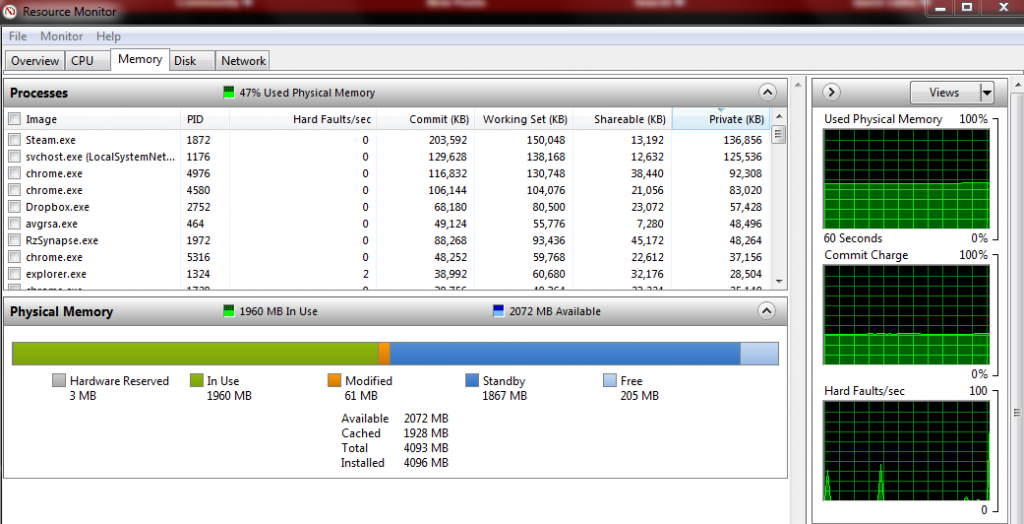
memory.png


Not much different from your idle readings. But after running one of those games it would be unplayable.
 
Yes that's the point of having a pc. So you can run a ton of programs. If you want to have to close your browser everytime you boot up a game and not have the option of listening to music, that's fine. Me? I like to be able to alt tab in and out of BF3 without my pc having a seizure.

Just opened 10 browsers, mem usage went up from 2.3gb to 2.4gb. Would still run BF3 just fine while not breaking 4gb. Wanna try again?

On top of that i opened, word, excel, powerpoint, windows media player, catalyst control center. Have steam, origin, msi afterburner running. 3.1gb at desktop to 4.23gb with bf3 running on top of all that. Wanna try again?
 
Never played planetside 2 so im not going to comment on that. Though 5gb of usage hardly seems to warrant 16gb total.
 
I mean, if you wanna have 4gb that's your call. I'm not forcing you to go spend money. I'm just saying in my experience it isn't enough.
 
Never played planetside 2 so im not going to comment on that. Though 5gb of usage hardly seems to warrant 16gb total.

Take note that this is a fresh install of windows 7. I just installed it yesterday and I only have PS2 installed. I might install bf3 later tonight and post the readings on that later.

And yes I agree 16 gb is overkill. That is why I recommended 8.
 
Yes that's the point of having a pc. So you can run a ton of programs. If you want to have to close your browser everytime you boot up a game and not have the option of listening to music, that's fine. Me? I like to be able to alt tab in and out of BF3 without my pc having a seizure.

for me when gaming I only have the game (and gaming client) plus FRAPS and at max maybe an open browser with a few tabs open...all that other shit is just wasting resources...now I see why so many people complain about performance in games, there probably doing something similar...I'm probably in the minority and don't like to overload my system (especially when gaming)...that's why I rarely have issues even with the most highly demanding games
 
1 each, but thats besides the point. Why do you need 10 browsers with multiple tabs open while playing a game?
Because I want to.

It's not beside the point. 10 browsers with multiple tabs is similar to one browser with 10 x multiple tabs.

One person's "fuckton of unnecessary shit" is another person's standard requirements.

My SSD drive even uses 1gb of memory for cache.
 
Because I want to.

It's not beside the point. 10 browsers with multiple tabs is similar to one browser with 10 x multiple tabs.

One person's "fuckton of unnecessary shit" is another person's standard requirements.

My SSD drive even uses 1gb of memory for cache.

It is completely besides the point. You might as well argue that you should be able to do video encoding while you play games. :rolleyes:
 
It is completely besides the point. You might as well argue that you should be able to do video encoding while you play games. :rolleyes:
The not beside the point was about only having a few browser tabs open. Just because you only want a few open doesn't mean everyone else is the same way.

As for encoding while playing a game, well, sure, why not. Some people do like to multi-task with their computers.

You might as well argue that few people need a quad-core or otherwise-strong CPU because the person could just do one task at a time instead. :rolleyes:

You also might as well argue that I should be twiddling my thumbs right now while waiting for this hard drive cloning to finish before I do anything else with the computer. Who wants to do more than one thing at a time with a computer anyway? :rolleyes:
 
I wonder what polonyc2 decided on doing? Since he hasn't replied, I will ask for a update. Hopefully to calm all the arguing down a bit in here. Everyone here has different pc hardware needs. Perhaps add, this is what I need to do the things I do on a pc to your point. Good luck on your choice op.
 
Status
Not open for further replies.
Back
Top