• Some users have recently had their accounts hijacked. It seems that the now defunct EVGA forums might have compromised your password there and seems many are using the same PW here. We would suggest you UPDATE YOUR PASSWORD and TURN ON 2FA for your account here to further secure it. None of the compromised accounts had 2FA turned on.
    Once you have enabled 2FA, your account will be updated soon to show a badge, letting other members know that you use 2FA to protect your account. This should be beneficial for everyone that uses FSFT.

6282 ES CPUs won't oc

Nilsch

n00b
Joined
Dec 5, 2012
Messages
50
I got such great help getting these up and running here that I'll try my luck again. :)

The rig has been folding and has been stable for days, so I thought I'd try to overclock it. The problem is, it just won't overclock at all. Nothing. No matter what I try, the rig reboots after a minute or so.

I use TurionPowerControl and installed it using this great walk-through: http://hardforum.com/showthread.php?t=1669698

To overclock, I started with FREQ=2800 and VCORE=1.0500 and and worked my way up to 1.2500 where I stopped, using this procedure each time (also checked that the freq actually changed after each try):
FREQ=2800
VCORE=1.0500
sudo TurionPowerControl -boostdisable
sudo TurionPowerControl -fo 1
sudo TurionPowerControl -set ps 2 vcore $VCORE freq $FREQ
sudo TurionPowerControl -set ps 1 vcore $VCORE freq $FREQ
sudo TurionPowerControl -set ps 0 vcore $VCORE freq $FREQ
sleep 1
sudo TurionPowerControl -fo 0

I increased VCORE with 0.0125 each time up to 1.25. At each try the machine rebooted after about a minute. Same thing for FREQ=3000.

Are my CPUs just not very OC-friendly, or is there anything I have missed or can do differently?

I run Ubuntu 10.10 and my setup is based on another excellent guide: http://hardforum.com/showthread.php?t=1601608 it is followed to the letter.

I needed to update the kernel, so I ran sudo apt-get install linux-generic, other than that nothing is changed.

Some background details:

Ubuntu 10.10
Motherboard: Supermicro H8QGI+-F Quad G34 new
CPU: 4 6282 ES with the following specification: "AMD Opteron ZS262660TGG45 ES 16Core 2.6GHz 16M/L3 Matches Opteron 6282". They are used off ebay from a seller another folder I know have had success with (truesys02).
RAM: 16 x KINGSTON 2GB 1600MHZ DDR3 CL9 HYPERX BLU, KHX1600C9AD3B1/2G
PSU: Chieftec Nitro Series BPS-1200C Bronze
CPU coolers: 4 x Noctua NH-U12DO A3 Socket AMD G34
SSD: INTEL 330 SERIES 2.5" 120GB

BIOS info:
Firmware Revision : 2.06
Firmware Build Time : Jul 25 2012 19:33:26

I loaded the optimized defaults and only changed the following:

Secure Virtual Machine Mode: Disabled
PowerNow: Disabled
CPB Mode: Disabled
Bank Interleaving: Disabled
Power Down Enable: Disabled
ECC Mode: Disabled, Have tried Basic as well
Headless mode: Enabled
WHEA Support: Disabled
NUMA Support: Enabled
 
Last edited:
I made a typo. Wrote that I started at 0.0500, should have been 1.0500. Corrected now.
 
I was afraid to go past 1.25, due to this comment:
You don't specify what motherboard you are using, but if you are going to have the vcore pushed up over ~1.25V, you will need to add heatsinks to the VRMs.
Here: http://hardforum.com/showpost.php?p=1039115983&postcount=6

So 1.1375 is a good starting point? Where should I quit? (I am afraid to damage anything...).

BTW: I went up to 1.25 with no luck.
 
Last edited:
Read through this thread. Lots of good info on tuning 62xx ES chips:

Thread

That't the thread I linked to where it said it's not safe to go past 1.25. As I have gone through all the vcores up to 1.25 with 0.0125 intervals without sucess for both 2800MHz and 3000 MHz, I don't know what to do next, if anything.
 
1.2000 should be more than enough for 3.0 GHz.

Make sure that CPB/Turbo are disabled, as well as PowerNow.

Check ht-retries before and after OC (both at load). Ideally with additional -i 1 parameter
(short refresh) given that machine doesn't survive long.

Examine temps (at load) as well.


What is your PSU?
 
CPB/Turbo and PowerNow are disabled (you can see list of BIOS settings I changed in original post).

I just downloaded and ran ht-retries, it did not report any non-zero values.

Temps were fine, below 40.

All HW listed in OP. PSU: Chieftec Nitro Series BPS-1200C Bronze

Do note that I can't even get it to run for more than a couple of minutes @2.8GHz with vcore=1.25
 
Last edited:
Now the tpc oc doesn't seem to work at all. I first tried to oc with Ubuntu 10.10, then installed 11.10 and tried there as -alias- was using 11.10 with such oc success. The behaviour reported above was similar for both 10.10 and 11.10.

Now, I reinstalled 10.10 and TPC doesn't seem to do anything. sudo tpc -l | grep "pstate 2" doesn't report any changes.

The oc script outputs this:
... (I deleted the start, as it is just more of the same) ...
All nodes all cores pstate 0 - set core voltage to 1.200 (rounded to 1.5500)
All nodes all cores pstate 0 - set frequency to 3000.000 (rounded to 1600)
*** -set parsing completed

Done.
Turion Power States Optimization and Control - by blackshard - v0.43
Those rounding numbers look strange, or is it supposed to be that way?

The freq were updated correctly when I ran sudo tpc -l | grep "pstate 2" before the last 10.10 reinstall. Sigh... Now what? :confused:
 
Did as you said and this time the output looked good, and the machine promptly crashed (FREQ=3000 and VCORE=1.2000). Didn't have time to copy and paste anything, but I used the same script as in my first post, just with the given FREQ and VCORE values.

I must have downloaded the wrong version somehow. I followed the instructions given here: http://hardforum.com/showthread.php?t=1669698 just copy and paste.

So, with that's out of the way. Why won't it overclock? :confused:
 
I just talked to -alias- who overclocked his 6276 to 3.7GHz. His theory is that I need reg/ecc ram for my ES cpus. He will loan me 4 and I will test with those, 1 for each cpu. If anybody has other suggestions, I will be grateful. It will give me something to do while waiting for the snail-mail. :).
 
Last edited:
I think musky should make an update for that post as soon as possible, many people were confused by it. The stock version of tpc won't work for OC of opteron 6200 (and even Opteron 6100) at all. All you need to do is downloading a tpc of tear's version.

Did as you said and this time the output looked good, and the machine promptly crashed (FREQ=3000 and VCORE=1.2000). Didn't have time to copy and paste anything, but I used the same script as in my first post, just with the given FREQ and VCORE values.

I must have downloaded the wrong version somehow. I followed the instructions given here: http://hardforum.com/showthread.php?t=1669698 just copy and paste.

So, with that's out of the way. Why won't it overclock? :confused:
 
Tear's binary is more up-to-date than the google code version, so I'd suggest running that if there are any issues.

To clear up any confusion, the google code version here does allow 62xx series CPUs to be overclocked, but has notable bugs that have been fixed in the SVN source as well as tear's binary.

Yes, you do want the VRMs actively cooled if you are above 1.25V.
No you should not need 1.25V to run at 3.0GHz.
What revision are you running? A0, B0, B1? Patriot has some Bulldozer Spicy chips that he could never get to overclock, what silicon spin you're running might help the overclocking process.

This is what works for my 6274 spicy chips.
Code:
#!/bin/bash
/usr/bin/TurionPowerControl -set core all pstate 1 frequency 3800 vcore 1.3750
/usr/bin/TurionPowerControl -htctemplimit 75
/usr/bin/TurionPowerControl -boostdisable
/usr/bin/TurionPowerControl -bst 1
/usr/bin/TurionPowerControl -nbfid 8

Code:
TurionPowerControl -l
Turion Power States Optimization and Control - by blackshard - v0.431

Main processor is Family 15h (Bulldozer/Interlagos/Valencia) Processor
        Family: 0xf             Model: 0x1              Stepping: 0x0
        Extended Family: 0x15   Extended Model: 0x1
        Package Type: 0x3       BrandId: 0x0
Machine has 4 nodes
Processor has 8 cores
Processor has 7 p-states
Processor has 1 boost states

Power States table:
-- Node: 0 Core 0
core 0 pstate 0 (pb0) - Boost PState Disabled
core 0 pstate 1 (p0) - En:1 VID:14 FID:22 DID:0.00 Freq:3800 VCore:1.3750
core 0 pstate 2 (p1) - En:1 VID:43 FID:6 DID:0.00 Freq:2200 VCore:1.0125
core 0 pstate 3 (p2) - En:1 VID:45 FID:4 DID:0.00 Freq:2000 VCore:0.9875
core 0 pstate 4 (p3) - En:1 VID:47 FID:2 DID:0.00 Freq:1800 VCore:0.9625
core 0 pstate 5 (p4) - En:1 VID:48 FID:0 DID:0.00 Freq:1600 VCore:0.9500
core 0 pstate 6 (p5) - En:1 VID:50 FID:12 DID:1.00 Freq:1400 VCore:0.9250

Code:
 TurionPowerControl -spec
Turion Power States Optimization and Control - by blackshard - v0.431

Northbridge Power States table:
------ Node 0 of 3
NbVid 33 (1.1375V) NbDid 0 NbFid 8 NbCOF 2400 MHz
Northbridge Maximum frequency: no maximum frequency, unlocked NB multiplier

Chips themselves
Code:
cat /proc/cpuinfo 
processor       : 0
vendor_id       : AuthenticAMD
cpu family      : 21
model           : 1
model name      : AMD Eng Sample, ZS222445TGG44_32/22/2_2/16    
stepping        : 0
microcode       : 0x6000425
cpu MHz         : 2200.094
cache size      : 2048 KB

Decoding Engineering Part Number
Code:
ZS222445TGG44

ZS - Server Engineering Sample
22 - 2.2 GHz
24 - ?
45 - ?
T - Socket G34
G - 16 Core
G - 16 MB L3
44 - Product Revision (B0)

So yours should look like: ZS26 ???? TGG43 for Rev A1 / TGG44 for Rev B0 / TGG45 for Rev B1
 
Last edited:
My conclusion on tpc is based on my experiences only and might be not comprehensive. Thank you for clarifying it.
A frequency of 3.8GHz is very nice. Is it achieved on a 4P rig?

Tear's binary is more up-to-date than the google code version, so I'd suggest running that if there are any issues.

To clear up any confusion, the google code version here does allow 62xx series CPUs to be overclocked, but has notable bugs that have been fixed in the SVN source as well as tear's binary.

Yes, you do want the VRMs actively cooled if you are above 1.25V.
No you should not need 1.25V to run at 3.0GHz.
What revision are you running? A0, B0, B1? Patriot has some Bulldozer Spicy chips that he could never get to overclock, what silicon spin you're running might help the overclocking process.
 
Only a 2P here.

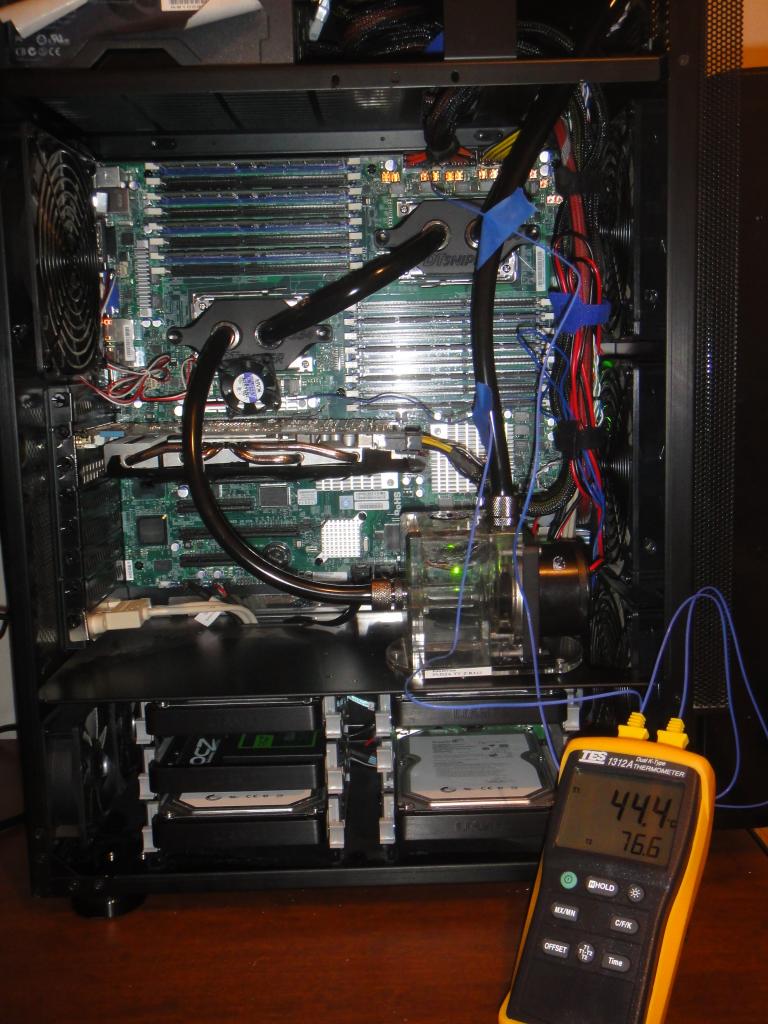
The thermocouple is measuring the temperatures of the VRMs. Note the Copper VRM heatsinks in the upper right and the 40mm fan above the video card.

WaterCoolingVRMTemps_Small.jpg
 
Chieftec Nitro Series BPS-1200C Bronze
Looks like a muti-rail design. With uneven 12V rails, too...

I couldn't find the mfr specs. Can you post a pic of (or describe) rail/cable distribution (of the whole PSU) ?
What is your current population of EPS12V slots in the motherboard (which slots are populated and with which cables) ?

It's most likely the PSU that's causing your issues, not the memory.

Do you have another PSU you could check? Ideally single-rail, 800W or more.
 
I'm >< this close to making a release of TPC what will obsolete all different versions out there...
Stay tuned.
 
There is one 24 pin cable and two 8 pin cables supplying power to the motherboard. The 24 pin and one 8 pin is fixed to the PSU, the second 8 pin needs to be inserted (it's modular). It only fits in one socket on the PSU.

There is a picture here and more information about it:
http://www.plugloadsolutions.com/psu_reports/CHIEFTEC_BPS-1200C_ECOS%20667.1_1200W_Report.pdf
http://www.chieftec.eu/en/psus/nitro-85-series/bps-1200c.html

I only have two other PSUs > 800W; one is the exact same type, and the other is same brand, but the 950W edition. The 1200W sits in a 4P 6172 rig, and the 950W in a 4P 6128, both of which I plan to overclock later with your OC BIOS.

The 950W has both 8 pin plugs fixed to the PSU. Specs for the 950W: http://www.chieftec.eu/en/psus/nitro-85-series/bps-950c.html

If the ECC/REG RAM I will borrow from -alias- doesn't improve things (I should have it in the mail tomorrow), I might buy a Corsair 1200W to check later. It doesn't hurt to have a spare, although expensive. I will keep you posted on the results. At least now I have two things to try out.

BTW, the rig is completely stable while folding on stock clock, it is only when overclocking I run into problems.

Looks like a muti-rail design. With uneven 12V rails, too...

I couldn't find the mfr specs. Can you post a pic of (or describe) rail/cable distribution (of the whole PSU) ?
What is your current population of EPS12V slots in the motherboard (which slots are populated and with which cables) ?

It's most likely the PSU that's causing your issues, not the memory.

Do you have another PSU you could check? Ideally single-rail, 800W or more.
 
Last edited:
There is one 24 pin cable and two 8 pin cables supplying power to the motherboard. The 24 pin and one 8 pin is fixed to the PSU, the second 8 pin needs to be inserted (it's modular). It only fits in one socket on the PSU.

There is a picture here and more information about it:
http://www.plugloadsolutions.com/psu_reports/CHIEFTEC_BPS-1200C_ECOS%20667.1_1200W_Report.pdf
http://www.chieftec.eu/en/psus/nitro-85-series/bps-1200c.html
Ok, so two 50A rails, presumably. Not terrible...

Determine which rail (or rails, hopefully) provide current to both your 8-pin connectors.
 
I am betting both 8-pin EPS connectors are on the same 12V rail and all the PCIe connectors are on the other 12V rail. 600w/50A is no where enough for a 4P overclock.
 
I bought these as -alias- recommended them, he has several rigs using the Chieftec Nitro 950W. Also he overclocked a 6276 past 3GHz with the cheaper 950W edition. Surely the more expensive and better speced 1200W can't be that bad then? I hope not. :)

I found this: 12V Rail: Two rail +12V1/12V2 from a review of the same, but different name and packaging: http://www.kitguru.net/components/power-supplies/zardon/adata-hm-series-1200w-power-supply-review/

Does that mean they are on separate rails? I have no clue about this sort of thing. Bought hardware on ebay after an insurance payment due to illness, I am folding for myself and others who are or will be inflicted by disease. Also, it keeps me occupied. :)

It's a rather steep learning curve, but a lot of fun. Really appreciate all the help!!!
 
Last edited:
They are on separate rails as this:

+12V 1: 50A / 600W
+12V 2: 50A / 600W

I am betting both 8-pin EPS connectors are on the same 12V rail and all the PCIe connectors are on the other 12V rail. 600w/50A is no where enough for a 4P overclock.
 
They are on separate rails as this:

+12V 1: 50A / 600W
+12V 2: 50A / 600W
Do you have evidence to support EPS12V-cables-on-different-rails claim?
Sticker? Manual page? Something?
 
Is it not taken for granted from this picture, there is 12V1 and 12V2?


Uploaded with ImageShack.us

And there is this, quote:
"Among all these, the first sub-series (350~500W) uses dual +12V rail design of 11~18A rails, the next sub-series (550~950W) with single rail design of 44~76A, and the 1200W one using two 50A rails". Chieftec could not have been that stupid to put the 2 x EPS12V 8pins cables on the same rail?

Do you have evidence to support EPS12V-cables-on-different-rails claim?
Sticker? Manual page? Something?
 
Last edited:
We're not disputing existence of two 50A rails but relation of said rails with EPS12V cables.

Chieftec could not have been that stupid to put the 2 x EPS12V 8pins cables on the same rail?
That's exactly what we're trying to determine.
I wonder if it could be as easy as measuring resistance between any of 12V wires
of two EPS12V connectors (with PSU turned off, that is).

They may very well be on the same rail. Typical enthusiast setup involves GPUs so it's not uncommon
to have dedicated GPU (PCI-E) rail. I wouldn't call that "stupid". I would call it normal design consideration.

Finding single rail 800W+ PSU would put quick end to this. As would using PCI-E-to-EPS adapter.
 
Well, I can not argue this issue for sure, but I will have to ask my supplier for what is the fact in this matter. I will be back with an answer as soon as possible. One of the future facts is that I will learn some thing new daily the the rest of my life!
 
In the review i linked to in post #30 it says: "Two rail +12V1/12V2". But I think I finally understand the problem now: Whether the actual CABLES carry 600W/50A each. I am a slow learner... :eek: How is that normally specified in spec sheets?
 
Last edited:
Back
Top