• Some users have recently had their accounts hijacked. It seems that the now defunct EVGA forums might have compromised your password there and seems many are using the same PW here. We would suggest you UPDATE YOUR PASSWORD and TURN ON 2FA for your account here to further secure it. None of the compromised accounts had 2FA turned on.
    Once you have enabled 2FA, your account will be updated soon to show a badge, letting other members know that you use 2FA to protect your account. This should be beneficial for everyone that uses FSFT.

6 Monitors

Quincer

n00b
Joined
Oct 14, 2005
Messages
14
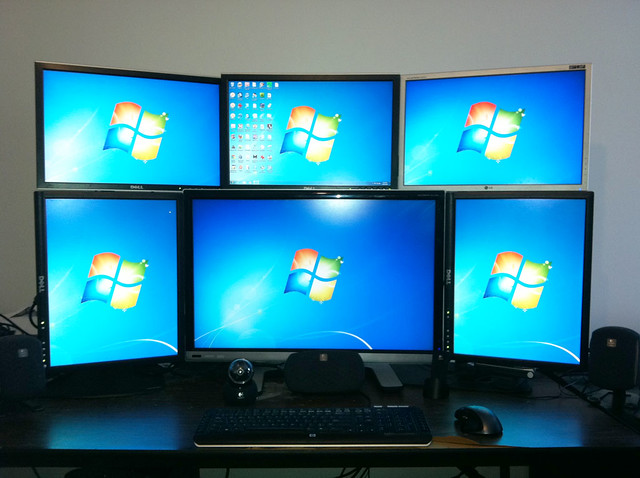
I was looking for a solution for a 6 independent monitor setup.
One was for mostly 2d and another for some 3d (if its even 3d, mostly streaming but no gaming).

I know eyefinity will support 6 if I am correct, but are they independent monitors and am I looking to go from mini dp to dvi (x6 active display ports)?
 
First, a few questions:
How big are these 6 monitors? What resolution? and what inputs?
In fact, a Newegg or similar link to the exact monitor would be nice (unless mix and match :p).

Any budget and/or target price range?


General tips: pretty much any card with 6 physical ports on the back will drive 6 seperate displays. The issue then becomes cards with that many ports. The vast majority of cards like that use at least 4 mini-DisplayPort due to mDP's power and form-factor. If you are running on screens that only support Dual-Link DVI it quickly gets expensive for the adapters.

If your monitors support DisplayPort then you could daisy-chain them to get away with using less ports, but it didn't sound like yours do.
 
I think the 6 monitors they have in mind are only about 24" 1080p monitors and a combination of dvi/vga.
I don't think the monitors they have in mind have display ports.
Budget is about 400 or so for the card or so?
 
Alright more questions :)

Does the motherboard have vga and DVI outputs? How many PCI-E slots? Could they, theoretically, use more than 1 card in there?

Do they care if it takes up more than 1 slot?

One way or the other, I reccomend something like this graphics card in conjunction with 2 relatively cheap HDMI to single-link DVI cables like this one.

That gives you 2 DVI ports, plus 2 HDMI ports that you can use with those cables, plus the DVI and D-sub (VGA) ports from your motherboard makes 6.

This is all assuming you don't do anything terribly hard (or really even a bit intensive) on your graphics card. But you stipulated no gaming, so this should do you fine. And total budget is like sub-$200 assuming you live in the US.

Quick note: Zotac is an OK-at-best brand name. It was just the first one I saw, you may wish to look for a similar card that Isn't Zotac. However lots of people have success with them anyways.

Second note: If you do buy from newegg or a similar e-tailer, please use the "Commisioned buying links" of this website, not the links that I posted. They are part of a global sticky AFAIK.
 
Do you need OpenGL? Will you be doing anything with AutoCAD or something like that? If not, there are 6-port video cards based on AMD GPU's that would do it with a single card, such as the ASUS 7950 DirectCU. By using active single-link DisplayPort-to-DVI adapters (you'll need 4) you can hook up 6 DVI monitors.

I have the HD6950 DCUII and use 4 adapters to do this:


asymetric_six_monitors by rtangwai, on Flickr
 
Here is a card around your budget that comes with 2 adapters already. You'll need to purchase 4 more passive mini-DP to DVI or VGA adapters as needed, but those only cost about 5-10$ a pop.

Card: http://www.newegg.com/Product/Product.aspx?Item=N82E16814131474

Adapters: http://www.monoprice.com/products/p...=10246&cs_id=1024604&p_id=5999&seq=1&format=2

You won't be able to get 6 monitors any other way unless you get 2 cards and crossfire them. Because you want independent displays you won't need to worry about setting up eyefinity or crossfire support.

You could save some money buy getting two cheaper cards though if your motherboard allows for crossfire and has enough PCI-E x16 slots. A combination of 2 Sapphire Flex edition cards would be good as each allows for 3 DVI connections.

Here is a card you could buy 2 of to support up to 8 monitors: http://www.newegg.com/Product/Product.aspx?Item=N82E16814139055
 
Last edited:
Just buy 2 video cards that support 3 monitors each. If gaming at all, buy one gaming card and one non gaming card.

This is a good card to run 3 moitors off of. http://www.newegg.com/Product/Product.aspx?Item=N82E16814102960

Crossifre is not needed, they dont even have to be both nvidia or AMD.

If your motherboard does not have 2 PCI-E slots your options go down and your cost goes way up to the point that replacing the motherbard might be a better option.
 
Last edited:
Just buy 2 video cards that support 3 monitors each. If gaming at all, buy one gaming card and one non gaming card.

This is a good card to run 3 moitors off of. http://www.newegg.com/Product/Product.aspx?Item=N82E16814102960

Crossifre is not needed, they dont even have to be both nvidia or AMD.

If your motherboard does not have 2 PCI-E slots your options go down and your cost goes way up to the point that replacing the motherbard might be a better option.

That card cannot run 3 monitors. It will only support two.

Here is a card around your budget that comes with 2 adapters already. You'll need to purchase 4 more passive mini-DP to DVI or VGA adapters as needed, but those only cost about 5-10$ a pop.

Card: http://www.newegg.com/Product/Product.aspx?Item=N82E16814131474

Adapters: http://www.monoprice.com/products/p...=10246&cs_id=1024604&p_id=5999&seq=1&format=2

You won't be able to get 6 monitors any other way unless you get 2 cards and crossfire them. Because you want independent displays you won't need to worry about setting up eyefinity or crossfire support.

You could save some money buy getting two cheaper cards though if your motherboard allows for crossfire and has enough PCI-E x16 slots. A combination of 2 Sapphire Flex edition cards would be good as each allows for 3 DVI connections.

Here is a card you could buy 2 of to support up to 8 monitors: http://www.newegg.com/Product/Product.aspx?Item=N82E16814139055

Passive adapters will not work. Active adapters are required, especially when using the two DVI ports, which cost $25 for a single-link active DVI adapter.

Those displayport to DVI adapters look like the passive version on the powercoler. All the active displayport to DVI adapters look larger than those. You will need 4 additional active DP to DVI adapters to run 6 monitors off of that card.
 
Passive adapters will not work. Active adapters are required, especially when using the two DVI ports, which cost $25 for a single-link DVI adapter.

I'm running 2 24inch monitors off of passive adapters as we speak. You only need an active adapter for Dual Link DVI.
 
I'm running 2 24inch monitors off of passive adapters as we speak. You only need an active adapter for Dual Link DVI.

If you're running two monitors, that's fine. All the passive adapters really do is force the graphics card to output a DVI signal through the displayport connectors.

As soon as you're using 3 or more, the active adapters are needed. AMD cards cannot send out more than two DVI signals at once. The rest of the signals need to be displayport signals, which can then be converted to a DVI signal using an active adapter.
 
If you're running two monitors, that's fine. All the passive adapters really do is force the graphics card to output a DVI signal through the displayport connectors.

As soon as you're using 3 or more, the active adapters are needed. AMD cards cannot send out more than two DVI signals at once. The rest of the signals need to be displayport signals, which can then be converted to a DVI signal using an active adapter.

Unless you buy a sapphire flex card.
 
If you're running two monitors, that's fine. All the passive adapters really do is force the graphics card to output a DVI signal through the displayport connectors.

As soon as you're using 3 or more, the active adapters are needed. AMD cards cannot send out more than two DVI signals at once. The rest of the signals need to be displayport signals, which can then be converted to a DVI signal using an active adapter.

Thanks for the update. Here is what AMD has to say http://support.amd.com/us/eyefinity/Pages/eyefinity-dongles.aspx

To the OP, the cheap sapphire flex card seems to be a great option. I only suggested a single card because I don't know what type of setup you have and not every board will support multiple cards.
 
plz dont post bad info. That card will run 3 monitors fine. Thats what it was designed for.

Woops, my bad. I thought it was one of those normal two output only cards, since it didn't have DP.
 
sorry to overtake this thread but I have an important question:
Im putting together 6 monitors (17'' dells with DVI connections)

6870 2GB eyefinity 6 http://www.elsner-computer.de/produ...PowerColor-RADEON-HD-6870-2GB-DDR5-PCI-E.html has six mini DP ports

ASUS 6950 DCII http://uk.insight.com/productinfo/g...se&utm_medium=feed&utm_campaign=base&src=FRO1 has 4 mini DP ports and two DVI

Which would I be better getting either :

two 6870 2GB for crossfire and selling my old 6950 2GB (not eyefinity 6)in my signature ,,,on the assumptions that I could run 6 monitors in crossfire for gaming:

or

should I get the asus on the assumption that I could run eyefinity with my old 6950 2GB (see my signature) and go crossfire to support 6 monitors whilst gaming? [or in the case that i. i can't run 2x 6950's spoken about in xfire I would gsell my old 6950 (signature)
___________________

Also if there is a genius lurking on the forum, could you please enlighten be whether I can support 8 9 or 12 monitors from the 6870 in eyefinity crossfire or whatever.


Im also going to rince over my motherboard (see signature) just to check whether a 6950 dcii and my 6950 2gb would actually fit because that would bulk up to three standard card sizes? '', requiring,,,,2 or 3 pci slots im not sure.....


all in all this is quite a hard investigation and I eed this forums help as much as possible :)

________________________________________________

this is my assumption: two 6870's in crossfire eyefinity would allow to game on 12 monitors [which quite frankly is ridiculous]

a 6950 2gb and a 6950 dcii 2GB would allow in crossfire gaming on 10 monitors in eyefinity as one supports 6 and the other supports 4. Whilst if I was to revert to just the 6950 dcii I could support 8 , 9 , 10, 12 whatever with the approporiate adapters TH2GO whatever (ignoring the ridiculous cost etc)

now,,,i received some advice that on a single 6950 dcii I could use an adapter to make 8 screens confiurable under windows without mirrororing one screen,,however on another thread I made someone said that on a 6950 2GB using a mini DP- DVI dual split would only give mirrored image under windows display settings, whislt for me it is essential to have 8 separate screens recognized.

___________

so as you may assume I am confused about the last point I made and under the impression therefore that crossfire 6870's would actually hold the possibility to run whatever screen configuration I want 6 - 12 dspite that fact that those cards only have a fan each and would probably be noisier , hotter im presuming

my motherboard has two pci-E http://www.excaliberpc.com/images/resources/604316/3c1a7e3a553747f9b37b642147b4a762.jpg
 
Last edited:
Wow Thank you for all the replies.

(Mind you they have not told me what type of monitors)
Originally I had thought of getting two Sapphire Flex for 6 monitors to test if it would be sufficient enough if the machine its going into had two pci-e.
I found out that they went ahead and purchased a 7870 (no idea which variant/make/model/or even vendor), so I'm guessing I'm going to be out buying active display port adapters since I'm pretty sure the monitors they have in mind do not have DP.

Thanks for all the information here.
 
sorry to overtake this thread but I have an important question:
Im putting together 6 monitors (17'' dells with DVI connections)

You can have 12 monitors from 2 cards, but not in eyefinity which needs all the monitors to come from a single card. You could just span the game window over all 12 screens, but then (I think this still happens) you lose crossfire, so would be running it off a single card. Which depending on the game, wouldn't be great (on that point, running that much screen space off a single 6950, be prepared to drop a few settings to keep things playable).

Depending on the game, remember the bezels. If it's a FPS, you want a whole monitor in the middle, so 3 monitors works well, but 8 (4x2) would leave a blind spot in the center. In general you want an odd number, so 7 Portrait would work, but 6 not so well.
 
Ive gone and bought a 6950 dcii 2gb to add to me current 6950 2gb. Going to get two zotak mini DP to hdmi to dvi adapters for the 6950 2gb and may eventually upgrade from 6 dell 17''s to 12 and see what its like in eyefinity.

may try to avoid getting a triple head adapter for 3x3, and somehow run 9 in a 3x3 configuration.

otherwise ill hold out for 4x3 and 4x2 and stick to 3x2.

if not ill just play eyefinity in 6 monitors. *shrugs* little project i guess
 
Back
Top