• Some users have recently had their accounts hijacked. It seems that the now defunct EVGA forums might have compromised your password there and seems many are using the same PW here. We would suggest you UPDATE YOUR PASSWORD and TURN ON 2FA for your account here to further secure it. None of the compromised accounts had 2FA turned on.
    Once you have enabled 2FA, your account will be updated soon to show a badge, letting other members know that you use 2FA to protect your account. This should be beneficial for everyone that uses FSFT.

5950x locks up in bios

Joined
Aug 28, 2021
Messages
927
so this has me perplexed...

My daily driver is a 5950x on a x570s aorus master with a 4090 and 64GB of ram. For awhile it has suffered from random reboots. I figured it was due to needing to reinstall windows after years of swaps. Now, I'm not so sure.

In preperation for that fateful time when I reinstall everything, I installed Win11 on a clean nvme and was running some tests. But when I'd go into bios, after a minute or so, it would lock up and nothing on screen would respond....but numlock still flashes.

So I updated to the newest bios, reset defaults and turned csm off and went to just one stick of ram. Still locks up. Different ram stick, same thing.

Any ideas?
 
Was CSM on when windows was installed to the drive? Are there other NVMEs still mounted to the board?
 
My very ignorant take would be that if your computer crash in the bios, what actually is on those harddrive or CSM is not the problem (or not the only problem)

Something is going on at a lower level than that, before any of those get involved, one of the cpu-motherboard (probably not ram according to your test)-power supply or a combo of those is having a problem.


I could try if it is not much trouble to remove everything that is not one stick of ram like the GPU, usb hub, ethernet, to make sure that it is one of the those 3 (cpu-motherboard-psu), but that would be my guess...

I imagine that the temps shown in the bios looked ok ?
 
My very ignorant take would be that if your computer crash in the bios, what actually is on those harddrive or CSM is not the problem (or not the only problem)

Something is going on at a lower level than that, before any of those get involved, one of the cpu-motherboard (probably not ram according to your test)-power supply or a combo of those is having a problem.


I could try if it is not much trouble to remove everything that is not one stick of ram like the GPU, usb hub, ethernet, to make sure that it is one of the those 3 (cpu-motherboard-psu), but that would be my guess...

I imagine that the temps shown in the bios looked ok ?
i dont have much plugged in under normal circumstances...

mouse, keyboard, UPS, gpu, nvme.

I have another cpu and board I could swap, but....YUCK, what a pain.
 
Your 5950x may be dying. Try to boot with a CCD turned off.
 
I suppose the other thing i could do is manually downclock the heck out of it.
Is it running high inside the bios when it crash ? When testing the ram, it did remove the EXPO overclock ?

They are often running quite calmly in there, ~3.4/3.7 ghz, if the number they show in the GUI is correct. If the crash is systematic enough (never make it to 10 minutes in the bios say or post boot while doing X) and your cooling solution is not to complicated, a cpu swap could be relatively low effort.
 
I think I've traced the problem to the mouse...

When it is not plugged in, bios is fine. When it is, it locks up within minutes.

Now time to drill down...usb port, mouse model or mouse in general...

It is a Microsoft mouse, and I swapped it with an identical mouse, so I know it isn't the mouse itself.

Good news is I don't think it is the expensive bits. As much as a new 9800x3d would be nice, I don't want to buy one. And I didnt really want to go buy a new am4 at this point either.
 
I would check the Mobo manufacturer site to see if there’s a more updated bios than what you’re running. May fix the issue.
 
Weird.. so the usb2 ports cause issues for the mouse. Seems OK in a usb3....
If they all share the same HUB internally (the usb2 ports) it could be an electric-hardware level issue

All the usb 2.0 ports could be on the same Hub, which could be defective:

Integrated in the CPU:
- 2 x USB 3.1 Gen 2 (Note 1)/Gen 1 Type-A ports (red) on the back panel
- 2 x USB 3.1 Gen 1 ports on the back panel
Integrated in the Chipset:
- 1 x USB Type-C™ port with USB 3.1 Gen 2 support, available through theinternal USB header
- 1 x USB Type-C™ port on the back panel, with USB 3.1 Gen 2 support- 1 x USB 3.1 Gen 2 Type-A port (red) on the back panel
- 4 x USB 3.1 Gen 1 ports available through the internal USB headers
Chipset+USB 2.0 Hub:
- 8 x USB 2.0/1.1 ports (4 ports on the back panel, 4 ports available throughthe internal USB headers)

Considering you went for a old bios to a new bios and both have the issue I would not have faith in a bios update to change things and that an issue that you did not had and started to have.... as well....


Maybe a case/other short with one of the USB 2.0 port (and because they are on the same hub, the problem will be on all of them if it is active because they are a bit interconnected (share the same hub) ?

an usb HUB would be a cheap fix (connected in the working usb 3.0 port) and you would not loose much from it as those usb 2.0 port were already on a hub.
 
If they all share the same HUB internally (the usb2 ports) it could be an electric-hardware level issue

All the usb 2.0 ports could be on the same Hub, which could be defective:

Integrated in the CPU:
- 2 x USB 3.1 Gen 2 (Note 1)/Gen 1 Type-A ports (red) on the back panel
- 2 x USB 3.1 Gen 1 ports on the back panel
Integrated in the Chipset:
- 1 x USB Type-C™ port with USB 3.1 Gen 2 support, available through theinternal USB header
- 1 x USB Type-C™ port on the back panel, with USB 3.1 Gen 2 support- 1 x USB 3.1 Gen 2 Type-A port (red) on the back panel
- 4 x USB 3.1 Gen 1 ports available through the internal USB headers
Chipset+USB 2.0 Hub:
- 8 x USB 2.0/1.1 ports (4 ports on the back panel, 4 ports available throughthe internal USB headers)

Considering you went for a old bios to a new bios and both have the issue I would not have faith in a bios update to change things and that an issue that you did not had and started to have.... as well....


Maybe a case/other short with one of the USB 2.0 port (and because they are on the same hub, the problem will be on all of them if it is active because they are a bit interconnected (share the same hub) ?

an usb HUB would be a cheap fix (connected in the working usb 3.0 port) and you would not loose much from it as those usb 2.0 port were already on a hub.
strange bit is it is only the mouse when pluggeed into the 2.0 ports. everything else plugged into those is fine.

I still need to check another brand of mouse to see if it may be some weird mouse/mobo weirdness, which I suspect is the issue. For example, even when plugged in, the bios acts slower and kinda laggy and the mouse doesn't work at all in the bios. If I totally take my mouse out, then the bios is a lot snappier.
 
strange bit is it is only the mouse when pluggeed into the 2.0 ports. everything else plugged into those is fine.

I still need to check another brand of mouse to see if it may be some weird mouse/mobo weirdness, which I suspect is the issue. For example, even when plugged in, the bios acts slower and kinda laggy and the mouse doesn't work at all in the bios. If I totally take my mouse out, then the bios is a lot snappier.
USB peripherals are well known to cause issues. Sometimes the issues don't show up until a later time. I was forced to upgrade from my Q6600 system because at one point it wouldn't turn back on no matter what I did. Had it stripped down to essentials and swapped a bunch of stuff out and still no go. I had every single USB device removed except for one, my mouse (the keyboard was an IBM Model M with PS/2 connector). After upgrading to a Ryzen 2600x and B450 board it wouldn't start up. I had already swapped out known, good power supplies so this was really odd. Disconnected my Logitech G700s mouse and everything started up fine. I was able to repeat this. Once the system was up and running there were no issues so I had to disconnect the mouse any time I powered down to get the system to start up again.

For those wondering, the G700s is a wireless mouse but the battery life is so terrible that it wasn't worth using it as a wireless mouse and it was connected with the USB charging cable all the time.
 
Well, back at it. Thought I has my 5950x random crashes figured out and traced to the mouse....

Nope.

Running a linux live usb to see if it still crashes. I am suspicious I have a bum 5950x.
 
Could also be the board. In my 3+ decades of PC building I’ve only had one CPU failure. When not over clocked they’re probably the single most reliable component
 
I was really surprise when I got an issue with one recently 7900x, never before, last thing I suspected really..

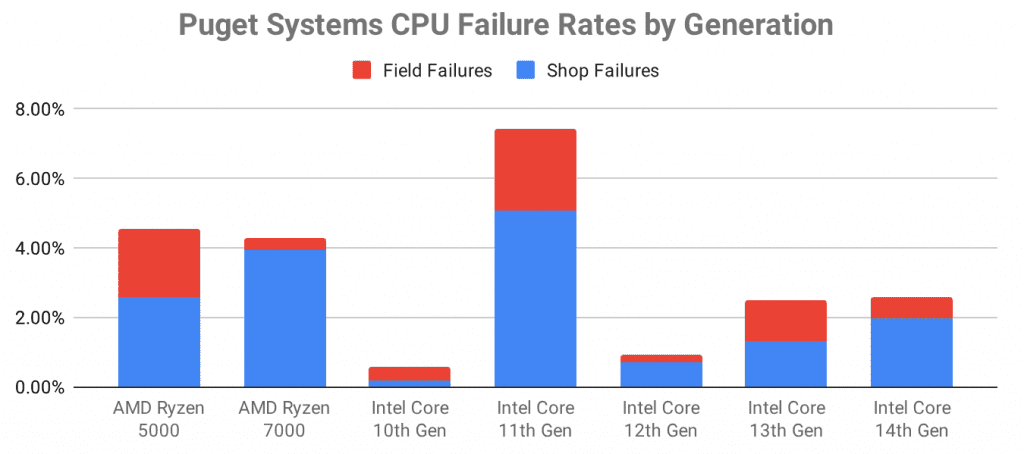
That said when puget showed numbers, last year
https://www.pugetsystems.com/blog/2...-perspective-on-intel-cpu-instability-issues/

They were incredibly, so I was way less surprised if it had happened in 2023, seem way more common that I thought
Systems-Intel-CPU-Failure-Totals-by-Group-1024x454.png


could be the board, but could be either, but if that ~2% failure rate in the field is an indication close to some reality, nothing special if that the case.
 
Yeah, it could be the board...that is my next thing to test. I have a 3600x with a b450. i'll probably just swap them around and see what happens.

To make it potentially worse, I've been dealing with this issue for months trying to figure it out...warranty expired on the 5950x a few months ago.

I've been looking at 9800x3d pieces. Shame on me.
 
Beware some B450 boards lose support for 3000 series chips if flashed to support 5000 series cpus and can not be reverted to support 3000 series because of the bios soic capacity limitation.
 
My 5950x would randomly reboot every few days in the middle of the night at idle. It turned out to be to Ryzen Master auto tuning. Once I set everything back to defaults and uninstalled RM it worked fine. After bios manual OC and undervolt it is still fine. The only other issue I had was it not booting properly with an external HD connected even with it set to last priority.
 
My 5950x would randomly reboot every few days in the middle of the night at idle. It turned out to be to Ryzen Master auto tuning. Once I set everything back to defaults and uninstalled RM it worked fine. After bios manual OC and undervolt it is still fine. The only other issue I had was it not booting properly with an external HD connected even with it set to last priority.
I don't use RM because I think it tucked, but I think it is still installed. I'll have to try making it go bye bye.
 
I don't use RM because I think it tucked, but I think it is still installed. I'll have to try making it go bye bye.
Reset your bios defaults after uninstalling because RM fucks with it. I know it's a pain but made a big difference for me. AMD makes some decent HW but good lord is their software shit.
 
When I was new to AM4, I used RM a couple of times. Once I realized I could do everything myself in the bios, I ejected that turd.
 
Reset your bios defaults after uninstalling because RM fucks with it. I know it's a pain but made a big difference for me. AMD makes some decent HW but good lord is their software shit.
I’ve only seen this happen if you actually make bios changes with RM. if only used as a fancy looking monitoring app, a simple uninstall should suffice.
 
I’ve only seen this happen if you actually make bios changes with RM. if only used as a fancy looking monitoring app, a simple uninstall should suffice.
A lot of those apps fall in the category of "useless motherboard apps" because real tuning is on the hardware level and not inside an operating system.
 
My 5950x would randomly reboot every few days in the middle of the night at idle. It turned out to be to Ryzen Master auto tuning. Once I set everything back to defaults and uninstalled RM it worked fine. After bios manual OC and undervolt it is still fine. The only other issue I had was it not booting properly with an external HD connected even with it set to last priority.
I haven't uninstalled RM, but I did just slap in a blank m.2 and make a new windows install. It has now been sitting for about three days without an issue. No PBO or anything right now, but I think you may be on to something there...I'm not sure what else could be giving so much grief considering it has a way to interact with the bios.

I think I've had two problems. Microsfot mouse and the x570s master do not like each other so it would cause a crash and then (most likely) ryzen master also would cause crashes with this platform.


Yuck.
 
Most of the time people are running unstable OC without knowing it. Usually by running a negative curve in the hopes it will run cooler.
 
Well, back at it.

I thought it had ot licked the past five months but problems surfaced again today.

The system post but them locks up on system boot...this is no pbo no xmp too...

Ram doesn't matter.

Going to one ccd and it boots.

Taking ccd2 down from 3400mhz down to 3000mhz and it boots.


Of course my warranty expired two months ago.
 
My very ignorant take would be that if your computer crash in the bios, what actually is on those harddrive or CSM is not the problem (or not the only problem)

Something is going on at a lower level than that, before any of those get involved, one of the cpu-motherboard (probably not ram according to your test)-power supply or a combo of those is having a problem.


I could try if it is not much trouble to remove everything that is not one stick of ram like the GPU, usb hub, ethernet, to make sure that it is one of the those 3 (cpu-motherboard-psu), but that would be my guess...

I imagine that the temps shown in the bios looked ok ?
I had this problem on an intel z790 I think it was the nvme that was the problem.
 
Well, it is 100% the ccd on the cpu. I removed it and tried it on a different motherboard with the same results.

I did an RMA with really low expectations.

The question i have now is...now what? I can detune the multiplier on the bum ccd, but tim not sure that would work very well going from P cores to sucky cores. I can just shut the ccd off and have a 5800x.
 
Well, it is 100% the ccd on the cpu. I removed it and tried it on a different motherboard with the same results.

I did an RMA with really low expectations.

The question i have now is...now what? I can detune the multiplier on the bum ccd, but tim not sure that would work very well going from P cores to sucky cores. I can just shut the ccd off and have a 5800x.
Why do you think they won't rma it?
 
That blows hopefully they help you out. I have a 5900x sitting around if you are SOL.
 
Just an update....

As expected they said "no"

Not sure what to do with it at this point. I mean with one ccd off it is still a 5800x.

I can de-tune the bad ccd but it seems then the good one doesn't turbo.

Maybe giving it more voltage will "fix" it.

I wish ddr5 wasn't so expensive.
 
Back
Top