• Some users have recently had their accounts hijacked. It seems that the now defunct EVGA forums might have compromised your password there and seems many are using the same PW here. We would suggest you UPDATE YOUR PASSWORD and TURN ON 2FA for your account here to further secure it. None of the compromised accounts had 2FA turned on.
    Once you have enabled 2FA, your account will be updated soon to show a badge, letting other members know that you use 2FA to protect your account. This should be beneficial for everyone that uses FSFT.

580.88

Status
Not open for further replies.

erek

Fully [H]
2FA
Joined
Dec 19, 2005
Messages
17,427
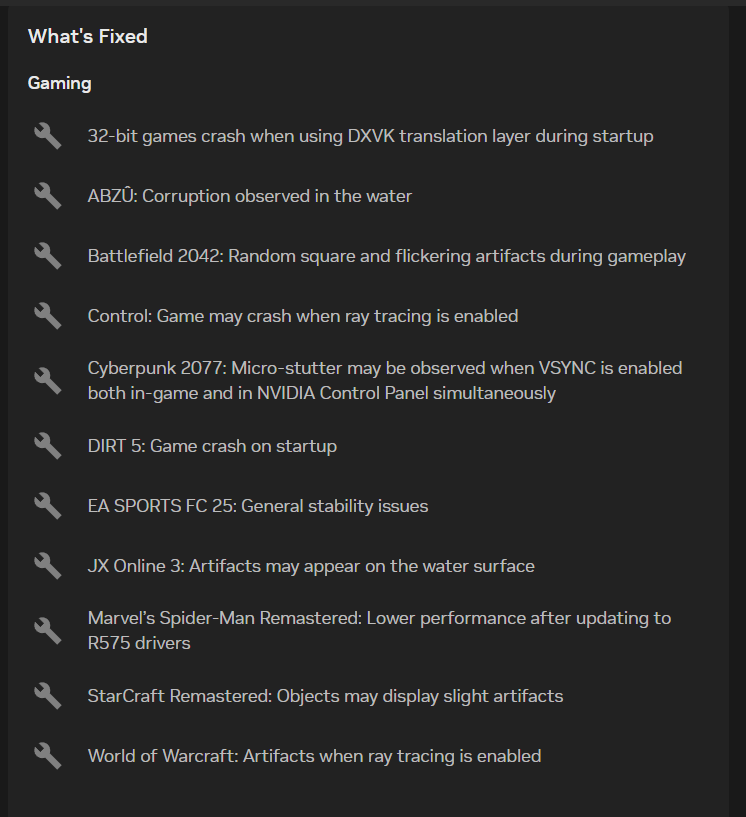
“According to the release notes, the NVIDIA GeForce 580.88 WHQL driver fixes issues in Marvel's Spider-Man Remastered, World of Warcraft, Starcraft Remastered and several other games, including issues with Battlefield 2042, which experienced random squares and flickering artifacts and micro-stutter issues when VSYNC is enabled in Cyberpunk 2077. It also fixes issues in Blender and Cloudflare WARP, issues with GPU video memory after enabling NVIDIA Smooth Motion, and an issue where the GPU scaling option is missing from NVIDIA Control Panel/NVIDIA App when a DSC monitor is connected. The driver also fixes flickering issues during window resize with the Samsung 57-inch Odyssey Neo G9 and blank screen issues in DisplayPort 2.1 mode with HDR on the LGE 27GX790A-B. NVIDIA also announced it will continue supporting Maxwell, Pascal, and Volta GPUs with Game Ready drivers until October 2025, after which these will get quarterly security updates for the next three years. NVIDIA is also extending Windows 10 Game Ready Driver support for all GeForce RTX GPUs to October 2026”

Source: https://www.techpowerup.com/339459/nvidia-releases-geforce-580-88-whql-game-ready-drivers
 
I was hoping their Win10 support would stretch to the 60 series launch driver but it doesn't seem like that's going to happen.
Hopefully Windows 12 is good.
 
  • Like
Reactions: erek
like this
I am still getting an unrecoverable Black Screen after installing. This only started occurring after the last driver set and also i had unplugged and plugged back in my 12VHPWR to check on it
 
Express install, again no issue here. Jumped back into Stalker 2 to test them out, and man. This game runs smooth using 3x frame generation and DLAA, latest DLSS model enabled. It's gorgeous and maxing out my 4k144Hz display with all settings on Epic. Makes me wish I had waited on this game. A few months back 3x was an unusable mess. Now I can barely tell I'm looking at two generated frames per cycle. It's really incredible what NV is doing with their software. We all know the elephant in the room.... pricing... but the value being added here with these leaps in framegen performance cannot be ignored. I hope AMD has a compelling answer for this in time for next gen releases!
 
Seems fine so far. The last driver (from the beginning of July) fixed all of my issues and this doesn't seem to have brought any of 'em back. The NvPresentUpdate program that lets you enable Smooth Motion on the 40-series still works, too.
 
I am still getting an unrecoverable Black Screen after installing. This only started occurring after the last driver set and also i had unplugged and plugged back in my 12VHPWR to check on it
i’m going to try DDU to see if that helps
 
Installed. No issues yet. Increased steel nomad scores. Haven’t tried other stuff.
 
  • Like
Reactions: erek
like this
No issues yet, installed yesterday. Seems like they've ironed out most of the bugs since the 5xxx series launch.
 
This seems like a good driver, assuming they didn't break anything. So far seems ok but haven't used it much yet. Marginally faster than 576.80 in Doom DA and CP2077. Everyone gaining several hundred points in Port Royal and close to 576.28 in Steel Nomad. Maybe finally a solid driver?
 
They actually fixed an issue I was having with the new Vibrant Visuals in Minecraft Bedrock, used to be all this weird corruption near the edge of water blocks in the distance, that seems to be gone now.
 
Dammit, so close...

1754083830871.png
 
DDU resolved my black screen issue after installation
Did a clean install and that solved my coming out of the black screen issue on my main PC with a 5090. Still don't get why my 5080 machine can have no issues with any driver I threw at it, but the 5090 did.
 
Screenshot 2025-08-02 132451.png


Think it's funny the stuff mentioned the Nvidia Forums actually gets fixed that they can pinpoint like that is pretty crazy.
 
The white flashing at the desktop is back for me with this driver. :facepalm:
 
I am still getting an unrecoverable Black Screen after installing. This only started occurring after the last driver set and also i had unplugged and plugged back in my 12VHPWR to check on it

Just with the Install and nothing else? Plan on gaming tonight with these Drivers after I repaste my CPU.
 
Status
Not open for further replies.
Back
Top