If you have an upgraded cooler, which one did you get? I am about to buy this card and want to OC as much as I can. but also have lower load temps. I dont even know if an upgraded cooler is necessary. my current 8800GT hits over 100F under load in crysis on its stock cooler, so Overclocking is not even an option with it. but this time around with the 4870 I would like to be able to get a little more performance and maybe a little more longevity.
![[H]ard|Forum](/styles/hardforum/xenforo/logo_dark.png)
Navigation
Install the app
How to install the app on iOS
Follow along with the video below to see how to install our site as a web app on your home screen.
Note: This feature may not be available in some browsers.
More options
-
Some users have recently had their accounts hijacked. It seems that the now defunct EVGA forums might have compromised your password there and seems many are using the same PW here. We would suggest you UPDATE YOUR PASSWORD and TURN ON 2FA for your account here to further secure it. None of the compromised accounts had 2FA turned on.
Once you have enabled 2FA, your account will be updated soon to show a badge, letting other members know that you use 2FA to protect your account. This should be beneficial for everyone that uses FSFT.
You are using an out of date browser. It may not display this or other websites correctly.
You should upgrade or use an alternative browser.
You should upgrade or use an alternative browser.
4890 owners..
- Thread starter Boostage
- Start date
A
altcon
Guest
4870 or 4890?
Anyway I got the toxic 4890 which has a better then stock cooler.
Anyway I got the toxic 4890 which has a better then stock cooler.
Agreed. At least Asus supports their products too.
If you have an upgraded cooler, which one did you get? I am about to buy this card and want to OC as much as I can. but also have lower load temps. I dont even know if an upgraded cooler is necessary. my current 8800GT hits over 100F under load in crysis on its stock cooler, so Overclocking is not even an option with it. but this time around with the 4870 I would like to be able to get a little more performance and maybe a little more longevity.
The Thermalright T-Rad2 will be nice when their VRM-R1/VRM-R2 cooling solution is released in distribution/retail.
Right now, there are no custom/third party coolers which address VRM cooling out of the box for reference design boards, so I would just stick with the Asus card mentioned by DeadSkull, as it also has voltage tweaks to get the most out of the card.

How are your temps compared to stock?
They dropped 6-8 degrees on idle top out in the 60's for load I would say. The only reason I like them is that they are lot quieter.
 The VRM stuff is about the same or little higher since I have the wimpy heat sinks and the wimpy fans that came with the coolers.
I have a Cosmos 1000 case which is a sealed case almost so the temps inside get warm.
I will try these heat sinks for the VRM stuff when they sell her in America. If they fit under the cooler......Looks like they might not.
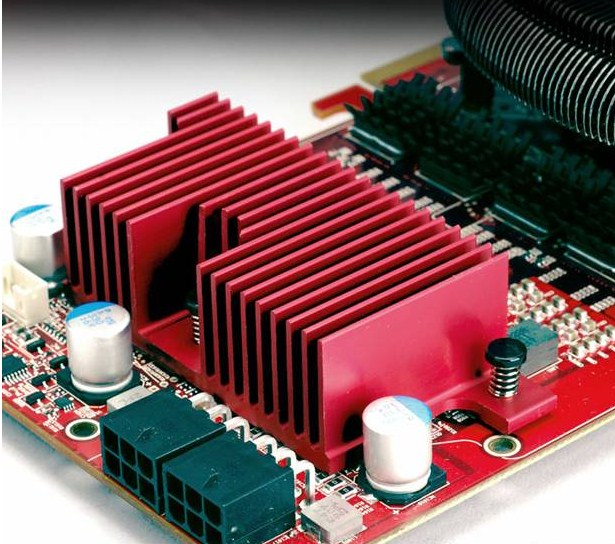
These might work better me thinks..... I should buy these instead.
Last edited:
I also have the Toxic, and while I agree it's not for everyone, I don't know why you think a card that is basically the loudest card in existence and doesn't perform as well is a better choice.
http://www.techpowerup.com/reviews/ASUS/EAH4890_TOP_SuperML/27.html
I also have the Toxic, and while I agree it's not for everyone, I don't know why you think a card that is basically the loudest card in existence and doesn't perform as well is a better choice.
http://www.techpowerup.com/reviews/ASUS/EAH4890_TOP_SuperML/27.html
I dont know about loudest, Asus Top consistently got better temps then Toxic in TPUs reviews. Anyways EAH4890s non reference pcb design is the best of all HD 4890s, cooling system is again the best and dual volterra controllers for both gpu core/ram is unparalled amongst other HD 4890 non reference designs. Honestly Asus would've done better if they didnt bother to stay within the constraints of 2PCIE slots width and put bigger and wider fans on that thing, maybe like two 92x25mm for optimum cooling.
IMHO, Asus EAH4890 is a true [H]enthusiast card with the level of control over gpu/mem voltages it offers you. Just because TPU only managed to get their hd 4890 Top to 940 core w/ stock volts doesnt mean that its representative of all the other cards out there; quick check on newegg reveals people got to 950-970 on stock volts with this card so TPU probably got a bad one.
BTW Sapphire toxic stock voltage is 1.4V so you guys aren't getting any special rv790 chips in Toxics
you're just getting overvolted rv790 chips Well, you could always solder some aluminum and a leaf blower on top of your 4890 and contend that you achieved the best temperatures.
It's always a sound vs. heat tradeoff that defines what card to pick.
I have two Toxics, and it's always amusing when someone strolls along with a chip on their shoulder regarding this card.
The ASUS TOP comes clocked at 900/1000 with a two-fan nonstock cooler and some "Super ML" feature. You can also tweak the voltage on the card through ASUS software (and ATI Tools...is this even a big deal?). Asus's PCB is black.
Sapphire's Toxic comes with clocks of 960/1050 and a vapor-change based nonstock cooler. I think the software is primarily the same as any other stock 4890 otherwise. Sapphire's PCB is blue.
In terms of warranty, it's all anecdotal and there are plenty of complaints regarding ASUS and Sapphire on this board. There are also laudatory stories as well. I think it's a toss up.
I'd love to see some reviews that say the ASUS card outperforms the Toxic for performance. I'd also like to see a comparison between the two cards at the same clocks. At stock, one would expect lower temperatures from the ASUS, given its lower voltage and inferior clocks. So that's the temperature aspect of the equation. As for sound, well it appears so far that Asus has conceded that battle to Sapphire hand over fist.
I think both are fine cards, and are great for keeping temperature, and sound, low. This is especially true if you don't want to fit an aftermarket cooler on your card...something that can be tricky. By the way, I don't think anyone really thinks they are getting a special chip when they get a Toxic card.
Anyway, both cards are fine....but it's important to keep perspective whenever someone comes in and says, "Toxic is overrated." It may only be overrated because your value system is whack.
It's always a sound vs. heat tradeoff that defines what card to pick.
I have two Toxics, and it's always amusing when someone strolls along with a chip on their shoulder regarding this card.
The ASUS TOP comes clocked at 900/1000 with a two-fan nonstock cooler and some "Super ML" feature. You can also tweak the voltage on the card through ASUS software (and ATI Tools...is this even a big deal?). Asus's PCB is black.
Sapphire's Toxic comes with clocks of 960/1050 and a vapor-change based nonstock cooler. I think the software is primarily the same as any other stock 4890 otherwise. Sapphire's PCB is blue.
In terms of warranty, it's all anecdotal and there are plenty of complaints regarding ASUS and Sapphire on this board. There are also laudatory stories as well. I think it's a toss up.
I'd love to see some reviews that say the ASUS card outperforms the Toxic for performance. I'd also like to see a comparison between the two cards at the same clocks. At stock, one would expect lower temperatures from the ASUS, given its lower voltage and inferior clocks. So that's the temperature aspect of the equation. As for sound, well it appears so far that Asus has conceded that battle to Sapphire hand over fist.
I think both are fine cards, and are great for keeping temperature, and sound, low. This is especially true if you don't want to fit an aftermarket cooler on your card...something that can be tricky. By the way, I don't think anyone really thinks they are getting a special chip when they get a Toxic card.
Anyway, both cards are fine....but it's important to keep perspective whenever someone comes in and says, "Toxic is overrated." It may only be overrated because your value system is whack.
IMHO, Asus EAH4890 is a true [H]enthusiast card with the level of control over gpu/mem voltages it offers you.
and some "Super ML" feature. You can also tweak the voltage on the card through ASUS software (and ATI Tools...is this even a big deal?). Asus's PCB is black.
Hahaha....way to go out of your way and prove my point.
Wenty, wait for the Thermalright VRM-R1 or R2 coolers. They will fit. Those iandh sinks likely won't do the job. I used the reference cooler's backplate and it also worked pretty well at dispersing heat.
Paradoxex: I agree with most points, but my Sapphire 4890 Vapor-x non-toxic/atomic won't even boot on my Asus motherboards (P6T Deluxe, P5B WiFi-AP).
Don't I look smart when I take it back to the shop and it boots up fine on their Gigabyte MB. So now we'll find out how good their support is.
Paradoxex: I agree with most points, but my Sapphire 4890 Vapor-x non-toxic/atomic won't even boot on my Asus motherboards (P6T Deluxe, P5B WiFi-AP).
Don't I look smart when I take it back to the shop and it boots up fine on their Gigabyte MB. So now we'll find out how good their support is.
I dont know about loudest, Asus Top consistently got better temps then Toxic in TPUs reviews. Anyways EAH4890s non reference pcb design is the best of all HD 4890s, cooling system is again the best and dual volterra controllers for both gpu core/ram is unparalled amongst other HD 4890 non reference designs. Honestly Asus would've done better if they didnt bother to stay within the constraints of 2PCIE slots width and put bigger and wider fans on that thing, maybe like two 92x25mm for optimum cooling.
IMHO, Asus EAH4890 is a true [H]enthusiast card with the level of control over gpu/mem voltages it offers you. Just because TPU only managed to get their hd 4890 Top to 940 core w/ stock volts doesnt mean that its representative of all the other cards out there; quick check on newegg reveals people got to 950-970 on stock volts with this card so TPU probably got a bad one.
BTW Sapphire toxic stock voltage is 1.4V so you guys aren't getting any special rv790 chips in Toxics
Oddly enough my EAH4890 can only do 940 on stock volts. The way I keep it is...
GPU = 985
RAM = 4800
Volts = 1.375
If I want 1ghz GPU then I have to drop the memory down to 4600, for some reason it won't work any higher than that. The difference in benchmarking with the RAM at 4600 vs 4800 was pretty significant (32fps vs 26fps average in crysis benchmark tool with everything as high it will go at 1680 x 1050). I don't think I got the best GPU in my card, and damn is this fan insanely loud...especially at 100% speed
I'm scared to up the volts anymore than 1.375 as I would like to not have to upgrade (from a blown card) for at least 1 year *fingers crossed*Oddly enough my EAH4890 can only do 940 on stock volts. The way I keep it is...
GPU = 985
RAM = 4800
Volts = 1.375
If I want 1ghz GPU then I have to drop the memory down to 4600, for some reason it won't work any higher than that. The difference in benchmarking with the RAM at 4600 vs 4800 was pretty significant (32fps vs 26fps average in crysis benchmark tool with everything as high it will go at 1680 x 1050). I don't think I got the best GPU in my card, and damn is this fan insanely loud...especially at 100% speed
EAH4890 "vanilla" version or "Top" version? Anyways 1.4V or even 1.45V is fine for rv790 chips, Sapphire has Toxic chips run at 1.4V stock and Powercolor puts some of their chips in the PCS+ line under 1.5V.
Surprised that you get such a big difference in performance going from 4600 to 4800. When I owned an HD 4890, ram at 4600 to 4800 range resulted in only a 2 fps difference with core overclocked to 985.
EAH4890 "vanilla" version or "Top" version? Anyways 1.4V or even 1.45V is fine for rv790 chips, Sapphire has Toxic chips run at 1.4V stock and Powercolor puts some of their chips in the PCS+ line under 1.5V.
Surprised that you get such a big difference in performance going from 4600 to 4800. When I owned an HD 4890, ram at 4600 to 4800 range resulted in only a 2 fps difference with core overclocked to 985.
Vanilla card, and I am a bit perplexed by the gain in performance as well. I don't even have 3dmark installed but maybe I should just to see what happens.
Thanks for the info on the volts...the only reason I haven't gone higher is because on the Asus Smart Doctor control panel anything above 1.375 puts you in the yellow "danger" zone. I will start playing and benchmarking when I get time this weekend and see what happens...
Vanilla card, and I am a bit perplexed by the gain in performance as well. I don't even have 3dmark installed but maybe I should just to see what happens.
Thanks for the info on the volts...the only reason I haven't gone higher is because on the Asus Smart Doctor control panel anything above 1.375 puts you in the yellow "danger" zone. I will start playing and benchmarking when I get time this weekend and see what happens...
Gpu makers have to account for all sorts of conditions when they put the warning labels on voltages etc...as long as you have decent airflow (as in not dell btx case airflow) you should be fine at 1.4V.
snaggletooth
Supreme [H]ardness
- Joined
- Aug 16, 2005
- Messages
- 4,767
Thanks for the info on the volts...the only reason I haven't gone higher is because on the Asus Smart Doctor control panel anything above 1.375 puts you in the yellow "danger" zone. I will start playing and benchmarking when I get time this weekend and see what happens...
Dude, yellow means "Go Faster!"