• Some users have recently had their accounts hijacked. It seems that the now defunct EVGA forums might have compromised your password there and seems many are using the same PW here. We would suggest you UPDATE YOUR PASSWORD and TURN ON 2FA for your account here to further secure it. None of the compromised accounts had 2FA turned on.
    Once you have enabled 2FA, your account will be updated soon to show a badge, letting other members know that you use 2FA to protect your account. This should be beneficial for everyone that uses FSFT.

4850 Low FPS

This thread is rather disheartening for my planned computer build. Rocking an 8800GT, I'd hate to take a step backwards with a 4870... considering I play a lot of source games (CS:S and TF2 extremely often).

Are these just isolated instances, or have a lot of people noticed this poor performance?
 
completly deleted my steam and everything from it, reinstalled and now waiting 10 years for it to download from steam

why the F***!! do they sell you a 2 DVD box if it still downloads most of the crap!

shall report back tomorrow.
 
This thread is rather disheartening for my planned computer build. Rocking an 8800GT, I'd hate to take a step backwards with a 4870... considering I play a lot of source games (CS:S and TF2 extremely often).

Are these just isolated instances, or have a lot of people noticed this poor performance?

seems isolted so far from what i found and from this threads, Visiontek cards
 
I was having fps issues in TF2 myself. I was running a 4600+ @ 2.7GHz, 4GB of memory in an Asus A8R32-MVP motherboard and was getting between 30 and 60 fps.

After spending $475 on a new motherboard, processor and ram I'm getting 70-200 fps.

Don't you wish you picked a cheaper hobby? ;)
 
cqe.png

As you can see its still reporting the wrong driver. Everything else is ok now though. Is it possible Vista isn't loading the correct driver?

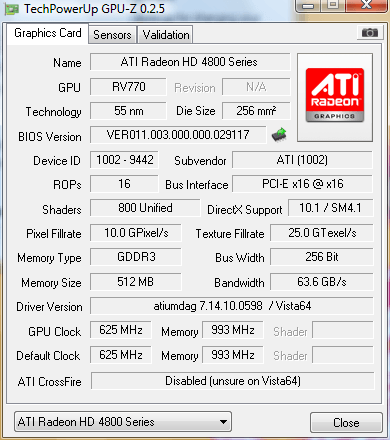
Rydawg, can you post a shot of gpu-z if you're using Vista so we can see what it says there?

I'm running my 4850 on Vista x64 also and my driver shows up as exactly the same. I'm the one who is also getting fubar'd performance in HL2 games. I started the HL2 thread you mentioned earlier. I suspect it still to be that driver issue. I can assure you its not CPU limited as I have already upgraded my motherboard to P45 chipset and OC'ed my proc. to 3.1GHz from 1.8GHz stock and I get less fps then before...

Something is so fubar'd with these drivers it's not even funny, why can't ATi have drivers ready before they release cards?!?

I want to see someone else's GPU-Z screen shot running Vista x64
 
Let me chime in also. Have a Diamond HD4850 installed last night.

CS:S Video Stress test:

1280x1024
All maxed settings
8xMSAA
16xAF

E7200 2.53ghz stock = 235fps
E7200 4ghz = 274

My 8800gt runs a lot faster when I had it, on an E6600 @ 3.6ghz. 320fps or around there, 1650x1050 4xAA 16xAF also, on this system with an E7200 @ 4ghz same settings I am only in the 250's.

I don't know why the HD4850 is so fubarred :( 3Dmark2006 is also lower.

Nvm, memory was retarded, I had the data down and the HD4850 scored 20-30 fps higher in all benches in HL2 engine, especially the Lost Coast one.
 
TF2 has a very big issue with not having true multicore support, which has caused FPS issues with a lot of users over at the Steam TF2 forums. I wouldn't worry too much about FPS drops in TF2... Valve has been adding so much crap to the game that overall performance has declined since its release.
 
Remmeh, true Valve is doign that and they dont support 100% multicore. BUT all the people that are having issues in this thread werent having issues previously.

On a side note, i have another thread about my computer and have narrowed it down to 3 things, cpu, motherboard or drivers of some sort :p
 
Remmeh, true Valve is doign that and they dont support 100% multicore. BUT all the people that are having issues in this thread werent having issues previously.

On a side note, i have another thread about my computer and have narrowed it down to 3 things, cpu, motherboard or drivers of some sort :p
I had mine apart last night and noticed the northbridge fan has ceased moving, so I'll be replacing that today and crossing my fingers that that will be the solution.
 
I completely ditched tf2 and reinstalled it, and so far, no drops below 50FPS, yet!!!
 
Here's mine from today:

GPU-Z.jpg


Same as yours, but without the FPS issues.


my GPU-Z is identical to yours, i run vista 64 SP1.

my quad core is coming in today or tomorrow, even though i doubt it was a CPU issues even with all the crap they added but i will know for sure :)


So, so far, reinstall steam from FRESH if you can! see if it helps.
 
okay some changes, the latest steam update may have done something

e4400 @ 3Ghz, turned my ingame setting to all HIGH 4x AF 4x AA 1600 x 1200

1 core of my cpu runs at 96-100% FPS go from 40ISH upto 150+ in some places...

seems like the update may have added something that is kicking my CPU's butt!
 
okay playing some more, i did drop into thew 20's are some point but again CPU 1 core pegged %100! this is on a 27 person server
 
okay playing some more, i did drop into thew 20's are some point but again CPU 1 core pegged %100! this is on a 27 person server

This is because TF2 lacks multicore support.

mat_queue_mode 2 still crashes my system after 30-45 minutes but I gain about 25-30 fps while it does work :D
 
i guess when i had my 7600GT i wasn't CPU limited but GPU limited... now i am finding out i am CPU limited :(
 
q6600 is here today prob going in tonight so will know for sure when i get it nicely OC'D!
 
Food for thought for those in this thread. I've been comparing my scores in Race Driver Grid with a friend. And we are seeing a huge difference in scores. He's got a Q6600 to my E6400, 4870 to my 4850 (clocked to 750/1100). Now just to show the difference, we are talking, 90-100fps in Grid to my 50-60fps on the same run with the same settings. Now just to be sure it wasn't something messed up I have run 3dmark06 and vantage and compared gpu scores and they are in line with his. It would seem to me that the big discrepancy(sp?) is between a dual core cpu vs quad core for this particular game. I think it's worth testing, I'll be getting a quad soon so I will test it afterwards and see if my Grid scores increase to be closer to his. But I think this might be the case in many other games as well. For Grid we are talking about 1680x1050 with 4 and 8 x AA. I'd be curious to see if others with similar setups are seeing the same thing.
 
I fixed my issue. The NB replacement fan didn't do it, quite likely my NB was too damaged at that point so I opted to upgrade to an Asus P5Q-E w/ an E8400 and 4GB of OCZ Reaper HPC Edition RAM. I'm now getting 75 FPS steady in the same spot in WoW with 24x CFAA. Next on my list of things to upgrade is my monitor, any suggestions on a 22"?
 
Weird. My rig isn't top dog for sure but I get around 170 when playing DoD at 1680x1050 on max settings. The 4850 is as good as a performer as everything said it would be. The reports of people with issues (like you folks) are mostly because of other faulty parts, not the card.

I can play crysis on High on 1680x1050 and Lost Planet on High on 1680x1050. All UT3 based games on max settings on 1680x1050. To me thats AWESOME. :D

I fixed my issue. The NB replacement fan didn't do it, quite likely my NB was too damaged at that point so I opted to upgrade to an Asus P5Q-E w/ an E8400 and 4GB of OCZ Reaper HPC Edition RAM. I'm now getting 75 FPS steady in the same spot in WoW with 24x CFAA. Next on my list of things to upgrade is my monitor, any suggestions on a 22"?

I have the LG W222t or what ever. Got it on sale for 230, I love it. :D
 
No other parts are faulty for me, trust me, everything has been tested!

i can play cs:s and hit 170 FPS sure, but it doesnt stay there the whole time, an cs:s is better coded for multiple cores cs:s = Dod


i havent installed my q6600 yet, has been a SHIT week for me

Storm took out my 37' LCD TV through the cable port (my cable modem also got fried how i know it was the cable and not power)

my washing machine just kicked it in with a load in it!!

WTF! is next!
 
Interesting, my machine at home is of similar specifcation to yours and I've just purchased a HD4850. I'm away at the moment but I've got the card fitted in a 3.0GHz Pendium D; the performance in WoW is certainly not what I had expected at a resolution of 1280x1024.

From your report of receiving a significant FPS increase from an upgraded CPU, I suspect that the CPU was a bottleneck in your system. Considering that my monitor has a maximum resolution of 1920x1200 (which in theory should result in a GPU bottleneck instead), I'm unsure of whether to keep the card and see for myself or to purchase a new baseline system.
 
No other parts are faulty for me, trust me, everything has been tested!

i can play cs:s and hit 170 FPS sure, but it doesnt stay there the whole time, an cs:s is better coded for multiple cores cs:s = Dod


i havent installed my q6600 yet, has been a SHIT week for me

Storm took out my 37' LCD TV through the cable port (my cable modem also got fried how i know it was the cable and not power)

my washing machine just kicked it in with a load in it!!

WTF! is next!

CS:S / DOD:S is entirely single threaded.

TF2 is the first source engine game that has support for multi-theading as far as I know.

try 'find thread' in the console, and you'll get a list of commands to try.
 
Didn't DOD:S switch to a new engine though with the latest update? Surely it supports dual-cores now.
 
cs:s uses more then one core i am sure of it, it was the first to get the support, well source engine, it may not be %100 pure multi core but it does use more then one


Now, i did a complete format!! 8.7 drives, q6600 @ 3ghz fr now.. completly reinstall of steam and all the games from scratch, and now i get god dam freezing every 1-2 mins, game stops sound goes into a loop like the system will crash and then it goes back to normal!

formating AGAIN! if it still messes up after this, this entire rig is going out my fucking window cause i dont have the patience any more for this BS!
 
OH this is PISSING me off!!

okay so

1. format HD - delete partiion in vista set up - install buisness
2. in order i install Chipset Drivers | SP 1 | any updates on windows update after that | 4850 8.7 drivers (rebooting of course between)
3 Create ATI profiles - adjust fan spedd (core / mem all else stock)
5. Install Steam
6. run Tf2

YUP god dam drops from 60FPS solid (58/59/60 vsync on) hit an open room and BAM! plummet to 30FPS!!!! then goes back up and then on and off 60 - 30, 60 30 (number are approximate between 25-30 and 50-60)

in game settings all high, bloom on, AA x4 and AF 4x (AA is edge detect in ATI CCC)


so after all the shit i have tried with this, i have 2 options

1. go back to my 7600GT and be GPU limited as obviously my q6600 @ 3Ghz is cpu bound to this game :rolleyes: (just like my e4400 @ 3ghz was apparently too)

2. throw this whole dam rig out this window and say F*** it!!!! and go buy a dell!
 
Download rivatuner, manually crank the fan speed to 100%.

In Rivatuner, open up the hardware monitor window and customize it to show all temps and clock speeds. Leave the monitor running as you run the source engine.

Download CPU-z, double check your cards running at 16X and not 8X or 4X.

Run dxdiag, click on the display tab, whats the "approx total memory size"? Shold be 1500-2000MB if your system is 4GB, 700-1000MB if its 2GB.
 
  • GPU-Z - PCI-E 2.0 x16 @ x16 2.0
  • fans peed is %75 idle temp of 44C right now (rebooted) (profile manual edit)
  • DxDiag Approx Total Memory 2297

going to get riva, see what is going on.

i turned up AA in CCC to 24x and fps seem more steady now
 
Um, dude, did you say you're running with v-sync on?

is that a problem?

Its not. I know the answer. I know exactly what V-sync does, where its done and how it does it. Turning off V-sync does not increase your FPS, at least by my definition of a frame.
 
Correct me if I'm wrong but drops to 30fps would be exactly an effect of v-sync. If your monitor refresh rate is 60hz then next sync point would be 30fps. How long are those drops? 1/2 second? More? I have seen that behaviour in my computer many times. Always with vsync enabled, with various cards 6800gt, 1950xtx, 8800gt and now 4870 cf.
 
is that a problem?

Its not. I know the answer. I know exactly what V-sync does, where its done and how it does it. Turning off V-sync does not increase your FPS, at least by my definition of a frame.

Did I say it was a problem? I only asked because if he is running v-sync, he's never going to see more than 60fps, with occasional drops to 30. He seems to be thinking that those drops to 30 indicate a performance problem that isn't there.
 
is that a problem?

Its not. I know the answer. I know exactly what V-sync does, where its done and how it does it. Turning off V-sync does not increase your FPS, at least by my definition of a frame.

It is. V-Sync will cause the game to wait for / match the monitor. I confirmed it on my rig. CS:S no V-Sync = 200 FPS, with V-Sync = 60 (59.99) FPS.
 
The other thing I'm thinking is that the 48xx series may have an issue w/ backwards compatability. Both of us are lacking pci-e 2.0. Anyone out there running a 48xx w/ under pci-e 2.0?

Are there any reviews out there of a 4850/4870 on a pci-e 1.* board?
Asus P5B mobo with the 4850 and running Cod4 maxed out (1024 and only ½ AA), no problems here.
 
interesting then , i had Vsync on as with LCD i always thought to prevent tearing it should be on, off to try some Tf2 with no vsync :)

fingers crossed!
 
so far i had fraps doing some recording for min / avg and min was 30 FPS or so with vsync off... doing some more now
 
Did I say it was a problem? I only asked because if he is running v-sync, he's never going to see more than 60fps, with occasional drops to 30. He seems to be thinking that those drops to 30 indicate a performance problem that isn't there.

sorry, get a little touchy after being told by 300 steamforum idiots what v-sync is and how it works.
 
I also have a performance problem with an HD4850. Actually with two different systems with HD4850 cards.

My PC: Intel E4500 @ 3.0 GHz, Gigabyte P35-DS3L, 2x 1GB DDR2-667 Apacer, Sapphire HD4850, Corsair HX 520W PSU.

I have tried different drivers - the latest 8.7 from AMD's home page and the ones that came with the card, 8.6 I think. I installed the latest DirectX, formatted the hard drive, tried with Vista64 and XP32 - the performance is better in XP but I still get only 20 - 30 fps in Oblivion, no matter what resolution I use.

I tried the fan fix, it reduced the temperature but did not improve performance. I can't be CPU-limited, a 3 GHz C2D is enough for Oblivion and the CPU usage in Task Manager never goes to 100% on either core.

I updated the BIOS with no results, changed settings in the BIOS (removing overclocking, changing voltages, RAM timings, increased PCI-e frequency and voltage) but again with no results.

One thing I noticed - according to GPU-z the GPU load never goes above 40-50% and most of the time it is between 0 and 30%, which suggests that something else is bottlenecking my system. Also the GPU temperature barely changes at all when I run Oblivion.

I also tried UT3 - it also ran very badly in Vista (20 - 50 fps), but now runs quite well in XP: 60 - 120 fps most of the time and the GPU load also seems to go up while playing it.


Another PC (not mine) had a Club 3D HD4850 with AMD 5000+, Gigabyte MA770-DS3, 2x 2GB DDR2-800 Apacer and a 450W Corsair PSU with Vista64. I tried almost all the same things, but Oblivion and UT3 still ran like crap. The fps was similar to what I had on my own PC, maybe a bit lower in UT3, probably because of the slower CPU.


Bah, I bought this card so I could play Oblivion and UT3, but now I'm getting pretty much the same framerates I had with my previous card (7900 GTO). I wonder if it's a hardware conflict of some kind or should I just wait for better drivers.
 
Back
Top