• Some users have recently had their accounts hijacked. It seems that the now defunct EVGA forums might have compromised your password there and seems many are using the same PW here. We would suggest you UPDATE YOUR PASSWORD and TURN ON 2FA for your account here to further secure it. None of the compromised accounts had 2FA turned on.
    Once you have enabled 2FA, your account will be updated soon to show a badge, letting other members know that you use 2FA to protect your account. This should be beneficial for everyone that uses FSFT.

4850 Low FPS

seethru

n00b
Joined
Jul 13, 2008
Messages
19
I should first say that my problem seems to be a lot like the HL2 thread posted elsewhere here. I'm not sure if its exactly the same.

I installed a 4850 into my PC a little under two weeks ago, and I have to say I'm not impressed. I haven't had an ATI card since a 9500, and I was very excited when I saw the numbers being benched on this card so I decided to take the plunge and switch. Unfortunately I haven't been able to get above 30-40 FPS in ANY game.

Here are my system specs.

AMD Athlon 64 X2 4400+
DFI LanParty NF4 SLI-DR
4GB DDR1 OCZ Platinum RAM
650W OCZ GameXStream (SLI Ready)

Vista Ultimate x64

I'm playing all games at 1280x1024 on a 19" Samsung Monitor.

Up until two weeks ago I had a 7900GTX, and obviously got more than 30-40 FPS in games so this should have been an upgrade. When I check GPU-Z, depending on the game, its using anywhere from 0-50% GPU and only in one case, in the WoW character selection screen, it uses 100%. I'm open to any and all suggestions. I personally don't think my cpu is a bottleneck here as its happening in many different games.

I should also state that my AA/AF settings, if set in CCC, do not work in games. I'm guessing this MAY have something to do with this all.

Something I should add is there is only one game where I've seen a FPS increase and thats Age of Conan. I was able to up my settings to max, and saw it run at around 40fps which was an improvement. This, among other things, is what makes me think it isn't my processor. It doesn't make sense that a new, more taxing game runs better than older, less taxing games (WoW for instance, which in-game uses 0% GPU).
 
hmm did you do a driver sweeper before installing the new card, which slot do u have the card in. Reading up on your mobo, one slot runs full 16x, the other only 2x
 
I've had the 4850 for 2 weeks about. Kinda same thing.
I had an 8800GT and 1st couple days of new 4850 whooped the GT's ass, but after that it was worse. Since then I bought a 4870 and returned it ( same lower than the GT frps) and OC's the 4850 and still get less frps than i was gettign with the 8800GT. WHen in full battle mode in TF 2 with 20+ people my 8800GT would slip t about 50 frps, then 4850 will drop as low ast 40 or 38 sometimes, both stay well above 60 when im not in combat with a ton of people though. perhaps the gddr3 doesnt do to well or something?
 
hmm did you do a driver sweeper before installing the new card, which slot do u have the card in. Reading up on your mobo, one slot runs full 16x, the other only 2x
Slot #1, GPU-Z reports it as running in 16x and yeah, swept a few times, and even formatted in an attempt to fix this. Starting to drive me crazy.

I've had the 4850 for 2 weeks about. Kinda same thing.
I had an 8800GT and 1st couple days of new 4850 whooped the GT's ass, but after that it was worse. Since then I bought a 4870 and returned it ( same lower than the GT frps) and OC's the 4850 and still get less frps than i was gettign with the 8800GT. WHen in full battle mode in TF 2 with 20+ people my 8800GT would slip t about 50 frps, then 4850 will drop as low ast 40 or 38 sometimes, both stay well above 60 when im not in combat with a ton of people though. perhaps the gddr3 doesnt do to well or something?
This is about the FPS I get in WoW, 60 when nothing is going on MAX (with vsync off for good measure). If I'm in Shat with a lot of people it can dip down into the teens.

Out of curiosity Rydawg, whats your system specs? What resolution are you playing TF2 in?
 
system in sig. 1680 by 1050 think it is ( native for 22")
Ok, so we have nothing in common, aside from the limited FPS we're getting. Was hoping I'd be able to notice at least ONE thing in common between the both of us. This probably rules out my theory that the card sucks at lower resolutions. This also however rules out that the card is being limited by my processor as you have a pretty decent rig and you're experiencing the same issues.
 
I've had the 4850 for 2 weeks about. Kinda same thing.
I had an 8800GT and 1st couple days of new 4850 whooped the GT's ass, but after that it was worse. Since then I bought a 4870 and returned it ( same lower than the GT frps) and OC's the 4850 and still get less frps than i was gettign with the 8800GT. WHen in full battle mode in TF 2 with 20+ people my 8800GT would slip t about 50 frps, then 4850 will drop as low ast 40 or 38 sometimes, both stay well above 60 when im not in combat with a ton of people though. perhaps the gddr3 doesnt do to well or something?

Something is diffently up, am getting 101fps MAX everything, AA,AF, draw distance 300m+ everything maxed out i mean everything. On a single 4850 am getting 101fps. Crossfire OFF.

ON my 8800gts 512mb i was getting 70fps...

BTW this is coming right off of a 8800gts, no format , just uninstall driver restart, then sweep. XP 64bit.


This is on TF2 btw
 
Something is diffently up, am getting 101fps MAX everything, AA,AF, draw distance 300m+ everything maxed out i mean everything. On a single 4850 am getting 101fps. Crossfire OFF.

ON my 8800gts 512mb i was getting 70fps...

BTW this is coming right off of a 8800gts, no format , just uninstall driver restart, then sweep. XP 64bit.


This is on TF2 btw
Just to rule out temps I've got my 4850 idling at 60 and just hitting 80 under load. I also OCed it to see if I could get a few more frames and it still stuck to the 60 MAX. Something has got to be artificially limiting it.

Rydawg, what manufacturer?
 
I used all drivers.
Whats a good program to sweep out drivers? i have a few but wanted to see what others use.
Visiontek HD 4850
I manually raised the fan speed to 50% and maintain a 690/1083 overclock at temps are 45C idle and 65 max in game
 
I used all drivers.
Whats a good program to sweep out drivers? i have a few but wanted to see what others use.
Visiontek HD 4850
I manually raised the fan speed to 50% and maintain a 690/1083 overclock at temps are 45C idle and 65 max in game
Well now, theres something we have in common. I too have a Visiontek.

I used driver sweeper, it seemed to work the best w/ Vista x64.
 
Should I maybe just send this one back and perhaps even get a different manufacturer?
 
Going to do some testign tonight with different drivers. Friend says that the driver installed by windows automatically did him fine.
 
I have never played WOW but from reading way too many times. The character select screen will use 100% GPU where the game uses way less. As to why usage would be 0%, no idea.
 
The other thing I'm thinking is that the 48xx series may have an issue w/ backwards compatability. Both of us are lacking pci-e 2.0. Anyone out there running a 48xx w/ under pci-e 2.0?

Are there any reviews out there of a 4850/4870 on a pci-e 1.* board?
 
going to bestbuy right now to pick up a 260gtx, wanted to compare cards for awhile so my 'testing' of the 4850 will be more fun as i play with the 260 as well. woot for BB return policy !
 
I tried that default driver thing, it didn't give any better performance. I'm really close to returning this card and getting a 260 or 280.
 
Friend got a 4850 and it only performed a bit better than his previous 3870 in HL2 stress test. His cpu is 2.4GHZ Phenom and I think that's where his problem is. His score is about 90fps and mine is 154fps on 4870 with 3.4GHZ C2D cpu. Both on Vista64. My system ram is clocked higher than his too, 400mhz vs 472mhz.
 
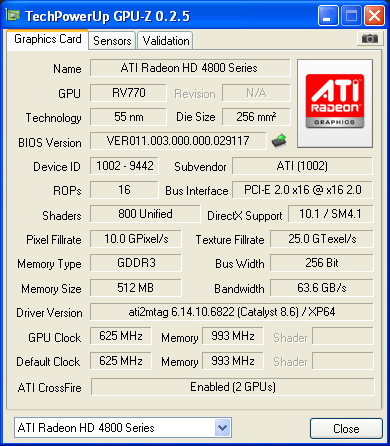
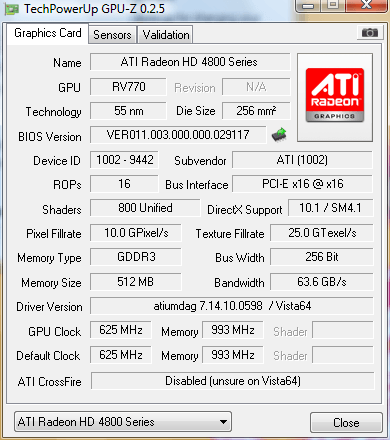
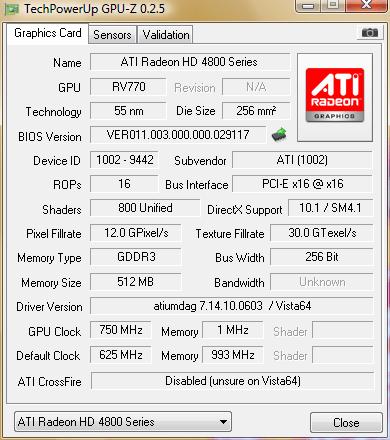
Here is the main gpu-z screen for anyone looking at this wondering if its running at the right speeds.

6bk.png


gpu-z is reporting the wrong default core clock and default memory clock speeds.
 
unknown for your bandwidth???

should be something like this (this is mine)

88p.png


also memory 1mhz.. .wtf

and look at your driver ATIumdag, and no cat number

should be Ati2mtag and then give cat number
 
unknown for your bandwidth???

should be something like this (this is mine)

88p.png


also memory 1mhz.. .wtf

and look at your driver ATIumdag, and no cat number

should be Ati2mtag and then give cat number
I noticed the 1mhz and just figured that gpu-z was reporting something wrong...but the bandwidth and cat number I didn't, must have been getting tired at that point. I'll have to try another uninstall, clean, and reinstall when I get home tonight.
 
Don't buy a 260. I bought it last night. Same preformance as 4850 on my system, though atm I'm starting to think its something else in my system.

I installed the 260 last night and after about an hour of playing TF 2, i got constant crashes and errors. I reinstalled my 4850 and got the same frps as b4 but with no errors/crashes.

I ended up moving all my non system files to my external HD and reinstalled Vista Premium sp1 ( 64 bit) Which it was horrible slow. wish i knew where to look at fixing my system. This system doesnt preform any better than my old amd athlon 64 x2 4000.
 
I think its one of two things

1.drivers fubar, not runnig the card correctly

2.MOBO fubar (OLD nf4 board) not enough BW for card- notice N/A for bandwidth.. hmmm
 
cqe.png

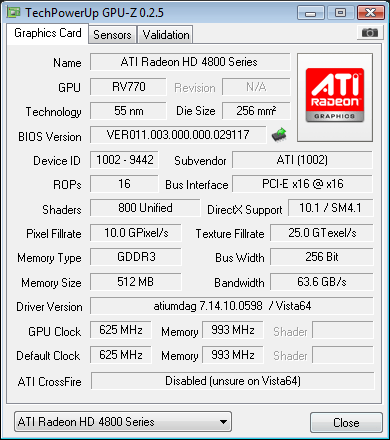
As you can see its still reporting the wrong driver. Everything else is ok now though. Is it possible Vista isn't loading the correct driver?

Rydawg, can you post a shot of gpu-z if you're using Vista so we can see what it says there?
 
I have a 4850 and I run perfectly fine. I couldn't be more pleased with my video card. This is a weird problem. I am actually going to reinstall everything, because I get a bit of chop every now and then due to hard drive being plugged up.
 
Well I've just finished OCing my processor a little up from 2.21 to 2.65, and I've gone from 33 fps to 45-50 in COD4. My FPS in the area of WoW I've been testing hasn't changed with a mid 30's, and my Crysis FPS is getting an average of 30 FPS. Now I'm definitely thinking perhaps it is my processor, and if thats the case perhaps I'll send it back until I see how Nehalem is going to do.
 
The other thing I'm thinking is that the 48xx series may have an issue w/ backwards compatability. Both of us are lacking pci-e 2.0. Anyone out there running a 48xx w/ under pci-e 2.0?

Are there any reviews out there of a 4850/4870 on a pci-e 1.* board?

I can confirm it's not a pci-e 1 problem. Running mine on a DFI NF4 SLI-D. The 1mhz mem clock from GPU-Z is due to a bug between it and 8.7 drivers. It's just not reading the value correctly. The driver version also seems fine from what I can tell (going by this gpu-z validation SS).

Do you get low fps when you play fullscreen as well as windowed? Does turning off aero help?

edit: Just saw you're playing everything at 1280x1024 and you didn't originally have your proc OC'd. Yea, at that res, you're going to be CPU-bound by a lot.
 
I can confirm it's not a pci-e 1 problem. Running mine on a DFI NF4 SLI-D. The 1mhz mem clock from GPU-Z is due to a bug between it and 8.7 drivers. It's just not reading the value correctly. The driver version also seems fine from what I can tell (going by this gpu-z validation SS).

Do you get low fps when you play fullscreen as well as windowed? Does turning off aero help?

edit: Just saw you're playing everything at 1280x1024 and you didn't originally have your proc OC'd. Yea, at that res, you're going to be CPU-bound by a lot.
I've got a few CRT monitors lying around all 19 or 20", should I see what resolutions they're capable of?

Just tried them at 1792x1344 same fps. I think I've just about run out of patience and this card will be going back by the end of the week.
 
Let me chime in also. Have a Diamond HD4850 installed last night.

CS:S Video Stress test:

1280x1024
All maxed settings
8xMSAA
16xAF

E7200 2.53ghz stock = 235fps
E7200 4ghz = 274

My 8800gt runs a lot faster when I had it, on an E6600 @ 3.6ghz. 320fps or around there, 1650x1050 4xAA 16xAF also, on this system with an E7200 @ 4ghz same settings I am only in the 250's.

I don't know why the HD4850 is so fubarred :( 3Dmark2006 is also lower.
 
Well now, theres something we have in common. I too have a Visiontek.

I used driver sweeper, it seemed to work the best w/ Vista x64.


Viosntek here and i am having this same exat issue, i can hit over 100FPS, but then BAM drop to low 20's suddenyl then back up

formated put in 8.7, did driver cleaner and put in 8.6+HF - no diff!!

fan profile 65% temps not that hot..

Is Visiontek sending out faulty cards? FOr me to send my back from costa rica i might as well buy a new one it would cost so much! i have a x38 DFI board with 2 x16 and both give the same results
 
Querstion

did you do a fresh install of steam and tf2? or did a backup restore? i just left my original folder and ran steam, wondering if may steam is holding something it shouldnt...
 
Back
Top