16:9 vs 16:10

The games calculate horizontal FOV using as a reference the vertical FOV, which is fixed. The calculation is done not based on the resolution of the screen, but on the ratio between the height and the width (basically the aspect ratio). The higher the ratio is (the wider the image is) and the higher is the horizontal fov.

Which if you are obsessed by a minor increase in horizontal view, you can simple set your (1920x1200 monitor) resolution for that game to 1920x1080 and have the same thing. (equal)

And in all the other games that don't do this you will have more vertical screen area. (better)

And in every productivity application in the world you get more vertical screen area. (better)
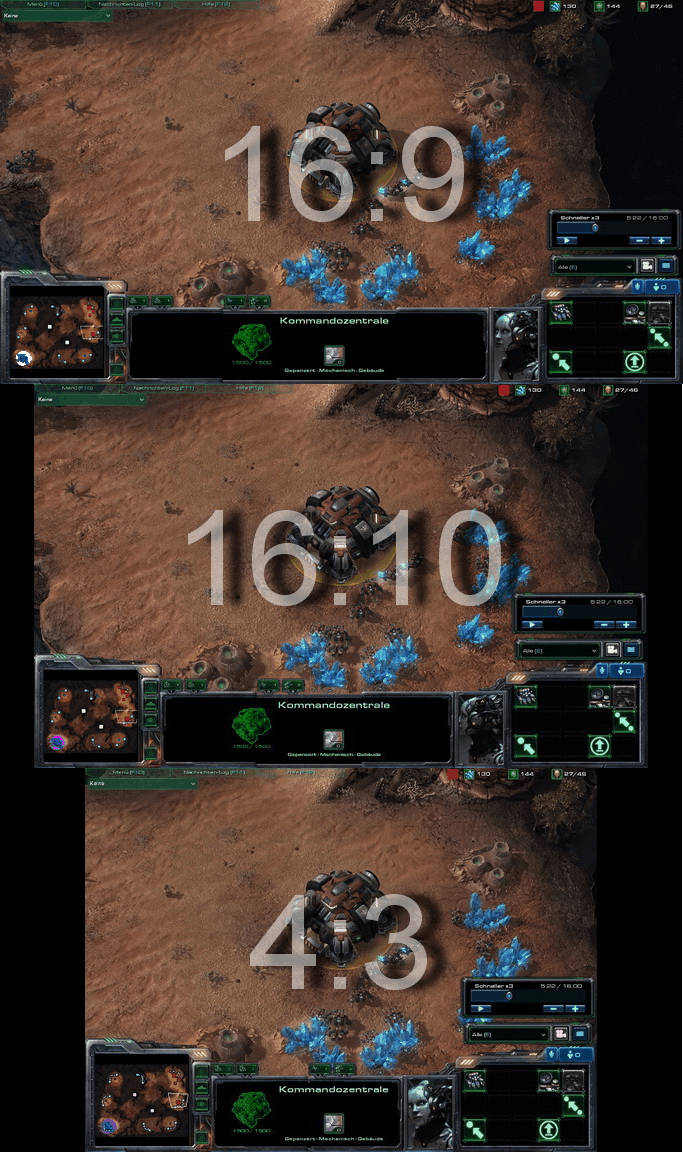
 
I've been reading monitor reviews for the past month, really really wanting to get 16:10.

I'm about to settle for a 16:9.

Why?

All the affordable 16:10 24" displays are IPS and have quality control issues. Issues for which the manufacturers have stopped accepting returns (tinting, banding, etc) claiming that the problems are within acceptable variance. Also, as they're IPS I have concerns about ghosting.

If I go with a high-quality 16:9 TN I can get far better black levels out of the box without tons of calibration (and better black levels even after calibration), I'll be saving a few hundred dollars, and I won't be worried about trying to go through multiple exchanges to get a decent display.

I'm interested to hear what 16:10 monitor you'd suggest I go with. Because right now it looks like I have to seriously compromise on quality or comprimise on res, and I'm thinking that vert res is what I've got to toss. Much as I may not want to.

OK I can see right now I'm gonna have to post a monitor sticky post! I don't want to, but I guess I will have to.

First, not all 16:10 24" monitors are IPS. Check Amazon. I just bought this monitor and it's a 26" (25.5" useable) monitor at 16:10. It's a TN panel. http://www.amazon.com/ASUS-VW266H-25-5-Inch-Widescreen-Monitor/dp/B001LYPNFQ

It was 292 shipped, plus a 30USD rebate for a grand total of 262.00. Reviews say it's a technically "decent" TN monitor and the price is unbelievable.

Why can't you do 23"? After 23" ISP panels do have problems, but up to 23" the Super IPS panels are really nice, ghosting isn't a problem today. Second, I think you have the black level problem flip-flopped, as TN panels are worse than IPS panels as far as gray scale and black levels are concerned.

If you are ok with a TN panel, there are many 23-24" 16:10's. but you have to look for them.

Here are some examples:
http://shop.lenovo.com/SEUILibrary/...-category-id=2FAF239B768947AD95895F826C34447E

http://www.mwave.com/mwave/skusearc... T240HD widescreen 1920x1200 1000:1 5ms vga d

http://www.mwave.com/mwave/skusearc... T240 widescreen 1920x1200 20000:1 (1000:1 ty

http://www.mwave.com/mwave/skusearc...-281HPB Widescreen LCD Monitor 27.50 - 1920 x

http://www.mwave.com/mwave/skusearc...5W widescreen LCD Monitor 1920x1200 1000:1 6M
 
As an Amazon Associate, HardForum may earn from qualifying purchases.
The games calculate horizontal FOV using as a reference the vertical FOV, which is fixed. The calculation is done not based on the resolution of the screen, but on the ratio between the height and the width (basically the aspect ratio). The higher the ratio is (the wider the image is) and the higher is the horizontal fov.
Example:

Interesting. Thank you. But what if the game supports both 1920 x 1200 resolution and 1920 x 1080?
 
OK I can see right now I'm gonna have to post a monitor sticky post! I don't want to, but I guess I will have to.

First, not all 16:10 24" monitors are IPS. Check Amazon. I just bought this monitor and it's a 26" (25.5" useable) monitor at 16:10. It's a TN panel. http://www.amazon.com/ASUS-VW266H-25-5-Inch-Widescreen-Monitor/dp/B001LYPNFQ

26" isn't 24". If I'm going to go to a larger panel I want increased resolution to go with it.

Why can't you do 23"? After 23" ISP panels do have problems, but up to 23" the Super IPS panels are really nice, ghosting isn't a problem today.

Do the 23" IPS run 1920x1200? If so, I'll get to researching them.

Second, I think you have the black level problem flip-flopped, as TN panels are worse than IPS panels as far as gray scale and black levels are concerned.

Acer G245H is a $250 24" 1920x1080 TN. Out of the box (well adjusting brightness) to 120cd/m^2 and have a black level of 0.10 - 0.15. The ZR24w is a $400 (promo price) 24" 1920x1200 IPS. Out of the box black levels (after adjusting brightness) will result in a black level of around 0.50. After hardware calibration some units can get down to 0.15 - 0.20. Others never make it better than 0.25. The U2410 a $500-600 24" 1920 x 1200 IPS after hardware calibration will get into the 0.15-0.20 range.

If you are ok with a TN panel, there are many 23-24" 16:10's. but you have to look for them.

Yes there are some, but I've not (yet) run across any reviews for them. I still haven't decided what I'm going with, just saying that so far at least my research is showing a lack of affordable (i.e., sub $500-600ish) 24" 1920x1200 displays. I'll look into the ones you've posted though.
 
As an Amazon Associate, HardForum may earn from qualifying purchases.
26" isn't 24". If I'm going to go to a larger panel I want increased resolution to go with it.


Do the 23" IPS run 1920x1200? If so, I'll get to researching them.


Acer G245H is a $250 24" 1920x1080 TN. Out of the box (well adjusting brightness) to 120cd/m^2 and have a black level of 0.10 - 0.15. The ZR24w is a $400 (promo price) 24" 1920x1200 IPS. Out of the box black levels (after adjusting brightness) will result in a black level of around 0.50. After hardware calibration some units can get down to 0.15 - 0.20. Others never make it better than 0.25. The U2410 a $500-600 24" 1920 x 1200 IPS after hardware calibration will get into the 0.15-0.20 range.


Yes there are some, but I've not (yet) run across any reviews for them. I still haven't decided what I'm going with, just saying that so far at least my research is showing a lack of affordable (i.e., sub $500-600ish) 24" 1920x1200 displays. I'll look into the ones you've posted though.

Of course they do! I'm sitting in front of a 23" Phillips Super IPS 23" right now. I think I bought this around 2006 for 1100USD. You can get the same panel for less now, around 700 900 easily.

If you can afford, by all means go Super IPS (or better) at 1920 x 1200.

Here are the specs for my panel:
Picture / Display
•LCD panel type: 1920 x 1200 pixels, Anti glare polarizer, RGB vertical stripe
•Panel size: 23" / 58.4 cm
•Effective viewing area: 495.4 x 309.6 mm
•Pixel pitch: 0.258 x 0.258 mm
•Brightness: 300 cd/m²
•Contrast ratio (typical): 700:1
•Display colours: 16.7 M
•Viewing angle: 178º (H) / 178º (V), @ C/R > 10
•Response time (typical): 12 ms
•White Chromaticity, 6500K: x = 0.313 / y = 0.329
•White Chromaticity, 9300K: x = 0.283 / y = 0.297
•Maximum resolution: 1920 x 1200 @ 60Hz (digital input)
•Recommended resolution: 1920 x 1200 @ 60Hz (digital input)
•Video dot rate: 205 MHz
•Horizontal scanning frequency: 30 - 94 KHz
•Vertical scanning frequency: 56 - 85 Hz
•Aspect ratio: 16:10
•sRGB

Not great, right (except the vertical and horizontal viewing angle at 178 degrees!)? Well, if you're doing graphics work, you won't use all the brightness you get from a TN panel anyway. To get my TN panels close to the calibrated Phillips, I have to turn the brightness way, way down. I see NO ghosting on this monitor either with movies or games, including FPS games. Be aware too that IPS panels come with a matte finish and not the water smooth screens that TN come with. It makes specific items look a little grainy, like when doing photo processing. But that's just IPS. You won't see it in games or movies or even desktop stuff, programs, etc.
 
Last edited:
Interesting. Thank you. But what if the game supports both 1920 x 1200 resolution and 1920 x 1080?

Same thing happens. It's hardcoded in the way engines are done, so more or less every game works like this: the wider the screen is the higher the fov is. Just think of eyefinity setups...
 
kache

What I mean is do you lose horizontal space on a 16:10 when playing the game at 16:9, just because the monitor is physically 16:10? I mean how does the game know what native resolution your monitor is?
 
Which if you are obsessed by a minor increase in horizontal view, you can simple set your (1920x1200 monitor) resolution for that game to 1920x1080 and have the same thing. (equal)

And in all the other games that don't do this you will have more vertical screen area. (better)

And in every productivity application in the world you get more vertical screen area. (better)

I don't know why so many people don't get this.

And people actually think a band of gamers who play Hor+ games should rule the entire display market to phase 16:10 out. Too bad for all of those graphic designers and other people who actually make livings using displays on PCs.
 
I don't know why so many people don't get this.

And people actually think a band of gamers who play Hor+ games should rule the entire display market to phase 16:10 out. Too bad for all of those graphic designers and other people who actually make livings using displays on PCs.

Well see above two posts. Unless he is mistaken.
 
kache

What I mean is do you lose horizontal space on a 16:10 when playing the game at 16:9, just because the monitor is physically 16:10? I mean how does the game know what native resolution your monitor is?
No, you don't. If you play at 1920x1080 you will have the 16:9 horizontal fov, the same of a 16:9 native monitor.

Wrong answer.

Never confuse FOV in games with resolution/aspect ratios of monitors!


bs2.jpg

Exactly. It's not a matter of monitor. It's a matter of aspect ratio of the game image. Thus, if you use 1920x1080 on a 1920x1200 monitor (with 1:1 mapping, obviously) you will have the same horizontal FOV of the same game run at the native resolution on a 16:9 monitor.
Though, the physical width of the 16:10 screen is lower, because of Pitagora (if the diagonal is the same and the height is higher the width will be lower).
 
I've noticed two things we need to concentrate on, which will then sum up the factual differences of 16:10 vs 16:9 monitors:

All things being equal (monitor size)

(1) Is the size of a 16:10 monitor horizontally smaller physically? If so, how much for a 24" monitor?

(2) Can a 16:10 monitor display as much picture in games and movies as a 16:9?
  • Some games offer 16:9 and 16:10 formats. Do you lose any part of the gaming image for either aspect ratio, given that the game supports both aspect ratios? If the game only supports 16:9 will your 16:10 monitor show as much game image horizontally as the 16:9 (scaling of some sort)?


Let's reply to these questions with facts only, and please cite your sources. No riffing. That way we can all look up your information and see if the information is in fact true.

I know for a fact (from viewing my monitors right here and now) that on my three monitors, two being 16:10 and one 16:9 that the 16:10 monitors display just as much of the Win7 desktop as the 16:9 does, and the same for the 16:9, but I have less vertical desktop space using the 16:9 monitor. In other words, say, if I have Winamp opened and dragged full screen on the 16:10, and drag it over the the 16:9, I will have to drag the border of Winamp to fit the smaller vertical desktop of the 16:9 monitor. both 23" The 16:9 just can't display as much desktop vertically as the 16:10. This goes for all application windows too.
 
Last edited:
(1) Is the size of a 16:10 monitor horizontally smaller physically? If so, how much for a 24" monitor?

(2) Can a 16:10 monitor display as much picture in games and movies as a 16:9?
  • Some games offer 16:9 and 16:10 formats. Do you lose any part of the gaming image for either aspect ratio, given that the game supports both aspect ratios? If the game only supports 16:9 will your 16:10 monitor show as much game image horizontally as the 16:9 (scaling of some sort)?

A 24" 1920x1200 monitor's viewable dimensions is 20.35" x 12.72", which is 258.85 square inches.
A 24" 1920x1080 monitor's vewable dimensions is 20.92" x 11.76", which is 246.02 square inches.
You can see what that looks like here.

When displaying a 16:9 image using 1:1 pixel mapping, a 24" 1920x1200 monitor will display it as a 20.35" x 11.43" image, with 232.6 square inches.
When displaying a 16:9 image, a 24" 1920x1080 monitor will display it as a 20.93" x 11.76" image, with 246.14 square inches.
The 16:9 image on those two displays will look like this. To be clear: a 24" 16:9 monitor will display a 16:9 image larger than a 24" 16:10 monitor will. The 24" 16:10 monitor can only display a 16:9 image as large as a 23.3" 16:9 monitor can.

So, to answer your questions:

1) A 24" 16:10 monitor's display area is 0.57" smaller horizontally than a 24" 16:9 monitor.

2) is a trick question because a 24" 16:10 monitor has more display area than a 16:9 monitor but not as much width (and which matters more varies on the game), games vary in whether they correctly handle widescreen, and movies on DVD or Blu-Ray are often in 1.85:1 or 2.35:1 format (but generally speaking, 16:9 is better for movies than 16:10).

2a) On a 1920x1080 monitor that is displaying a 1920x1080 image in a Vert- game, you will see less vertically and the same horizontally than you would on a 1920x1200 monitor displaying a 1920x1200 image in a Vert- game; on a 1920x1080 monitor displaying a 1920x1080 image in a Hor+ game, you will see the same vertically and more horizontally than you would on a 1920x1200 monitor displaying a 1920x1200 image in a Hor+ game.

For more about Vert- and Hor+, see the WSGF FAQ's section on screenchange. Using WSGF's Game List, you can fix almost all post-Win95 games to correctly display Hor+ even if the game doesn't natively correctly handle 16:10 resolutions.
 
I agree, but we need consensus. I'd like some other knowledgeable person to concur.
 

Sorry, but this is meaningless. The physical dimentions mean nothing, because display size is a personal choice based on the working environment and distance of the viewer from the screen. As long as you have the same pixels in the same 1920:1080 configuration and each pixel holds the same numeric value, then you have the same FOV, because you are looking at the exact same image. If you want it to be bigger just move your head closer to the screen or buy a bigger screen.

I personally am using a Dell 2709W with a native res of 1920:1200. The physical width of the screen is 22.80 in. If I run a gmae in 1920:1080 with 1:1 pixel mapping do I have a wider FOV then a 23 in. 16:9 screen?

For those that have not delved into game programming; FOV is set by the camera viewing the scene. It is a fixed value that is hard coded into the program code. Display size and resolution is handled by the rendering engine which scales the output as needed. When you move your head closer or further away you are doing the exact same thing. You are scaling the image. It would be correct to say that you are changing your FOV with regard to the display, but not with respect to the scene on the display. The image on the screen is a 2D representation of a 3D scene. The game programmer is the only one that has control of that.

The bottom line is that when you are looking at the exact smae image you have the exact same FOV.

From a scientific stand point an image has to have more pixels or a higher color depth to contain more information.

The only advantage of a 16:9 screen is price. The pics above make that very obvious.
 
Last edited:
Sorry, but this is meaningless. The physical dimentions mean nothing, because display size is a personal choice based on the working environment and distance of the viewer from the screen. As long as you have the same pixels in the same 1920:1080 configuration and each pixel holds the same numeric value, then you have the same FOV, because you are looking at the exact same image. If you want it to be bigger just move your head closer to the screen or buy a bigger screen.

I personally am using a Dell 2709W with a native res of 1920:1200. The physical width of the screen is 22.80 in. If I run a gmae in 1920:1080 with 1:1 pixel mapping do I have a wider FOV then a 23 in. 16:9 screen?


Which has a ridiculously high input lag... Amazing for games... :rolleyes:
Look, it's pure math. If the diagonal is the same and the height is lower the width is higher. Thus, if the purpose is to use 16:9 media (videogames, movies, cartoons, and so on), it's preferable to take the 16:9, which is larger.
And, anyway, if we look at the economic part, at the same price you can get a good 1080p or a crappy 1200p (or none at all), and in most cases it's pointless to spend tons of money just for 160 vertical pixels.
 
Look, it's pure math. If the diagonal is the same and the height is lower the width is higher. Thus, if the purpose is to use 16:9 media (videogames, movies, cartoons, and so on), it's preferable to take the 16:9, which is larger.
.

Why the obsession about "larger"? This is a computer station, not a living room with seating spaced at arbitrary viewing distances. I know that I've never undertaken a screen size upgrade without the express purpose of also increasing the resolution of the display. I can't understand the argument for another 0.5" of horizontal space with the same # of horizontal pixels (and fewer vertical pixels) on it. Do you need those very same pixels to be larger so the experience is even less immersive? Do you like having to turn your head more to follow action on the screen? Do you like seeing the screen door effect of inter-pixel spacing?

This position that a 24" 16:9 is "better" than a 24" 16:10 because it's "bigger" is pretty darn weak.
 
...the only conceivable argument against 16:10 is that you'll have to run 16:9 content letterboxed, which --> ONOZ, TEH BLACK BARZ@!$!!!!! Not very compelling.
I never suggested that you had to be compelled by it. What I said is that price is not necessarily 16:9's only advantage.

Unless you prefer letterboxing, the inability to display 16:9 content without letterboxing (or stretching) is a disadvantage of 16:10 displays. Thus, a 16:9 display potentially has more than one advantage.
 
Why the obsession about "larger"? This is a computer station, not a living room with seating spaced at arbitrary viewing distances. I know that I've never undertaken a screen size upgrade without the express purpose of also increasing the resolution of the display. I can't understand the argument for another 0.5" of horizontal space with the same # of horizontal pixels (and fewer vertical pixels) on it. Do you need those very same pixels to be larger so the experience is even less immersive? Do you like having to turn your head more to follow action on the screen? Do you like seeing the screen door effect of inter-pixel spacing?

This position that a 24" 16:9 is "better" than a 24" 16:10 because it's "bigger" is pretty darn weak.

Screen door effect? Really? I'm thinking you've never seen a 1920x1080 display. If you're really turning your head more for the extra half inch of viewing angle, your eyes are probably too close together. To address the less immersive thing...why then do eyefinity and surround users state their wider aspect ratio is more immersive then?

I don't see why it bothers so many people that there are people out there that like 16:9 and don't care enough to shell out the extra couple hundred bucks for a 16:10 screen. Get a hobby.
 
i like 16x9.
at 1920x1080, i still have enough vertical res for my needs, and i get enough width for immersive gaming. no problems for me :)
 
I don't need to imagine the letterboxing on my silver-bezeled 16:10 Cinema Display when I'm viewing 16:9 content. There's no need to: It's already there.
 
I don't need to imagine the letterboxing on my silver-bezeled 16:10 Cinema Display when I'm viewing 16:9 content. There's no need to: It's already there.

I think that was already covered a few times, and with more humor:

BUT TEH BLACK BARS!!$!ONE111!!!

If you had 16:9 you would have black bars for 4:3, 2.39:1, 1.85:1 IOW all movies and old TV.

If you are obsessively hating on black bars you can do what I sometimes do when watching 2:39:1 movies (which have big black bars). Zoom the picture a bit. 16:9 to 16:10 is only a small zoom that will not really crop anything important or degrade image quality and you will be rid of the black bars that are causing your complex.
 
16:10 at 1920x1200 is more "productive" for me because I can open two Word documents side-by-side at 100% and still have enough vertical space for the ruler and menu bar. I can't do that with 1920x1080. The same goes for programming work.

For NV Surround or Eyefinity, 3 x 16:10 also feels better than 3 x 16:9, which is just a tad too wide.

There is no sense arguing about this. Panel manufacturer will produce more 16:9 screens because they are more cost efficient (cheaper) to make. (From the same big glass panel, they can cut more 16:9 1920x1080 screens than 16:10 1920x1200 screens.) However, some consumers have found 1920x1200 to be more desirable and willing to pay more.

I think it's fine and great that both 16:9 and 16:10 panels are available to the market. Everyone buys what they want. What's the problem?
 
Which has a ridiculously high input lag... Amazing for games... :rolleyes:
Look, it's pure math. If the diagonal is the same and the height is lower the width is higher. Thus, if the purpose is to use 16:9 media (videogames, movies, cartoons, and so on), it's preferable to take the 16:9, which is larger.
And, anyway, if we look at the economic part, at the same price you can get a good 1080p or a crappy 1200p (or none at all), and in most cases it's pointless to spend tons of money just for 160 vertical pixels.

Why the jump to input lag? I will just use your logic; "It works fine for me". I have a Sony GDM-F520 if I want to eliminate input lag and that was not part of the discussion. A slight difference in screen size does not give you any advantage at all. What I stated earlier is a well known fact. To get more info on the screen you have to increase the number of pixels or at least the color depth which will give you a wider dynamic range. Actually a 1920:1200 screen has a significant advantage over a 1920:1080 screen, because it gives you more lines of resolution and a greater ability to aim more accurately

As I have stated before some of us do a lot more that low budget gaming on or comps. When you are working on docs, code, or graphics, that extra virtical space matters to the point where it is worth the extra expense.
 
I think it's fine and great that both 16:9 and 16:10 panels are available to the market. Everyone buys what they want. What's the problem?

The problem is the more desirable and practical panel (IMO) is being phased out, so that statement is not true. The panel makers are taking away my choices in the effort to make a buck. Typical less quality, less price, sell more attitude. /reply


As it was mentioned in this thread, on very small screens like laptops 16:9 is a problem because there isn't enough vertical space to even RDP/VNC/VM to a server that runs 1024x768. The menu bar in the VMware client take up too much of that precious vertical space. If laptops were still available in 4:3, like 1400x1050, that would make it the sweet spot. 1280x800 (16:10) is barely acceptable but still exhibits that problem, and 1366x768 (16:9) is unusable.

For bigger monitors, I firmly believe some people are buying bigger & wider monitors than what they really want in order to make up for the vertical space lost. This would be even more true on a 16:9 monitor. Anyone remember how content we were with 19" and 21" CRTs and LCDs?

I don't believe manufacturers have ergonomics or our best interests at heart. 16:9 is a compromise, not an ideal. And if manufacturers offered both equally for years to come there wouldn't be a stink about it, but they took away my 4:3 and now they're taking away my 16:10 - both ergonomically better for my needs.
 
Where did you read that panel manufacturers are phasing out 16:10 completely? I believe there are sufficient number of people who find 16:10 (and IPS) desirable enough to pay a premium for them, hence they will always be around.
 
Where did you read that panel manufacturers are phasing out 16:10 completely? I believe there are sufficient number of people who find 16:10 (and IPS) desirable enough to pay a premium for them, hence they will always be around.

My choices for 16:10 laptops are slim and 4:3 non existent. It's moving that direction. Anyone can see it.
 
Back
Top