• Some users have recently had their accounts hijacked. It seems that the now defunct EVGA forums might have compromised your password there and seems many are using the same PW here. We would suggest you UPDATE YOUR PASSWORD and TURN ON 2FA for your account here to further secure it. None of the compromised accounts had 2FA turned on.
    Once you have enabled 2FA, your account will be updated soon to show a badge, letting other members know that you use 2FA to protect your account. This should be beneficial for everyone that uses FSFT.

Alienware AW3926QW Glossy 39" 5K2K 165Hz w/ RGB Stripe

I didn't want to downsize to a 39" but if that price is true then I might have to. Are we sure these youtubers aren't just quoting inaccurate information from a rep who misspoke? Because that price is undercutting LG by a MASSIVE margin.
 
I'm getting this for sure now that the first True Black 1000 monitor has been revealed to be a 27" 1440p screen. It's going to be a long while until TB1000 spec hits ultrawide panels so I'll be grabbing this Alienware then I'll upgrade years later down the line once we get a TB1000 version.

Crazy we are still in dim territory with 4K OLED monitors.. the 2026 S95H TV is hitting almost 3,000 nits in a 10% window!
 
Crazy we are still in dim territory with 4K OLED monitors.. the 2026 S95H TV is hitting almost 3,000 nits in a 10% window!

It's also crazy that there are people (mostly on Reddit) who actually think OLED monitors are bright enough and that anything more will "sear your eyes". :rolleyes:
 
Crazy we are still in dim territory with 4K OLED monitors.. the 2026 S95H TV is hitting almost 3,000 nits in a 10% window!
I just cant imagine a OLED monitor with current tech that gets that bright lasting beyond a year of heavy PC related used. Works great as a occasional media consumption display like on a TV with a lot more surface area to dissipate heat but no chance as a desktop monitor.
 
I just cant imagine a OLED monitor with current tech that gets that bright lasting beyond a year of heavy PC related used. Works great as a occasional media consumption display like on a TV with a lot more surface area to dissipate heat but no chance as a desktop monitor.

What I don't understand is why they can't upsize the tech used in the 13" iPad Pro. I can use that thing for hours on end without a trace of burn-in. 264 ppi with 1000 nits sustained SDR and 1600 peak HDR.
 
I just cant imagine a OLED monitor with current tech that gets that bright lasting beyond a year of heavy PC related used. Works great as a occasional media consumption display like on a TV with a lot more surface area to dissipate heat but no chance as a desktop monitor.

It's so crazy they put a huge metal plate on the back to act as a heat-sink/bezel (yes the silver thing is actually part of the TV):


1780894775469.png
 
Coming in at $1100 is pretty crazy, considering RGB stripe has never been used on any previous OLED ultrawide before. Awesome that it's glossy too. I think I will sell my 45" LG for this.
 
I just cant imagine a OLED monitor with current tech that gets that bright lasting beyond a year of heavy PC related used. Works great as a occasional media consumption display like on a TV with a lot more surface area to dissipate heat but no chance as a desktop monitor.

I don't use my current (now dated) OLED gaming tv for static desktop/apps, so I fall closer to what you described with your second line, keeping my oled as the "stage" for gaming and media for the most part.

However if I was using an OLED for static desktop/apps, I would at least set up windows desktop HDR slider to be pretty low, where it would auto switch to a game's or movie's HDR metadata and override that when I launched a HDR game or HDR media. If you want to stay out of HDR mode for more desktop accuracy, you could set up a different named picture mode on a gaming tv that has lower brightness, or for a monitor - a color profile or other brightness app that you can swap or toggle, to keep the SDR brightness down for static desktop/apps. I'd also run apps with dark modes on as much as possible. My windows HDR slider is probably at 250 nit or less in the windows desktop HDR slider settings.

Just pointing out that while a modern screen might capable of doing 900nit SDR in a 25% window, 1000nit + in 10% windows in SDR/HDR, or higher in 10%, 2%, 1% windows in HDR, it doesn't necessarily mean your static app SDR usage has to be configured to be that high.

.
 
It's also crazy that there are people (mostly on Reddit) who actually think OLED monitors are bright enough and that anything more will "sear your eyes". :rolleyes:
Yes and no. Its complicated. It depends on the panel type and how serious you are about picture quality. If you are serious about picture quality, you are already in a lightning controlled environment (not talking about a dark cave, but bias lightning, controlled lightning in the room. Preferable around 6500k for the different light sources and no direct light towards the screen). In those cases, you will notice that it can actually improve perceived image quality on oleds, regardless of which generation of panel it is.

If you are in an environment that you have no control and lights go everywhere, you are already screwed and need as much brightness as possible to compensate. Not only against light, but also reflections.

Then you have the panel problem which complicates this further. A Woled panel might have brighter highlights then a QD oled panel and even though they roughly have the same gamut, the color volume is better on the QD oled. On the high brightness due to the white, the colors cannot keep up on the Woled, leading to duller colors. This is part of the physical characteristics of the panel tech itself. You might wish for higher brightness then.

Lots of dumb discussions on Reddit. I dont have an account there and never had one. Both can be correct. More brightness will sear your eyes and burn your retinas in some environment, while for others its too dull and need more. :) Oleds, regardless of panel type, are flawed in many ways, but still beautiful. Just pick the correct one according to where you intend to use it, see how much control you have to improve on the flaws and have fun.

Personally, I have a lightning controlled environment, so I use the oled in SDR with about 40% brightness. Looks beautiful, bright and colors pop.
 
Yes and no. Its complicated. It depends on the panel type and how serious you are about picture quality. If you are serious about picture quality, you are already in a lightning controlled environment (not talking about a dark cave, but bias lightning, controlled lightning in the room. Preferable around 6500k for the different light sources and no direct light towards the screen). In those cases, you will notice that it can actually improve perceived image quality on oleds, regardless of which generation of panel it is.

If you are in an environment that you have no control and lights go everywhere, you are already screwed and need as much brightness as possible to compensate. Not only against light, but also reflections.

Then you have the panel problem which complicates this further. A Woled panel might have brighter highlights then a QD oled panel and even though they roughly have the same gamut, the color volume is better on the QD oled. On the high brightness due to the white, the colors cannot keep up on the Woled, leading to duller colors. This is part of the physical characteristics of the panel tech itself. You might wish for higher brightness then.

Lots of dumb discussions on Reddit. I dont have an account there and never had one. Both can be correct. More brightness will sear your eyes and burn your retinas in some environment, while for others its too dull and need more. :) Oleds, regardless of panel type, are flawed in many ways, but still beautiful. Just pick the correct one according to where you intend to use it, see how much control you have to improve on the flaws and have fun.

Personally, I have a lightning controlled environment, so I use the oled in SDR with about 40% brightness. Looks beautiful, bright and colors pop.

The main problem seems to be that most people are simply do not understand that 2000 nits of peak brightness does not mean 2000 nits of fullscreen brightness. A lot of people seem to get confused and think that if a display is capable of 2000 nits then the entire screen will be blasting you with that much brightness which is not at all how it works due to ABL. Obviously 2000 nits of full screen brightness is definitely going to sear your eyes, but only the elements on screen that need to be that bright will ever reach that brightness level, while the majority of the image is actually in the SDR range. Now admittedly, I would be lying if I said that 2000 nits for my light controlled environment isn't a little bit overkill so I do agree with your point that it does depend. Sitting 2.5ft away from my 55" S95F I do sometimes end up squinting when getting hit with those bright highlights and it can start to get a little bit uncomfortable for longer gaming sessions.
 
The main problem seems to be that most people are simply do not understand that 2000 nits of peak brightness does not mean 2000 nits of fullscreen brightness. A lot of people seem to get confused and think that if a display is capable of 2000 nits then the entire screen will be blasting you with that much brightness which is not at all how it works due to ABL. Obviously 2000 nits of full screen brightness is definitely going to sear your eyes, but only the elements on screen that need to be that bright will ever reach that brightness level, while the majority of the image is actually in the SDR range. Now admittedly, I would be lying if I said that 2000 nits for my light controlled environment isn't a little bit overkill so I do agree with your point that it does depend. Sitting 2.5ft away from my 55" S95F I do sometimes end up squinting when getting hit with those bright highlights and it can start to get a little bit uncomfortable for longer gaming sessions.
Thats true. Peak brightness is measured in only small portions of the screen. That kind of brightness in full screen would destroy the eyes physically over time. :p Reddit have a lot of people who have heard many things, but does not know what it means.

Getting high peaks on an OLED is part of the "wow" experience. ABL is a pain, so I try to avoid the peak brightness settings on the screen and use the HDR 400 instead. Peak brightness dulls the colors due to ABL on my screen.

The S95F can really give high peaks and I fully understand why you want that. Since you are in a light controlled environment, you can compensate with light in the room if it didnt have those high highlights, but always nice to have more capabilities on a screen. Makes it more versatile. :)
 
The main problem seems to be that most people are simply do not understand that 2000 nits of peak brightness does not mean 2000 nits of fullscreen brightness. A lot of people seem to get confused and think that if a display is capable of 2000 nits then the entire screen will be blasting you with that much brightness which is not at all how it works due to ABL. Obviously 2000 nits of full screen brightness is definitely going to sear your eyes, but only the elements on screen that need to be that bright will ever reach that brightness level, while the majority of the image is actually in the SDR range. Now admittedly, I would be lying if I said that 2000 nits for my light controlled environment isn't a little bit overkill so I do agree with your point that it does depend. Sitting 2.5ft away from my 55" S95F I do sometimes end up squinting when getting hit with those bright highlights and it can start to get a little bit uncomfortable for longer gaming sessions.
It also isn't going to actually hurt your retinas. I don't think these guys appreciate just how bright actual outdoor sunlight is. Plenty of surfaces are going to reflect light in the 1000nit+ range. That's why even when phones push their screens in to the 2000nit range when going hard outside they still aren't that bright. Even 10000nits is about what you get staring at a T8 light. Not something Id' want to do all day, but not something that is going to damage your eyes.

Now that said, when everything is bright your eyes are going to clamp down their irises, which you don't do in a dark room so ya, when things get too bright they can be, well, too bright. However Dolby did pretty extensive testing and that's how they arrived at their 10k figure. People liked it when the specular highlights were really bright.

I think the issue at the moment you can run in to with games is they aren't all graded well, particularly for high brightness displays. So they may have too much of the image that is super bright. It is supposed to be that the brighter it is, the less that would ever hit that and then for shorter times. Like 10k nits would only be for super bright highlights, a glint of sunlight off of a reflective surface for example, and then only for a bit. Not something you'd try to display lots of for long times. Games aren't always good with that since they probably rarely have a reference monitor to grade them on and most gamers play on monitors that just can't handle high brightness so it isn't a big deal. Devs need to get better at proper grading and supporting those high brightnesses, but making sure they are used sparingly.

Of course some won't, the Michael Bay effect will apply. Audio in movies is supposed to be the same way, a proper Dolby or THX setup will do 105dB on the mains and surrounds and 115dB on the sub. That is loud enough to actually damage hearing if you listen to it for long periods of time. It's not meant for that though, rather there should be big dynamic hits rarely, and much less normally. But then you get someone like Bay come along and push that shit up high for a whole damn film.
 
  • Like
Reactions: elvn
like this
It also isn't going to actually hurt your retinas. I don't think these guys appreciate just how bright actual outdoor sunlight is.
Yep. The sun is massively bright compared to all but high end extra bright artificial lights. Monitors do not fall into that category. One thing with some "eye comfort" monitors I think may not be BS is the low blue light thing. Not because monitor level blue light is going to damage your eyes, but because it makes your brain think it's still evening rather than night and you shouldn't go to sleep quite yet. Depending on your work schedule that could be good or bad. If you're working a night shift you maybe want your screens throwing blue light at you at 3am to help keep you awake. If you work a day job, have to get up at 6, and you're gaming at 10pm, probably not.
 
Check this out:

View: https://youtu.be/eNiI2h-fECs
Direct comparison 34" ASUS PG34WCDN vs LG 39GX950B. I suppose the LG is in many ways the same as the AW3926QW.
Getting my pg34wdcn in a few days. The difference in black quality is very noticeable on camera.
 
  • Like
Reactions: elvn
like this
Looks very promising. Glad I did not get that LG 5K2K OLED...I just don't think I'd have been happy with it. Glossy FTW. $1100 seems TGTBT, but I certainly won't argue with them about it.

Might just grab one for my WFH setup if there aren't any glaring faults.
 
Looks very promising. Glad I did not get that LG 5K2K OLED...I just don't think I'd have been happy with it. Glossy FTW. $1100 seems TGTBT, but I certainly won't argue with them about it.

Might just grab one for my WFH setup if there aren't any glaring faults.

I have some info you might be interested in about that.

I returned my LG 45 gx950a, 21:9 5120x2160 screen a few weeks after I received it, because I didn't like the picture quality. Much later, after keeping an eye out online for info on it, I found out that LG had been clamping the mids, making the normal scene more dim in order to push more brightness at the higher end within the same overall screen output. That combined with the effect of the matte abraded layer, the layer which made OLED blacks look flat, and which already reduced the perceived "pop" lushness and saturated look of the colors, and made bright, solid fields of color have a granulated look. It also made anything with film grain or games with fog or ambient light filters, (green/yellow ambient auras), look way more noisy than they should. So the normal scenes in HDR, the general HDR game worlds, were dim looking, and the matte abraded screen surface just doubled down on it.

People had found some work-arounds to limit the peak brightness and bring the mids back up, but eventually LG released a fw update to address it (in the same way pretty much, I believe). I think the matte abraded surface and overall PQ presentation/HDR capaiblity (and it's not tandem, btw) - probably makes that a flawed screen still, even with the fw updates. At least imo.

. . . . . . .

I wish someone would make a 45" 5120x2160 , 21:9 tandem (glossy) oled at 800R. There is some hope someone might end of 2027 (during LGs cycle for cutting that glass I guess?), but nothing concrete about that. If they do, I hope they don't listen to the people who complained about the 800R, (or that they don't avoid 800R out of fear of some lost sales).

I really loved the 800R on a screen that large when viewed at the 32" center of curvature. At that distance, all of the pixels all the way to the ends of the screen remained on-axis to your (pointed directly at you), as if you held a screen out in front of you in portrait on a giant selfie stick and roated your chair (like a compass) to make the full screen width. It made a very immersive experience, almost VR-ish, but without the "holographic" 3D effect. I just couldn't suffer those PQ flaws.

I understand some people want a flat screen for desktop/apps, but artists have made "straight lines" in art in alcoves for thousands of years. You eyes can adjust to it, plus design suites usually offer grid guidlines you can toggle, besides. I also think that many (most) ultrawide screens don't allow people to sit in the center of curvature at all, due to most uw screen's overall dimensions. Since sitting nearer than the center of curvature can exacerbate geometry/distortion issues, and uniformity issues, that might make people react where they want less curve out of that experience (instead of more curve so they are at the center). I consider 1500R on a screen the size of this alienware essentially flat, however, at least comparatively. It's a short arc segement of a 1500R(adius), 1500mm , ~ 5' radius / 10' diameter circle. Seems like a great screen all around though , for a near viewing desktop environment, since it's around the same height as a 32" 16:9. I prefer larger format screens now, but it's nice to see them making this. I just hope someone makes another large format 45" 21:9 (or qd-oled ark-like screen or something, minus issues), tandem oled screen in a year or two.

.
 
Last edited:
While this is likely going to be my next monitor, the KVM thing may be overblown. I see only one USB connection on the rear and then two at the bottom. I don't want things sticking out from the bottom of the panel. Maybe we can plug a hub to the rear port but Windows and macOS has given me issues with running daisy-chained hubs in the past (the monitor being counted as a 'hub').
 
I have a cheap USB hub plugged in to my 342c and I've had an issue like three times in the years I've owned it. Hopefully that's the norm.
 
While this is likely going to be my next monitor, the KVM thing may be overblown. I see only one USB connection on the rear and then two at the bottom. I don't want things sticking out from the bottom of the panel. Maybe we can plug a hub to the rear port but Windows and macOS has given me issues with running daisy-chained hubs in the past (the monitor being counted as a 'hub').
Yeah this isn't one of Dell's Thunderbolt Hub monitors. I see that too in the specs - downstream USB is one in the rear (still facing down, but not a the bottom of the panel) and 2 at the bottom. WTF Dell. Upstream you get one USB-B and a USB-C with DP alt mode and power delivery. Not as good as their pro models, but good enough for 2 machines. You'll probably be ok with a hub plugged into the back for keyboard, mouse and a webcam if you want one. We have that setup with Dell U3818DW monitors at work. USB hub plugged into the back. It's not really necessary since they have 2 rear ports and 2 on the left side, but someone decided all standard issue monitors would get a hub plugged into the rear. Second 2 numbers are the 2-didgit year, so yeah these are from 2018 and kinda getting old. They give us a bit of trouble but it's mostly old cables going to shit and causing problems with video. If anything works it's the mouse and keyboard. These things have been sitting at the office for years getting flogged. Word is management is thinking about swapping all of them out because they're getting old and getting annoying. That's how my employer rolls. Mass replacements, keep everything the same as possible. At any rate if our 2018 model Dell screens are ok with a hub slapped onto the back wouldn't be surprised if the latest Alienware was ok too.

As far as the Thunderbolt Hub monitors go, the one thing I think is a bit deficient is there's no keyboard intercept option built into the monitor. If you want a hotkey to switch the KVM you have to run Dell Display and Peripheral Manager. If you're not running it using the built-in monitor controls to switch the video and USB connection to a different computer is about the easiest I've seen it, but doing it via keyboard shortcut requires the Dell software to be running on the machine that's currently displayed.
 
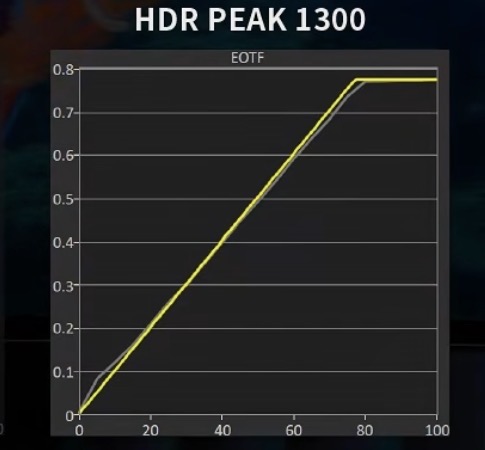
Some charts from a chinese review. The Peak1300 mode EOTF doesn't look too bad compared to QD OLEDs, actually looks useable.
 

Attachments

  • IMG_3099.png
    IMG_3099.png
    807.8 KB · Views: 0
  • IMG_3098.jpeg
    IMG_3098.jpeg
    32.5 KB · Views: 0
  • IMG_3097.png
    IMG_3097.png
    674.5 KB · Views: 0
  • IMG_3096.png
    IMG_3096.png
    774.2 KB · Views: 0
Also, using Peak1300 does not appear to cause craptastic dimming in higher APL scenes like on QD OLEDs

1783446590638.png


So it seems at least on RGB Tandem OLEDs, you can have higher peak brightness for these lower APL scenes without completely killing brightness in high APL scenes.

1783446839355.png
 
Man the HDR brightness is so poor. It will end up doing like mid 400nits 10% window real scene.
 
Man the HDR brightness is so poor. It will end up doing like mid 400nits 10% window real scene.

It is what it is. The form factor is so good I'm willing to live with the crappy HDR until we get a version that can actually do 1000 nits on a 10% window in real content, or the refresh rate increased to 360Hz whichever comes first.
 
It is what it is. The form factor is so good I'm willing to live with the crappy HDR until we get a version that can actually do 1000 nits on a 10% window in real content, or the refresh rate increased to 360Hz whichever comes first.
I dunno it's just way too compromised. 165hz, 1st gen OLED monitor brightness, and a fan.

I just feel like we've made no progress what so ever since the first 32" launched outside of text quality because this offers the same thing 3 years later with some additional slivers of width. I don't think this thing will have any realistic color volume advantage unless it's sub 5% window.
 
I dunno it's just way too compromised. 165hz, 1st gen OLED monitor brightness, and a fan.

I just feel like we've made no progress what so ever since the first 32" launched outside of text quality because this offers the same thing 3 years later with some additional slivers of width. I don't think this thing will have any realistic color volume advantage unless it's sub 5% window.

We honestly may never get any OLED monitor with good HDR capability at all, probably need some other upcoming self emissive tech like QDEL or Samsung's self emissive QNED for that as I have zero faith in TB1000 monitors. I already have an S95F to satisfy my HDR gaming so at this point I don't really care too much if HDR on my monitor sucks because GLOSSY 5120x2160 @ 165Hz with no white subpixel BS is going to be pretty sweet.
 
We honestly may never get any OLED monitor with good HDR capability at all, probably need some other upcoming self emissive tech like QDEL or Samsung's self emissive QNED for that as I have zero faith in TB1000 monitors. I already have an S95F to satisfy my HDR gaming so at this point I don't really care too much if HDR on my monitor sucks because GLOSSY 5120x2160 @ 165Hz with no white subpixel BS is going to be pretty sweet.
You convinced me to buy the monitor. If the horrible grainy greys and vertical bands are gone with the absence of a white sub pixel and it can come near QD-OLED uniformity I'm all for it. With the 48" C6 I'm trying to use now I just cant get over the vertical bands. Makes every explorer window/dark themed content look disgusting.
 
You convinced me to buy the monitor. If the horrible grainy greys and vertical bands are gone with the absence of a white sub pixel and it can come near QD-OLED uniformity I'm all for it. With the 48" C6 I'm trying to use now I just cant get over the vertical bands. Makes every explorer window/dark themed content look disgusting.

Interesting, I thought the dithering they use on newest TV's is supposed to address these issues which is why monitors are way worst since they forego all that extra fancy processing.


I'm gonna wait for some more reviews on this one. This has me kind of wary:

https://www.reddit.com/r/ultrawidemasterrace/comments/1uprojf/aw3926qw_对比_39gx950b/

tl;dr
LG on left, AW on right. White uniformity looks awful on this guy's panel.

View attachment 814666

I can't really tell but to me it just looks like the RGWB variant is just straight up brighter in full field white? Maybe the Alienware looks slightly pinkish on the left side compared to the right.
 
You convinced me to buy the monitor. If the horrible grainy greys and vertical bands are gone with the absence of a white sub pixel and it can come near QD-OLED uniformity I'm all for it. With the 48" C6 I'm trying to use now I just cant get over the vertical bands. Makes every explorer window/dark themed content look disgusting.

How many hours do you have on it so far? They say use it normally 50 to 100 hours, some say up to 200 hours - where it will run through it's lighter, short wear-evening cycles a few times normally. Then if you still see a problem, maybe force a full (long) wear-evening routine. People have seen that clear up after one or both.

A lot of people have said it cleared up after that, though some may slightly exist due to the nature of the panel tech, it mostly "went away" and is not in your face issue anymore from many reports. (People may see severe banding out of the box, and after some short pixel refresh times and/or a manual long refresh cycle, it becomes very subtle and something you'd have to look for.

If not, it could be a panel lottery thing, so I would run it 200 hours, if it's still bad I'd run a manual (long) pixel refresh. If it's still bad, I'd swap it during your return window for a different panel and start over.

. . .

Feel free to answer in the C6 thread if you feel like it. I just noticed your reply here because I'm following this thread out of interest, too.
  • Panel Settling: A prominent AVSForum OLED Banding Discussion advises new owners to wait roughly 100–200 hours of viewing time and to run automatic compensation cycles to allow the screen's uniformity to improve.
  • Source & Color Settings: Users have frequently found that what appears to be severe color banding is sometimes a compression artifact or processing bug. Switching your UHD player or streaming device output from YCbCr 4:2:0/4:2:2 to 4:4:4 often resolves the issue.
  • Gray Uniformity: Members use 5% and 10% gray test patterns in dark rooms to identify these vertical streaks. While subtle banding is widely considered standard for OLED technology (often dubbed the "panel lottery"), severe banding that distracts in normal viewing usually warrants a warranty replacement.

. .

https://www.reddit.com/r/LGOLED/comments/1sunzc8/vertical_banding/

. . .

You could also try dropping down from 165Hz mode to see if that does anything, and swap to a different high quality high bandwidth hdmi cable - in the process of elimination.


. . . .

C6H user on avsforum:
"
After two 4 hour pixel refreshes, this panel is super clean as far as vertical banding goes 👍
There is some lght tinting at the edges but I rarely notice it.

I'd say my only real complaint, coming from years watching QDOLED, is low light scenes causing the white subpixel flashing. Hopefully LG can get a better handle on that.

I love this TV. It's a keeper."

. .
 
Last edited:
Of course there is now a flood of 5K2K OLED monitors after becoming impatient and pulling the pin on the Odyssey Neo G9 57" 🤣 🤬😡😭

I suppose it means I can at least enjoy 240hz ultrawide 4K gaming until the 240hz versions of these monitors start showing up.
If its any consolation the 57" resale value is nearly worthless so your stuck with it forever..... like me
 
I don't think any of us want you or anyone to suffer with something you don't like. At least it's a pretty cool monitor?
 
Yea I find it interesting how RGB basically turns WOLED into a less power efficient QD-OLED with better text rendering, but ultimately this one model is probably too compromised for me too.

Low HDR brightness, a fan, 165hz, and 39" is close to my preferred size, but I'd still prefer bigger.
 
Yea I find it interesting how RGB basically turns WOLED into a less power efficient QD-OLED with better text rendering, but ultimately this one model is probably too compromised for me too.

Low HDR brightness, a fan, 165hz, and 39" is close to my preferred size, but I'd still prefer bigger.

The other bonus is that there is zero black level raise in a bright room compared to QD OLED and no grey banding compared to RGWB WOLED, but yeah I was really hoping it would at least do HDR without the crazy dimming of QD OLED in it's bright mode but unfortunately it does not. I'm willing to accept low overall HDR brightness compared to TVs but that QD OLED style dimming is on another level, it was so bad I got rid of my 32" QD OLED after just 4 months.
 
Yea I find it interesting how RGB basically turns WOLED into a less power efficient QD-OLED with better text rendering, but ultimately this one model is probably too compromised for me too.

Low HDR brightness, a fan, 165hz, and 39" is close to my preferred size, but I'd still prefer bigger.
How I feel as well. Lol. Just another in a long line of "exciting at first, disappointing later" monitor announcements once more details are fleshed out. Ah well - the search continues. I was just going to use this at my WFH setup (desk #2) for the extra resolution and OLED image quality compared to the Samsung 40" 4K I'm currently using there (my God the input lag that seemed acceptable on those early 4K TVs is atrocious now), so the 165Hz would be plenty there. But yeah...too compromised for even that use case if you can't disable the aggressive dimming which would drive me crazy. And the fan doesn't help its case as far as I'm concerned, even if it is user replaceable according to the service manual.
 
Back
Top