For those using a Ubuntu derivative vs Arch...

. Maybe if you have to add a repository but at that point you already know how to drive a command line.
Like I know how to do this, but I don't want to.

I can manually shift the gears and operate a clutch too, but much prefer automatic transmissions in my cars. Unless I'm on the track... Then I want to feel the engine and the road bend to my every whim.
 
Neither Windows nor OSX can be used without a CLI for some functions.
There's nothing in Windows I run into in my normal day to day that requires the CLI.

I can't install and configure Linux to work without it.

Nothing wrong with that, I just don't like it.
 
Like I know how to do this, but I don't want to.

I can manually shift the gears and operate a clutch too, but much prefer automatic transmissions in my cars. Unless I'm on the track... Then I want to feel the engine and the road bend to my every whim.
It's odd you mention cars, as I prefer a real manual with a clutch I actuate...

Yes, I ruptured the tendon in the sole of my foot in bumper to bumper traffic - But I still love my manuals!
 
Like I said, 99+% have no need for CLI. Linux on the other hand almost requires it. Definitely requires it for updating programs and drivers.
What are you talking about? I never use the command line to update either one. Most of the time there's a handy little icon in the taskbar showing new updates. Click on that to bring up the package manager, click on the update button, type in my password and then updates happen. It's been that way for me since about 2007 or 2008 and I've had at least one of my systems on Linux since that time.

To actually need to use the console is extremely rare. That I use the console from time to time is by choice because it's easier and faster for what I'm doing.
 
  • Like
Reactions: ChadD
like this
What are you talking about? I never use the command line to update either one. Most of the time there's a handy little icon in the taskbar showing new updates. Click on that to bring up the package manager, click on the update button, type in my password and then updates happen. It's been that way for me since about 2007 or 2008 and I've had at least one of my systems on Linux since that time.

To actually need to use the console is extremely rare. That I use the console from time to time is by choice because it's easier and faster for what I'm doing.
Using the console is not rare at all. Not even remotely. From an LTS Ubuntu release to Arch, it's needed on every install. The fact we even discuss it shows this.

I would wager every single Linux user out there knows what the terminal is and has to use it often enough they know what it is while on the other hand the average windows user has never even heard of PowerShell or CMD.
 
But I want it. Why cant I just have what I want. This is my biggest gripe about linux. Using the CLI is only faster if you already know the commands, i have no interest in memorizing commands like I'm a computer programmer. I just want to use it.

Well, the CLI is also fast when you need support.

You copy the commandline you got in and you copy and paste the result out so that the helper can see what happened. That is a lot more straightforward than describing a menu dive and exchanging screenshots.

Plus CLI interactions are text-searchable, screenshots are not.
 
  • Like
Reactions: ChadD
like this
Well, the CLI is also fast when you need support.

You copy the commandline you got in and you copy and paste the result out so that the helper can see what happened. That is a lot more straightforward than describing a menu dive and exchanging screenshots.

Plus CLI interactions are text-searchable, screenshots are not.
I love the CLI if the directions online work. 9 times out of 10 each new Ubuntu version stops old advice from working.
 
I love the CLI if the directions online work. 9 times out of 10 each new Ubuntu version stops old advice from working.

Yes, there is that. But that is partially Ubuntu specific.

One of the reasons why I like FreeBSD better. Integrated manpages, one central handbook, one wiki.
 
To actually need to use the console is extremely rare.
I'm kind of curious for how many this is actually the case or small workarounds/troubleshooting becomes so reflexive that it becomes forgotten when it occurs.

Like, recently I had an issue with Kubuntu's native GUI update manager. Inexplicably no updates would work when clicked (either individually or as a whole). GUI error dialog said to use a particular CLI command to fix it. The command didn't work. So I tried manually updating a particular package that was mentioned in some of the CLI output, via the CLI, whereupon the issue was resolved. Someone I spoke with encountered the same problem.

Consider that a user who wasn't comfortable with troubleshooting or registering and asking on forums/etc would not have been able to update *anything* in that scenario. No individual packages would update.

Another time I used the included front-end version of a typically CLI program, with a single purpose (can't recall which off the top of my head). It failed to do the one thing it was designed to do. It straight up didn't do anything. So I used the CLI instead and it worked no problem.

Having used Linux both as a GUI distro and headless I've found it very CLI centric, to where the GUI feels like a thin veneer. For headless use cases it's actually great though as the CLI side of things is robust and modular so it's useful for scripting things.
 
I'm kind of curious for how many this is actually the case or small workarounds/troubleshooting becomes so reflexive that it becomes forgotten when it occurs.

Like, recently I had an issue with Kubuntu's native GUI update manager. Inexplicably no updates would work when clicked (either individually or as a whole). GUI error dialog said to use a particular CLI command to fix it. The command didn't work. So I tried manually updating a particular package that was mentioned in some of the CLI output, via the CLI, whereupon the issue was resolved. Someone I spoke with encountered the same problem.

That is a particularly disgusting aspect of GUIs, especially in Linux. Whether you like GUIs or not, people have to admit that there is a lot of swallowing up error messages going on, or at least the interesting parts of error messages. CLI usually displays clear, actionable error messages.
 
There's nothing in Windows I run into in my normal day to day that requires the CLI.

I can't install and configure Linux to work without it.

Nothing wrong with that, I just don't like it.
Your comparing windows though to non commercial, "distros" made by and for power users or for IT professionals to maintain for users in corpo settings.

If you want to talk about versions of Linux specifically designed for mass market users. Then you have to go to SteamOS / Android.

You have to use a CLI in Android? no. Chrome OS? I know people like to argue those are not Linux but they are.
You have to use a CLI in SteamOS? no. Steam OS is a better example for people doing things we like to do on PC. SteamOS isn't going to require anyone to touch a terminal.
 
  • Like
Reactions: Axman
like this
Well, the CLI is also fast when you need support.

You copy the commandline you got in and you copy and paste the result out so that the helper can see what happened. That is a lot more straightforward than describing a menu dive and exchanging screenshots.

Plus CLI interactions are text-searchable, screenshots are not.
Also very true. Anyone looking online for official MS support... is going to get fix procedures that have them open a command line and type commands.
MS doesn't prescribe fixes with click this click that click here and push this button.

Also... windows has plenty of things "average" users get into such as regedit policy managers and probably other "GUI" stuff. I'll take simple ~/.local text settings files over all that windows gobbledygook.

Linux isn't really complicated, its just for most people they have a decade ore two or three using windows. Those systems have become normal to them.
 
Having used Linux both as a GUI distro and headless I've found it very CLI centric, to where the GUI feels like a thin veneer. For headless use cases it's actually great though as the CLI side of things is robust and modular so it's useful for scripting things.
The GUI is a veneer. No doubt.
That is also true of windows and macos as well. The GUI is always the illusion.
The earliest windows versions were essentially DOS file managers. It wasn't until windows 3.1 that booking into windows was the default setting.... a setting many users changed. I'm sure there are still plenty of people out there that remember starting windows by typing >win
Microsoft has done a bad job of tending to the core bones of their OS. (its why they need things like the Linux subsystem now) Thier OS a mess. Windows NT was pretty well structured, but they have basically been iterating on that base for over 30 years now. New systems to replace old systems that never actually get depreciated resulting in multiple systems doing the same job. How many control panels does windows have these days? Software that keeps its config files is seemingly random areas as guidance on such things went from none, to idea 1, to idea 2, to idea 3... but software that uses the old stuff is still allowed to do its thing.
Apples OS are probably the best veneer... as really the UI is unified clean, and it is built on a solid moduler system. MacOS is still posix compliant. MacOS is a fully functioning Unix OS. I get why Apple the consumer product company abandoned their server version of MacOS. In a way its too bad, it was and could still be a solid commercial unix server OS. Headless MacOS could be a great product, I get it not Apples base customer.
 
Consider that a user who wasn't comfortable with troubleshooting or registering and asking on forums/etc would not have been able to update *anything* in that scenario. No individual packages would update.
How is that any different to sfc /scannow or DISM / Online / Cleanup Image / CheckHealth, DISM /Online /Cleanup-Image /ScanHealth or DISM /Online /Cleanup-Image /RestoreHealth /Source:repairSource\install.wim?

Such tools are literally a necessity under Windows where the OS has corrupted (which does happen often enough in the case of failed Windows updates).

Such commands are often recommended under Microsoft's own quite useless support forums.

I love the CLI if the directions online work. 9 times out of 10 each new Ubuntu version stops old advice from working.
I've got to say, I've never had trouble finding the fixes I need running an Ubuntu LTTS based distro. Quite often, even the Arch Wiki has come in handy regarding diagnosis and repair of my Ubuntu LTS systems. As stated, I've encountered more frustration trying to resolve Windows issues using Microsoft's own support forums.

Arch, it's needed on every install.
There are packaged Arch distro's, much to the disgust of Arch devs.
 
Well, the CLI is also fast when you need support.

You copy the commandline you got in and you copy and paste the result out so that the helper can see what happened. That is a lot more straightforward than describing a menu dive and exchanging screenshots.

Plus CLI interactions are text-searchable, screenshots are not.
I can agree with that - however when the obvious solution is just presented in a graphical context menu, you don't need help. I expect >50% of the "i need help with this" for linux is related to something that needs run on the CLI, that really doesn't need to be run on the CLI if it was presented as an option in the GUI.

I also understand why this is a challenge under linux - the whole idea of being one size fits all for each package, and broad compatibility. Just saying, its both its greatest strength and greatest weakness.
 
Apples OS are probably the best veneer... as really the UI is unified clean, and it is built on a solid moduler system. MacOS is still posix compliant. MacOS is a fully functioning Unix OS. I get why Apple the consumer product company abandoned their server version of MacOS. In a way its too bad, it was and could still be a solid commercial unix server OS. Headless MacOS could be a great product, I get it not Apples base customer.

Last time they couldn't make OSX performant enough for server loads. They is actually not easy. Also quite a few kernel panics, e.g. the infamous one when a Linux NFS client made a hardlink.
 
  • Like
Reactions: ChadD
like this
How is that any different to sfc /scannow or DISM / Online / Cleanup Image / CheckHealth, DISM /Online /Cleanup-Image /ScanHealth or DISM /Online /Cleanup-Image /RestoreHealth /Source:repairSource\install.wim?

Such tools are literally a necessity under Windows where the OS has corrupted (which does happen often enough in the case of failed Windows updates).
The Kubuntu OS wasn't corrupted. Some bug occurred with the updater, which couldn't be fixed by the updater's suggested CLI command.

I've never used any of those commands on Windows, fwiw. Windows and Mac are very GUI-first and when they require troubleshooting they also afford this via GUIs (not necessarily always ideal, per uOpt's point, but it does allow for it either way). Whereas Linux's fallback is pretty much always the command line.

The difference is one can have an experience in those OSes where a command line never has to be touched, while in my Linux desktop experience it's a not uncommon thing, either as GUI troubleshooting fallbacks don't exist (such as my example) or something doesn't work as intended.

The amount of CLI testing I had to do under Linux both to test if SSD TRIM was working over USB for the particular enclosure controllers and to configure workarounds for them (since workarounds are the only things possible for TRIM over USB) took pages of note taking. Jeff Geerling has a whole page devoted to it but it still required additional tests. There is even 10 year old bug thread about it. On Windows and Mac it's not even something people think to have to consider. On Linux it's not even surfaced to the user as a problem anywhere, you just have to know 🙃

To Chad's point about SteamOS, ChromeOS and Android, they're good examples that GUI-first and well-funded projects can be effectively idiot-proof, which is great. Downside is they're all locked down, compared to traditional desktop OSes. macOS has already been heading in the restrictive direction in the last few years though but its UI was already solid.

(I'll also say the Windows 11 UI is a major regression for configuring settings even compared to W10, to where it makes something like KDE look better. Just configuring a network adapter the other day was tedium compared to the traditional list UI since it split each setting into some separate hidden widget, to the point it was aggressively wasting time.)
 
Last edited:
I've never used any of those commands on Windows, fwiw. Windows and Mac are very GUI-first and when they require troubleshooting they also afford this via GUIs (not necessarily always ideal, per uOpt's point, but it does allow for it either way). Whereas Linux's fallback is pretty much always the command line.
I use those commands literally all the time, what those commands do simply can't be done via the GUI. Essentially, what you're seeing is advanced OS functions via the CLI - No different to Linux. Most operations under modern Linux distro's and even MacOS can be done via the GUI, it's mostly advanced functionality done via terminal.

The amount of CLI testing I had to do under Linux both to test if SSD TRIM was working over USB for the particular enclosure controllers and to configure workarounds for them (since workarounds are the only things possible for TRIM over USB) took pages of note taking. Jeff Geerling has a whole page devoted to it but it still required additional tests. There is even 10 year old bug thread about it. On Windows and Mac it's not even something people think to have to consider. On Linux it's not even surfaced to the user as a problem anywhere, you just have to know
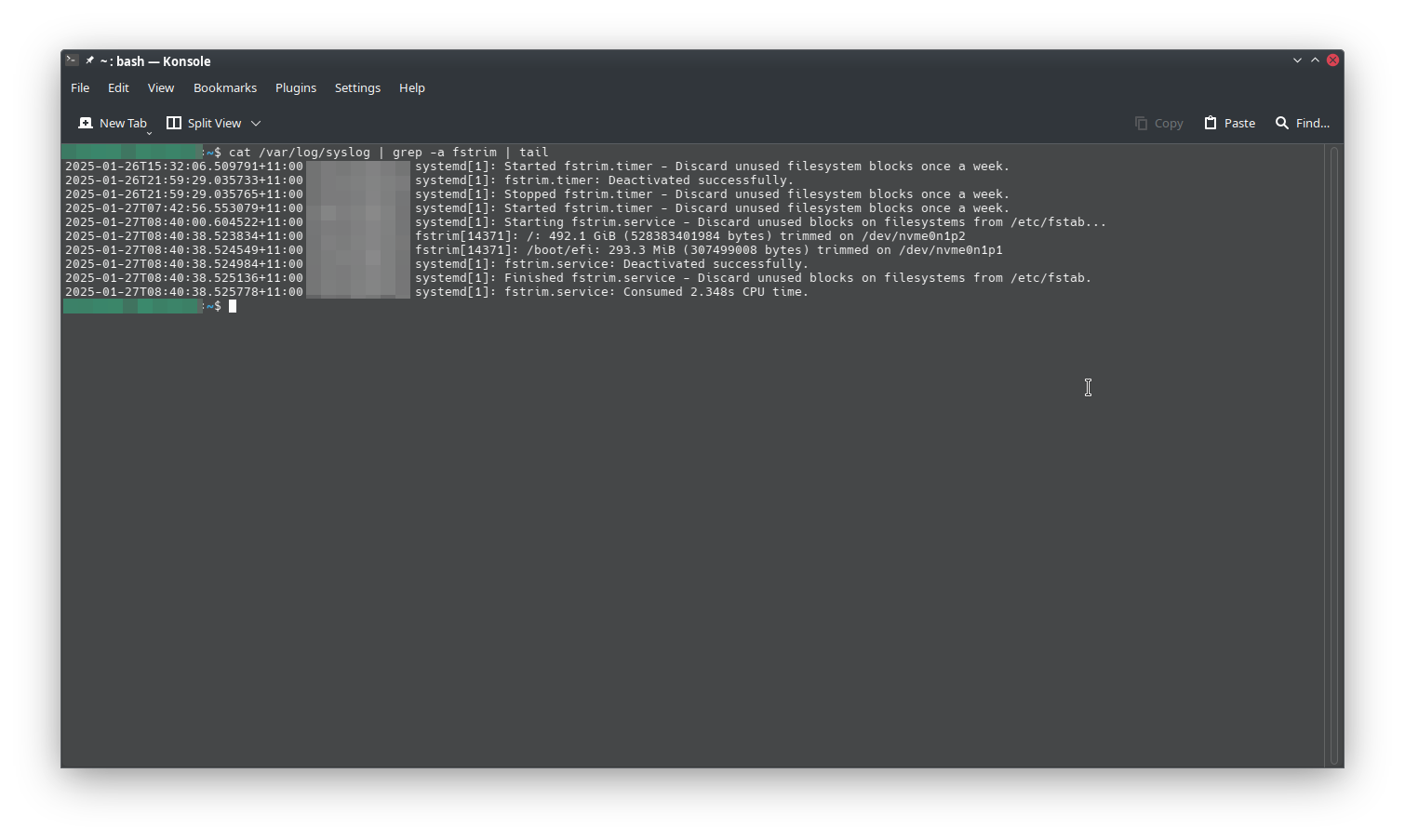
Trim via USB is a bit of a PITA no matter what the OS, as you're mostly relying on the devices ability to support UASP. However a quick Google search (under a minute) found the exact command needed to check if trim is operational on my system, and highlight the partitions/mount points being maintained via TRIM. It was easier highlighting the command and pasting it using the middle mouse button under terminal than trawling through a GUI looking for the option to inspect for TRIM operation.
 

Attachments

  • Trim.png
    Trim.png
    102.1 KB · Views: 0
Trim via USB is a bit of a PITA no matter what the OS, as you're mostly relying on the devices ability to support UASP. However a quick Google search (under a minute) found the exact command needed to check if trim is operational on my system
Not to get off on too much of a digression but it's a Linux specific issue, not whether the controller supports UASP. All the controllers I tested have UASP. Full response spoiled below.

Your screenshot shows fstrim auto set for two PCIe attached NVMe devices, which is expected. Fstrim doesn't auto work on USB attached SSDs out of the box ime (and most others), which sends one down a rabbit hole of trying to discover why, finding the kernel bug threads, unmap workarounds, etc. The process to enabling the workaround is non-trivial, hence why some have written guides/wiki sections.

Then there are controllers which under Linux only support partial TRIM even when fstrim was used (ie: the full extent wasn't trimmed). I found this out by testing. So one controller wouldn't trim the expected amount (a JMicron) while another would (AsMedia).

An extra wrinkle is which type of TRIM (basic discard vs fstrim) even depends on the filesystem under Linux, most relevant for NTFS formatted drives, which if using the native ntfs3 kernel driver it unfortunately doesn't support fstrim at all, only discard.

Even more of a gotcha, outside of Linux per se, was some of the AsMedia controllers only support TRIM on Linux with specific firmware versions. There's a lengthy German thread about this. I luckily had some with the correct firmware else I would have had to flash them...

I mean, there's not much of a way to sugar coat it, Linux requires a user be comfortable doing deep dive troubleshooting, not making assumptions about basic things one takes for granted on other OSes and use of the CLI.
 
Last time they couldn't make OSX performant enough for server loads. They is actually not easy. Also quite a few kernel panics, e.g. the infamous one when a Linux NFS client made a hardlink.
True. I think they were in a much different place when they were trying to do a server version. Non consumer stuff is just not their wheel house. I wonder though now with their improved file system if they couldn't make it work. They have no real reason to chase that market.
 
Not to get off on too much of a digression but it's a Linux specific issue, not whether the controller supports UASP. All the controllers I tested have UASP. Full response spoiled below.

Your screenshot shows fstrim auto set for two PCIe attached NVMe devices, which is expected. Fstrim doesn't auto work on USB attached SSDs out of the box ime (and most others), which sends one down a rabbit hole of trying to discover why, finding the kernel bug threads, unmap workarounds, etc. The process to enabling the workaround is non-trivial, hence why some have written guides/wiki sections.

Then there are controllers which under Linux only support partial TRIM even when fstrim was used (ie: the full extent wasn't trimmed). I found this out by testing. So one controller wouldn't trim the expected amount (a JMicron) while another would (AsMedia).

An extra wrinkle is which type of TRIM (basic discard vs fstrim) even depends on the filesystem under Linux, most relevant for NTFS formatted drives, which if using the native ntfs3 kernel driver it unfortunately doesn't support fstrim at all, only discard.

Even more of a gotcha, outside of Linux per se, was some of the AsMedia controllers only support TRIM on Linux with specific firmware versions. There's a lengthy German thread about this. I luckily had some with the correct firmware else I would have had to flash them...

I mean, there's not much of a way to sugar coat it, Linux requires a user be comfortable doing deep dive troubleshooting, not making assumptions about basic things one takes for granted on other OSes and use of the CLI.
The driver and the device has to support UASP, Linux supports UASP at kernel level and has for quite some time now. As stated, this is a problem no matter what the OS used, some firmware revisions of USB SSD are blacklisted for reasons no one truly understands beyond the manufacturer.
 
But I want it. Why cant I just have what I want. This is my biggest gripe about linux. Using the CLI is only faster if you already know the commands, i have no interest in memorizing commands like I'm a computer programmer. I just want to use it.
Well, duplication of commands and options and interactions with a gui is crazy complicated.
 
There are packaged Arch distro's, much to the disgust of Arch devs.
That isn't really true. The arch devs have no issues with the distros based on Arch, even the ones that just use arch repos.
Arch has accepted work done by other distros back into their own repos. I mean there isn't really much extra stuff in arch proper repos. There has also been overlap with some devs working on Arch proper and spin off distros like Manjaro. Though sure they got upset with Manjaro that time their package manager started slamming the arch servers with requests... woops. lol

If you mean they refuse to help people with technical issues, if they are running a arch based distro. I mean that seems pretty logical. If your running Kabuntu, canonical isn't going to help you out either if something isn't working. Yes Arch has felt the need to remind people in their forums a few times over the years. If you are not running arch don't come round here asking for help cause the ISO you downloaded from some little distro run by 1 guy has their distro doing something funny. It happens with every distro, I think arch is a bit unique in that a lot of newer to Linux people hear Arch is hard but X or Y distro is arch with an installer and assume they run Arch now. It would be sort of like someone running MX Linux trying to get help in the Debian forums.... I mean MX is Debian based, but MX devs have decided they had SystemD and use SysVinit. How would someone from Debian even help them... they are using compeltely different system.

Arch has had that issue in the past as well, I mean even well maintained great arch distros like Cachy. I mean an Arch dev might give you a command that doesn't run in Fish. Cachy have decided to switch arches default shell from bash to fish. Long time LInux people on cachy either say cool I like fish or they switch it to bash or Zsh or ion or whatever they want for a shell. The issue comes for a newer Linux user on something like Cachy goes on their forums asking for help and doesn't even understand they are using a completely different shell. Sure on Arch you can change the default shell and use almost anything that exists its in the repos... the thing is someoen that installed arch the arch way either knows they are on another shell, or it can be assumed their on bash. That is just an example off the top of my head. Arch has tons of little choices like that, that is what Arch heads love is being able to make a ton of choices for themselves. All that choise though makes Arch a pain in the ass to help other users out with. It is very helpful if that user knows every thing that was changed from the default.
 
If your running Kabuntu, canonical isn't going to help you out either if something isn't working.
Realistically speaking, any fix for Ubuntu LTS is going to work under any other distro based on Ubuntu LTS considering the only major change is the DE - They're even pulling from the same repo's. The biggest problem Arch devs have with Manjaro, is the fact that Manjaro maintain their own repo, which isn't in line with Arch's own repositories - For this very reason, when users have problems with Manjaro, Arch devs don't want anything to do with it.

And honestly, Arch devs frown at anyone asking for advice that didn't 'build' their Arch install from the Archinstall script at the very minimum - Because building your own distro apparently makes you a Linux expert, even though you're just stepping blindly through detailed instructions on the Arch wiki while really absorbing the bare minimum (or just simply running a pre configured script). Use Linux for long enough and you'll absorb more about the OS than you'll absorb blindly following instructions on a wiki or running a pre configured script with little to no prior experience.

Don't get me wrong, I'm not 'anti Arch', I'd run Arch again before I'd run vanilla Ubuntu with Canonical's Snap rubbish - But I definitely do not believe Arch is the be all and end all of Linux distro's to the extent Arch users portray it to be, the same Arch users that wrongfully claim that to use an Ubuntu LTS distro means your distro is 'old'...What a load of rubbish. A stable build is not the same as 'old'.

I can believe it. But windows figured it out for the most part.

They did, they developed WinGet.
 
Last edited:
Incomplete cli commands
Obsolete cli commands
cli commands with syntax errors
cli commands with gibberish in them
All these and more will forever keep the masses away from Linux. Nothing against the cli itself, just the people who write, publish and maintain the commands.
 
Incomplete cli commands
Obsolete cli commands
cli commands with syntax errors
cli commands with gibberish in them
All these and more will forever keep the masses away from Linux. Nothing against the cli itself, just the people who write, publish and maintain the commands.
co-pilot speaks cli gibberish pretty well
 
Incomplete cli commands
Obsolete cli commands
cli commands with syntax errors
cli commands with gibberish in them
All these and more will forever keep the masses away from Linux. Nothing against the cli itself, just the people who write, publish and maintain the commands.
All of that describes many third party apps across multiples operating systems. I don't think its fair to make it about Linux only. Plus I prefer Linux CLI over Windows & PowerShell.
 
Incomplete cli commands
Obsolete cli commands
cli commands with syntax errors
cli commands with gibberish in them
All these and more will forever keep the masses away from Linux. Nothing against the cli itself, just the people who write, publish and maintain the commands.
https://wiki.archlinux.org/title/Command-line_shell

You just gotta pick the collection of commands you prefer..... /jk

To answer you question seriously though. Its ok the majority of Linux people don't really want much to go "mainstream". I would be very happy if a company like Valve translates SteamOS into something a large % of the mass market PC users can use and be happy with. I am also very fine with that same group of people not becoming Arch or Ubuntu or any other distro users as well. ChromeOS did grab a good bit of market share for awhile, but Google is Google. Hopes of mainstream at this point are probably almost all on Valve. Google is clearly never going to turn chromeos into anything worthwhile. I have a feeling Nvidia might reskin Valves SteamOS to sell their own hardware some point soon. The idea that distros as we know them are ever going mainstream is just silly. Without OEM support nothing is going mainstream.
 
Incomplete cli commands
Obsolete cli commands
cli commands with syntax errors
cli commands with gibberish in them
All these and more will forever keep the masses away from Linux. Nothing against the cli itself, just the people who write, publish and maintain the commands.

The only commands really needed are those associated with your distro's package manager, and I'm unaware of any major changes to such commands making them obsolete. Furthermore, in many cases you don't even need to know the commands re: Your distro's package manager, as a number of software packages are supplied in .deb or .rpm format and can be installed just like Windows using the GUI. Last I tried, Pacmac still works under Arch should the user want to install software via the AUR using the GUI.

As stated, terminal based package management is so effective that Microsoft introduced a package management tool of their own called WinGet.

Linux is not Windows, Windows is not the benchmark all other OS's need to aspire to because it's all certain generations have been conditioned to know since primary school. Linux is an OS unto itself, and learning something new can be challenging as well as rewarding depending on how one approaches learning new things.

You want nonsensical? Try creating a directory under CBM Basic V2 on the Commodore 64.
 
I tried to do a simple windows server with sql etc to host some stuff...


Gotta say, i was so fing happy to ditch that and have my cli back.
 
I tried to do a simple windows server with sql etc to host some stuff...


Gotta say, i was so fing happy to ditch that and have my cli back.

The concept of a desktop and MMC's to manage a server seems totally ass backwards to me. What an insane waste of resources for no real benefit.
 
I'd like to say that I'm as anti MS as they come. I'd love to see one or more Linux distros sacrificed to draw the masses away from MS. The only way that will happen is by making all the basic stuff GUI and getting rid of that abomination called CUPS. Many Linux distros turned in the right direction when they eliminated most of the error messages that scroll by when Linux boots. And, of course, Linux networking could us some work.
I've been using Mint Cinnamon for years now and it comes as close as they come to being ready for the masses but still has a way to go. Some distros will and should stay true to their roots but some should break away and go after MS users. This would be a better world if that were to happen.
 
I'd like to say that I'm as anti MS as they come. I'd love to see one or more Linux distros sacrificed to draw the masses away from MS. The only way that will happen is by making all the basic stuff GUI and getting rid of that abomination called CUPS. Many Linux distros turned in the right direction when they eliminated most of the error messages that scroll by when Linux boots. And, of course, Linux networking could us some work.
I've been using Mint Cinnamon for years now and it comes as close as they come to being ready for the masses but still has a way to go. Some distros will and should stay true to their roots but some should break away and go after MS users. This would be a better world if that were to happen.
You're complaining about LTS issues. Highly stable with some backporting BUT you're probably not seeing the improvements that might possibly benefit you. I can print just fine with CUPS for an Epson printer at home & networking is really easy with Network Manager (I use nmtui for quick & easy config from the terminal if there's no DE). Plenty of other implementations of many systems/subsystems to make it easier.

From my perspective, you're just taking the lazy way out by not testing more & then complaining about not exploring other options to make it better for YOU. There are distros that do chase after Windows users but the new users usually hit the complaints faster about the differences when they're comfortable. Those that are really fed up (with Windows) are usually fine with experimenting with a distro or two to learn what they like & move away from Windows.
 
The only way that will happen is by making all the basic stuff GUI and getting rid of that abomination called CUPS.

What basic stuff cannot be done via the GUI, and what's wrong with CUPS? It seems to work fine for MacOS. Furthermore, Linux Mint provides nothing for the masses that any other packaged distro based on Ubuntu LTS doesn't provide (excluding vanilla Ubuntu LTS due to Canonical's insistence regarding Snaps).

As stated, Linux is Linux. It is not a clone of Windows, it is an OS unto itself. Learning new things can be exciting depending on one's perspective. Linux isn't difficult, Linux is simply different by virtue of the fact that it isn't Windows.

Realistically speaking, Windows popularity has little to do with it's GUI or ease of use (many average Windows users can't even successfully install software unless it's Malware, they always seem to be able to install Malware not a problem in the world). The popularity of Windows is due to the indisputable fact that it's on the device when you buy it - Which is 100% marketing, and Linux naturally has no marketing department.
 
Recently I've had a ass load of problems with cups. I have 4 printers, all networked, 2 Brothers, 1 Canon and 1 Samsung. After upgrading to Mint 22 none of them would work. All had the same symptom, I send a job and nothing happens, no errors no messages no printing, no nothing. After stumbling around I did manage to get all but the Samsung printing. and yes, I did download and install drivers for all of them. The problem with cups is nothing about it makes any sense as far as troubleshooting is concerned. If it works, fine. If it doesn't you're screwed. It's grossly user unfriendly. I do realize it was the upgrade to Mint 22 that borked the printers but cups should not be so damn ed difficult to work with.
 
  • Like
Reactions: travm
like this
Recently I've had a ass load of problems with cups. I have 4 printers, all networked, 2 Brothers, 1 Canon and 1 Samsung. After upgrading to Mint 22 none of them would work. All had the same symptom, I send a job and nothing happens, no errors no messages no printing, no nothing. After stumbling around I did manage to get all but the Samsung printing. and yes, I did download and install drivers for all of them. The problem with cups is nothing about it makes any sense as far as troubleshooting is concerned. If it works, fine. If it doesn't you're screwed. It's grossly user unfriendly. I do realize it was the upgrade to Mint 22 that borked the printers but cups should not be so damn ed difficult to work with.

Most Brother printers are supported out the box, in the case they're not Brother package their drivers as .deb's and they can be installed via the packaged script - I've run numerous Brother printers under Linux and have never had problems with either printing or scanning over a network. Samsung printers are rare, the fact you encountered problems with a Samsung printer in no way surprises me. Canon printer support under Linux is spotty at best, for the record I've had brand new out the box driver issues with Canon printers under Windows.

Only yesterday I spent the whole morning sorting out driver issues regarding a Sato label printer under Windows 11.

No OS is ever 100% trouble free when it comes to printers I'm afraid.
 
Most Brother printers are supported out the box, in the case they're not Brother package their drivers as .deb's and they can be installed via the packaged script - I've run numerous Brother printers under Linux and have never had problems with either printing or scanning over a network. Samsung printers are rare, the fact you encountered problems with a Samsung printer in no way surprises me. Canon printer support under Linux is spotty at best, for the record I've had brand new out the box driver issues with Canon printers under Windows.

Only yesterday I spent the whole morning sorting out driver issues regarding a Sato label printer under Windows 11.

No OS is ever 100% trouble free when it comes to printers I'm afraid.
Printers are the bane of any OS. Printer diagnostic are the worst. No relevant warnings, just doesn't print. Why? Who the fuck knows 😂
 
Back
Top