Apple 27" LED Cinema Display

Does anyone here have a Dell U3011 or U2711 as well as the ACD 27" to compare side by side and post some pics?

 
Does anyone here have a Dell U3011 or U2711 as well as the ACD 27" to compare side by side and post some pics?

Atajo posted some pictures in another thread:
http://hardforum.com/showpost.php?p=1036533151&postcount=52

I noticed you've asked about both of these displays in a few different threads. The truth is there just isn't a "perfect" one-size-fits-all IPS display right now. It's all about tradeoffs and/or playing the waiting game. To sum it up:

DELL U2711 = $839, Harsh AG, "dusty" text (some people don't mind this, for others like me its a complete deal breaker)
Apple LED Cinema Display 27" = $999 + $150+ DisplayPort video card, text is CRYSTAL clear, very reflective when used in a bright environment (under controlled lighting I find reflections are a non-issue, I wouldn't trade this display for anything)
Samsung SA850 (No known pricing, panels are 10-15% cheaper to manufacture than those used by Apple and DELL, PLS panel shouldn't be plagued by "dustiness" or "reflections", rumored to ship May/June)
 
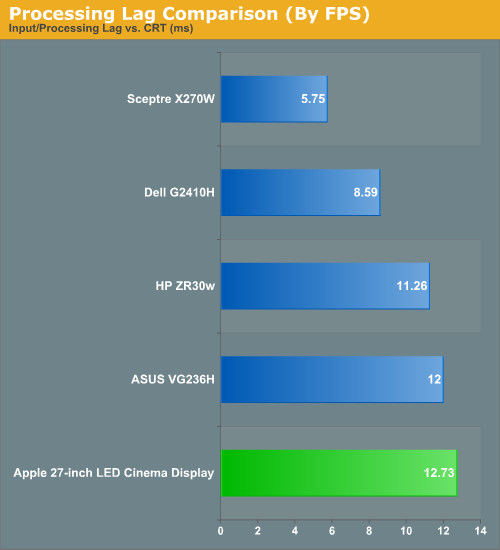
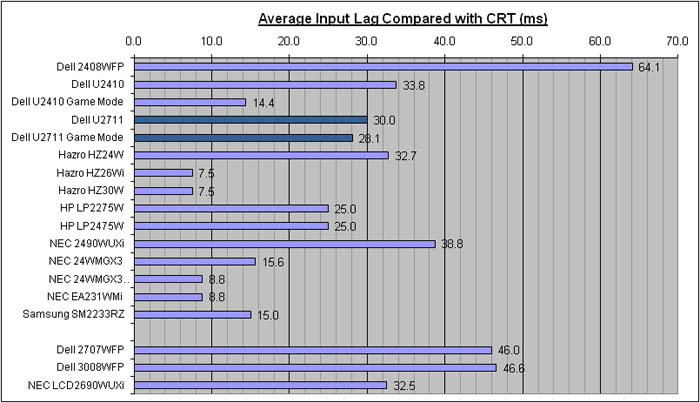
I agree. I researched it quite a bit. I was originally looking at the HP zr30w but I've extremely happy that I decided to get my 27" ACD. I would never get the dell, it has a scaler which = input lag. Anything approaching 20ms let alone 30ms is out of the running in my book.


input_lag.jpg

..
..

24904.png

..
..
http://www.anandtech.com/show/2922/2
..
..
Originally Posted by Topaz View Post
I'm one of the ones that returned their U2711 due to anti-glare, and I can assure you it is terrible. It's as though the entire screen has been smeared with oil and dusted with rainbow grit. There are other problems with the monitor, such as noise from the CCFL and the fact that it takes about 10 seconds to display when turning on/switching inputs. However, those would've been bearable to me if the AG hadn't been such a total deal-breaker.

^------ practically all of the other manufacturer's high rez ips screens have this over agressive AG.


the 27" 2560x1440 models also have a higher pixel density than the 30" ones.

This shows some good info I gathered off other sites regarding different screen size and resolutions.

http://3dalchemist.com/hardware-info/screen-sizes.htm


Personally, size/perspective wise I think monitors 22" to 30" are all good for at a desk, with 23" - 27" being the sweet spot (depending how far away your eyes are from them).


resolution_chart.png
 
Does anyone have problems getting OS X to require passwords after display sleep with the 27 ACD? I'm running 10.6.7 on a Mac mini and it will not require a password with it. If I plug in another display via HDMI at the same time it will. Very strange.
 
Just letting you guys know that the new Nvidia GTX 590 works flawlessly with the ACD. I get boot screens and everything. Both the EVGA and the ASUS version have a mini display port so I didn't have to buy that $150 adapter. The GXT 590 is pretty much the best bang for your buck graphics card and should be able to run all modern games on max with this high resolution monitor expect the "GPU killers" like Crysis 1 and Metro 2033.

For anyone still interested in getting this monitor, it’s a lot better in person than people are saying online. I promise you will never go back once you get this. My biggest concern was the reflection issue but there’s hardly any reflection. When the monitor is off it’s like a glass mirror but once the pixels light up there’s hardly and reflection what so ever. Also I was having issues getting the whole brightness control thing to work. I downloaded all the .exe’s people were providing on this topic but I was getting errors no matter what solutions people thought up. My solution was just going to best buy and buy the Mac OSX Snow Leopard for $30 and updating the boot camp software to 3.2 and the brightness automatically shot up to 100%.
 
Last edited:
Seyumi,

Are you running a SSD or is your BIOS set to AHCI mode? If so, you can uninstall BootCamp and the .exe will work as long as a bootable DVD (i.e. Windows 7) is in your DVD drive. Either way, sounds like you have everything working great. Glad you like your ACD. :)
 
Thanks for the gtx590 info -- 6990 works too :p they are pretty comparable performance wise. AMD gpu's tend to have more vram, better 2d quality, better hdmi performance, full hdmi sound vs nvidia's dts passthrough.... and generally cheaper vs similar performing nvidia cards.

AMD also scales much better in crossfire than nvidia does in sli. I'll provide a link later that shows this. It might come into play if you ever do trifire / tri-sli . (Like if I ever add another 6970 to make it trifire).

I don't think you are going to go horribly wrong with either choice, but to me the amd choice is better. I'd choose nvidia if I needed 3d perhaps, or physx without a dedicated physx card setup (otherwise I'd still do amd and just add an older gtx260 dedicated to physx).
 
Is this the same monitor as the one that comes with the 27" iMac? Saw that at BB today and the screen was damn impressive if you're not averse to gloss.
 
All you guys need to take pictures and put them in the "Show your LCD setups" thread!
 
All you guys need to take pictures and put them in the "Show your LCD setups" thread!

I did post an early makeshift setup cam-phone picture in the show your lcd's thread last week. I'll take some really good pics once I get my basement remodeled. I'm getting a new wall, new floor, remodeling some of the bathroom, updating aquarium setup in-wall, etc.. so it might be a few months. Although I have a nice 3-panel desk that I face outward from the wall, taking over a whole corner, I will probably build my own desk or mod that one eventually so that ergo arms can mount better, and so that I can put a monitor below my central monitor at an angle (part of it looking up through where a normal desk surface would be).

Once all that crap gets done, look out for some awesome pics. :D

Is this the same monitor as the one that comes with the 27" iMac? Saw that at BB today and the screen was damn impressive if you're not averse to gloss.

From what I've read, the imac uses the same panel. I saw it in bestbuy a few times and thought it looked incredible. I downloaded some high rez photos onto it from google to test it out a little. Later I went to a bigger mall that had an apple store and saw the actual 27" cinema display a few times before I decided to spring for it.

As I've said in various threads, glossy is great if you set your room up for it. I put my desk facing out from the wall (out from the corner more specifically) rather than against the wall which would be like a catcher's mitt for direct light. Any overhead lighting above and behind where you are sitting - let alone banks of fluorescents - should be entirely avoided. Lights behind the back of the monitors or at slight tangents are fine.
 
Thanks for the gtx590 info -- 6990 works too :p they are pretty comparable performance wise. AMD gpu's tend to have more vram, better 2d quality, better hdmi performance, full hdmi sound vs nvidia's dts passthrough.... and generally cheaper vs similar performing nvidia cards.

AMD also scales much better in crossfire than nvidia does in sli. I'll provide a link later that shows this. It might come into play if you ever do trifire / tri-sli . (Like if I ever add another 6970 to make it trifire).

I don't think you are going to go horribly wrong with either choice, but to me the amd choice is better. I'd choose nvidia if I needed 3d perhaps, or physx without a dedicated physx card setup (otherwise I'd still do amd and just add an older gtx260 dedicated to physx).

^---- I forgot to mention that nvidia is also much more cpu dependent than amd gpu's.. Depending on what cpu you have at the time, it could mean your performance is retarded by the cpu with nvidia while the comparable amd gpu might not be.


Multiple GPU scaling info...
http://www.widescreengamingforum.com/forum/viewtopic.php?f=57&t=22676

Things get ugly for Nvidia at 2560x1600. While a 67% performance gain for two-way and 112% gain for three-way SLI certainly aren't shabby, AMD’s 92% two-way and 245% 3-way gains put it in the winner’s circle.
 
Last edited:
I don't know if anyone has noticed, but Apple now has the 2009 27" iMacs on refurb for $1049. Pretty good deal if you're thinking about buying a 27" ADC.
 
do any of you guys install osx on generic hardware? issues with this monitor with certain video cards?
 
Unfortunately my previous ACD monitor I had not only had a bright pixel but had dust stuck behind the glass (I tried getting the dust issue fixed but ended up just making it worse) I ended up selling it to a co-worker for a $300 loss since I was out of my return period and small imperfections like that drive me crazy when I spend most of my day using a monitor I paid $1000 for. I was thinking of getting a Dell U2711 since they have a 0 bright/dead pixel policy but after seeing it in person, an ACD would still looks better even if it had 500,000 dead pixels....

Does anyone know Apples "real" return policy on this monitor is? I've looked it up online and even went into an Apple store to ask today. I pretty much got a BS beating around the bush answer about "well the dead/stuck pixels are on a case by case basis like where it’s located or if there’s a cluster of them" but when I looked online, it looked like you needed like 15 dead/stuck pixels to consider a replacement. Another tech said that as long as you just return it within the 14 day period, you will get a refund/exchange no matter what. Does anyone know if this is actually true? Can I just go back within 14 days and say "I didn't like it. I'd like to return it" and not even mention if I find anything like bright pixels or dust behind the glass? Thanks. I really love this monitor and willing to give it another try.
 
I'm pretty sure that bestbuy has a 14 day return period no questions. They don't stock the ACD in their store, but you can order to store. Another plus is that their extended warranty on the ACD is much cheaper than apple's, and lasts a year longer. The only downside I can see is that since they don't keep any in stock, you can't just swap one out and would have to order for store pickup all over again if you weren't happy with one.

Here is paste of their "bought online" returns policy.

Returning Online Purchases

You can return merchandise to a Best Buy store within the U.S. with the option of receiving a credit or an exchange. When mailing merchandise to our return center, your only option is to receive a credit for your purchase. You will receive a credit for your purchase if it meets the return criteria.
Return Period

Return online purchases within the timeframes below. The return period begins on the date you receive your order.

* 14 days for computers, monitors, projectors, camcorders, digital cameras, iPads, tablets and radar detectors
* 30 days for all other products
* 45 days for all products for Reward Zone Premier Silver members*


* If you are returning a mobile phone or device with a plan, Best Buy is not responsible for carrier charges incurred after the carrier's cancellation period. Please refer to the terms and conditions of your plan to verify the carrier conditions.
Returns In Store

Avoid shipping charges and receive a refund more quickly by returning online orders to any Best Buy store within the United States.

1. Include all original packing materials, manuals and accessories to avoid additional fees.
2. You must bring your packing list or receipt and your valid photo ID. Best Buy accepts the following forms of photo identification:

* U.S., Canadian or Mexican driver's license
* U.S. state ID
* Canadian province ID
* U.S. military ID
* Passport

We electronically secure your information solely for the purpose of returns management, in accordance with state and federal laws regarding consumer privacy.
 
So i'm debating on picking up one of these acd's to replace my 3 20wmgx2s. I love the high res/pixel pitch and am totally used to working on them since i use them at school all the time. I prefer this big single screen over my 3 20"s, which are tiny in comparison (yes i know i have more pixels with 3... but still).

However, I have a feeling the Samsung Sa850 is coming out soon and am really interested in what their PLS technology has to offer. I've read that its supposed to be released this spring, and I think spring is nearing... so should I wait for it? I can't find much info on this monitor at all.

I'm torn.
 
Does anyone know Apples "real" return policy on this monitor is?

Apple used to have a 15% restocking fee for returns of non-defective machines. A few years ago they got rid of that policy. You can now return anything for any reason, as long as its within in return window.
 
Purchased the ACD for $905 shipped from Amazon. Awaiting delivery. Here's to hoping no dust or dead pixels.
 
Purchased the ACD for $905 shipped from Amazon. Awaiting delivery. Here's to hoping no dust or dead pixels.

Good luck with that. My first one from Apple had 6 stuck pixels and my second one had one two inches down from dead centre.
 
So I couldn't wait for amazon to refund me my money first. Purchased a ACD from Frys. This time the glass isn't broken but it does have some pretty bad backlight bleed. It is NOT IPS glow. Here is a picture taken straight on: http://i.imgur.com/wHeDp.jpg the camera made the whole display brighter than what it really is, but you can still see the contrast between the bottom right corner and the other 3. If the bottom right was like the other 3 I could live with it. Going to try to exchange it on Friday.
 
Would it be possible to use three of these in Eyefinity? My card has the DP outputs(6990)

I haven't seen anyone using this display for multi monitors though, maybe because of the glare or are the bezels too thick?
 
Would it be possible to use three of these in Eyefinity? My card has the DP outputs(6990)

I haven't seen anyone using this display for multi monitors though, maybe because of the glare or are the bezels too thick?

I don't see why you wouldn't be able to use these in eyefinity. I think the reason you haven't seen anyone do it yet is because nobody has dropped 3K on three of these. I think you should be the first and post pix :D
 
"The change in default white point alone should be an indication
that Apple is experimenting with panels or panel vendors,
the rest of the data seems to back this up as well."

http://www.anandtech.com/show/4340/27inch-apple-imac-review-2011/7

Is there another vendor for a 27" IPS 2560x1440 panel?
Does Panasonic make one that size? Does anyone make IPS
panels other than LG and Panasonic?

More like they don't know what they are talking about and are making faulty assumptions. It could simply be batch variations.
 
Thinking about getting the 27" 1440p Hazro display (650$ vs 1200$ for the ACD) and was wondering how letter box movies look on 1440p displays in terms of how much they fill the screen. Could any one take a picture?
 
2560x1440 is the same 16:9 ratio as 1920x1080 so if you scale
the image up it will fill the screen exactly the same as
any 1080 (or 720) TV set. If the image isn't 16:9 there will
be the same size black bars as a 1080 or 720 TV would have.
You might notice scaling artifacts if the picture has a lot
of parallel lines such as a fence or a brick building.

If you *don't* scale the image up there will be quite a bit
of free space, which can be useful if you want another window
to take notes or answer email or whatever.
 
I don't plan on scaling but I'm still curious to see how much of the screen a 1080p file actually fills.
 
Last edited:
I added a 19" 1440x900 in portrait mode on each side of my ACD. I had to swing the side monitors back a bit on ergo arms for them to line up perspective-wise but it actually looks pretty cool that way I think. They are sus LED backlit TNs that I got off egg for $110 each. There was no way I was springing for three ACD's since i was doing an expensive gpu upgrade at the same time. I'm also waiting for the competition and reviews on 27in 120hz TNs later on. Im planning cpu,mobo,and ram upgrade xmas/q1-2:2012 , so it will be awhile yet. Whenever I get around to financing an eyefinity array I will decide between adding two more ACDs or three 120hz TNs. It will prob cost around the same to add either.


Another reason why paying lots of cash for a display is so absurd. LCD is such extreme fail.


putting $3000-$4000 worth of parts into a computer tower just to use on a $300 1080p (usually TN panel) monitor is also an extreme fail. I think anyone who has owned both a 1080p monitor and a 1440p/1600p (IPS) monitor can agree that's the bigger screen, higher resolution, tighter pixel pitch, better colors, better brightness, etc. is worth an extra $700 which is miniscule to what a lot of people put into their towers. The picture of the 1080p screen on top of the 1440p screen does indeed look like a joke from what you're paying but in person it's the difference between night and day (mainly has to do with the pixel pitch. Looking at a 1080p monitor is like looking through a screen door. You can see the pixels and it gets worse the bigger the screen gets like the 1080p 27"s) If I had to compare it.... iphone3 screen vs. iphone 4. Nothing left to say. That's the best comparison I could possibly make. The difference between those 2 screens are night and day.
 
I smile every time I get back to using my ACD. The image quality is eye melting imo. The rez increase and pixel pitch are great too. What does a 27in high quality, perhaps LED backlit screen cost in 1080p rez anyway? You cant compare TN. I just got an asus transformer tablet that is IPS too, and the screen is freaking awesome looking (1280x800).
 
Spending that much money on a computer is a fail in of its own...

Anyway it's irrelevant how much you've spent on a computer; it is still stupid to spend lots on an LCD when it will suck (now if it didn't, say it was an uncoated superfast RGBLED A-TW IPS with high build quality, then it would be more worth it, but then it would be ridiculously expensive so thus it again wouldn't be worth it) one way or another... That money can be spent on something else. Speakers. Food. Gold.

It makes much more sense to spend as little as possible, or get a high-end CRT and fix it up.

The point is that a few years ago you could just buy a (CRT) monitor and you barely even had to read any reviews beforehand, because you knew it would be good, you could actually expect it to function normally, unlike now when the norm is total failure and crap quality and to actually expect bullshit.
 
There are tradeoffs on all current panel tech. I love my acd . You used to be good with a tv for 20yrs too.. gpus of 150 bux.. but if you want high end you pay more. No use crying over it. I used a 24in widescreen sony fw900 graphics pro crt for the last 3yrs. Its back is ginormous and it weighs almost 100lb, takes a half hour to warm up to full contrast, and the 23in viewable could be larger. It also uses a lot of juice and puts off heat, and geometry and crisp edges can be issues as well as blooming with age. Its around 22in front to back, and I got it used for around $400. New they were like $2200 when they came out, and Im sure there were people crying about that too lol.

I own a 34in widescreen sony xbr960 1080i/"720p" superfine pitch crt hdtv too.. the best crt hdtv ever made. Glossy IPS screens are the closest thing to that richness I have seen, yet they have the edge crispness of lcd. I use the crt tv for consoles on occasio now, if ever. LCD tv tech has advanced enough that it is enjoyable for movies for me now, just in the last few years.
 
Back
Top