Mixing SSD and Standard drives

Spiko

Gawd
Joined
Nov 20, 2009
Messages
886
So I'll be building a new computer in the next week or so and I have most of the parts ordered. Heres my setup so far:
i7 920 /w Corsair H20
EVGA x58 SLI LE
XFX 5870
G.SKILL 6GB DDR3 Triple Channel

I have been using a Western Digital Caviar Green WD10EADS 1TB 32MB as an external drive hooked up to my laptop and my plan was to use it as my boot drive in the new build. However seeing as the rest of my system is reasonably high end (at least by my standards some of you guys are nuts) I thought it may be slightly on the slow side to run windows. I don't have a ton more money to spend as the rest of the parts have cleaned me out so my options are
A) Pick up another WD10EADS 1TB and run them in raid 0
or
B) Buy a SSD such as the OCZ Vertex Series 30GB

I've never owned a SSD so please forgive my noobness. I did search around but was unable to find the answers to a few specific questions I have regarding my situation. 30gigs wont cover my needs for OS, Programs, and games but it's all i can afford in a SSD right now. Between windows 7 and a 10 gig world of warcraft install I don't think I'd even have room left over for the CS4 suite let alone the laundry list of other games I want to install. So would I be better off with my OS on the SSD and Programs, games, and media on the WD 1TB or everything on 2 of the WB 1TB in raid 0?

thank you in advance for any advice you have to offer

-Spiko
 
Last edited:
I think you should wait a bit til you can afford a bigger SSD and then get that. In the mean time, booting off the WD Green will not be all THAT bad. They're not generally recommended as boot drives (because the faster Black drives are basically the same price), but the difference between a Green and a Black is not like the difference between an HD and an SSD. It'll be fine to boot off it for a while.

You can run them in RAID-0 if you want, though I guess that'd be a pretty unorthodox configuration for Green drives. Or you can get a fast 500GB boot HD for about $50. Samsung F3 500GB is probably the fastest. I'd assume two Greens in RAID-0 would beat it though, but I'm not sure.
 
Hmm those Samsung F3 500GB are pretty cheap. Two of them in raid 0 is still cheaper than the SSD. I know it wont match it in performance but it's within my budget and fits my size needs. I know waiting and saving for the bigger SSD would be ideal but there's no more money coming in and I'd end up spending it on other shit anyway.

so option C) Samsung F3 500GBx2 in raid zero with the WD green for media.

thank you for the quick reply. More input very welcome.
 
I don't know what your budget is

About 140 bucks is my max. Sadly thats all thats left of me after buying everything else. Forgot to mention it's all going into a brand new corsair 800D :D

Right now I'm leaning towards those Samsungs that were recommended. reviews seem solid and they meet my needs. That and it's a technology I understand. I think I'll let SSD mature a bit before I jump in.
 
Get the Kingston 40Gb drive, it should be big enough for your OS and some key apps.

Then install the rest of your apps, data, docs, etc on your 1Tb drive.
 
^^^ This. I just ordered mine after waffling about the different low-cost SSD options. Now I just need to settle on a mobo and ram for my i7 build.
 
I grabbed a 30gb Vertex a few weeks ago.I did my W7 install to that and moved my 150gb Raptor to games,program and storage duties and Im absolutely blown away by it.14 second boot times are sweeet and the overall feel is just amazing..Whenever SSD prices settle down I will upgrade then but until that time Im pretty happy with my setup(see sig).
 
Seconded.
Picked up a 30gb Vertex yesterday; waiting for delivery on it today. I opted for the Vertex because the OCZ drives support TRIM, just like the Intel drives do. The Kingston drives do not support TRIM; it's "supposedly" coming but there's no definitive date (and Kingston's quote was something along the lines of "it's in the pipeline"). Could be tomorrow, could be 6 months from now. The only ways to 'refresh' an SSD's performance is TRIM f/w, using Indilinx's wiper app (which only works on Indilinx based drives), using Intel's SSD Toolkit (which only works on Intel drives and not Kingston's even though theirs are physically Intel drives)....or doing a complete flush with HDDERASE and deleting everything and starting from scratch again (having to reinstall Windows and your apps). On a Kingston drive, HDDERASE is the only option ATM.

Best quote I've read in a long time:
Anand said:
We expect our computers to react immediately to input; even waiting 6.6 seconds is an eternity. Waiting 31 seconds is agony in the PC world. Worst of all? This is on a Core i7 system. To have the world’s fastest CPU and to have to wait half a minute for a couple of apps to launch is just wrong.

Mixing SSD+regular platter drives is OK.
You're building an i7, you want speed....get an SSD. All you really need on the SSD is the Windows install (and some apps if you want). Use regular drives for games, cache, and storage (everything else). I personally see no reason to buy a 60gb+ SSD. Until a Windows install takes that much, I think the 30s/40s are sufficient. :)
 
Last edited:
When you have a 25+ GB steam folder there is a reason for a larger SSD :)

I have a 100+gb Steam folder....didn't make me want a larger SSD, I just planned on throwing it on one of my AAKS drives. :)
100+gb SSD's are too high $ per GB IMHO. Hell even the 64gb SSD's are very pricey at current street prices. :eek:
 
Keep in mind that RAID0 increases transfer speeds, but does nothing to improve access times. Near-instant access times are why SSDs make your computer seem snappier. Rather than ~10ms access times, they have 0.1ms access times. Because of the moving parts in a HDD, their random 4KB read times are usually around 0.5MB/s. A good SSD can hit 30MB/s on the same test due to the near-instant access of flash memory.

As chanchan alluded to, RAID0 also doubles your chance of hardware failure. If either drive in RAID0 dies, you've just lost two drives' worth of data. You have backups (you do, right?) but if one drive in a RAID0 dies, it will be more disruptive than if the same drive had died with two independent drives.


I opted for the Vertex because the OCZ drives support TRIM, just like the Intel drives do. The Kingston drives do not support TRIM; it's "supposedly" coming but there's no definitive date (and Kingston's quote was something along the lines of "it's in the pipeline"). Could be tomorrow, could be 6 months from now. The only ways to 'refresh' an SSD's performance is TRIM f/w, using Indilinx's wiper app (which only works on Indilinx based drives), using Intel's SSD Toolkit (which only works on Intel drives and not Kingston's even though theirs are physically Intel drives)....or doing a complete flush with HDDERASE and deleting everything and starting from scratch again (having to reinstall Windows and your apps). On a Kingston drive, HDDERASE is the only option ATM.

AS Cleaner (see the Tony Trim thread) should theoretically erase all the free blocks on your SSD. Not quite as elegant as real TRIM support, but you can simply run it occasionally to undo the performance degradation that comes along with filling up all the flash.


When you have a 25+ GB steam folder there is a reason for a larger SSD :)

You can use NTFS junctions (symlinks) to redirect Steam stuff. My main Steam folder is on my HDD, and I use Link Shell Extension to put the games I'm currently playing on the SSD, but still under the Steam directory structure.
 
Is harddrive failure really that prominent? I've been a heavy computer users for oh, I duno, the past 20 years or so and have never had a HD in a computer or any device for that matter crap out on me. Am I just extremely lucky?
 
Keep in mind that RAID0 increases transfer speeds, but does nothing to improve access times. Near-instant access times are why SSDs make your computer seem snappier. Rather than ~10ms access times, they have 0.1ms access times. Because of the moving parts in a HDD, their random 4KB read times are usually around 0.5MB/s. A good SSD can hit 30MB/s on the same test due to the near-instant access of flash memory.

As chanchan alluded to, RAID0 also doubles your chance of hardware failure. If either drive in RAID0 dies, you've just lost two drives' worth of data. You have backups (you do, right?) but if one drive in a RAID0 dies, it will be more disruptive than if the same drive had died with two independent drives.


AS Cleaner (see the Tony Trim thread) should theoretically erase all the free blocks on your SSD. Not quite as elegant as real TRIM support, but you can simply run it occasionally to undo the performance degradation that comes along with filling up all the flash.


You can use NTFS junctions (symlinks) to redirect Steam stuff. My main Steam folder is on my HDD, and I use Link Shell Extension to put the games I'm currently playing on the SSD, but still under the Steam directory structure.

i'm been reading up on the NTFS junction as of late actually. I keep most played games on my SSD currently and everything else goes to the storage drive. As I start to install more games (just did a fresh install of windows a few days ago) think I will junction the rest of the games to my AAKS drive.
 
I have a 100+gb Steam folder....didn't make me want a larger SSD, I just planned on throwing it on one of my AAKS drives. :)
100+gb SSD's are too high $ per GB IMHO. Hell even the 64gb SSD's are very pricey at current street prices. :eek:

All depends on your budget I guess.
 
Is harddrive failure really that prominent? I've been a heavy computer users for oh, I duno, the past 20 years or so and have never had a HD in a computer or any device for that matter crap out on me. Am I just extremely lucky?
Number 2

On a side note you just jinxed yourself by saying it you know that right?
 
Is harddrive failure really that prominent? I've been a heavy computer users for oh, I duno, the past 20 years or so and have never had a HD in a computer or any device for that matter crap out on me. Am I just extremely lucky?

Just lucky. I had a 2.5" drive fail on me this week in a mini-itx system here at my office.

I've "only" had 3 harddrives fail on me over the past 12+ years.

Luckily all were on aging systems, and I knew it was coming on 2 of the 3 systems. (ie: I got warning signs, so backed everything up)
 
You can hardlink 1 file on two different drives?

Whats the performance of these scenarios:
  1. Win7 on SSD but Games/Programs on HDD
  2. Win7 on SSD with hardlinks to Games/Programs on HDD
  3. Win7 and Games/Programs on SSD
 
I'm going to have 3TB of storage from 3 traditional drives.

I plan to install Windows 7 on an SSD along with key applications, etc. So that will be the main drive. My question is this - what drive should the page file go on?
 
I moved my page file off my SSD and its on my storage drive now. Alot of people say to leave it on the SSD but I don't want the writing to the page file on my SSD. However if you have enough ram in your system should barely touch the page file anyways.
 
I don't use a HDD/SSD page file. I removed the C: location as soon as Windows was done installing. I have not had any issues.
 
I don't use a HDD/SSD page file. I removed the C: location as soon as Windows was done installing. I have not had any issues.

Can some please explain to me what this means, or point me in the right direction so I can figure it out by myself? I'd search but I don't even know where to start.
 
Can some please explain to me what this means, or point me in the right direction so I can figure it out by myself? I'd search but I don't even know where to start.

Basically I turned of all page file usage on the HDD/SSDs. I am not saying it is the best thing to do. I personally have had no issues doing so, but some people will crash after changing it.

This should be read, then decide if you want to do it or not. I am one of the minority it mentions apparently.

I did simply move it to a separate drive for years but started removing it completely about a year and a half ago.
 
You can hardlink 1 file on two different drives?

There are a few different types of links in NTFS. Some will work between different drives, some won't.

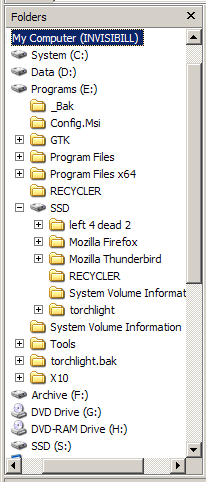
My own setup has my OS install on C: on the SSD, my user profile and other data on D: on the SSD, and the rest of the SDD mounted as E:\SSD\ rather than as a separate drive letter (where the main E: is the first partition on my HDD). Because the Intel SSD Toolbox references some things by drive letter, I also added a mapping for S: for the last partition on the SSD as well (just to make sure it was accessible to those tools).

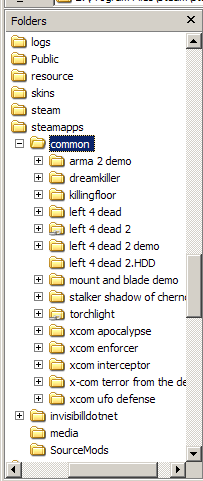
When I install a game, it goes to E:\Program Files\Game\. I move the Game folder from E:\Program Files\ to E:\SSD\, then create a link to it in E:\Program Files\. The game files are stored on the SSD, which is mapped to E:\SSD\. There are links in the original install locations pointing at the folders in this directory, so that E:\Program Files\Game\game.exe is actually redirected transparently to E:\SSD\Game\game.exe. The game runs from the SSD, while still appearing to be in the original install location.

You can see the SSD partition mounted as E:\SSD\ and S:\ in the first pic, as well as the apps and games I have stored there. In the second pic, you can see the links from my original Steam folder which point to the other location on the SSD (notice the slightly different folder icons).
ssdlinks1.png
ssdlinks2.png


Whats the performance of these scenarios:
  1. Win7 on SSD but Games/Programs on HDD
  2. Win7 on SSD with hardlinks to Games/Programs on HDD
  3. Win7 and Games/Programs on SSD

A hardlink is just a transparent shortcut, so 1 and 2 are exactly the same. The only difference is that with option 1, you'd have to manually install the game to D:\Game\ rather than C:\Program Files\Game\. With option 2, C:\Program Files\Game\ would actually redirect to the HDD, even though it's "inside" the SSD's drive letter. With either of these options, your OS accesses would be faster, but your games would be 100% exactly the same as before. Note that by separating your OS and apps to separate drives, you may get some improvement since one drive can be accessing the OS files while the other drive can simultaneously be accessing the app files. If both OS and apps are on the same physical drive, it may have to stop accessing the app files momentarily to access OS files. This has nothing to do with SSD specifically, just splitting the load between multiple pieces of hardware in general.

Option 3 would provide the best performance, but most people can't afford to buy enough SSD space to hold all their apps and games.

Option 4 is what I'm doing. OS on SDD, most apps on HDD, and "apps I want to speed up" on SSD. Along with putting the important apps on SSD, I'm linking them under the HDD's directory structure just to make things easier. I can move apps from HDD to SSD and back whenever I want simply by moving the files and creating a link. The files are still accessible via their original location, so I don't have to bother with installs getting messed up or anything. This method works well for me due to how I have my system partitioned already.

If you want to set up something similar, I started a new thread with instructions. How to install your system to SSD and seamlessly move apps to HDD to save space
 
When you have a 25+ GB steam folder there is a reason for a larger SSD :)

Sure, and a lot of us would like a Ferrari instead of a Honda as well... But if you've got the cash and inclination to opt for a 30-80GB SSD, I wouldn't deny yourself the huge performance boost just because you can't use it for EVERYTHING just yet... Using it only for the OS, 1-2 games, and your most important apps while having everything else on a 500GB-1TB drive is still leaps and bounds better than any other setup (cost-wise and performance-wise).

As others have mentioned, it's not hard to sue symbolic links to split a Steam folder or w/e in order to arrange stuff across an SSD + a regular drive. Is it one more step? Well yeah, but chances are you won't be using SSD for ALL your storage needs anytime soon (prices won't drop that far that fast), so you might as well get used to such an arrangement sooner rather than later. InvisiBill's setup works for him, but you can just arrange it however it seems logical to you, so don't get frustrated if it seems overtly complicated.

In the case of the OP I'd probably opt for the 30GB Vertex + w/e HD for data... Even if he can't keep WoW on the SSD. Just having Windows 7 and his other apps on it (plus maybe one or two other games w/smaller installs) will still be a huge treat compared to any regular HD. In a couple months or a year you can retire the Vertex to a netbook/laptop or sell it off.

That's what I planned to do with the 80GB X25-M on my dekstop but after using I'm itching to upgrade some of my other systems to SSD so much that I might just get a couple of 30GB Vertex/Agility drives in a month or two... Or the similarly-priced 40GB Kingston drives if they finally have TRIM support by then. I think the OCZ drives are like $10-20 cheaper after MIR tho.
 
Last edited:
I ordered two of the new Kingston V Series 40GB drives.

I could care less about TRIM as they are going into a RAID 0 config. TRIM doesn't support RAID, nor any other operating system other than Win 7.

SSD for OS and massive platter drives for storage are the way to go in the foreseeable future, maybe for many more years to come.

Personally, 80 gigs is about 4 times what I need for an OS partition so no need to wait any longer.
 
TRIM CAN work with RAID, the only reason it's not supported right now is because no RAID drivers, including Intel's, have been updated for it (kinda sad considering Intel's presence in the SSD market)... But it should happen eventually. Whether Kingston releases TRIM firmware for the 40GB drives is another IF on top of that... Kinda worrisome if you ask me, tho it's based on the same 34nm G2 drives Intel is making so it shouldn't be a hard update to implement.

Why'd you opt for two 40GB V Series drives instead of a single 80GB X25-M anyway? With the gimped write speeds on the 40GB you're probably not surpassing the 80GB X25-M by much on that end, read speeds would probably be better but you're paying the same amount for the same capacity w/added complexity... Meh.
 
Why'd you opt for two 40GB V Series drives instead of a single 80GB X25-M anyway? With the gimped write speeds on the 40GB you're probably not surpassing the 80GB X25-M by much on that end, read speeds would probably be better but you're paying the same amount for the same capacity w/added complexity... Meh.

Real world I doubt the write speeds would be noticeable between either setup. Small writes to registry and other databases are what's of more concern to me as it's an OS drive and these drives aren't lacking there. RAID will more than compensate for the crippled write speeds. Not sure what you mean about complexity since it's simply being striped. SSDs in essence are RAID arrays anyway.

Reads will smoke anything on the market in terms of price per GB or otherwise at the moment.

They're about $60 cheaper and in stock. Later I can part them out to other machines, my game server and back up dev machine in particular.

Thanks for the info about the RAID drivers, didn't know that.
 
Last edited:
Sure, and a lot of us would like a Ferrari instead of a Honda as well... But if you've got the cash and inclination to opt for a 30-80GB SSD, I wouldn't deny yourself the huge performance boost just because you can't use it for EVERYTHING just yet... Using it only for the OS, 1-2 games, and your most important apps while having everything else on a 500GB-1TB drive is still leaps and bounds better than any other setup (cost-wise and performance-wise).

As others have mentioned, it's not hard to sue symbolic links to split a Steam folder or w/e in order to arrange stuff across an SSD + a regular drive. Is it one more step? Well yeah, but chances are you won't be using SSD for ALL your storage needs anytime soon (prices won't drop that far that fast), so you might as well get used to such an arrangement sooner rather than later. InvisiBill's setup works for him, but you can just arrange it however it seems logical to you, so don't get frustrated if it seems overtly complicated.

In the case of the OP I'd probably opt for the 30GB Vertex + w/e HD for data... Even if he can't keep WoW on the SSD. Just having Windows 7 and his other apps on it (plus maybe one or two other games w/smaller installs) will still be a huge treat compared to any regular HD. In a couple months or a year you can retire the Vertex to a netbook/laptop or sell it off.

That's what I planned to do with the 80GB X25-M on my dekstop but after using I'm itching to upgrade some of my other systems to SSD so much that I might just get a couple of 30GB Vertex/Agility drives in a month or two... Or the similarly-priced 40GB Kingston drives if they finally have TRIM support by then. I think the OCZ drives are like $10-20 cheaper after MIR tho.

Bro, I totally agree with you, even if you can only afford a 30GB SSD it still better than a HD.
 
There are a few different types of links in NTFS. Some will work between different drives, some won't.

My own setup has my OS install on C: on the SSD, my user profile and other data on D: on the SSD, and the rest of the SDD mounted as E:\SSD\ rather than as a separate drive letter (where the main E: is the first partition on my HDD). Because the Intel SSD Toolbox references some things by drive letter, I also added a mapping for S: for the last partition on the SSD as well (just to make sure it was accessible to those tools).

When I install a game, it goes to E:\Program Files\Game\. I move the Game folder from E:\Program Files\ to E:\SSD\, then create a link to it in E:\Program Files\. The game files are stored on the SSD, which is mapped to E:\SSD\. There are links in the original install locations pointing at the folders in this directory, so that E:\Program Files\Game\game.exe is actually redirected transparently to E:\SSD\Game\game.exe. The game runs from the SSD, while still appearing to be in the original install location.

You can see the SSD partition mounted as E:\SSD\ and S:\ in the first pic, as well as the apps and games I have stored there. In the second pic, you can see the links from my original Steam folder which point to the other location on the SSD (notice the slightly different folder icons).
ssdlinks1.png
ssdlinks2.png


A hardlink is just a transparent shortcut, so 1 and 2 are exactly the same. The only difference is that with option 1, you'd have to manually install the game to D:\Game\ rather than C:\Program Files\Game\. With option 2, C:\Program Files\Game\ would actually redirect to the HDD, even though it's "inside" the SSD's drive letter. With either of these options, your OS accesses would be faster, but your games would be 100% exactly the same as before. Note that by separating your OS and apps to separate drives, you may get some improvement since one drive can be accessing the OS files while the other drive can simultaneously be accessing the app files. If both OS and apps are on the same physical drive, it may have to stop accessing the app files momentarily to access OS files. This has nothing to do with SSD specifically, just splitting the load between multiple pieces of hardware in general.

Option 3 would provide the best performance, but most people can't afford to buy enough SSD space to hold all their apps and games.

Option 4 is what I'm doing. OS on SDD, most apps on HDD, and "apps I want to speed up" on SSD. Along with putting the important apps on SSD, I'm linking them under the HDD's directory structure just to make things easier. I can move apps from HDD to SSD and back whenever I want simply by moving the files and creating a link. The files are still accessible via their original location, so I don't have to bother with installs getting messed up or anything. This method works well for me due to how I have my system partitioned already.

If you want to set up something similar, I started a new thread with instructions. How to install your system to SSD and seamlessly move apps to HDD to save space

Thanks for the detailed explanation. =)
 
Not sure what you mean about complexity since it's simply being striped. SSDs in essence are RAID arrays anyway.

Thanks for the info about the RAID drivers, didn't know that.

Complexity-wise, I was mostly alluding to the lack of TRIM support w/RAID setups (currently), having to break apart the array to run firmware updates, etc. It's really not a big deal either way if you upgrade often (and backup regularly). I'm sure you'd be very happy w/either setup.

I really hope they update RAID drivers sooner rather than later, I might end up forming a 160GB array w/my existing 80GB X25-M G2 (which I was gonna move to the laptop) and just get a 60GB OCZ drive for my laptop. 'Specially if we see another big mid-year price drop that carries over to older models (X25-M G1 drives were sold at G2 prices for a while when G2's were still unavailable).
 
I run a 60GB Vertex with a 1TB Seagate. I like it. What I do, and would prefer to do always, is to set up the system to not even touch the HDD. If you ever have it spin down (which is nice if you hardly use it), but then it accesses a small file for some app, you wait a substantially longer time than if it never spun down or if everything was just on the SSD to begin with.

So I have my OS/apps/games on my SSD, then I put shortcuts inside respective folders linking things such as My Music to a folder with all those files on D:. I set each application like WMP to go to D: to begin with rather than My Music on C:.

Now, the easy way around all this is to just turn off the HDDs ability to spin down in power options. I don't really want to do that, because like I said, I only store videos/music on my HDD and there's no reason for that drive to be spinning all night/day.

What I'm going to do soon is buy the 160GB G2, which should be enough space for doing things the way I want to.
 
So by the time I got around to placing my order the drive was no longer on sale and was out of my price range. I ended up getting two of the SAMSUNG Spinpoint F3's recommended to me in this thread and I'm going to run them in RAID 0. At least this way I can have all my games on it.

Thank you all very much for your input. It was educational. I still plan on going SSD in the future but I want to let them mature a bit more. I'm guessing this time next year the idea of paying 160 bucks for a 30gig drive will seem ridiculous. They'll be faster bigger and cheaper and so i'll just get one when they meet my needs.

Thank you again for the replies. :D
 
Back
Top