Slow Vista loading time 2x 6401aals in raid0

sprout2287

Gawd
Joined
Jul 30, 2007
Messages
857
Good morning everybody:D,

I have a minor problem with my raid 0 setup. I replaced my wd raptor, 74gb, 16mb cache drive with a pair of wd black 6410aals drives in raid 0 a few months ago. This is my first raid setup ever but definitely not my first build.

Before, when I was running my raptor, I could load vista in far less time than I do now. I used to have about two and a half passes of the green loading bar and the computer hopped right into windows with only a flash of the windows orb.

Now, as my video shows, it takes quite a few passes of the green bar and it always pauses for a couple of seconds midway. This has happened since i first set up my array. The pause is the most concerning part to me. I've searched the web all over for similar problems and found nothing like mine; other people typically have a crash following the pause.

The pc has been this way for months, as I set it up with the array in November of 2008, with no behavioral changes.

I have tried reinstalling vista cleanly (format, re-setup array, stc) and it does the exact same thing.

I have also followed the configuration settings found at www.blackviper.com. I always configure my computers using this site and have never had an issue. I have, since the reinstall of windows, tried first without any changes, then with these settings in place, with the same results as well.

I never get any hard drive errors or system crashes from this.

hd tach and hd tune results are below as well as the video of my typical loadup. Numbers look good, but vista loadup doesn't.

System specs are in my sig. Volumes are raid0 80gb + raid1 556gb using intel matrix manager volume: "write back cache" is enabled for both arrays


hdtuneresults.jpg


hdtachresults.jpg


Link to the video of the bar loading and whole pc boot time.

http://www.vimeo.com/4131279

Preemptive thanks for any insight, ideas, or advice.:cool:
 
You know i had the same experience setting up two 320gb 7200.10 in raid0 using a cheap raid card. I think it may be the controller or driver or something because after load it was a little faster with the raid card. I still use the raid0 for loads and all the sequential network transfer i do but put a faster drive for boot and prefere it this way.
 
^Thanks for sympathizing. This is really getting on my nerves though, as I can't seem to find a solution.

The raid controller is the onboard marvell in my P5Q dlx. Drivers are up to date from asus' site.

I am debating right now about going with a single velociraptor 150gb or keeping what I have.

I will probably re-do my array again, formatting both drives, and starting from scratch. If the problem is still there, I'll have to get the velociraptor.
 
I understand the desire for quick vista bootup, but the cost of a raptor just for that purpose seems silly IMO. If you were to leave your computer on instead of turning it off would probably not cost as much in electricity as the HD... Maybe switch to a sleep/hibernate mode vs turning off. I can really only think max vista load time difference is going to be 10 seconds or so.
 
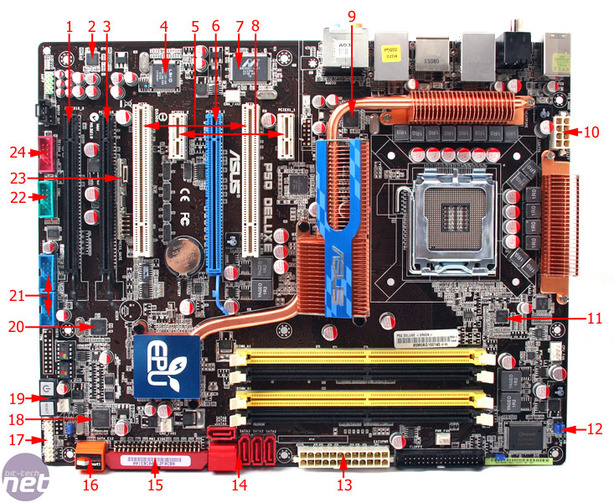
Sorry, I thought all I had was the marvell controller. If I have both, I'm not sure which I'm on. I'm using the red colored, perpindicular to the motherboard connectors (#14 on the pic, far right two connectors). I never used the orange ones for anything (#16 in the pic).

As far as drivers, I've installed the intel ones.

Might this be my problem?

overview1.jpg
 
I understand the desire for quick vista bootup, but the cost of a raptor just for that purpose seems silly IMO. If you were to leave your computer on instead of turning it off would probably not cost as much in electricity as the HD... Maybe switch to a sleep/hibernate mode vs turning off. I can really only think max vista load time difference is going to be 10 seconds or so.

It's not so much a quest for speed as it is a desire to have to be as fast as it was before (74gb raptor). I upgraded from the raptor so I could have better performance.

I feel like something is not working properly if it starts up slower than before. I just want to correct the problem.
 
My single WD1600AAJS boots Vista faster then that. I would use the ICH10R.
 
You can verify this in my vimeo clip...

I thought that was what I was using. At boot, after the ai logo, it first says ... "marvell 88se61xx adapter bios version... initializing" Then it says "adapter 1 disks information no hard disk is detected!"

I'm guessing that's the marvell, and that I'm not using it. Because then it says...Intel matrix storage manager... ICH10r..." and it shows my arrays.

So am I correct to assume I am using the ICH10r as well as the intel raid drivers I installed?
 
yes the red ports are the intel ones
you could disable the marvell controller in bios as you are not using it to speed boot up times
if you haven't maybe try making a like 100G or so partition on the array for the operating system and applications,referred by some as short stroking the drives,will be quicker
 
^ My raid 0 is 80gb and the raid 1 is the rest, 560 something gigs. o/s is on the raid 0.

Thnx for confirmation on the marvell. I'll turn it off in the bios.

UPDATE

Disabling the marvell controller in the bios fixed the hanging green bar thing. Great!!!

Now I just have to fix the fact that it's still making 7 or so passes of the green bar. May need a fresh win install for that one.

Thanks to everyone who helped with advice and ideas.
 
Last edited:
Sorry to be the bringer of bad news but I've always heard that raid 0 actually SLOWS down boot up time. Again that's just what I've heard as I've never tried it, but will soon.
 
than you will be in for a nice surprise,raid0 array as a boot drive does speed windows boot times along with everything else in multitasking use will have less chance of slow downs if the other components aren't a bottle neck
for hardware controllers,it adds 5 seconds to overall boot time for my areca card to load its' firmware
 
I got windows reinstalled last night/this morning before work.

SP1 is done and my drivers are all installed.

Loading windows, it's down to six passes of the green bar with no hesitation anymore.

When I get home, I'll disable all the unnecessary startup programs and applications.

My goal is 3 or less passes of the green bar. That's what my raptor did. I'm not installing av software or office yet, till i get it down there.


Sorry to be the bringer of bad news but I've always heard that raid 0 actually SLOWS down boot up time. Again that's just what I've heard as I've never tried it, but will soon.

I understand a few additional seconds of boot time for the raid manager to load, but windows loading is my main concern. As far as I understand, windows boot time should be faster with raid.
 
that stripe size works good for multi purpose use,a gaming only set up I had I went with 16/16 that worked nice for game load times
 
Ok, so I got it running and the features I don't use are disabled. I'm getting about 7 passes of the green loading bar.

Does this seem normal? Anybody else with a raid array having so many passes? I just wonder since the raptor I had, non-raided, loaded in less than 3 passes.

I might just attribute it to the raid loading up.

Any more ideas, suggestions, or comments.

BTW, thnx everybody so far for the help.
 
you could do some bench mark program runs like crystal mark or hd tune to confirm your array is running proper but your load times seem ok to me
will probably load a little quicker as you get some usage time on the fresh install
 
I have a WD6400AAKS (basically the same drive you have) and it passes 3 times. Hard OCP did a boot up test recently of two raptors in raid and the boot time took a long time with 2 raptors in raid-0, just like you have. Raid drives just take longer to boot. At school I use a Dual quad core Xeon system with a SAS disk and 4GB of ram and XP and it takes longer to boot that my Vista system.

Also, I know you probably don't want to hear this but by using factory drivers for everything is also going to slow down your boot drive. I've experimented and putting chipset drivers, raid drivers, sata drivers etc did nothing for my system but slow down boot and lower FPS. I've come to learn to use Vista default drivers. The only driver I install after I install my OS is my GPU and printer (or other accessories). The stock Vista raid drivers are very good and I bench marked them vs new chipset drivers and they were actually lower minimal transfer with new drivers.
 
That's good to hear actually. I might try with factory drivers if I get impatient with the way it is.

I have pretty much come to the conclusion that the number of green bar passes is relative to the fact that I have a raid array versus one drive.
 
i have a very similar set-up to you (raid 0 with aals) and to get load times a slight bit faster you can go to msconfig and disable GUI start up and enable all 4 cores (assuming quad) to be utilized in the loading process
 
^ Did the above and got about a half a bar faster loading time. Now it's taking about 6.5 passes.
 
Back
Top