• Some users have recently had their accounts hijacked. It seems that the now defunct EVGA forums might have compromised your password there and seems many are using the same PW here. We would suggest you UPDATE YOUR PASSWORD and TURN ON 2FA for your account here to further secure it. None of the compromised accounts had 2FA turned on.
    Once you have enabled 2FA, your account will be updated soon to show a badge, letting other members know that you use 2FA to protect your account. This should be beneficial for everyone that uses FSFT.

x1900xt--need help asap (red led=error??)

kdog

Limp Gawd
Joined
Aug 31, 2004
Messages
256
Hi guys, I was just finishing up my new system...new heatsink/fan, graphics card, mobo....

My monitor will not display anything, but my mobo is fine since the green led is on. I disconnected everything except for the basics.
I would like to know if it is normal for the x1900 series to have two LED's on (next to power connector), or does it signify an error?
My guess is that my PSU may be too old, thus not providing enough juice....can anyone comment?
Are red LED's=not normal on the x1900xt??
 
I'm not sure how comparable this is but since no one has answered yet I'll tell you what I can.
On my X1800XT the red led light flashes once when booting and then doesn't light up again.

Do you have the PCIE power connector plugged into the back of the card, and is the card properly seated in the slot?

What kinda power supply do you have?
 
when I finished my biuld, I didnt have the PSU connected properly and I got a red led error right where the PCIE dongle plugged into the card, I had the card plugged in but I needed to have my PSU plugged into the mobo at 2 places...do you have your PSU plugged into 2 places?
 
kdog said:
Hi guys, I was just finishing up my new system...new heatsink/fan, graphics card, mobo....

My monitor will not display anything, but my mobo is fine since the green led is on. I disconnected everything except for the basics.
I would like to know if it is normal for the x1900 series to have two LED's on (next to power connector), or does it signify an error?
My guess is that my PSU may be too old, thus not providing enough juice....can anyone comment?
Are red LED's=not normal on the x1900xt??

I have a 1900xt card , and those lights are not on during normal operation.
I beleive they only come on when there is a problem.
As to what the problem is i dont know, but you might try a new PS see if that fixes it.
 
thanks guys, its as I suspected.....not enough juice
I have a 520w OCZ PSU, however, its the one without the 6 pin rail i need for the graphics card.
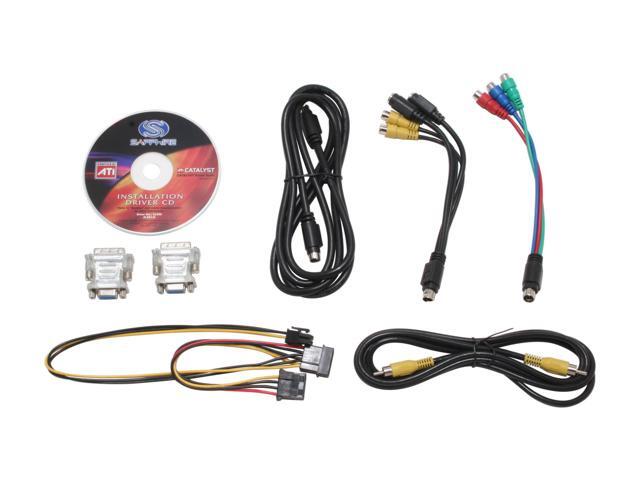
14-102-003-06.JPG

The card came with the wire on the bottom left, however, it only had one 4pin prong going into the 6 pin.....I need either a new PSU, or the wire with the 2, 4 pin prongs going into the 6pin...
 
Is your PSU ATX v2.0 standard? If not, your 12v rails might not be able to handle the load.

This will sound very backwoods--But, what are the chances you could get an old 200watt AT power supply and dedicate 2 of that unit's 4-pin power connectors into that 6-pin converter?

As an example, I remember back when I upgraded from a Athlon K7 to Athlon XP's, my ATX power supply was just marginally underpowered. Until I could afford a PS to replace that one, I simply powered all my hard drives and fans with a secondary AT power supply. When turning the PC on, I would turn on the AT power supply first. Once the drives spun up to speed, I turned on the rest of the PC. Powering off was simply reverse of that order. I was actually surprised when I found out that doing this didn't cause any unpredictable "electrical magic"

Could something like that work in this situation?
 
nobi125 said:
I'm not sure how comparable this is but since no one has answered yet I'll tell you what I can.
On my X1800XT the red led light flashes once when booting and then doesn't light up again.

Do you have the PCIE power connector plugged into the back of the card, and is the card properly seated in the slot?

What kinda power supply do you have?

Actually on my X1900XTX the red LED by the PCI-E 6pin plug comes on for a few seconds when I first turn my computer on, but doesn't come on at all after that. So I believe it is the same as the X1800XT series.
 
I dont know guys, I think i am screwed.
I replaced the PSU with a brand new V2.0 550 watt adjustable rail Antec, and still got the BSOD with 2 red lights constantly on from my vid card....

FYI, I upgraded the motherboard and the CPU fan at the same time, but I don't think those are the problem. I noticed the cpu temps still rise via an external sensor, so it is still working....and the mobo LED light is green so it must still be good to go.

I am going to a local computer store, and ask them nicely if I can briefly plug in my x1900 into one of their PC's to see if it works....if not, I got a DOA graphics card....Anyone ever hear of a DOA graphics card?

I think it has to be one of 3
A) Bad/Fried Mobo, but LED is on
B) CPU, I may have crushed it by overtightening zalman, but doubt it
C) Most likely its a bad video card, will find out tomorrow.
 
do you have your PSU plugged into 2 different spots on the mobo and 1 dongle plugged into the card itself?
 
I have the PSU plugged into 3 spots.
4 pin on the mobo
huge 20? pin on the mobo
6pin on the graphics card

and the rest of course SATA drive, floppy, etc.
 
On my Abit KN8 Ultra, I have 3 plugs on the board itself: the 24 pin ATX, the 4 pin and a 4 pin molex on the very bottom (it says it's PCI-E power related). My x1800XL is powered by a single 6 pin PCI-E connector.

I've had DOA video cards. DOA's do happen, so if you can isolate it as the problem, try to exchange it thru the store you bought it at if it's under their required time limit, usually 15 to 30 days.
 
kdog said:
I have the PSU plugged into 3 spots.
4 pin on the mobo
huge 20? pin on the mobo
6pin on the graphics card

and the rest of course SATA drive, floppy, etc.

well then it seems like you have all those bases covered...maybe the card is not getting enough juice?

**EDIT**
I just realized that we have the same mobo, I dont know what the troubles could be it seems like you have it plugged the same way I do.
 
Update, I went to a local computer shop.

Results, after $25 of tech time....DOA mobo.

Very weird...The green LED still lit up, but apparently it was fried/non-functional...Oh well I am glad its the mobo and not anything else.
They also checked the ram, cpu, and the card and all were fine.
Thats good news depending on how you look at it lol.
 
Yeah the green light on the motherboard is misleading, it just means that there's power going to the motherboard.
 
Back
Top