• Some users have recently had their accounts hijacked. It seems that the now defunct EVGA forums might have compromised your password there and seems many are using the same PW here. We would suggest you UPDATE YOUR PASSWORD and TURN ON 2FA for your account here to further secure it. None of the compromised accounts had 2FA turned on.
    Once you have enabled 2FA, your account will be updated soon to show a badge, letting other members know that you use 2FA to protect your account. This should be beneficial for everyone that uses FSFT.

X1900XT artifacting

Eagle156

2[H]4U
Joined
Jan 21, 2006
Messages
2,242
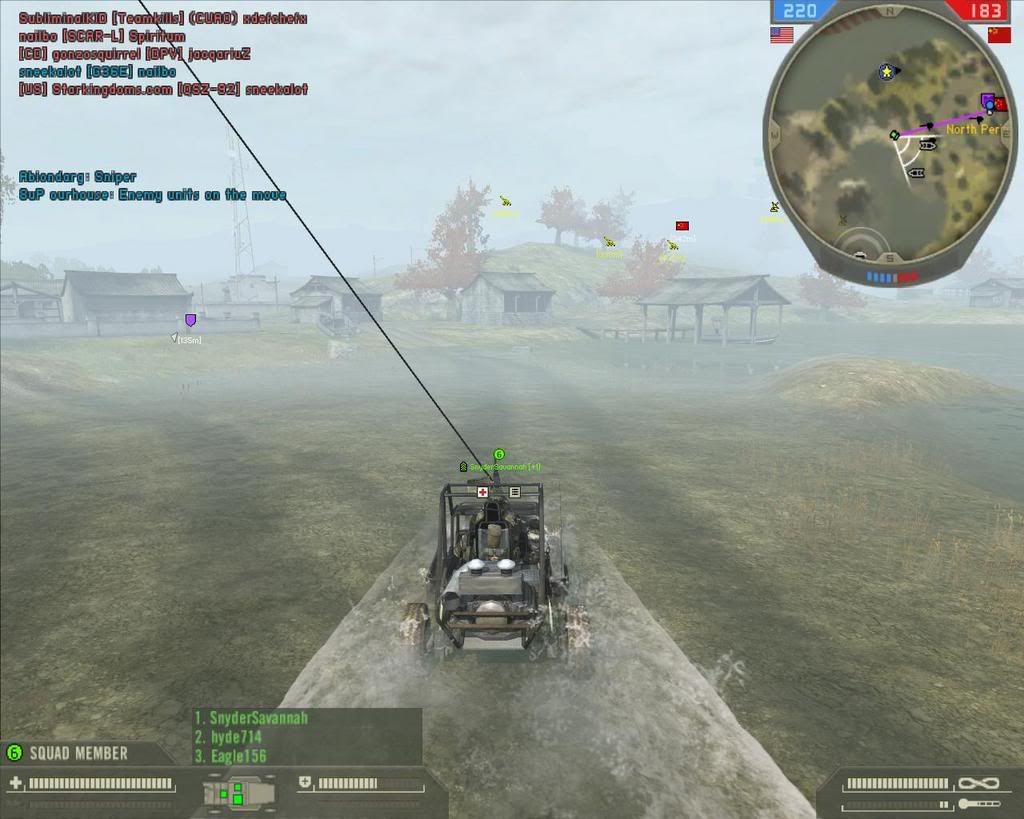
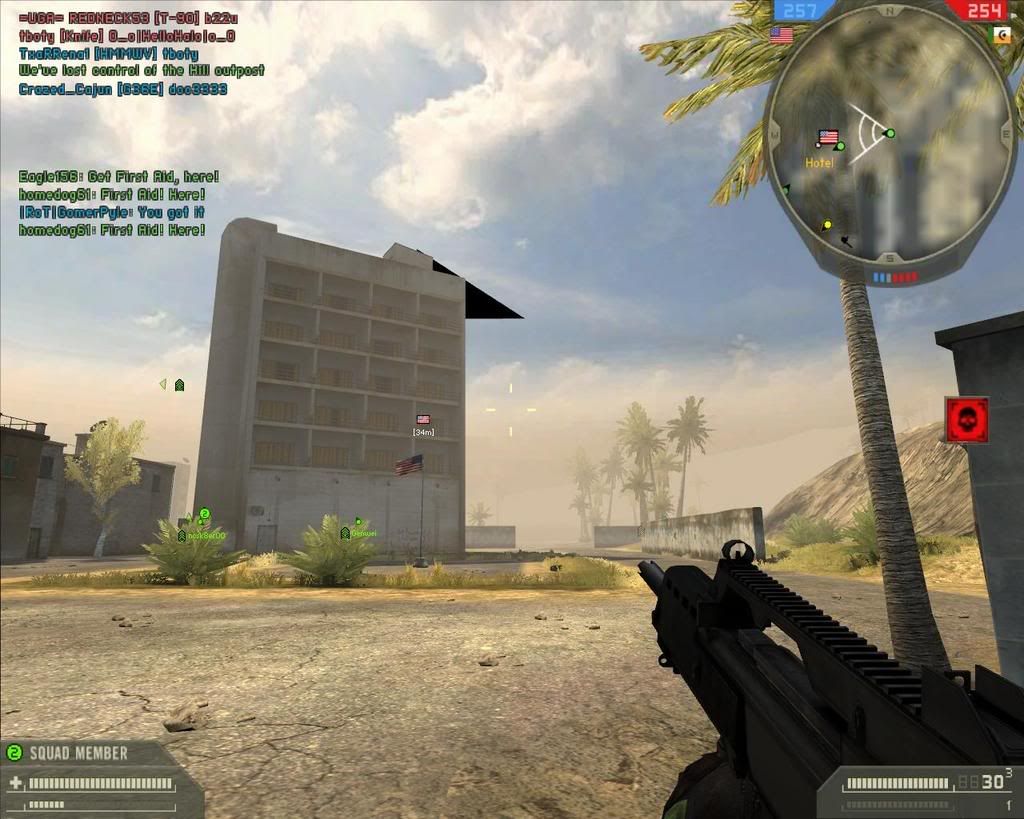
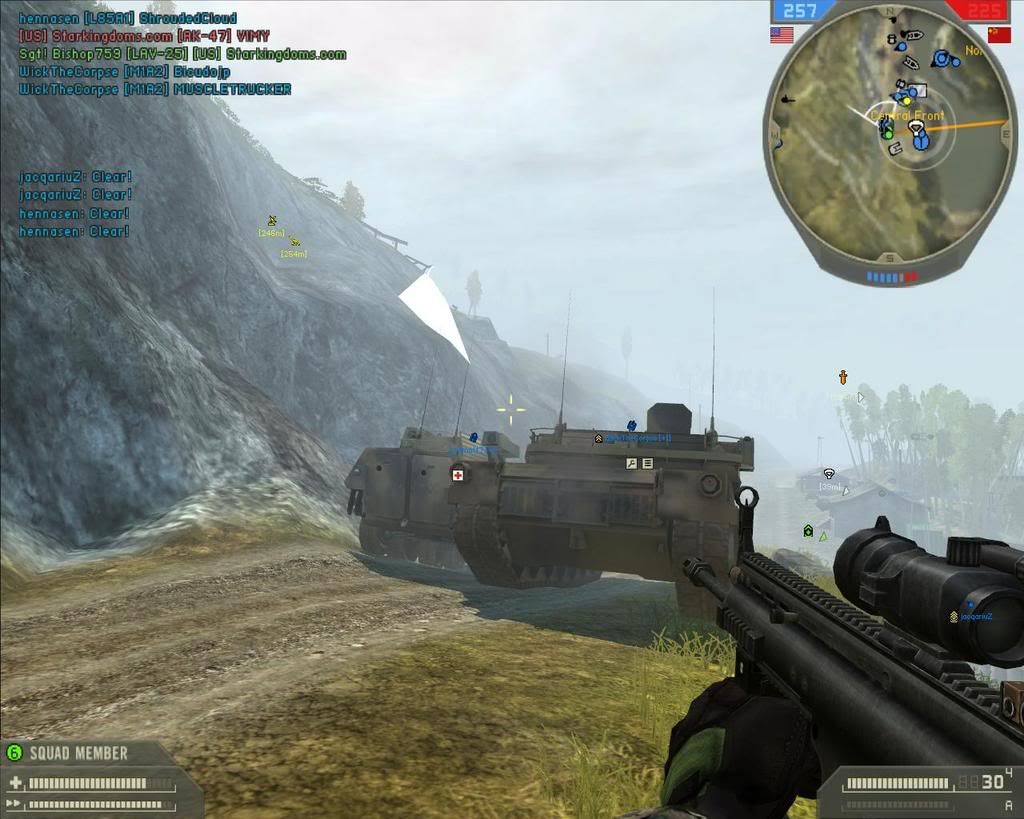
This past week I've been getting artifacts in games after playing for about an hour. However, I haven't overclocked anything, the temp in the room is the same as before, and I haven't changed anything on the comp. Here are some pics:
screen076.jpg


screen077.jpg


screen078.jpg


Artifacting.jpg


I assume that this is heat related since it only happens after a certain period of time. All my fans are working and I cleared out whatever dust was in the case (which wasn't much). I think the ati cooler sucks up a lot of dust with my mesh side panel because when I blew some compressed air into it, a whole crap load of dust came flying out. Is there any way to properly clean it without taking it off? Closed heatsinks suck.:( That's the only cause I can think of - dust.

I also tried the 6.11 drivers (previously using the 7.2 cats) with a clean uninstall with drivercleaner like I always do, and it was a futile effort. I want to replace the crappy hsf but I don't want to lose my warranty, especially if the card is artifcating at stock like this.:( How's Sapphires support? Do they cross ship? I can't afford to be without a card for the 3 weeks or whatever it takes them to replace it.
 
in ALL the games or just battlefield. i can only notice one problem with the first srceenshot, but it looks like a game problem not artifacts caused by heat, u might try getting a new PSU, yes sometimes that happens when there is not enough juice!
 
Well I would indeed suggest that you try to clean up the cooler well.

Just used some canned air to clean up my VF900 on X1900XTX, idle tems dropped from 50c -> 43c which is quite much. I have hard time thinking that this is anything else than heat related, as you did mention that the system has worked well in the past.

edit:

As I understanded hardly any manufacturer cross ships cards :( If the cooler clean up does not work, quess its RMA time. One more thing, you seem to be reluctant to change the stock cooler which is understandable due to warranty void. But I strongly suggest you to do so, temps will quite significately and stock coolers thermal pastes have always been applied badly in my cases.
 
I tried using ati tool to increase the fan speeds and the artifacting went away (yes it happens in all games). However, the noise is even worse than before.:rolleyes: I need a new cooler.
 
Yeah stock ati cooler bites, even with the small heatpipes. And it is too noisy.

Water ftw...


Ply
 
Ok, after some more testing it appears that bf2 is still artifacting, other games aren't. Here are some more pics:
screen087.jpg


screen089.jpg


It's like that after about 10-15 mins of play, but doesn't happen all the time. I've played BF2 on this same setup for about 6 months and it worked fine. I've never seen weird artifacting like this. WTF?
 
Thats the same exact issue on my x1900xtx card running in BF2142.
I started using ATI tools to turn the fans on sooner which helped. But eventually it came back and got worsed. To the point the screen would go black and the game would still be running.

Its fixed with the new cards.

I just sent the x1900xtx back to be RMA'ed.
 
POS.:mad: I don't have another PCI-E card to wait with while this gets RMAed.

I am having exactly the same problem with my X1800XT? It looks EXACTLY like the pictures you posted in BF2. So the cards are defective?

I am starting to think that the poor fan control on the ATI drivers killed my card. I bet your card is dying too, ATI tool doesn't help me although it does sort of delay the problem. It will come back. You should just RMA that card.

Myproblem is that I put an Arctic Cooling accelero cooler on it, and it is NOT REMOVEABLE. So I can't RMA. It does not come off, it is on like glue. The memory thermal pads it came with do not loosen up, even with a hair dryer heating them up.
 
in ALL the games or just battlefield. i can only notice one problem with the first srceenshot, but it looks like a game problem not artifacts caused by heat, u might try getting a new PSU, yes sometimes that happens when there is not enough juice!

DO NOT GET A NEW PSU! I tried that already! It doesn't fix this problem.
 
Well if I RMA this I'm out of my gaming comp for the 2 weeks or whatever it takes for them to fix this = not happening, unless the card is cross shipped which I kinda doubt.
It seems that ATI cards tend to have a habit of dying early. I've used several different ATI cards in different pcs, and they all tend to die after a few years. nVidia cards in the some pcs still haven't died yet. I'm pretty pissed at ATI right now.:mad:
 
Well if I RMA this I'm out of my gaming comp for the 2 weeks or whatever it takes for them to fix this = not happening, unless the card is cross shipped which I kinda doubt.
It seems that ATI cards tend to have a habit of dying early. I've used several different ATI cards in different pcs, and they all tend to die after a few years. nVidia cards in the some pcs still haven't died yet. I'm pretty pissed at ATI right now.:mad:

I asked ATI to send me either a temporary card or a replacement card before sending mine back. No dice. I bought my new setup before sending the other one back. I'll sell it when it returns.
 
I have the same problem with bf2 and my x1900xt. It happens the most at game start, then seems to go away. I noticed this problem first started with the addition of the full catalyst driver package.

I used ATItool to turn up the fan and mine goes away also.

I am tempted to buy another hard drive, fresh install WITHOUT the catalyist control center and see if it goes away.
 
I have the same problem with bf2 and my x1900xt. It happens the most at game start, then seems to go away. I noticed this problem first started with the addition of the full catalyst driver package.

I used ATItool to turn up the fan and mine goes away also.

I am tempted to buy another hard drive, fresh install WITHOUT the catalyist control center and see if it goes away.

Don't bother with the hard drive, it isn't control center per se that is causing it. You can run the driver without control center. What is causing it is, probably, damage to the memory or core from overheating due to the poor fan control from control center. That is right, DAMAGE. When your video memory gets fried, a lot of times the first thing that happens is that it tolerates a lot less heat before it artifacts. Then it gets worse and worse. The artifacting may go away for you guys when you override the fan control, but that doesn't mean the card isn't damaged. With mine, at this point, it doesn't matter if I crank the fan control up to 100% manually, it will artifact eventually. Using the fan control override just makes it artifact a bit less, or delays the artifacting.

The best thing you can do, in my opinion, is RMA the card if you can. Then when you get the replacement, make sure you use the fan control override whenever you game, ALL the time. I'm not saying it should be on 100 all the time, but if you are going to load the graphics card, you better have the fan going full blast.

Either the cards were defective from the start, or the drivers fried them, or something, but I'm ticked off too.
 
I am planning on buying another hard drive for a fresh xp install, so that is a moot point.

I believe the control center has something to do with it, I believe it is pushing the clocks up and not allowing for the fan to compensate. Texture loss and artifacting are two different animals. I might pick up a waterblock for the card and void whatever warranty it has.

I bought it for $300 open box on newegg about a year ago, so no big loss.
 
I am planning on buying another hard drive for a fresh xp install, so that is a moot point.

I believe the control center has something to do with it, I believe it is pushing the clocks up and not allowing for the fan to compensate. Texture loss and artifacting are two different animals. I might pick up an aftermarket cooler for the card and void whatever warranty it has.

I bought it for $300 open box on newegg about a year ago, so no big loss.
 
I am planning on buying another hard drive for a fresh xp install, so that is a moot point.

I believe the control center has something to do with it, I believe it is pushing the clocks up and not allowing for the fan to compensate. Texture loss and artifacting are two different animals. I might pick up a waterblock for the card and void whatever warranty it has.

I bought it for $300 open box on newegg about a year ago, so no big loss.


The type of artifacting shown in this thread is from video memory corruption. It is well documented that this type of artifacting, or "spiking" is from the video memory.

Control center isn't really the issue, because you can remove control center and keep the driver. The driver is what switches the clocks.
 
I made a post about this a while ago, I was having problems in BF2142, WoW, and other "new" graphically intensive 3d games. Spiking really sucks. I RMAd my video card and newegg no longer has any x1900xt's left - so they are giving me a refund.
 
I made a post about this a while ago, I was having problems in BF2142, WoW, and other "new" graphically intensive 3d games. Spiking really sucks. I RMAd my video card and newegg no longer has any x1900xt's left - so they are giving me a refund.

I wonder what ATI will do with my RMA'd x1900xtx?
 
I am having exactly the same problem with my X1800XT? It looks EXACTLY like the pictures you posted in BF2. So the cards are defective?

I am starting to think that the poor fan control on the ATI drivers killed my card. I bet your card is dying too, ATI tool doesn't help me although it does sort of delay the problem. It will come back. You should just RMA that card.

Myproblem is that I put an Arctic Cooling accelero cooler on it, and it is NOT REMOVEABLE. So I can't RMA. It does not come off, it is on like glue. The memory thermal pads it came with do not loosen up, even with a hair dryer heating them up.

quit being an alarmist. It serves no purpose here. I suggest opening the case side, and getting some real air blowing across the system. Then decide if you need an aftermarket GPU cooler. I am keeping this as a topic of interest and email responses. I usually do not, but I would like to see this one out.

You can confer with me about your discrepancies. I do not think this is as big an issue as people are stating. Silicon is resilliant.
 
quit being an alarmist. It serves no purpose here. I suggest opening the case side, and getting some real air blowing across the system. Then decide if you need an aftermarket GPU cooler. I am keeping this as a topic of interest and email responses. I usually do not, but I would like to see this one out.

You can confer with me about your discrepancies. I do not think this is as big an issue as people are stating. Silicon is resilliant.

First, I really hope you aren't talking to me, because I don't like your condescending tone. Second, I'm not being an alarmist. If you don't RMA your card before the warranty runs out, then you are SOL when it does start artifacting again.

Second, I am using a Silverstone and my case has 5 120 mm fans, two 80mm fans, and I have a fan card below my video card. I also used a household fan and opened the side case and put some "real air" blowing on the card. No change.

What do you mean I can confer with you? I don't need your permission to post.
 
That was not intended for you. It was for someone else being an alarmist. I realized I posted the wrong quote, my bad. I suggest dropping clocks down to see if yours goes away. If it does than its heat. On the x series you can have a tornado blowing on the card, if an individual memory module is the culprit, and under the heatsink, it will not help.
 
Ive got exactly the same problem, and it happened after I installed 7.2. I have polygon anomalies appearing after 15 minutes to 30 minutes of play. Increasing my fan to 100% did clear it, but it eventually started to appear again. It didn't happen in BF2, but it happens in stalker and Test drive unlimited.

It was never overclocked, and I have an Arctic Cooler that kept it under 87 degrees, and with full fan it only goes up to 77 degrees. But I'm a dumb ass. I put AS5 between the sticky pads and the VRAM , this was'nt dumb the part, what is is that I thought I could cool the Ram better without AS5 in between, so I took it off, but now that the problem persist, I'm afraid I won't be able take the cooler off. But the pads weren't as sticky when new, so there is some hope.

You guys reckon, with a Thermalsomething HR-03 cooler, with Ram heat sinks + fan should cool this baby down better than the Arctic crap. Cause I reckon its the VRAM that is closest to the exhaust that bounces back from the mother board, which is heating up. Its a bad design, because I believe the heat from the GPU spreads via the cooler to the VRAM. If they individually had there own cooling, I'd think it would be better.

By the way I did go back to 6.11, 6.8 and 6.7 and I still have anomalies.
 
Interesting, I got the artifacts after 7.2 as well. Perhaps the drivers screwed with the fan settings which damaged the card, and now we're screwed.:rolleyes:
 
Ive got exactly the same problem, and it happened after I installed 7.2. I have polygon anomalies appearing after 15 minutes to 30 minutes of play. Increasing my fan to 100% did clear it, but it eventually started to appear again. It didn't happen in BF2, but it happens in stalker and Test drive unlimited.

It was never overclocked, and I have an Arctic Cooler that kept it under 87 degrees, and with full fan it only goes up to 77 degrees. But I'm a dumb ass. I put AS5 between the sticky pads and the VRAM , this was'nt dumb the part, what is is that I thought I could cool the Ram better without AS5 in between, so I took it off, but now that the problem persist, I'm afraid I won't be able take the cooler off. But the pads weren't as sticky when new, so there is some hope.

You guys reckon, with a Thermalsomething HR-03 cooler, with Ram heat sinks + fan should cool this baby down better than the Arctic crap. Cause I reckon its the VRAM that is closest to the exhaust that bounces back from the mother board, which is heating up. Its a bad design, because I believe the heat from the GPU spreads via the cooler to the VRAM. If they individually had there own cooling, I'd think it would be better.

By the way I did go back to 6.11, 6.8 and 6.7 and I still have anomalies.

Based on the research I have done, on various forums and sites, I believe that it is the video memory and not the GPU that is defective. The type of artifacting we are seeing here is commonly attributed to video memory corruption.

I am also using the Arctic Cooler and I'm going to try and get in there with a thin knife and slice the pads away so I can get the cooler off. This is the method most people recommend. I would probably not go back to Arctic Cooling after my experience with this coolering (Accelero).
 
Well I'm going to try to put the stock blow dryer back on tomorrow and see how things go from there. I've already got 3 fans blowing on it, from the voltage regulator end. But I believe the card is damaged, but we'll see.
 
Well Ive placed back the 747 stock cooler, and set the fan to 100%. Played TDU for 30 minutes and not one single artifact, then played stalker for 15 minutes, and no artifact, then back to TDU and still no artifact. So after an hour, nothing, only problem is GPU temp goes up to 102 degrees :eek: , VPU recovery reduced my frequencies for safety, lol. Funny thing is ATT says 102 right after I alt-tab from TDU, but 1 second later the screen flashes and the temp shows 74.

On Ati Tool 3d cube, the temp goes upto 84. Stalker also showed about 89 when I alt-tab, and no screen flash happened like TDU.

I guess, I have to play a bit more with it, but I believe I'll have to adopt a HR-03 heat sink with fan.
 
Well Ive placed back the 747 stock cooler, and set the fan to 100%. Played TDU for 30 minutes and not one single artifact, then played stalker for 15 minutes, and no artifact, then back to TDU and still no artifact. So after an hour, nothing, only problem is GPU temp goes up to 102 degrees :eek: , VPU recovery reduced my frequencies for safety, lol. Funny thing is ATT says 102 right after I alt-tab from TDU, but 1 second later the screen flashes and the temp shows 74.

On Ati Tool 3d cube, the temp goes upto 84. Stalker also showed about 89 when I alt-tab, and no screen flash happened like TDU.

I guess, I have to play a bit more with it, but I believe I'll have to adopt a HR-03 heat sink with fan.

So let me get this straight. You had the kind of spiking in the picture posted in this thread. You were using an Arctic Cooling Accelero aftermarket cooler. Now you've gone back to the stock cooler and the artifacting has disappeared?
 
So let me get this straight. You had the kind of spiking in the picture posted in this thread. You were using an Arctic Cooling Accelero after market cooler. Now you've gone back to the stock cooler and the artifacting has disappeared?

Yep. With Arctic Cooling Accelero (100% fan) the VRAM temp was high (according to the polygon spiking I kept on getting, at least 1 in the first 5 minutes) and GPU was about 75-85.
Now with stock, VRAM seems to be cooler (as I haven't seen one spike yet), but GPU temp went up to maximum recorded 106 degrees, but TDU ran fine. I'm going to open it up again, and make sure the AS5 and cooler is contacting the GPU properly. I probably should of screwed the bracket tighter first, then screw the outer screws loose, so the card doesn't bend and lose contact on the center, therefore the GPU

When I refer to GPU, I mean the actual processor itself, not the whole card.

By the way I did another 30 minutes of TDU, and no spiking what so ever.

I guess the Accelero sticky pads are junk, and don't do anything but superglue the VRAMs to the cooler, but remember I did have AS5 on the sticky pads before, so they lost some of there stickiness (So I'm not a dumb ass after all, as I mentioned I was before, cause I was able to remove the Accelero). The thermal pads on the stock cooler are actually pretty good, as they don't stick and are cool to the touch.

I think the Accelero, as mentioned before, is circulating warm exhaust air on the motherboard which increases the temperature of the graphics card edge on the motherboard side, effectively heating up the two VRAMs that sit there.

More testing and HR-03 is probably a go.
 
This is nuts. The cooler wasn't touching the Processor properly. So I adjusted it, and spread the AS5 a little more evenly. Installed it. Then Windows took 3 minutes to load :confused: . It then said it cannot find my Graphics Card :( . I Error Checked the drive and found one of the Ati files was corrupt :rolleyes: . Reinstalled the drivers. Everything now looked good :) , but the GPU now went up a record high 109 degrees!!!!!!! :eek: I better stop playing and get a new cooler.:mad:

The HR-03 has been ordered. :cool:

EDIT:

OK, fixed my high GPU temp problems. It was the same discovery as before, and that is the center of the processor was not touching the cooler. I removed the thin layer of AS5, which I have none left of, and placed a big blob of leftover Thermalright Thermal Paste which came with a Thermalright chipset heatsink. And vuala, temps only topped 88 degrees after 1 hour play of Test Drive, and not one single polygon spike, anomaly or artifact. So the conclusion is that the Arctic Cooling Accelero was not cooling the VRAM's properly, and I have concluded that most likely the two VRAMs closest to the motherboard were over heating and producing polygon anomalies. But I must say again, that I had AS5 between the sticky pads and the VRAM's, which may or may not have contributed to the problem in the first place.

Once I get the HR-03 Cooler, I'll keep you guys updated.

Hope my report helps :)
 
Good grief, I hope those temps are in Fahrenheit, but I suspect not :eek:

Well I believe there is a temperature sensor in the middle of the processor, cause you see the outer edge of the processor was contacting the cooler, but the inside wasn't. Strangely enough the 109 degrees CELCIUS did not produce any other anomalies. Strange hey.
 
I may actually have the answer to this problem as I too experienced this in time past. The problem is simple, it's the ram overheating. When ram overheats it cannot obtain and process all your cache from:
C:\Documents and Settings\your name\My Documents\Battlefield 2\mods\bf2\cache
What happens is simple, some data is processed while others are not. Normally it's not the GPU because the GPU is allowing you to play the game as if this anomaly wasn't happening. The GPU is processing what information is coming from the ram. The problem here is that the ram is not sending the proper data to GPU. It's getting corrupted and even though the GPU processes what is sent, the ram is not, thus the problem you see.

There is no temp probe to determine how hot your ram gets therefore making diagnoses is very difficult. However, I did some experimenting with my water cooled x1900xtx video card without any ram sinks on the ram (ram is bare with nothing on them) and sure enough I got those stripe(s). Mine wasn't nearly as bad because I didn't OC the ram that much.

The only solution I have so far is to make sure there is proper contact between your heatsink and ram. The only real solution is to figure out how to cool the ram. Also, in some cases you may have to lower the ram's clock speed to get it to function. In other cases there are other defective components in the video card that warrant RMA all together.
 
Got my Thermalright HR-03 last week and installed it today. Stock Cooler GPU temp was maximum 89. Thermalright HR-03 gave me a maximum 74 with Arctic Cooling 9cm Fan on 5V, and its very quiet. And the Ramsinks are doing good as I have not gotten any artifacts after 2 hours of play of STALKER.

Pretty good investment I reckon.
 
turn off ur xfire or disable in-game chat....

I had same problem with my X1900XT card so i decided to turn off xfire then no more artifact in any game afterward... so i thought ya all should try this way..?
 
I'm having these exact issues with my X1900XT. Started around the same time there was a major update in World of Warcraft (which may well coincide with me installing the 7.2's). As I only played WoW I kind of ignored it, as often an ALT+TAB to desktop and back would fix it for a while.

Now I've stopped playing WoW and started playing other games, it has become much more noticeable. I gave up on Vista as the graphics driver would constantly be resetting. On XP the driver doesn't reset anymore, and games run fine apart from the 'spiking' going on. GPU temp is usually around 61-65 if I ALT+TAB to desktop when the artefacting occurs.

Couple of screenies :

http://i19.tinypic.com/30xak91.jpg
http://i16.tinypic.com/30391c3.jpg
http://i17.tinypic.com/4349lav.jpg
http://i11.tinypic.com/2m4zz2q.jpg

Tried various drivers and several fresh installs of XP and Vista, and I get problems with pretty much anything I run.

Mine hasn't been overclocked, and just has stock cooling so I think I'm going to RMA it. Just wondering how long I'm going to have to go without a PC, as I don't know anyone with a spare pci-e card. Hell, all my mates are still on AGP cards!
 
You'll be without your card for two weeks, minimum.

Those temps that you cited are in the same range as my x1800xt temps when it artifacts. 60 and above...
 
Back
Top