X-Fi vs. Realtek ALC889A

DenonSix

n00b
Joined
Oct 15, 2009
Messages
4
All,

I currently own an X-Fi Platinum (the PCI version, purchased 2-3 years ago). It has been working well so far, but i'm about to upgrade my system to an i7 setup. The Gigabyte motherboard I am looking at has on-board Realtek ALC889A audio.

My usage is gaming, music/movies (w DD/DTS passthrough).

According to this: http://www.hardcoreware.net/reviews/review-373-1.htm
(I know its the newer PCI-e titanium) its starting to look like at the very least the audio quality potential of this realtek chip is matching the X-Fi.

Is there any real reason for me to keep using the X-Fi vs. the onboard audio? All things being equal I might as well remove it for airflow and simplicity.

I know X-fi supports Alchemy and EAX 5.0, but I hear that EAX may be on the way out and my gaming typically involves playing newer, recently released games vs. older ones.

Thanks in advance...
 
Bumping this, because I'm also ordering a Gigabyte board with the same onboard audio.

I'm not sure what it takes to pass all my audio through just an optical cable, I'm really out of touch with current sound cards.
 
EAX is considered depricated according to Creative, they're jumping on the OpenAL bandwagon (more like "Being pushed onto"), the X-Fi supports both though (it can handle OpenAL or EAX/DS3D, and ALchemy to handle EAX/DS3D emulation)

as far as sound quality differences, the X-Fi will have better analog inputs and outputs than your onboard solution, almost guranteed, and is far less likely to be bothered by noise (many onboard solutions have issues with interference, due to being mounted on the mainboard, which has a ton of other stuff going on)

now, you're using digital TOSlink, which means interference is going to be a relative non-issue, so the only things X-Fi will have over the onboard solution:

EAX/ALchemy
better inputs/outputs
front bay (fairly sure your card should have this)
Dolby Digital Live/DTS Connect support (which almost no onboard solutions have, if you don't have the upgrade pack from Creative, spend the few dollars)

that last point is the biggie, as it allows you to pass 5.1 from games and other sources digitally out to your receiver/decoder, without needing an analog connection, this is still a relatively rare feature for onboard solutions

as far as the actual DD/DTS passthrough from movies, almost every digital output solution out there will handle this, as long as the software player supports it (VLC does, mpc does iirc), so that isn't really an issue

basically:
I'd keep the X-Fi since you already have it, and it gives you more features, so why shelve it?
 
(I know its the newer PCI-e titanium) its starting to look like at the very least the audio quality potential of this realtek chip is matching the X-Fi.

Yup, and I can verify (with actual tests, and while I didn't have a PCI-e titanium to compare, that Realtek's numbers aren't bullshit. I was able to test a Creative x-fi surround external, and found Creative's numbers are exaggerated)

as far as sound quality differences, the X-Fi will have better analog inputs and outputs than your onboard solution, almost guranteed,

A lot of that depends on the board. I've a gigabyte with ALC889a chips, the numbers in a RMAA loopback test are pretty close to the same creative surround device above.

and is far less likely to be bothered by noise (many onboard solutions have issues with interference, due to being mounted on the mainboard, which has a ton of other stuff going on)

Again - depends on the board. Gigabytes are nice for quiet beautiful audio, so are Asus. (which is why a lot of media device manufacturers use Asus stuff - such as Fusion Research)

Dolby Digital Live/DTS Connect support (which almost no onboard solutions have, if you don't have the upgrade pack from Creative, spend the few dollars)

gigabyte ga-ep45-ds3r has the DDL and DPL2 stuff. It actually generates it from Stereo or other sources. Lots of onboard solutions have this now. Look for "Dolby Home Theater" boards. DTS Connect is different I think. Most any coax/optical card will pass through unmolested bitstreams, its the generation thats hard to find.

Is there any real reason for me to keep using the X-Fi vs. the onboard audio? All things being equal I might as well remove it for airflow and simplicity.

I dispensed with consumer level cards a while ago. Onboard audio is excellent these days. Short of a need for gaming or some especial connections, (which ASIO stuff does better anyways) - I don't see a reason to have a separate sound card.

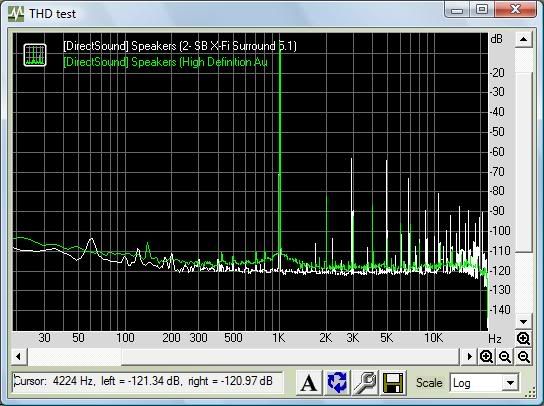
THD test - Realtek ALC889a via Gigabyte board vs - Creative X-Fi Surround 5.1 (USB)

THD.jpg


The test tone is at 1khz - the little white peaks are harmonic distortion. -90 is barely audible, the green line is the realtek onboard. What this indicates is the Creative card creates a tiny bit more distortion than the onboard one.

Just a test, not even of the same card OP is talking about - just a demo that onboard doesn't suck as much as folks might think.
 
Last edited:
I'm in the same boat-ish, my new system will have the 889A on it and I have a PCI X-Fi. I'll use the X-Fi in no small part because of the CMSS-3D which is handy at times.
 
yes I read it, its weird to quote though.

basically, I wasn't trying to make any black and white statements, and thats more or less how you read my post:

- the USB X-Fi is nothing compared to the nicer PCI/PCIe cards, I'm not saying you're accusing it of being identical, just pointing that out

- I wasn't aware that the Gigabyte had DPL2/DDL, I know my Intel does (I don't use it, but it does), but that doesn't mean I know every board with the feature, its good to know that for future reference (and I didn't say no onboard has it, just that "almost no" solutions have it, which I would think is a fairly accurate claim, as the vast majority still don't)

- no idea if DTS:C is even available outside of Creative, to be honest, no idea why anyone would care though, if you can pass the DTS soundtrack from whatever source, thats good enough imho (and for games, DDL is fine)

- mainboard sound quality has improved over the years, but it really varies specific board to board, I've seen $350 Asus boards that review like dolls have issues with RFI for the end user, its just a lot of stuff on the same board, interference isn't impossible, I wasn't trying to say ALL boards have this issue, again, I said "many"
 
IMHO if you have an X-Fi, keep it. If you don't have an X-Fi, don't bother and just use the onboard sound. Unless you NEED one of the X-Fi specific features mentioned above, you will be hard pressed to hear a difference unless you have a very high end speaker setup.
 
Although I will admit onboard sound has improved over the last few years, at least the ALC1200 HD is, it still isn't as good as what Creative has to offer. I would also go dedicated over onboard but if cash is tight onboard will do just fine...
 
One thing to note about OpenAL is that the only company that actually implements it in hardware that I know of is Creative. This is not surprising as OpenAL is also their standard. Technically it is open source, but Creative does most of the development, hosts the docs, and so on. They more or less direct the spec these days.

So if you want proper OpenAL support, Creative is the best bet.

Over all, I recommend Creative cards for gaming. Their drivers annoy me, they really should do a better job, but all in all they are the best gaming cards out there.

Also in my opinion S/PDIF with DTSI is the way to go for audio to a receiver, unless you are doing HDMI. It is just less problems all the way around. With an analogue connection not only do you have more wires, but ground loops, my mortal nemesis and the bane of good audio, can sneak in. With a digital connection, this is no problem. One cable, no ground loops. You can also always switch it to 2-channel uncompressed mode if you feel that the compression is hurting sound quality in music.

Also some (many? most?) receivers only do bass management and the like on digital sources. Analogue they pass straight through to the preamp. For example my Denon receiver is capable of doing a number of nice things with an audio signal like bass management, per channel room equalization, per channel delays, and per channel volume trim. Basically, it tries to make you're setup as perfect as possible.

On a digital source, all those work. On an analogue source? Only the volume adjustments. All the rest are bypassed, since they are done by the DSPs. So a large part of the reason to own the receiver doesn't get used unless the input is digital.

Only real problem you'd run in to is if you wanted to do 7.1 speakers. While movies don't really make use of 7 channels, being mixed for 5, games can. They simply specify the location in space they want the sound, the system then works out what speaker(s) to output to. So if you want 7 channel sound, you don't want to do DTSI encoding since it is 5 channel.
 
I just picked up the Gigabyte UD5P board, haven't bothered to install my X-FI Prelude because the onboard + DDL works really great.
 
Back
Top