![[H]ard|Forum](/styles/hardforum/xenforo/logo_dark.png)
Navigation
Install the app
How to install the app on iOS
Follow along with the video below to see how to install our site as a web app on your home screen.
Note: This feature may not be available in some browsers.
More options
-
Some users have recently had their accounts hijacked. It seems that the now defunct EVGA forums might have compromised your password there and seems many are using the same PW here. We would suggest you UPDATE YOUR PASSWORD and TURN ON 2FA for your account here to further secure it. None of the compromised accounts had 2FA turned on.
Once you have enabled 2FA, your account will be updated soon to show a badge, letting other members know that you use 2FA to protect your account. This should be beneficial for everyone that uses FSFT.
You are using an out of date browser. It may not display this or other websites correctly.
You should upgrade or use an alternative browser.
You should upgrade or use an alternative browser.
Wireless Roaming
- Thread starter glowtraq
- Start date

klank
Killer of Killer NIC Threadz
- Joined
- Aug 22, 2011
- Messages
- 2,175
Yes. make sure the channels do not over lap. This will cause interference.
Actually if you tune it correctly running the same channel is better for roaming. As long as your coverage cells don't overlap. However the general rule is to use non overlapping channels, but not all clients roam seamlessly this way.
klank
Killer of Killer NIC Threadz
- Joined
- Aug 22, 2011
- Messages
- 2,175
If you use non overlapping channels you can have the coverage areas over lapping which will provide close to seamless roaming.
Sure if you ignore the fact that many clients have issues roaming this way.
klank
Killer of Killer NIC Threadz
- Joined
- Aug 22, 2011
- Messages
- 2,175
I have 5 AP's, can I use 2 others channels in the 2.4ghz spectrum other than 1, 6, 11 which will allow roaming?
I suggest setting up your five APs with a three channel plan. Try not to overlap the channels, use the below image as a guide. Give that setup a try and see if you have any issues roaming, most likely you will be fine. If you do have issues let us know and describe the layout of the building and the APs in relation.
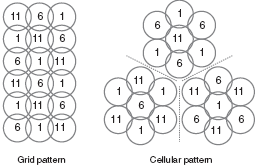
Thank you for the chart, correct me if I am wrong, would this setup work:
Floor 3 south AP = CH 1
Floor 3 north AP = CH 6
Floor 2 south AP = CH 6
Floor 1 south AP = 11
Floor 1 north AP = 1
The point between North and South per floor is split by 300'+ Feet
Floor 3 south AP = CH 1
Floor 3 north AP = CH 6
Floor 2 south AP = CH 6
Floor 1 south AP = 11
Floor 1 north AP = 1
The point between North and South per floor is split by 300'+ Feet
Last edited:
klank
Killer of Killer NIC Threadz
- Joined
- Aug 22, 2011
- Messages
- 2,175

Yes, that will work.