• Some users have recently had their accounts hijacked. It seems that the now defunct EVGA forums might have compromised your password there and seems many are using the same PW here. We would suggest you UPDATE YOUR PASSWORD and TURN ON 2FA for your account here to further secure it. None of the compromised accounts had 2FA turned on.
    Once you have enabled 2FA, your account will be updated soon to show a badge, letting other members know that you use 2FA to protect your account. This should be beneficial for everyone that uses FSFT.

Windows XP and SSD alignment

Rob94hawk

2[H]4U
Joined
Jul 20, 2002
Messages
2,222
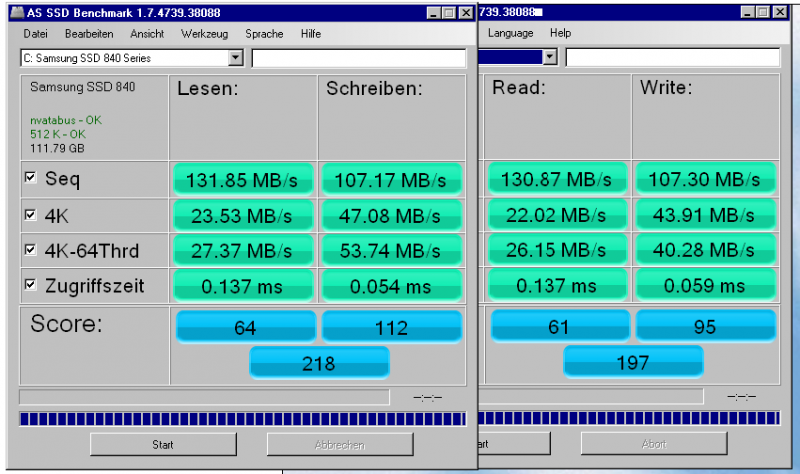
I used AOMEI Partition Assistant to align the SSD after a migration from a real old and slow HD. The OS is Windows XP on an old AMD socket 939 system. (Don't ask! Just roll with it.) Scores improved but when AOMEI asked me to set partition alignment I wasn't sure what size to pick. Through brief research I picked 1024. But I noticed after running the benchmark it reads 512 k - OK Shouldn't that read 1024? Did I set the size wrong?

Note: that the benchmark is After/Before alignment.
 
I always use 64kb / 128 sectors partition alignment for XP and 1024kb / 2048 sectors for Vista / 7 / 8
 
The rule for proper SSD alignment is very simple: the offset (in KBs) has to be divisible by 4.

That means 64k, 512k, 1024k, 2048k, and 101MB are all okay. 101MB is tricky because it's 103,424K which is divisible by 4; I mention 101MB because it's a typical offset for the C partition on a Win7 install.

WinXP ordinarily installs the start sector at 126, and cloning an existing OS (including Win7) also starts at 126, so you need to be sure that your cloning app will fix the alignment properly and set it to do so.

Because the math can be tricky if you have more than one partition, it's best to just use an SSD benchmarking app to check alignment; AS-SSD does that.
 
Back
Top