• A Great friend to the HardForum with a great kid that he is trying to get a scholorship to continue his schooling. Please give hime a vote! Only 24 hours left! Thanks.
    If you have an VOTE FOR KEENAN!

Windows Vista: No Mic audio?

daedal

Gawd
Joined
May 10, 2005
Messages
686
I can't hear my mic's input in Vista. I can see the bar move with input and all, but I can't hear it. The sound card is a built-in IDT (I'm on a laptop).

From what I could find on Google, this is a problem many are having but I can't seem to find a solution.

Halp!
 
my friend is having the same problem with vista.. he wants to use the computer as a karaoke machine, but i guess its not happening
 
I posted this very question on here about a month or two ago (in someone elses thread that was having the same problem).

it didn't get any replies AFAIK.... this is deff. a windows vista bug. The feature worked fine in XP.

What you may be able to do is use an external sound card for input and the internal for output but not 100% sure that it will work.

edit: you can try running XP in a virtual machine and do it that way
 
Works fine here.

Untitled-53.png
 
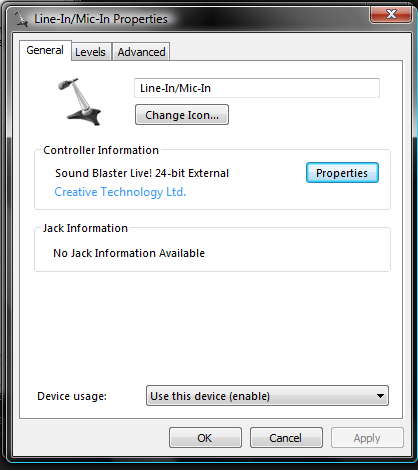
Realtek 888. I don't even have the Realtek software installed, the screenshot is from the Sound control panel when you go to the properties for the microphone.
 
that's odd... I'll have to check when I get home, but the last time I went through this I spent a good 2-3 hours messing with just about everything I could think of. It would properly record audio through the speakers and mic to a MP3 (audacity) but you couldn't hear anything via mic through the speakers.


maybe it's the realtek software for vista that's buggy?
 
How strange is that. I also don't have the option in the Microphone Properties panel.
 
Anyone know of a work-around solution? What I'm doing is streaming gameplay footage to Justin.tv using a HAVA Platinum HD box.

I looped the speaker port to the mic in port, so users get game sound, but I can't use a mic. Argh. What a pain.
 
O god... I just remembered I'm running Window 7 not Vista... Wow, i need to get used to that. I was running Vista for 2 years and only switched to W7 last week.

My bad!

Switch to Windows 7!
 
Update: I've resolved my problems. I'm still unable to get sound from my microphone to playback on speakers, but I'm able to get both my video stream and mic streams simultaneously by using a software mixer. I'm not 100% sure it's working properly, but I'll be able to test some time tonight. I'll update this post with my findings.
 
Last edited:
I can't hear my mic's input in Vista. I can see the bar move with input and all, but I can't hear it.

I'm still unable to get sound from my microphone to playback on speakers

Wait a sec, you are not trying to hear yourself right? Because if you are, you are not suppose to. You can, but that's not how it should be done. Only the people you are broadcasting to should hear you, not yourself.
Sorry if that is not it, but it seemed like it was.
 
Wait a sec, you are not trying to hear yourself right? Because if you are, you are not suppose to. You can, but that's not how it should be done. Only the people you are broadcasting to should hear you, not yourself.
Sorry if that is not it, but it seemed like it was.

Initially, yes, that's what I was trying to achieve. It would allow you to listen to yourself speak, which was also broadcasted with the line out mixer. In this case, while my voice mixes in, I can't hear myself unless I open the stream on Justin.tv.
 
bump, still looking for a solution, short of going back to windows XP. Cannot wait for windows seven (providing this issue is fixed in the final release).

I've found a few ways to fix it, but it's different for every setup (and can't find anything for my particular creative card)
 
bump, still looking for a solution, short of going back to windows XP. Cannot wait for windows seven (providing this issue is fixed in the final release).

I've found a few ways to fix it, but it's different for every setup (and can't find anything for my particular creative card)

Seriously... grab the Windows 7 RC like everyone else.
 
Back
Top