![[H]ard|Forum](/styles/hardforum/xenforo/logo_dark.png)
Navigation
Install the app
How to install the app on iOS
Follow along with the video below to see how to install our site as a web app on your home screen.
Note: This feature may not be available in some browsers.
More options
-
Some users have recently had their accounts hijacked. It seems that the now defunct EVGA forums might have compromised your password there and seems many are using the same PW here. We would suggest you UPDATE YOUR PASSWORD and TURN ON 2FA for your account here to further secure it. None of the compromised accounts had 2FA turned on.
Once you have enabled 2FA, your account will be updated soon to show a badge, letting other members know that you use 2FA to protect your account. This should be beneficial for everyone that uses FSFT.
You are using an out of date browser. It may not display this or other websites correctly.
You should upgrade or use an alternative browser.
You should upgrade or use an alternative browser.
Windows file-search preference?
- Thread starter Dario D.
- Start date


heatlesssun
Extremely [H]
- Joined
- Nov 5, 2005
- Messages
- 44,154
Thing is that the Vista and 7 searches are technically MUCH different, at least not without WDS installed on XP or 2000.
Search in 7 is simply awesome, much faster a less quirky than Vista's and it's become a MUCH HAVE feature for me. Since it searches OneNote and I store just about everything in my OneNote notebooks these days.
Search in 7 is simply awesome, much faster a less quirky than Vista's and it's become a MUCH HAVE feature for me. Since it searches OneNote and I store just about everything in my OneNote notebooks these days.
heatlesssun
Extremely [H]
- Joined
- Nov 5, 2005
- Messages
- 44,154
I know 7's search is much better than any of the other OS's, but they could have left the advanced options at least. Hence why I voted for Vista. XP's was by far the worst, right down to that damn dog that had to manually disabled.
"I had to manually disable the dog." Now that's something you don't hear every day.
Not sure what you saying is missing in 7 vs XP as far as advanced searches. I think its all there just done differently.
Are you sure? I can't find any way to even just do a regular file-name search, that doesn't include file contents. (unless you lookup custom search filters online)I know 7's search is much better than any of the other OS's
Snowknight26
Supreme [H]ardness
- Joined
- May 8, 2005
- Messages
- 4,436
name:texthere
heatlesssun
Extremely [H]
- Joined
- Nov 5, 2005
- Messages
- 44,154
Right, but what I'm pointing out is that you have to go online to learn that (so, the Win7 search is going to leave people like my mom out in the cold).
This doesn't make a lot of sense. If the file in a indexed location and if we're talking about non-IT moms and dads their stuff will be in those folders, then you get results based on the name AND the contents. That's far more useful than just the file name alone 9 times out of 10.
But I do agree the search filters needs a better interface but I use search all the time and the way it works by default is going to work for most people no problem.
But I do wish that adding index filters was a bit less cryptic. By in large you don't have to think about it to much EXCEPT for PDF's.
Why that wasn't disabled in XP Professional I have no idea. The search "companion" is nearly as bad as Clippit.XP's was by far the worst, right down to that damn dog that had to manually disabled.
heatlesssun
Extremely [H]
- Joined
- Nov 5, 2005
- Messages
- 44,154
Windows 7's is by far and away the best. To be honest, OS X's Spotlight is a bit better IMO, by default it indexes the entire drive and not just specific directories.
How extensible is SpotLight? And to be honest why would you want to by default index the whole drive, that's a bit wasteful isn't it? A couple of cool things about WDS search and Microsoft OneNote, it'll search HANDWRITING, just plain not converted to text handwriting, text in images and even speech in OneNote.
I live in OneNote these days, all of my personal notes and web articles and business cards and everything. You can put just about anything in it and its fully searchable.
heatlesssun
Extremely [H]
- Joined
- Nov 5, 2005
- Messages
- 44,154
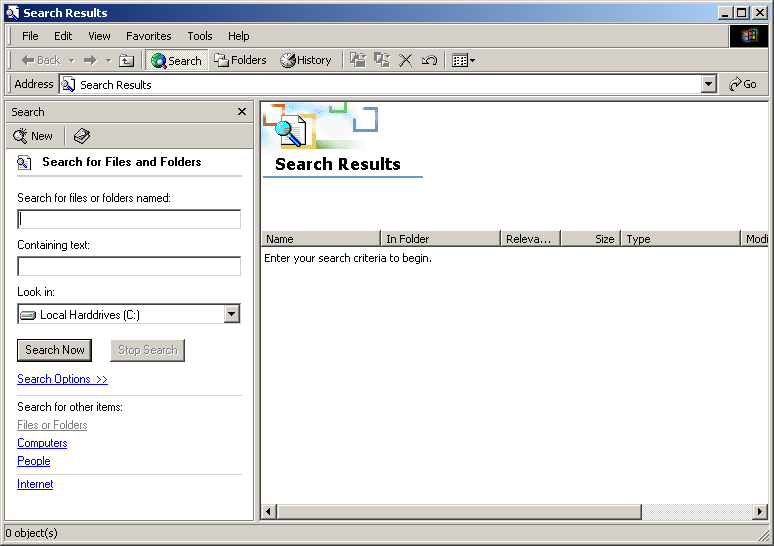
I am the only die-hard Windows 2000 search fan in the house? It can easily be applied to Windows XP, but any way to get the classic search back in Vista or 7?
The functionality of 2000/XP search is in Windows it just works differently.
How is it wasteful?And to be honest why would you want to by default index the whole drive, that's a bit wasteful isn't it?
What I mean is that if a non-technophile wants to specifically search for JUST a file-name, he won't know how to. (same if he wants to search for JUST file contents).This doesn't make a lot of sense. If the file in a indexed location and if we're talking about non-IT moms and dads their stuff will be in those folders, then you get results based on the name AND the contents. That's far more useful than just the file name alone 9 times out of 10.
I mean, ask the average Windows user to find a photo on his computer by trying "[person's name] photo" if they 10,000 emails, a trove of text documents, browser history, etc... They're going to be coming through those search-results for a WHILE, when a simple file-name-only search would have filtered out 98% of the other junk.
Basically what I'm saying is, Win 7's search doesn't have sufficient visible settings for the average user, and, by default, just brings up EVERYTHING related to your search.
I think people like it because it's simple and responsive... unaware that it's highly malformed. (it'll probably take some time before most have used it enough to really know what they're using exactly)
Last edited:
It wastes perf keeping the whole drive indexed and it wastes my time showing search results I don't want. Most of my drive I will never be searching for. Give me stuff in my libraries, stuff in the start menu, my communication history, and stuff in the PATH (convieniently, Windows indexes all of those) and I'm good. I don't need anywhere else.How is it wasteful?
Besides, a lot of time there's stuff you actively DON'T want indexed or searchable.
Why that wasn't disabled in XP Professional I have no idea. The search "companion" is nearly as bad as Clippit.
Aren't they going to bring him back in Office 2010? ;-)
name:texthere
Bullshit.
I should not have to go online to learn a bunch of random keywords to use something as simple as Search. That is ridiculous.
Having the keywords around is fine and dandy, but include an actual UI area with advanced search options for fuck's sake, similar to what Vista has.
heatlesssun
Extremely [H]
- Joined
- Nov 5, 2005
- Messages
- 44,154
What I mean is that if a non-technophile wants to specifically search for JUST a file-name, he won't know how to. (same if he wants to search for JUST file contents).
I mean, ask the average Windows user to find a photo on his computer by trying "[person's name] photo" if they 10,000 emails, a trove of text documents, browser history, etc... They're going to be coming through those search-results for a WHILE, when a simple file-name-only search would have filtered out 98% of the other junk.
Basically what I'm saying is, Win 7's search doesn't have sufficient visible settings for the average user, and, by default, just brings up EVERYTHING related to your search.
I think people like it because it's simple and responsive... unaware that it's highly malformed. (it'll probably take some time before most have used the new search enough to really know the ins and outs)
In Vista and 7 the search results are grouped by type so in the scenario you described the picture results wouldn't be mixed in with the emails and other documents. Plus from the Start Menu you don't get all of the results so you don't get a lot of stuff to filter through by default.
I do however agree that the filtering could be a more guided with a wizard or nice little interface.
Right (and you're right), but they would be 20 pages down the list (Win7 search results have been LONG for me, so far), and there would be a lot of them.In Vista and 7 the search results are grouped by type so in the scenario you described the picture results wouldn't be mixed in with the emails and other documents.
heatlesssun
Extremely [H]
- Joined
- Nov 5, 2005
- Messages
- 44,154
Right (and you're right), but they would be 20 pages down the list (Win7 search results have been LONG for me, so far), and there would be a lot of them.
You must have a LOT of stuff. I've got around 500,000 indexed items on my main rig and I don't have to scroll through much with single word searches usually.
I meant the search for "[person's name] photo". Of course, more narrow search topics (like "shopping list") will have less results. (but not THAT many less, with that word "list" in there. I get 735 results for both words, and 15,773 results for just "list") I AM on the higher end on how many files I have (my drives aren't exactly in fresh-install status), but still...
Last edited:
I found a list of all the search syntax. it seems like these should have been integrated more into the search ui. at least some sort of "more search options" button...
I found a list of all the search syntax. it seems like these should have been integrated more into the search ui. at least some sort of "more search options" button...
Exactly. This is why I voted for Vista instead of 7. There's no excuse for taking out the UI advanced search options.
heatlesssun
Extremely [H]
- Joined
- Nov 5, 2005
- Messages
- 44,154
Exactly. This is why I voted for Vista instead of 7. There's no excuse for taking out the UI advanced search options.
They didn't "take them" out, they just didn't include them all in the little drop down under the search box.
They didn't "take them" out, they just didn't include them all in the little drop down under the search box.
Don't be a smartass, you know what I mean.