• Some users have recently had their accounts hijacked. It seems that the now defunct EVGA forums might have compromised your password there and seems many are using the same PW here. We would suggest you UPDATE YOUR PASSWORD and TURN ON 2FA for your account here to further secure it. None of the compromised accounts had 2FA turned on.
    Once you have enabled 2FA, your account will be updated soon to show a badge, letting other members know that you use 2FA to protect your account. This should be beneficial for everyone that uses FSFT.

Windows 11 NVME performance enhancement!

vxspiritxv

[H]ard|Gawd
2FA
Joined
Feb 10, 2001
Messages
1,660
It's enabled when you see your drives move from "Disk drives" to "Storage disks" in Device Manager
My system is a bit of an oddball... Windows 11 LTSC, B650m, 7600, 64gb 4800 ecc, Crucial T705 (4k formatted before windows installed via nvme format --lbaf=1 /DEVICE)
Before:
1767012954148.png

After:
1767013003273.png

Commands to enable it:
reg add HKEY_LOCAL_MACHINE\SYSTEM\CurrentControlSet\Policies\Microsoft\FeatureManagement\Overrides /v 1853569164 /t REG_DWORD /d 1 /f
reg add HKEY_LOCAL_MACHINE\SYSTEM\CurrentControlSet\Policies\Microsoft\FeatureManagement\Overrides /v 156965516 /t REG_DWORD /d 1 /f
reg add HKEY_LOCAL_MACHINE\SYSTEM\CurrentControlSet\Policies\Microsoft\FeatureManagement\Overrides /v 735209102 /t REG_DWORD /d 1 /f
reg add "HKEY_LOCAL_MACHINE\SYSTEM\CurrentControlSet\Control\SafeBoot\Network\{75416E63-5912-4DFA-AE8F-3EFACCAFFB14}" /ve /t REG_SZ /d "Storage Disks" /f
reg add "HKEY_LOCAL_MACHINE\SYSTEM\CurrentControlSet\Control\SafeBoot\Minimal\{75416E63-5912-4DFA-AE8F-3EFACCAFFB14}" /ve /t REG_SZ /d "Storage Disks" /f

https://techcommunity.microsoft.com...25-ushering-in-a-new-era-of-storage-p/4477353
 
Last edited:
I'll hold for now but it it boosts all my old Optane stuff a bit more...nice!
 
I was looking at this, but was wary about it since I do use a RAID card. According to the scuttlebutt, it can be a problem for it, and I'd rather not have to unfudge a perfectly working system.
 
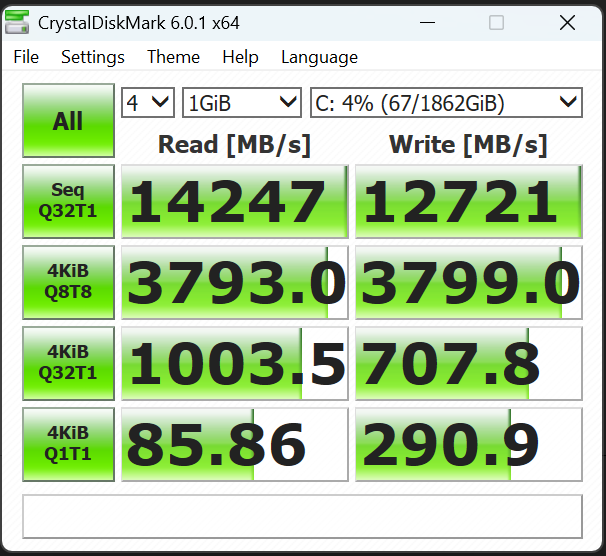
PCIe 4 limited, how are you getting 14GB/s of speeds on an NVMe drive?

B650M limited to M.2 on PCIe 4 x4 slot so max would be 4GB/s = just over 4k MB/s ? Or do you got it running off an adopter in a x16 slot?
 
PCIe 4 limited, how are you getting 14GB/s of speeds on an NVMe drive?

B650M limited to M.2 on PCIe 4 x4 slot so max would be 4GB/s = just over 4k MB/s ? Or do you got it running off an adopter in a x16 slot?

Gen 4 caps out around 7600mb/s. Gen 5 doubles that. He definitely has a Gen 5 capable slot, B650 can do it just fine if they enable it because they all use the PROM21 chipset. The only reason the boards don't all advertise it is because of the PCI-E traces themselves, the cheaper manufactured ones might not have the signal integrity for it.

Annnyways, this looks really cool and any improvement out of Windows can be seen as a big win considering how they've been going the other direction for so many years. Now we just need a file system that isn't 30 years old.

EDIT: tested 2 of my Gen 5 drives, T710 2TB on B850/9800X3D and Samsung 9100 Pro on Z890/265K. Big gains. Intel build on 11 Pro, AMD build on 11 LTSC.

CDM_ALL.png
 
Last edited:
I'd advise people to be very cautious about this right now.

It's important to remember that this was released for Windows Server 2025, not Windows 11. It only "works" in Windows 11 because Windows Server 2025 and Windows 11 share a common codebase.

Microsoft has said that they do not feel that this is ready for Windows 11 yet, to the extent that they have not even implemented it in any of the Insider builds yet, not even the more experimental insider builds such as the Dev or even the Canary channel builds.

Known issues include inability to boot into safe mode, inability to read SMART info from a NVMe drive, most/all disk utilities broken (including OEM utilities needed to update firmware, enable extra caching features, etc). In many cases you won't even be able to read the temperature of the drive anymore after doing this.

So it's good that it "works", just make sure that you know what you're getting yourself into before you enable what is essentially an Alpha feature (aka not even ready for Beta yet) on Windows 11.

Hopefully we'll get an option to enable this on a per-drive basis. It would be nice to experiment with this on a dedicated games drive before implementing it on an OS drive.
 
PCIe 4 limited, how are you getting 14GB/s of speeds on an NVMe drive?

B650M limited to M.2 on PCIe 4 x4 slot so max would be 4GB/s = just over 4k MB/s ? Or do you got it running off an adopter in a x16 slot?
How about
I'd advise people to be very cautious about this right now.

It's important to remember that this was released for Windows Server 2025, not Windows 11. It only "works" in Windows 11 because Windows Server 2025 and Windows 11 share a common codebase.

Microsoft has said that they do not feel that this is ready for Windows 11 yet, to the extent that they have not even implemented it in any of the Insider builds yet, not even the more experimental insider builds such as the Dev or even the Canary channel builds.

Known issues include inability to boot into safe mode, inability to read SMART info from a NVMe drive, most/all disk utilities broken (including OEM utilities needed to update firmware, enable extra caching features, etc). In many cases you won't even be able to read the temperature of the drive anymore after doing this.

Do these issues also affect Win Server? If so, then why did MS release this for Server?

Are the config settings in message #1 reversible. If so, can someone post those reg entries. Many thanks.
 
According to other posts, MS did release this for Server.
apparently "rando guy" got a promotion. still doesnt change the fact that op is telling people to use stuff for server on win11
 
Do these issues also affect Win Server? If so, then why did MS release this for Server?

Yes these issues affect Windows Server 2025 also. Probably one of the reasons why the feature is still opt-in, disabled by default.

Servers are often single-purpose machines, and if that single-purpose is enhanced by this, then it doesn't matter what else breaks.
Servers are often managed by professionals who would/should have real backups in-place, so wouldn't be relying on things like Safe Mode.
Most of the consumer drive software that is broken by this often doesn't apply in an enterprise environment anyway. For example, Samsung Magician doesn't even recognize Samsung Enterprise SSDs.
 
OK, so after an initial rush of excitement, and copying lots of web pages into a Word doc, I've come to realize that I'm not going to rush into enabling this new run-fast feature.
 

“Microsoft is fundamentally redesigning NVMe drivers for Windows; initial tests show significant performance shifts​


Initial tests with multiple NVMe SSDs already show clear effects of this architectural change. Random read accesses benefit particularly strongly. In corresponding benchmarks, random read performance increases significantly and in some cases reaches new peak values in IOPS. Applications with many small accesses, such as databases or virtualization systems, could benefit significantly from this.

The situation is currently different for sequential accesses. Classic benchmark programs such as AS SSD or other tests for linear transfers sometimes show lower efficiency than with the previous driver. The reason for this is probably that the new architecture is not yet fully optimized and focuses heavily on parallel I/O workloads. In scenarios with large sequential data streams, this can currently lead to measurable losses.

In addition, Microsoft has not yet activated the driver by default. Although it is already included in the current builds of Windows 11 25H2 and Windows Server 2025, it is still being treated as a preview. The company is thus pursuing a cautious strategy. Developers and testers can analyze the new implementation, while Microsoft gains time to identify potential problems and further optimize performance.

Technically, the new approach also lays the foundation for modern features from the current NVMe specification. These include zoned namespaces, which were developed specifically for large data storage systems and data centers. Such features enable more efficient management of large amounts of data and can improve the service life of flash memory.

However, this also means restrictions for practical use at present. Since the driver has not yet been finalized and individual benchmarks show significant fluctuations, its use is not currently recommended in productive environments. Especially in critical systems, it is advisable to wait until Microsoft officially activates the implementation and has made further optimizations.

Conclusion

Microsoft is working on a fundamental modernization of the Windows storage stack with the new NVMe driver. The switch to an IoRing-based architecture promises significantly higher IOPS and lower latencies, which is already evident in initial tests, especially for random read accesses. At the same time, current benchmarks still reveal weaknesses in sequential transfers. Since the driver is currently only integrated as a preview and is not yet activated by default, it remains to be seen how much Microsoft can further optimize performance before the final release.“

https://www.igorslab.de/en/microsof...al-tests-show-significant-performance-shifts/
 
Back
Top