
Will I Be Ok With This Setup?

P4rD0nM3

[H]ard|Gawd
Joined
Jun 5, 2007
Messages
1,544
Hello, I recently bought a computer from Hewlett-Packard, the model is a6000n.

It has the following specs:

PSU: OEM 300W*
Processor: Athlon 64 X2 (W) 4200+ 2.2 GHz
Chipset: GeForce 6150SE nForce 430
Motherboard Name: ASUS M2N68-LA
Memory: 1GB DDR2**
HDD: 250 GB SATA 3G 7200rpm
Optical Disc Drive: 16X DVD(+/-)R/RW RAM (+/-)R DL LightScribe
Modem: 56K bps Data/Fax Modem***
Video: NVIDIA Integrated 6150SE****
Audio: High Definition 7.1 audio
Network: Integrated 10/100 Base-T Networking Interface + PCI Wireless Card


* I replaced the OEM PSU with a Antec Basiq 500W Power Supply:

Dual +12V: Yes
Fans: 1
Input Current: 8A
Input Frequency Range: 47 - 63 Hz
Input Voltage: 100 - 240 V
Main Connector: 20+4Pin
Modular Cabling Support: No
PCI-E Connectors: 1 x 6Pin
PFC: Active
SLI Support: No
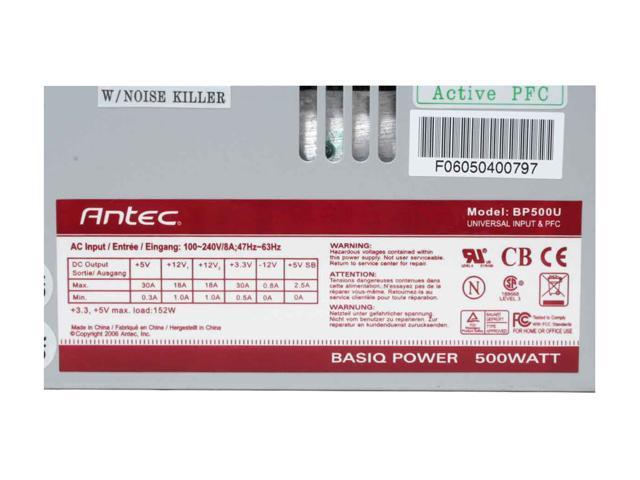
17-371-004-05.jpg


Pictures Courtesy of NewEgg.com

**Then I upgraded my memory from 1GB to 4GB DDR2 (4 Modules)

***I plan on taking this one out since I don't need it.
****I want to replace this with a high end video card (i.e. 2900xt)

I used the PSU Calculator that I found being posted here in the forums and with a 2900xt (If ever) I'll be at 480.

Sincerely,
P4rD0nM3
 
I don't really see the point in buying a more expensive, hotter, more power consumptive video card, i.e., 2900XT, when the 8800GTS is cheaper, uses less power, and performs better in the majority of games.

The PSU calculator is kinda misleading if you don't understand electronics, so don't rely on that. There's more to a good PSU than wattage.

Otherwise, you should be good.
 
Hello, I recently bought a computer from Hewlett-Packard, the model is a6000n.

It has the following specs:

PSU: OEM 300W*
Processor: Athlon 64 X2 (W) 4200+ 2.2 GHz
Chipset: GeForce 6150SE nForce 430
Motherboard Name: ASUS M2N68-LA
Memory: 1GB DDR2**
HDD: 250 GB SATA 3G 7200rpm
Optical Disc Drive: 16X DVD(+/-)R/RW RAM (+/-)R DL LightScribe
Modem: 56K bps Data/Fax Modem***
Video: NVIDIA Integrated 6150SE****
Audio: High Definition 7.1 audio
Network: Integrated 10/100 Base-T Networking Interface + PCI Wireless Card


* I replaced the OEM PSU with a Antec Basiq 500W Power Supply:

Dual +12V: Yes
Fans: 1
Input Current: 8A
Input Frequency Range: 47 - 63 Hz
Input Voltage: 100 - 240 V
Main Connector: 20+4Pin
Modular Cabling Support: No
PCI-E Connectors: 1 x 6Pin
PFC: Active
SLI Support: No

17-371-004-05.jpg


Pictures Courtesy of NewEgg.com

**Then I upgraded my memory from 1GB to 4GB DDR2 (4 Modules)

***I plan on taking this one out since I don't need it.
****I want to replace this with a high end video card (i.e. 2900xt)

I used the PSU Calculator that I found being posted here in the forums and with a 2900xt (If ever) I'll be at 480.

Sincerely,
P4rD0nM3


Don't go with the 2900 XT. It has too many drawbacks, when compared to a 8800 GTS 640 and it costs more, while performing the same.

With the rest you should be fine. Any good 450w will be more than enough for that system (including the GTS 640).
 
Hey man, thanks for the hasty reply. Well I just picked the 2900xt as my video card of choice for this question since it's power hungry. I'm actually getting an 8 series. If it's not just the watts, then is it the V ratings that's important? Is there a good website in understanding how this stuff works? I know I'm just going to buy probably like every two years or so, but extra knowledge won't hurt at all.
 
I'm actually getting an 8 series. If it's not just the watts, then is it the V ratings that's important?

The box for the GTS says it needs 26 Amps on the +12v Rail, I certainly wouldn't run in on anything lower than that. as far as I can tell, the PSU stated above has a total of 36 A on the +12v. You should be fine.
 
You could fit a couple fans in with that power supply. With a decent 400W supply you could run an 8800GTS fine, so I think your 500W should be plenty for a couple fans. I have 4 120mm fans running w/ a GTS overclocked and CPU overclocked (all in sig), and a 460W power supply. Haven't run into any problems yet.
 
Hi there! Yes I have Vista.

Hmm, is it possible to run two power supplies too? Is it practical? Not on my setup...but let's say I have an extra one since I just replaced my old one, can I just use the old one to power my motherboard and my optical drives? And the newer one is for my GPU and other power hungry hardware?

Oh with regards to fitting more fans. Thanks for the reply I was planning on replacing my heatsink/fan combo for the cpu.

Are this ideas overkill? I just want my computer to be rock solid and won't overheat. It's on 24/7 and I do some graphic intensive work with it. I know most of you guys might just say...it's just an HP, you should have just built yourself one. Well I just like HP's design that's all. Haha weak point huh? My laptop is an hp too and my old computer is an hp too.
 
i have my 8800gts on my shuttle 350w PSU :) with an opteron 165 OCed at 2.7ghz 1.4v
2gb of RAM and a 36gb Raptor HDD

with 2 laptop HDDs


you can definitely run a 8800gts on a 400w PSU that is not a powermax or anything wimpy like that....
 
i have my 8800gts on my shuttle 350w PSU :) with an opteron 165 OCed at 2.7ghz 1.4v
2gb of RAM and a 36gb Raptor HDD

with 2 laptop HDDs

lol wow, I think that might be getting a little crazy. Hope that thing doesn't burn out on you anytime soon :eek:
 
I thought my Antec PSU was a piece of crap, below average PSU. Hey guys, I haven't actually told you but it will be a 8800gtx now 8800gts.

Minimum System Requirements
1GB of system memory
CD-ROM drive
50MB of available hard disk drive space for basic driver installation
A PCI Express-compliant motherboard with an available PCI Express x16 slot
A vacant slot below the PCI Express x16 slot. The graphics card physically occupies two slots
A 475W PCI Express-compliant system power supply with a combined 12V current rating of 32A or more*
Two 6-pin PCI Express supplementary power connectors
-or-
Four 4-pin Molex power connectors
Minimum system power requirement based on a typical PC configured with an Intel Core2 Extreme X6800 processor
 
I thought my Antec PSU was a piece of crap, below average PSU. Hey guys, I haven't actually told you but it will be a 8800gtx now 8800gts.

haha you're all over the map. With your basic power supply and the 8800GTX, it might stress it out a bit... I'd be careful. But what screen resolution are you going to be using? I guess you said graphics not games ;) But are you sure you need the GTX and the GTS won't suffice? I would think if you're doing graphics and not gaming that a Quadro or FireGL card would be better for you....
 
Yes, it's not for games. A Quadro is a ton more expensive than a gtx (I'm not talking about the mid-range quadro...but the higher end ones).

Come to think of it...will it fit?

83-107-359-08.jpg


I'll be working on 1920x1200.
 
You're going to have to do SOMETHING with those cables! Take a look at the "Rate my Cables" post for some ideas ;)

I don't remember exactly how big the GTX is offhand, but you can find it somewhere on the net, then just take a ruler/measuring tape and measure the inside of your case.
 
Oh, trust me I've gone through those pages already and it makes me jealous. I'm still new to this kind of hobby (Though mine can't be really considered a hobby). Wire management is a new world to me. I have no idea how to put the wires at the back of the other side since I don't think I can take it off.

All I know is, the better your WM is, the better airflow you have. The GTX will be here by next week (Yes I choose the cheapest delivery).

Things to do:

* Wire Management

Not bad for a $500 computer where I put more than $500+ parts already. Haha.
 
Oh, trust me I've gone through those pages already and it makes me jealous. I'm still new to this kind of hobby (Though mine can't be really considered a hobby). Wire management is a new world to me. I have no idea how to put the wires at the back of the other side since I don't think I can take it off.

Use zipties like there's no tomorrow.
 
Back
Top