• Some users have recently had their accounts hijacked. It seems that the now defunct EVGA forums might have compromised your password there and seems many are using the same PW here. We would suggest you UPDATE YOUR PASSWORD and TURN ON 2FA for your account here to further secure it. None of the compromised accounts had 2FA turned on.
    Once you have enabled 2FA, your account will be updated soon to show a badge, letting other members know that you use 2FA to protect your account. This should be beneficial for everyone that uses FSFT.

Why SFF? Enlighten me

After towers for years I really got tired of hefting them around whenever I make a change, and I make alot of changes to my pc's. I also wanted something sitting on top of the desk without dominating it. I had the tower of the floor sucking up everything like cat hair and the like, the SFF on top of the desk stays clean inside. The CD/DVD tray at my fingertips is nice, as are USB ports. My SN25P is about 3 feet from my head when sleeping, and I sleep fine with it on 24/7.

I hope the DFI mATX is SLI, there already is that suspected EVGA SLI mATX board available in the Monarch SFF.
 
Actually SN95G5 has only 240 watt PSU. Still Runs 4200+ X2 Dual core and 6800GT and other hardware without any problems. Allready on 6800GT there was a sticker minimum 350 watt.

350 watt PSU out of a P-series will run anything You throw on it.

Well if You arent about to run big files server P chasis is solution.

Look at a SN26P. SLi capability, CPU FX57 or FX60, A64 4000+, 4800+ X2, Opterons 154 or 180, 2 GB RAM , 3x 500 GB HDD, DVD RW , media card reader, sound (if You don't like Envy24 take a Audigy 2 NX or Audigy 2 ZS Video Editor, 1 GB network card on board expandable to more network cards with USB 2,0 to Ethernet or USB 2,0 to Wireless SuperG adapters, PSU to power it all and ALuminum case. Mobo with Nforce chipset.

So what doo You miss? More then 2 GB RAM? Well some people live with 1 GB to. Most of a gamers live with 2 GB quite fine. 1,5 TB storage is good enough. Well all You need in this moment is there. Cooling is good enough and quiet enough. Wanna more cooling power? Well You can goo with external WC like Koolance with quick release hoses.

So modern SFF's pack enough power.

Or take a Iwill products with dual CPU setups. Inceredeble power in shuebox size.


MD
 
Gob said:
All the same, $500 (cdn) is a ridiculous amount for a case, mobo and psu.
I remember that I paid about 300 for my SN95G5, had the 6800GT already,added 1GB kingston value RAM for 100 and a 3500+ for around 200. Really a nice little box. It comes very professionally wired and required little on my part. I dont think you could buy any other system of this quality for the same money, yes you could go cheaper, but the quality would suffer.
 
DSC00101.jpg


3dmark05.jpg


My Shuttle's are as powerful as any Tower rig and both are practically silent - I have found that the The Shuttle Power supply's can handle ANY high end video card - for example I was running a 7800GTX with a 240W PSU in a Shuttle ST20G5.

My Shuttle SN26P runs dual 7800GTX's and an FX-60 with the stock 350W PSU! I also have a 7800GTX 512 in my Shuttle SB83G5 (modded a side window for the cooler to hang out) which has a 300W Shuttle PSU upgrade.
 
For the challenge.

At first it was overclocking, and ridiculously loud fans in a super full tower.
Then it was trying to rebuild the rig for silence. Undervolting fans, using premium parts built for low noise. Then it was do it all in a small form factor.

Small form factors have serious thermal limitations.

Why climb the "computer" mountain. Cause it's there.
 
dworley said:
DSC00101.jpg


3dmark05.jpg


My Shuttle's are as powerful as any Tower rig and both are practically silent - I have found that the The Shuttle Power supply's can handle ANY high end video card - for example I was running a 7800GTX with a 240W PSU in a Shuttle ST20G5.

My Shuttle SN26P runs dual 7800GTX's and an FX-60 with the stock 350W PSU! I also have a 7800GTX 512 in my Shuttle SB83G5 (modded a side window for the cooler to hang out) which has a 300W Shuttle PSU upgrade.

That is a top notch wiring job. I wish my qpack looked half that good. :(
 
That wiring job comes from Shuttle. You just need to plug plugs and there You are . P series are, except two screws that hold PCI cards, totaly toolless cases.


MD
 
Shuttles are quite nifty until something goes wrong. I previously owned an SN45G and an SB75G2V2 and they ran great, looked cool, and sat on my desk.

I wanted to upgrade to AMD 64 so I bought an SN85G4V3 and it worked for a while. Long story short the motherboard died and the thing was only a few months old. I guess partly my fault for buying it second hand but now I'm SOL because Shuttle has terrible support and doesn't even sell replacement motherboards.

I really want another one but just can't count on Shuttle anymore.
 
I'm going SFF because of noise and size. You can fit these little bad boy cases just about anywhere.

I'm currently finalizing plans for a SFF Coolermaster Centurian 540 that will include:
Two radiators (1 120mm, 1 2-80mm)
1.5 Terabyte HDD space
SLI (damn slow eVGA)
As well has an Audigy sound card (I'll have my PCI slots because of the single slot coolers from Koolance).

Thats more power then most towers, in half the space.
 
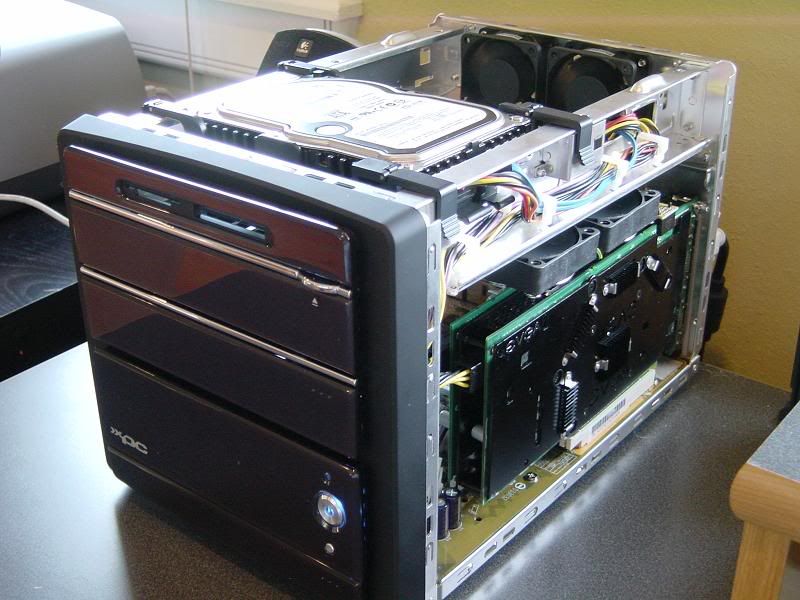
I just love the questions people asked me when I was carrying my qpack on the bus and home from school. They could't believe that a desktop computer can be that small, then I educate them about the SFF. Heck, if I could, then I would have built a few people a SFF computer.

But a disadvantage is the wires and my lack of experience with wire routing and the size of the computer. It took me twice as long as what I did on my mini-tower desktop. But that feeling of power as described above is well worth the manhours of wire routing.
 
adri1456 said:
I just love the questions people asked me when I was carrying my qpack on the bus and home from school. They could't believe that a desktop computer can be that small, then I educate them about the SFF. Heck, if I could, then I would have built a few people a SFF computer.

But a disadvantage is the wires and my lack of experience with wire routing and the size of the computer. It took me twice as long as what I did on my mini-tower desktop. But that feeling of power as described above is well worth the manhours of wire routing.
holy thread revival, batman!
 
Having owned both an SFF system (SN45G / NForce2 / GeForce 5900XT) and various quasi-gaming notebooks (Compal CL-56, Comapl EFL30), I can tell you that if you want a LAN box, it's really hard to beat the notebooks.

If you have the buxx to spend ($1200 for a decent gaming whitebook) and are willing to give up a bit of performance (e.g. GeForce Go 7600GT instead of a 7900GT, notebook drive, etc.), you gain the ability to enjoy LANs a lot more. It makes a huge difference - not having to lug the box there, not spending a lot of time to set up, not having to tear-down and put your stuff away. I find that I go to LANs more often, and that I am more impulsive (sometimes I even have mini-LANs with 4-5 people that are planned minutes in advance or not at all).

If, however, you want a box with real disks (you can't put 1.5TB of space in a notebook), a real GPU (getting a 7900GT in a notebook costs a fortune), or some room for expandability (you can put a dual-tuner PCI card in a Shuttle box - try that with a notebook), then a SFF box is excellent. With my Shuttle backpack and my GearGrip for my 17" LCD, I could set up my box in around 3 minutes and tear-down in about the same amount of time. I could carry it to a LAN and still have a hand free for doors or other stuff.

SFF boxes are like desktops, to go. They aren't laptops - if you want the ultimate portable system, get a notebook. They aren't desktops - you're not going to find 6 PCI slots in a SFF box. They are, however, a nice compromise. A Shuttle box doesn't look stupid sitting on a desk. You can put it on your back and take it with you. You can mod it like any full-size system (it is, of course, more challenging). You can upgrade the GPU, add a PCI card, or have a terabyte of storage. It's a lot of the flexibility of a desktop with a lot of the portability of a notebook.

Of course, I ditched my SFF about a year and a half ago. Why? Noise. SFF systems are notoriously noisy, particularly once you add a high-end GPU. My desktop is a Media Center box, for recording TV, so it's on 24/7, and it sits right next to me when I sleep. Noise is not an option. I switched to a desktop with an S12-430, a Zalman, and a fanless GPU. With Cool n' Quiet, the CPU fan doesn't run while the system idles (and the CPU stays below 50C). Nor does the case fan. The only fan that runs is the fan in the S12-430, which is so quiet that you can't even hear it from 3 feet away. Crazy? A bit. But your PC is personal. It should be what you want it to be. And, for many people, SFF systems fit the bill perfectly.
 
I put my shuttle running in my living room for fileshare and bt. it only has a power cord and ethernet plugged it. for the rest, I use VNC to control it via my laptop.
 
Why SFF? I have 5 computers in my Den. Mine, both my girls and the wife along with a laptop. Getting rid of the Mid Tower ATX's, along with LCD monitors made it so they could have regular desks instead of the larger wood desks. Plus they had a tendency to kick the tower when playing a game. I was always waiting for something bad to happen. Now with the SFF, they fit on the desk, are compact, and allow for a nice quiet computer environment.

-E
 
Steeeeve said:
Advantages:

Space saver
good for dorms if you go to college
light weight
normally quieter
can be placed on desk easily
portable
cute :p

Disadvantages:
mATX is limited
Shuttle is hard to upgrade....qpack is easier
no SLi or Crossfire as of right now
other part limitations
cramped

If you have like 1-2 harddrives and don't do too much (like running a server) then a SFF is great...they aren't loud and easy to put somewhere.

theres sli >> http://www.theinquirer.net/default.aspx?article=30227
 
1) QPacks are huge. My friend has one, and it takes up too much space in his apartment flat IMO.

2) As the aforementioned friend once mentioned once, mini-ITX systems are enough for the average person, flex-ATX systems are enough for the average gamer, and an mATX is mobo is enough for the upper echlon of gamers, and the only time people should need an ATX mobo is when they are running a server, a workstation or a high-end SLI rig with multiple expansion cards not including the GPUs... in terms of expandability. Reflecting on what he said, SFF systems offer just as much performance as full-ATX setups.

3) I have a rig in a Cooler Master Centurion 5. After playing only games during the first half of summer before coming to Japan without a computer, I regret not having a PC I could easily take on a plane with me.

4) Live in Japan for about three weeks, and you`lll quickly realise how important space is. The only PCs I`ve seen here so far are laptops, slim-line PCs or variations of those snazzy Fujitsu FMV LX series PCs.

5) A laptop with a mini-PCI slot can offer almost as much expandability as a SFF if you use a flexible mini-PCI to PCI converter that splits the mini-PCI slot into two PCI slots.
 
'm going SFF because of noise and size. You can fit these little bad boy cases just about anywhere.

I'm currently finalizing plans for a SFF Coolermaster Centurian 540 that will include:
Two radiators (1 120mm, 1 2-80mm)
1.5 Terabyte HDD space
SLI (damn slow eVGA)
As well has an Audigy sound card (I'll have my PCI slots because of the single slot coolers from Koolance).

Thats more power then most towers, in half the space.

nice , hope you notice that case is BTX.
 
I'm guessing he went perpendicular...(queue Hitachi flash video)
 
Aesthetics, portability, and challenge.

I personally like the look of the Aria. Small, but not mini. Classic black and grey with just a hint of "bling". People are always AMAZED that "that" is my computer. Surf, play HL2, listen to music, play DVDs, watch TV, etc, etc, etc, .... all from "THAT" little thing. Also keeping it up on the desk within easy reach for DVDs and USB access (plus a better presentation) is just choice.

I move every 3 months right now (at LEAST) so being able to grab the case, put it back into its original box and walk off with little fuss is handy.

Getting everything I want into a nice looking portable system AND keeping it cool/quiet. Challenges are always good and so are hobbies. While I know I could get a standard PSU if I moved over to the Hornet, Qpack, or whatever else, I think they are a little bigger than I wanted to go. Shuttles? To loud even with mods (unless you go EXTREME). And even then, a 50mm fan on the PSU is NEVER going to be QUIET. My Aria is locked into a 300W PSU but so far no problems (they even kept the same PSU when they put out the new model NSK 1300 this year). Having only 120mm fans (1 in the PSU and 1 modded into the front end of the left panel) provides TONS of cooling at no sound at all from where I sit just 2 feet away.

Anywho, its fun, its a challange, it meets my needs, its a conversation starter.
 
I, like a few of you, have the Monarch Hornet as well. I like it because I have a small apartment and not a lot of desk space. It's nice to be able to take it with me to a friends house to game also.

It also looks cool with the lighted feet that shine blue. Really cool looking. :)

I also have never had any problems with it, and the case is very well designed and built.

The good thing about a company that has a case that is customized and took a lot of care to design means they have a lot of staying power, and are going nowhere and are here to stay.
 
Back
Top