Why does my HD4850 suck!?

CamaroZ28

Gawd
Joined
Jul 10, 2008
Messages
740
Ok guys.. if you followed my previous thread then you know that I was having major issues with my Gigabyte HD4850. Well I bought a new motherboard for many reasons, needed something that overclocked better, wanted raid, and support for crossfire down the road. So I got this P45 chipset board because I have heard great things about their overclockability as well as abilty to run crossfire.

Now first thing I did was play with overclocking and I love this board for that, easily got my CPU up to 3.1GHz (344x9) when on my previous board I could only hit 2.4GHz (266x9). However apparently this game at a sacrafice to gpu performance because not only did I not improve my terrible frame rates in HL2 that my previous board was giving me, I got way worse!!

This time running HL2 Lost Coast Stress Test @ 1680x1050 with max settings, 4xmsaa, 8xAF. I got a disgusting 85fps for the overall stress test. (This is compared to the 95fps that I got on my previous crap Foxconn G33 board with PCI Express 1.1). And just to eliminate the question I varified in every single possible place that my card was indeed running at PCI Express 2.0 at 16x width.

Just incase I some how had an unstable cpu from overclocking, and because everyone says any C2D will run HL2 physics fine, I clocked my cpu back down to its original 1.8GHz (200x9) and ran the test there. Got 57fps with exact same settings.

Guys something is seriously wrong here and I am totally mind blown as to what it could be... Details are in Sig under _Desktop_. Also have catalyst 8.6 + Hotfix installed. Not to mention that this is a completely fresh reformat of Vista x64 Ultimate and I literally installed all drivers for mobo, then all catalyst drivers, then windows update, and went straight into the game. So if you think I need to reformat for some odd reason you will have to come up with a very good reason to convince me that is what will fix it, considering I have reformatted this thing like 3 times in the last 2 weeks.

P.S. I have a test tomorrow so I won't be able to post many responces for the remainder of tonight, but tomorrow I will be able be on a lot and post a lot more to anyones responces.

As always, thanks a lot for helping me out with this guys... I'm sure you could only imagine how bummed you would be if your brand new card was performing less then half of what it is supposed to... :(
 
Can you do the stress test at 1280x1024 and then I can compare scores with you. I have a 2180 @ 3.2 Ghz w/ 4850. I only have a 17" LCD so I can't go higher.

Also what are your exact settings in lost coast so I can match up?
 
Performance isn't just about the video card. Its about the system as a whole, drivers, configuration, etc.
 
Can you do the stress test at 1280x1024 and then I can compare scores with you. I have a 2180 @ 3.2 Ghz w/ 4850. I only have a 17" LCD so I can't go higher.

Also what are your exact settings in lost coast so I can match up?

Exact settings (as I said in my original post...) are High everything with 4xMSAA and 8xAF. I ran it at 1280x1024 with those settings and get 90fps overall. However during the majority of the stress test the fps were around 30, cept a couple of times where it went to 200 randomly.

Performance isn't just about the video card. Its about the system as a whole, drivers, configuration, etc.

Trust me... I am fully aware of that. And I just upgraded to a better motherboard and higher CPU clock (by a lot) and PCI Express 1.1 to PCI Express 2.0 and all other things the same ( including drivers) I get marginally worse performance.
 
Well what was you previous video card? Are you noticing worse performance than your previous graphics card you upgraded from?
 
Well what was you previous video card? Are you noticing worse performance than your previous graphics card you upgraded from?

This was my previous card... the only thing I changed was my motherboard, and in that change I gained pci express 2.0 and a higher clock frequency, and I lost nothing. I lost fps on this switch which doesn't make sense because overall system specs increased.
 
Maybe step up that cpu? I noticed a pretty big difference in performance when I went from an E4300 to an E8400.

Not sure why the score would go down though, unless something is faulty :\
 
Run CPUZ check the PCI-e speed in the motherboard tab. Make sure you are at x16 and not x1. You changed chipsets and didnt reformat? Thats trouble right there too..

Reformat.
 
Okay, just ran @ 1280x1024

Model detail, texture detail, shader detail, shadow detail = HIGH
Water detail = Reflect all
Color correction = Enabled
4x MSAA
AF 8x
Vsync disabled
HDR = Full

I got 163 fps with the 4850 overclocked in my sig

I set the 4850 back to default and got 164 fps so my CPU is obviously bottlenecking at this res.

I am on XP SP3 32-bit also, but the scores shouldn't be that much different under Vista.
 
Not too sure about that processor. I'd recommend a Q6600 G0 Quad myself. That's what I run and I don't

see myself upgrading from this processor for a very, very long time. This baby gets to 3.8 with ease. I'd

highly recommend switching to a quad. I wish you had went with an x38/x48 board. I doubt your P45

will run crossfire X at full bandwidth(16x/16x on both pcie lanes)
 
Run CPUZ check the PCI-e speed in the motherboard tab. Make sure you are at x16 and not x1. You changed chipsets and didnt reformat? Thats trouble right there too..

Reformat.

Wow... dude did you even bother to read the original post!! :mad:
I clearly stated that I checked three different sources and my PCI is running 16x 2.0. I also stated how fresh the reformat is and that I have reformatted 3 times in the past 3 weeks....

Okay, just ran @ 1280x1024

Model detail, texture detail, shader detail, shadow detail = HIGH
Water detail = Reflect all
Color correction = Enabled
4x MSAA
AF 8x
Vsync disabled
HDR = Full

I got 163 fps with the 4850 overclocked in my sig

I set the 4850 back to default and got 164 fps so my CPU is obviously bottlenecking at this res.

I am on XP SP3 32-bit also, but the scores shouldn't be that much different under Vista.

No I don't think your CPU is bottlenecking, there is a site that I read benchmarks off of before, its linked in my other post but its down right now... but they had the E8400 I believe running OC'd to 4.0GHz and it was getting the exact same fps as you except at 1680x1050 res. All other settings the same. I know something is seriously wrong with my system.. and I'm finally starting to think its the actual card just being a bad one... This is rediculous!
 
Not too sure about that processor. I'd recommend a Q6600 G0 Quad myself. That's what I run and I don't

see myself upgrading from this processor for a very, very long time. This baby gets to 3.8 with ease. I'd

highly recommend switching to a quad. I wish you had went with an x38/x48 board. I doubt your P45

will run crossfire X at full bandwidth(16x/16x on both pcie lanes)

Your right my motherboard will run 8x/8x 2.0 in crossfire as opposed to the 16x/16x 2.0 of the x38/x48. However, check out this review that compares P45 (Asus P5Q D), P35, X38, and X48. This is with Xfire 3870's and you can see that the P45 wasn't behind and in some places it was ahead. I know this may slightly different for HD4800's xfire, but considering the price difference (I paid $120) I think mine is more worth it for my personal needs.

Also considering HL2 is pretty much entirely single threaded... a quad would be pointless for this game. Just check the poster who gots great fps with his 2180, exact same processor as mine except 10x multiplier vs. my 9x.
 
Sorry guys but I have to study for my test for the rest of the night, but I will be able to post again tomorrow morning, thanks for the great help so far.
 
People - read the previous thread that he posted about on the matter. Suggestions are great, but when they've already been covered several times it is a bit frustrating.

Now here it is - HIS CPU IS NOT THE PROBLEM - unless somehow it is fooling his computer into thinking it is okay when something is actually flawed. Which pretty much seems impossible to me. Even running at stock speeds, his E2150 would not bottleneck this bad. Running at 3.2 GHz - no bloody way. My DOTHAN 1.86 GHz single core can run HL2 at 60+ FPS with a geforce go 6600 in my laptop. Clearly something else is wrong here.

I have to admit, it looks like it might the card itself. You've tried various drivers, a new mobo, a better OC on the CPU, and have a fresh install of vista. Seems little left to point fingers at. The only other suggestion I can think of is to try the 4850 out in someone else's rig. That way if they too acheive these low scores, you know it's the card.
 
The only other suggestion I can think of is to try the 4850 out in someone else's rig. That way if they too acheive these low scores, you know it's the card.
Good suggestion. Try it on other systems if you can even if the CPUs are different. It shouldn't really matter because at those graphics settings, it shouldn't be too CPU-bound.
 
People - read the previous thread that he posted about on the matter. Suggestions are great, but when they've already been covered several times it is a bit frustrating.

We're talking 8 pages of stuff here, sorry I didn't read all of it.:) Just RMA the card, I know that hardware problems suck, but I've lost count of the number of computers I've put together over the years and the number of hardware problems I've wouldn't even begin to fill an 8 page thread so at some point you have to cut your loses.
 
How did you validate your CPU overclock?

Nearly 24Hrs of Prime95 torture test with large FFT's, I'm actually currently running it right now just to make sure its still stable.

People - read the previous thread that he posted about on the matter. Suggestions are great, but when they've already been covered several times it is a bit frustrating.

Now here it is - HIS CPU IS NOT THE PROBLEM - unless somehow it is fooling his computer into thinking it is okay when something is actually flawed. Which pretty much seems impossible to me. Even running at stock speeds, his E2150 would not bottleneck this bad. Running at 3.2 GHz - no bloody way. My DOTHAN 1.86 GHz single core can run HL2 at 60+ FPS with a geforce go 6600 in my laptop. Clearly something else is wrong here.

I have to admit, it looks like it might the card itself. You've tried various drivers, a new mobo, a better OC on the CPU, and have a fresh install of vista. Seems little left to point fingers at. The only other suggestion I can think of is to try the 4850 out in someone else's rig. That way if they too acheive these low scores, you know it's the card.

I certainly appreciate your responce lol.. it has been a little frustrating when people keep repeating the same things to me without reading previous posts.

But I am going to try my card on my friend's rig this saturday hopefully, his specs are:

E6600 @ Stock
2GB Crucial Ballistix DDR2-800 cas4 ram
Asus P5N-E SLI (Nvidia 650i Chipset)
*using my spare Seagate 7200.10 80GB HDD

Let me know if anybody thinks that running my HD4850 on the 650i chipset might cripple it to somehow, that was the only thing I was skeptical about.

Unfortunatly, just about everyone I know who has a rig with PCI Express 16x slots all have Nvidia chipsets.. so if that is a problem then I might be a little screwed.:(
 
We're talking 8 pages of stuff here, sorry I didn't read all of it.:) Just RMA the card, I know that hardware problems suck, but I've lost count of the number of computers I've put together over the years and the number of hardware problems I've wouldn't even begin to fill an 8 page thread so at some point you have to cut your loses.

The other thing is that I'm worried about RMA'ing the card because I already cut the UPC off the box for the MIR. Will this be a problem, or should they just be able to replace it?

**Bought from Newegg on 7/3/2008, Manf. is Gigabyte**
 
The other thing is that I'm worried about RMA'ing the card because I already cut the UPC off the box for the MIR. Will this be a problem, or should they just be able to replace it?

**Bought from Newegg on 7/3/2008, Manf. is Gigabyte**

That's going to be a problem for the retailer more than likely. It shouldn't be a problem for the manufacturer.
 
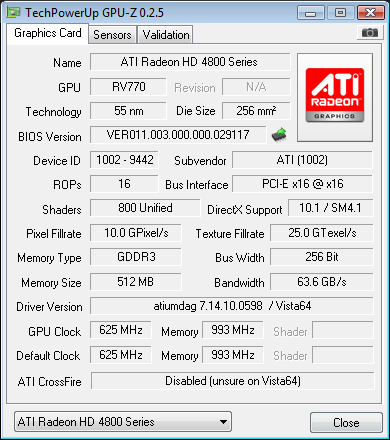
After reading through a couple of other people's issues with the 4850 that were similar to mine, I noticed we all had the same driver listed in GPU-Z (atiumdag 7.14.10.0598 / Vista64) . This is what installed when we all installed 8.6+Hotfix off of ATi's website. Someone else running XP64 had (ati2mtag 6.14.10.6822(Catalyst 8.6) / XP64) and their system was running perfect. Obviously the drivers are going to be different from Vista, but this shows up as a completely different format, different file name, different driver version number. So something just seems fishy to me here.

24x.png


If anyone else is running their HD4850 on Vista64, or even Vista32, please post what GPU-Z confirms your driver to be listed as to verify that my drivers aren't screwed up. Thanks!
 
1680 x 1050 shouldn't be bottlenecking by the CPU although I would check your power supply just to make sure its getting enough juice

Best suggestion as others stated is to stick it another computer and see if the relative performance changes... if it does, then its not the card.

Also try overclocking the card itself and see if performance changes at all. No changes / very little change (like 1-2fps) might mean the rest of your system has a bottleneck elsewhere as well.
 
Yah, 500 watt PSU should be enough...but not too sure of the brand he is using...Xion? Let us know how it works out on your buddy's system. My guess is you did a clean install of Vista 64 SP1 and installed the hotfix drivers right? Did you install the chipset drivers for your motherboard and do you have the latest bios for that motherboard? Good luck, hopefully testing it in your buddy's system will reveal if the card is defective.
 
Yah, 500 watt PSU should be enough...but not too sure of the brand he is using...Xion? Let us know how it works out on your buddy's system. My guess is you did a clean install of Vista 64 SP1 and installed the hotfix drivers right? Did you install the chipset drivers for your motherboard and do you have the latest bios for that motherboard? Good luck, hopefully testing it in your buddy's system will reveal if the card is defective.

Yes I did everything you mentioned here, and I know its not my powersupply because i've been monitoring all my voltages through HWMonitor. For the person who asked about my OC the Ram Divider is 5:6 which leaves my ram bearly OC'ed to about 826MHz (I've had it at 888Mhz stable in the past as well), my voltage is set to 1.4 right now with my FSB running 344MHz.
 
I did go through your old thread and noticed that someone reported getting only 10 fps more than you with the 4850. Could it just be HL2? Have you tried other games and noticed a lack of performance as well...
 
At this point I think its safe to say 99% sure the Video card itself is a dud. It happens :(
Waiting for your test results on your friends rig.
 
I did go through your old thread and noticed that someone reported getting only 10 fps more than you with the 4850. Could it just be HL2? Have you tried other games and noticed a lack of performance as well...

I haven't really had much time to try other games, however if you read my previous thread ( linked in first post) there is someone with a system running lower specs then my current setup getting almost double my fps. I'm pretty sure its not HL2 because I also found this review online.
 
given that you run it at 100+ fps, i dont see why youre complaining. I mean it could be driver issues, but i wont start complaining till it goes down 60fps average
 
given that you run it at 100+ fps, i dont see why youre complaining. I mean it could be driver issues, but i wont start complaining till it goes down 60fps average

Given that I run what at 100+ fps?? I don't know where you got these numbers? Even still, why would I be "content" with paying full price for something and not having it perform the way it should, regardless of whether it is "noticeable" or not. Not to mention that it is extremly noticeable considering during over half of the Lost Coast benchmark, my fps are red (meaning < 30).
 
Yeah Leepox, that's BS if he's getting half what he paid for... imagine getting half in crysis or any stressful games lol.

Anyways ran 1650x1050 at your settings and got 190fps exactly. 4ghz e7200 HD4850.

I know I know I should've read through your whole thread.

Did you try uninstalling and reinstalling your chipset drivers? I know that cut my fps in half when I forgot to a few months ago in the source engine.

EDIT: nvm, you reinstalled and reformatted several times lol.


OK try this: Enable CCC Overdrive. Put it to stock speed.... 625 core 993 memory, run test again, and see if it works.

I bet you it will work. :D
 
Hey all, new here :D

There is something definitely wrong with your 4850. I just ran the bench myself at 1680x1050 @ 4x MSAA / 8x AF. I got 101.15fps on a GeForce 8800GS. There is something definitely wrong with your vid card.
 
Yeah Leepox, that's BS if he's getting half what he paid for... imagine getting half in crysis or any stressful games lol.

Anyways ran 1650x1050 at your settings and got 190fps exactly. 4ghz e7200 HD4850.

I know I know I should've read through your whole thread.

Did you try uninstalling and reinstalling your chipset drivers? I know that cut my fps in half when I forgot to a few months ago in the source engine.

EDIT: nvm, you reinstalled and reformatted several times lol.


OK try this: Enable CCC Overdrive. Put it to stock speed.... 625 core 993 memory, run test again, and see if it works.

I bet you it will work. :D


I already have it set to that, could you post a pic of GPU-Z of your system so I can compare your driver with mine. Just want to make sure it's not the drivers.

Thanks!
 
Hey all, new here :D

There is something definitely wrong with your 4850. I just ran the bench myself at 1680x1050 @ 4x MSAA / 8x AF. I got 101.15fps on a GeForce 8800GS. There is something definitely wrong with your vid card.

Wow... that really scares me haha!
 
According to what you said you installed Cat 8.6 and then the Hotfix on top of that.

The Hotfix 8.6 drivers are a FULL set of drivers including the CCC. They're built off the 8.6 code but optimized for the 4000 series of cards. It is possible that by installing 8.6 and then installing the Hotfix on top you may have conflicting versions if something didn't overwrite correctly thus you losing optimizations for the 4000 series.

Personally I would reinstall ONLY the Hotfix drivers after cleaning the system with DriverCleaner or some other program. See what happens after that.

-V
 
Wow... that really scares me haha!

The 8800GS part or that my GS is running faster than the broken HD 4850 or that it can actually run Lost Coast at 101.15fps with 4x fsaa and 8x af? :p
According to what AZN said his HD 4850 should be blowing my 8800GS out of the water at 190fps.

A 90 fps difference can't be justified as a bad driver, IMO but it couldn't hurt. I feel your pain though a week ago I had a Radeon HD 3650. When I first got it two months ago the fan busted. The day right after I sent in the MIR. :( Sapphire wanted $15 for an "admin fee" which is BS and shipping costs considered it would be half the cost to get this 8800GS in the end... yeah...
 
Back
Top