• Some users have recently had their accounts hijacked. It seems that the now defunct EVGA forums might have compromised your password there and seems many are using the same PW here. We would suggest you UPDATE YOUR PASSWORD and TURN ON 2FA for your account here to further secure it. None of the compromised accounts had 2FA turned on.
    Once you have enabled 2FA, your account will be updated soon to show a badge, letting other members know that you use 2FA to protect your account. This should be beneficial for everyone that uses FSFT.

Whatup Windows?

RedWagnum

Gawd
Joined
Mar 30, 2007
Messages
615
So a couple of weeks ago I let my system update to Windows 21H1. After rebooting the first thing that pops up is the news widget. Don't need it, turn it off. Go on about my business. A couple days later I wonder what else is new in this update I go to view my update history where there is a "See what's new in this update" link. Click that and:
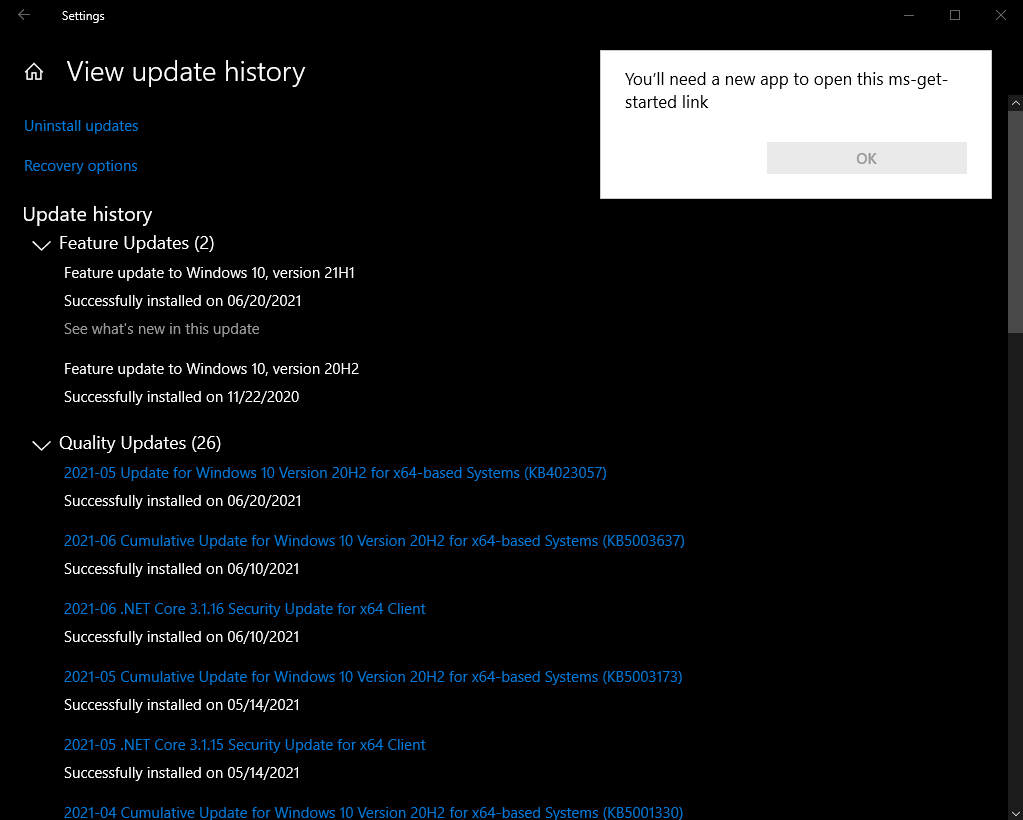
WTF Windows.jpg

WTF is that??? WHAT new app? Why didn't MS update install it with this update? Why doesn't the "OK" button work? F'ing Microsoft! 😡

Anyone know what the new app is and where to get it?
 
its supposed to open the tips app. if youve uninstalled it, thats why. if you want it, go to the store and reinstall it(Microsoft Tips).
 
its supposed to open the tips app. if youve uninstalled it, thats why. if you want it, go to the store and reinstall it(Microsoft Tips).
See, that's the thing. This worked fine until the 21H1 update. I know I used it for the 20H2 update and it worked fine. IIRC, it opened a link in Firefox, just as the other links on the Update History page did (and still does).

Useless. So I installed the Tips app. Clicked the "See what's new in this update" link, Tips opens:
1625220685682.png

Click on "What's new" and get:
  1. News and Interests, 1 sentence.
  2. Light or Dark mode, 3 sentences. (old news)
  3. Pin tabs from Edge to the taskbar, 3 sentences.
  4. Use ALT+TAB to jump between webpages, 1 sentence.
  5. Use Magnifier to read text aloud, 2 sentences.
  6. Emoji from keyboard, 3 sentences.
  7. How to use the Snipping tool, 2 sentences.
Best I can tell the only new feature introduced in this update is #1. Useless. Yes I know if I want to see what's new in 21H1 all I have to do is Google it. Not the point - this is a process that used to work fine and Microsoft borked it like they do so many other things.

If I was 30 years younger and had more patience I would dump Windows for some flavor of *nix.

/rant

pendragon1 Thanks for your help. You other guys, I hope clippy bites your wieners off! :abigsmile:

WTF Windows 3.jpg
 
Never too old to dump Windows.

But you will need some patience if you want to try Linux, I dual booted for 3 years before I felt comfortable.

It's better than ever but still not perfect, if you don't enjoy troubleshooting weird issues then it's probably not for you.
 
Never too old to dump Windows.

But you will need some patience if you want to try Linux, I dual booted for 3 years before I felt comfortable.

It's better than ever but still not perfect, if you don't enjoy troubleshooting weird issues then it's probably not for you.
knock it off, zealot.
 
Back
Top