• Some users have recently had their accounts hijacked. It seems that the now defunct EVGA forums might have compromised your password there and seems many are using the same PW here. We would suggest you UPDATE YOUR PASSWORD and TURN ON 2FA for your account here to further secure it. None of the compromised accounts had 2FA turned on.
    Once you have enabled 2FA, your account will be updated soon to show a badge, letting other members know that you use 2FA to protect your account. This should be beneficial for everyone that uses FSFT.

What's wrong with my hard drive?

Ann55

n00b
Joined
Aug 21, 2016
Messages
5
I don't understand what's wrong with my hard drive. I install OS every week, because after installing the system, during week computer shows me lots of messages like "check the disk, system file can't be loaded", when i want to open a program like Rad Studio i see a message "bds.exe. The memory could not be written" (it worked well only 2 days after installing, on third day i've got this message, so it won't run anymore on my computer). Every time OS loses system files and checking the system every time I start my computer, for example, recently i couldn't open "Device Manager" because it has lost a file devmgmt.msc, so every time i want to open Device Manager menu, i saw the message "Can't open because devmgmt.msc is missing". I don't understand what causes it to lose files during work? For example, my old hard drive works fine, so it can't be the problem with other hardware (like motherboard or PSU). Maybe you know what's wrong with it. Please answer.
P.s. here is smart i made today. Maybe it can help to identify the problem.
 

Attachments
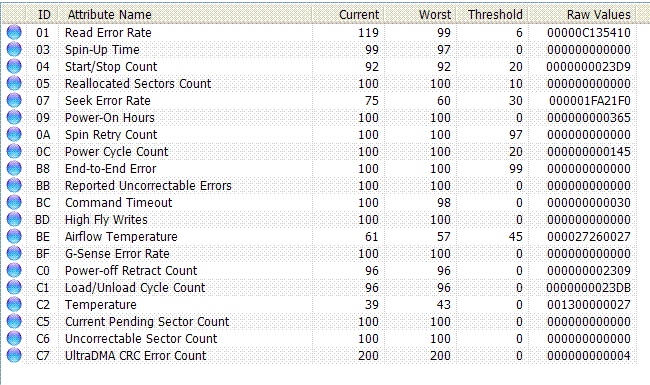
  • smart.GIF
    smart.GIF
    31.7 KB · Views: 69
Last edited:
You need a technician. He will install the drivers proper and possibly check your drive for physical damage to the sectors.
 
Please teach me how to identify that problem without a technician. Services master is very expensive for me. So I want to learn how to fix it by myself. Help me please.
 
Sounds like you have a bad hard drive that needs to be replaced. You can't "fix" it without disassembling the drive or replacing the circuit board. A bad drive is a bad drive, no amount of wishes will fix it.
 
Sounds like one of 2 things to start with.
A memory problem or a hard drive problem, or both.

What is your hardware?

If you know how to reset your CMOS and put the settings back how they were, do that.
This is to check if there is an unknown wrong setting or if the CMOS has corrupted.
Do you ever find that the clock runs slow/fast or resets?

Try removing and refitting the memory.
Do the same with the hard drive cables.
This is to simply test for a bad connection, there are many other issues it could be.

If the above does fix it, the OS might still have a corruption.
It depends on the problem and how severe it is.
In which case another OS install might be an idea (rather than trying to fix it) because you dont appear to have anything that needs saving.
 
I checked RAM with Memtest86. It didn't find any errors. I don't know about computer clock it synchronized with an Internet Time Server, so it can't run slow.
 
If you didnt want help, you shouldnt post asking.
 
Last edited:
You ignored the advice and made excuses to do nothing.
 
I need an advice how to identify what's wrong with it. Maybe the problem is in bad blocks or actuator arm works not correctly.

Oh you mean the hard drive may have an issue and you've decided not to follow any of the advice in this thread?
 
Back
Top